



AI Open Graph Image Generator – OpenGraph.xyz
Stop losing clicks to boring social previews. Boost your Click-Through Rate (CTR) by up to 70% with AI-powered, dynamic Open Graph images.

Solid choice
AI Open Graph Image Generator is a solid plugin choice in 2026, with a few things worth checking first. It runs on 100+ sites, is rated 5/5 and was last updated 1 day ago, and scores 75/100 on our health check.
- Actively developed — last update 1 day ago
- Tested with the latest WordPress (7.1)
- Small user base (100+ active installs)
- Very few reviews so far
Daily downloads
Download spikes usually follow a new release — each site that auto-updates counts as a download.
Rankings
Where AI Open Graph Image Generat… stands todayWordPress.org search rankings
Live position in the plugin search, top 100| Keyword | Position |
|---|---|
| dynamic og image | #3 |
| images | >100 |
| meta tags | >100 |
| og-image | #10 |
| open graph | #14 |
Version adoption
Share of active sites per release.
Rating breakdown
★★★★★★★★★★ 5 from 2 reviews
About AI Open Graph Image Generator
From the official readme · v1.6.2Description
Stop losing clicks to boring social previews. Boost your Click-Through Rate (CTR) by up to 70% with AI-powered, dynamic Open Graph images.
Most websites suffer from “broken” or generic social media previews. If you have a resource-rich site—like a news portal, real estate listing site, e-commerce store, or a large blog—manually designing and uploading Open Graph (OG) images for every page is impossible.
OpenGraph.xyz solves this by automating your entire social metadata workflow.
Why OpenGraph.xyz?
Our plugin bridges the gap between your WordPress site and the OpenGraph.xyz SaaS platform. We’ve seen specialized links jump by 70% in CTR when switching from static, unoptimized images to our dynamic, branded previews.
Key Features
- AI OG Image Template Creator: Simply enter your URL, and our AI analyzes your brand theme, colors, and content to generate a beautiful, custom OG image template in seconds.
- Dynamic Image Automation: Once set up, every new post or listing automatically generates a unique social image. No design skills or manual uploads required.
- Custom Short Links: Create beautiful, branded short links that allow you to A/B test your OG images and boost CTR.
- Global CDN Hosting: All images are served through our lightning-fast global CDN, ensuring your previews load instantly.
Note: This plugin requires an OpenGraph.xyz account. We offer a 7-day Free Trial with full access to all available features during the trial period (credit card required). Cancel anytime.
External Services
ogcdn.net
This is our open graph image generation service to create your og image. The URLs of your generated og:image tags point to this service with data about your page to dynamically create the images.
Terms of Service | Privacy Policy
api.opengraph.xyz
This is our service for the og image templates. This service will be accessed when you view and choose image templates for your pages.
Terms of Service | Privacy Policy
Installation
- Upload
opengraph-xyz.zipto the/wp-content/plugins/directory. - Activate the plugin through the ‘Plugins’ menu in WordPress.
Frequently asked questions
Do I need an OpenGraph.xyz account to use this plugin?
Yes, an account is required to connect your WordPress site to our automation engine. You can start with our 7-day Free Trial, which gives you full access to our Lite plan, which includes our AI Template Creator, Site Audits, and the full design suite. You can cancel at any time during the trial.
Who is this plugin for?
This plugin is designed for blogs, resource centers, listing sites, media publishers, e-commerce stores, and UGC websites that need automated Open Graph images at scale.
Is this plugin suitable for beginners?
Absolutely. For beginners, our AI Template Creator does all the heavy lifting—it creates a branded design for you based on your website’s URL. For users who need more control, we offer a manual editor to customize every pixel of your dynamic templates.
How do I design and set up my Open Graph templates?
After installing the plugin, you can – Use the AI Template Creator to generate a branded design automatically. – Select from our wide variety of pre-designed templates. – Use the Manual Editor to build a template from scratch. For detailed setup steps, check out our installation guide here.
How do I link template variables to WordPress variables?
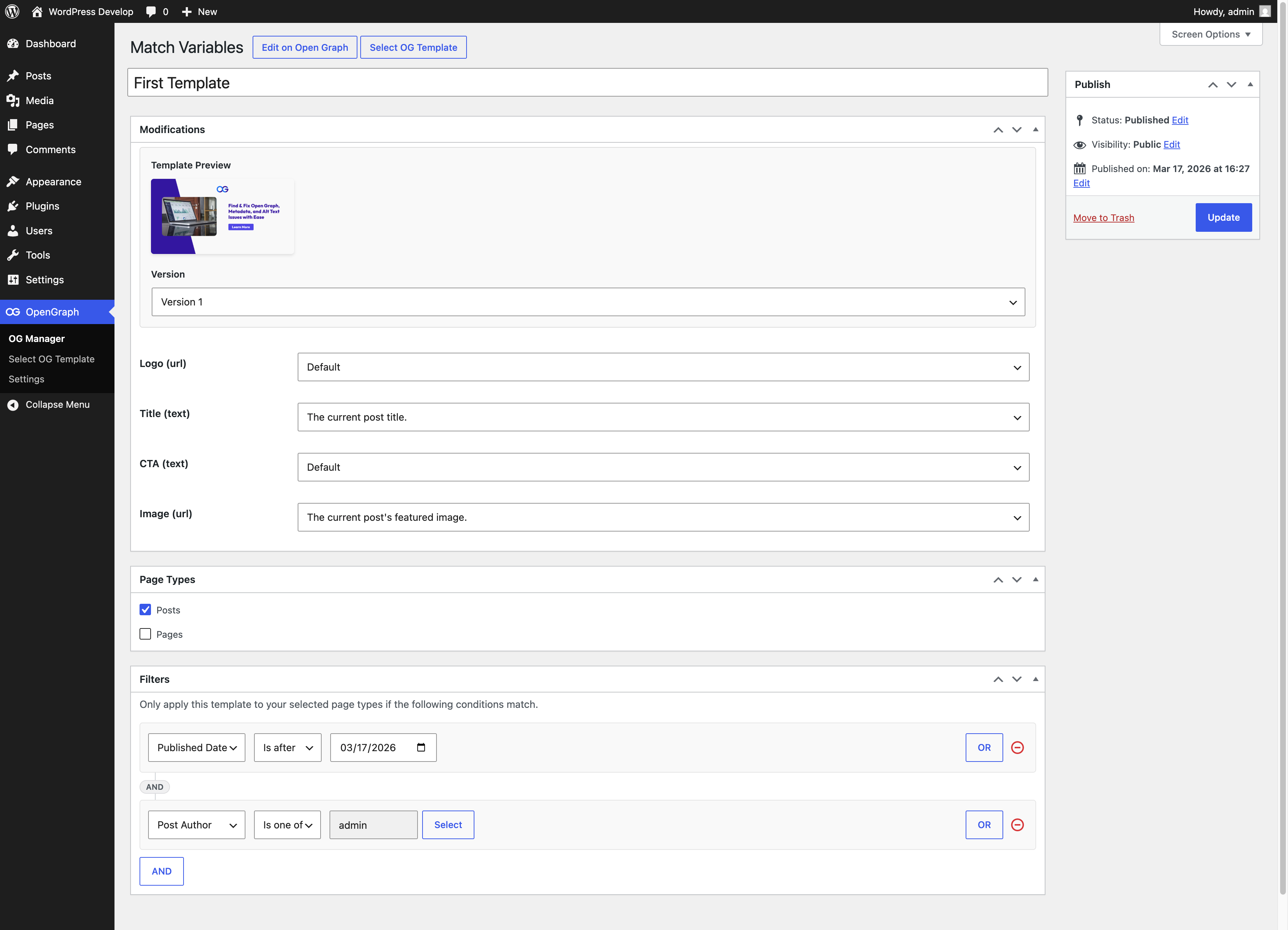
Once you’ve selected a template, the next step is to map the template’s dynamic variables to corresponding WordPress variables. For example, you can link a ‘title’ variable in your template to the ‘Post Title’ in WordPress. This ensures that the dynamic content from your site, like post titles or featured images, is automatically incorporated into your Open Graph images. You’ll find these settings in the template editing interface, where you can easily assign WordPress variables to your template’s dynamic elements.
Can I use different templates for different types of content?
Yes, the plugin allows you to assign different templates to different post types or individual posts. This ensures that each piece of content on your website can have a unique and relevant Open Graph image.
How to contact OpenGraph.xyz?
If you have any questions or need assistance, you can reach out to the OpenGraph.xyz team directly. Visit our website at opengraph.xyz and use the chat feature to get in touch with us. Our team is always ready to help you with any queries or support you may need regarding our service or the WordPress plugin.
Changelog
1.6.2
- Fix Squirrly SEO compatibility so template images are used for Open Graph and Twitter cards, while preserving standalone Open Graph output when Squirrly social metadata is disabled.
- Bundle the updated OpenGraph logo with plugin dialogs so it appears correctly in installed plugin packages.
1.6.1
- Update feature list
1.6.0
- Add troubleshooting help and improve the plugin menu and user experience
1.5.7
- Fix plugin packaging so runtime assets are included in plugin releases
- Update WordPress compatibility metadata through version 7.1
1.5.6
- Remove the filters JavaScript dependency
1.5.5
- Enhance Open Graph tag handling for better compatibility with multiple SEO plugins
Screenshots


For developers
Is this your plugin? Show off the numbers.
Add a live badge to your site, docs or GitHub README. It updates on its own — no account needed.
FAQ
AI Open Graph Image Generator: quick answers
Straight answers, pulled from live WordPress.org data.
Live data from WordPress.org · checked Oct 17, 2026
Is AI Open Graph Image Generator free?
Yes. AI Open Graph Image Generator is free to download and use from the official WordPress.org plugin directory.
Is AI Open Graph Image Generator safe to use in 2026?
AI Open Graph Image Generator is a solid plugin choice in 2026, with a few things worth checking first. It runs on 100+ sites, is rated 5/5 and was last updated 1 day ago, and scores 75/100 on our health check.
How many websites use AI Open Graph Image Generator?
AI Open Graph Image Generator is active on 100+ WordPress websites and has been downloaded 5,995 times since it launched in May 2024. It was downloaded 464 times in the last 30 days.
Does AI Open Graph Image Generator work with WordPress 7.1?
Yes. The developer has tested AI Open Graph Image Generator up to WordPress 7.1.3, the latest release. It requires WordPress 5.0 or newer.
What PHP version does AI Open Graph Image Generator need?
AI Open Graph Image Generator requires PHP 5.6 or higher. Most hosts run PHP 8.x today, so it works on any modern WordPress hosting.
When was AI Open Graph Image Generator last updated?
The latest version, 1.6.2, was released on October 16, 2026 (1 day ago).
Who makes AI Open Graph Image Generator?
AI Open Graph Image Generator is developed and maintained by OpenGraph.xyz.
Powered by PageForge
Want thousands of pages that rank like these? Build them in an afternoon.
This directory runs on the same engine as PageForge. Turn any spreadsheet, CSV or API into thousands of fast, SEO-ready WordPress pages — with schema, internal links and AI-written copy baked in.
- CSV, Google Sheets & API data sources
- AI content, schema & internal links per page
- Works with Elementor, Gutenberg, Yoast & Rank Math
- Free on WordPress.org — no credit card


