


NDV Product Image Upload for WooCommerce
Let WooCommerce customers upload and crop images and PDFs on product pages before adding to cart, with per-product rules and secure handling.

Use with caution
NDV Product Image Upload for Wo… works, but test it on a staging site before relying on it in 2026. Was last updated 2 months ago, and scores 55/100 on our health check.
- Small user base (<10 active installs)
- Very few reviews so far
How does it stack up?
Side-by-side on installs, updates, ratings & support



Daily downloads
Download spikes usually follow a new release — each site that auto-updates counts as a download.
Rankings
Where NDV Product Image Upload fo… stands todayWordPress.org search rankings
Live position in the plugin search, top 100| Keyword | Position |
|---|---|
| cropping | #70 |
| file upload | >100 |
| image upload | >100 |
| product customization | >100 |
| woocommerce | >100 |
About NDV Product Image Upload for WooCommerce
From the official readme · v1.1.0Description
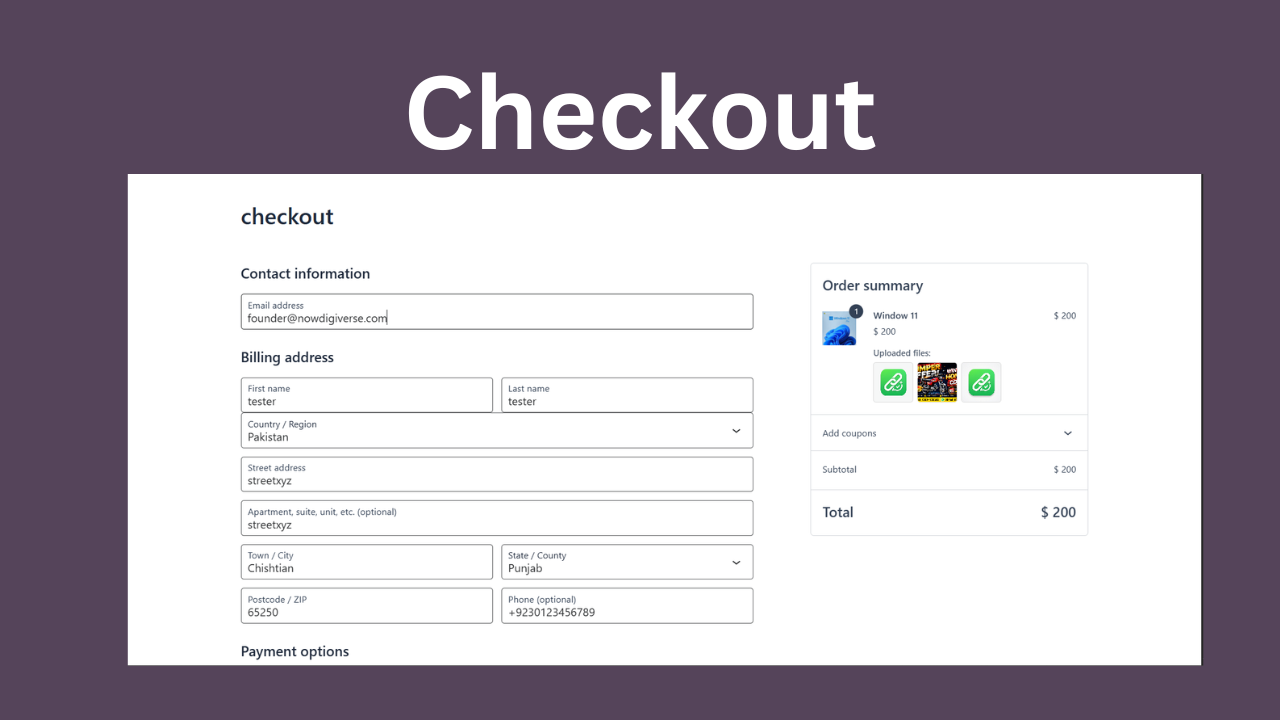
NDV Product Image Upload for WooCommerce lets both logged-in customers and guests upload and crop custom images (and PDFs) for specific WooCommerce products before adding them to the cart. It is ideal for personalised products, custom prints, photo gifts, and any store where customers supply their own artwork.
Everything is configured per product, so each product can have its own required file count, file-size limit, allowed file types, button styling, and cropping rules.
Key Features
- Guest & logged-in uploads — customers can upload without creating an account.
- Per-product configuration — set required file count, max file size, allowed types, button text and colour for each product.
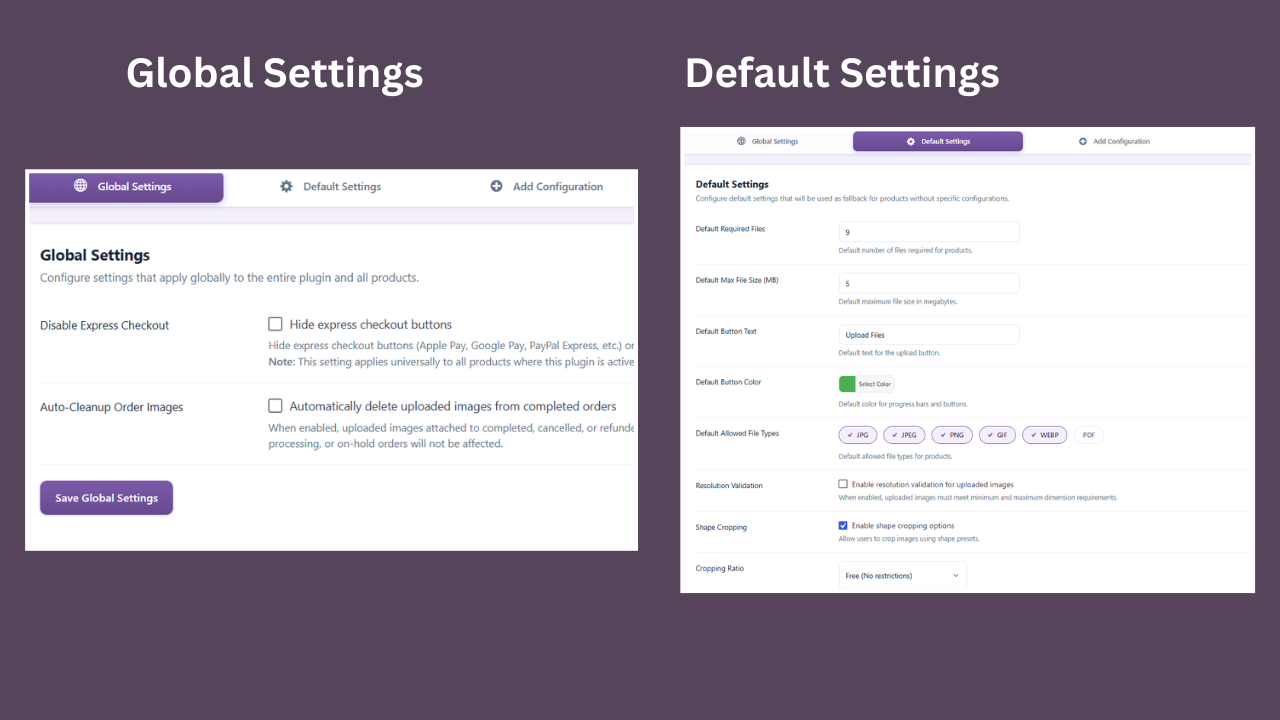
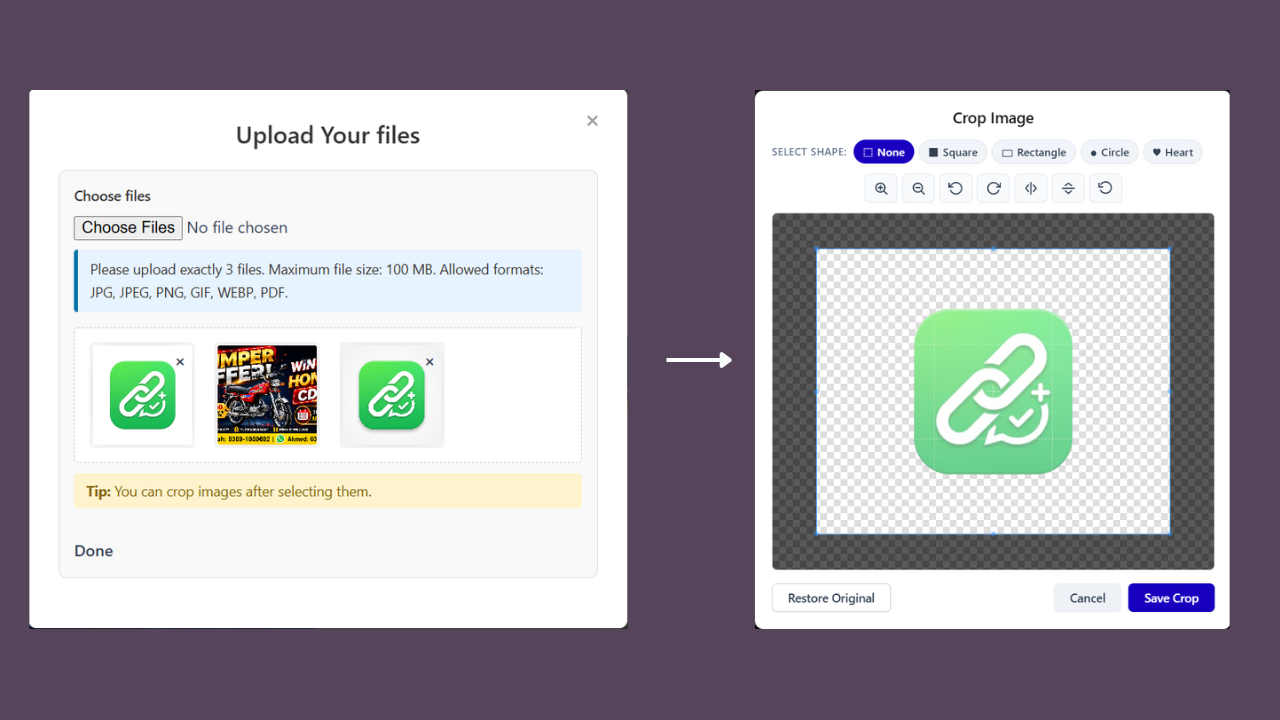
- Built-in cropping — crop before uploading with Cropper.js, including shape presets (square, rectangle, circle, heart) and fixed aspect ratios.
- PDF upload support — accept PDFs alongside images.
- Resolution validation — optionally enforce minimum/maximum image dimensions.
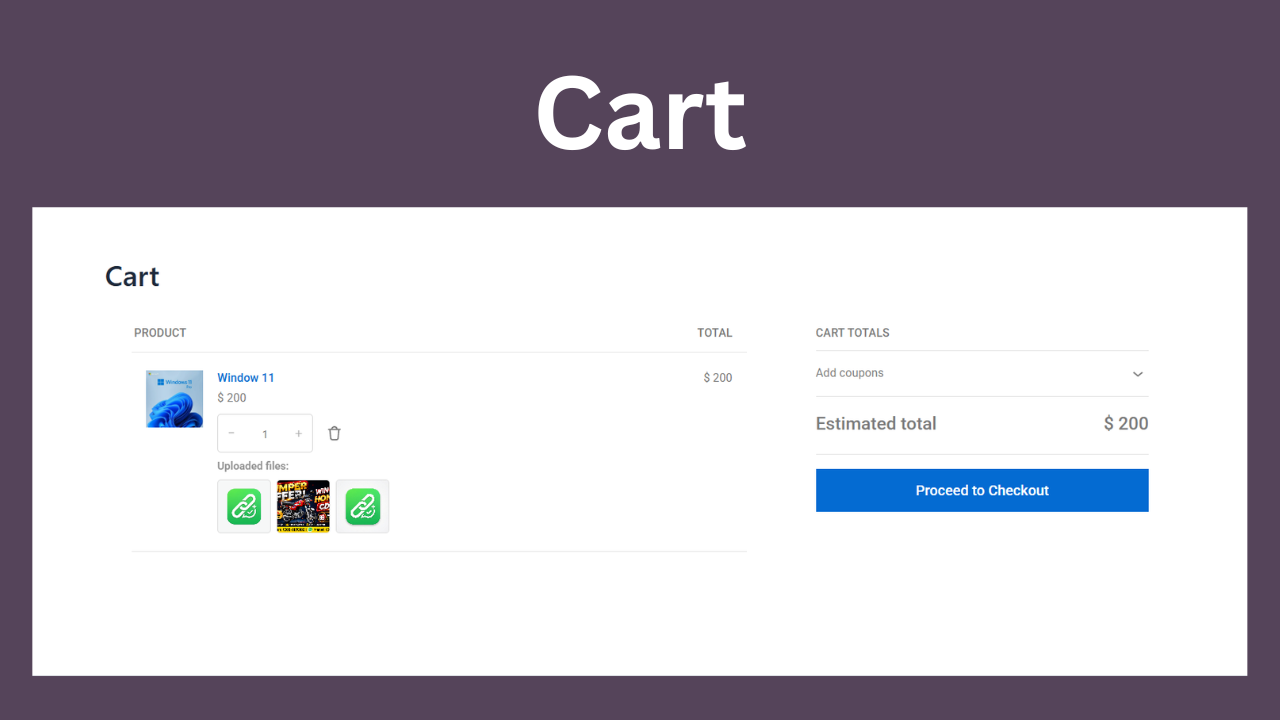
- Lock quantity to 1 — optionally prevent customers from ordering more than one of a product they upload artwork for.
- Default settings — define fallback settings used by products without their own configuration.
- Global controls — hide express checkout buttons (Apple Pay, Google Pay, PayPal Express) on product pages, and auto-clean uploaded images from completed/cancelled/refunded orders after a chosen number of days.
- Secure file handling — uploaded files are validated by type, size and content, stored outside the media library, protected with an
.htaccessrule on Apache/LiteSpeed, and served through a tokenised endpoint. - HPOS compatible — works with WooCommerce High-Performance Order Storage.
- Data control — choose whether to keep or delete plugin data on uninstall.
Use Cases
- Custom T-shirts and apparel — customers upload their designs
- Photo products — personalised photo books, mugs, or prints
- Custom artwork and logo printing
- Wedding and event stationery
Premium version
A separate Pro add-on extends this free plugin with:
- Bulk operations — apply settings to many products at once
- Import / Export all settings as JSON
- Security Logs dashboard — monitor upload attempts and events
- Dedicated Elementor widget for the upload interface
- Per-upload pricing and fees (charge or discount based on uploads)
The Pro add-on requires this free plugin and is available from the developer at https://nowdigiverse.com/. The free plugin is fully functional on its own.
Privacy Policy
This plugin does not send any data to third parties. Uploaded files are stored on your own server. For guests, a temporary session identifier is created to manage uploads; it is cleaned up when sessions expire or orders complete.
During an upload request the visitor’s IP address is read from the server and used transiently for rate limiting (a short cooldown between consecutive guest requests). It is not stored permanently and never leaves your server.
Credits
- Cropper.js (MIT) for image cropping
- Select2 (MIT) for the admin product search field
- WooCommerce for the e-commerce framework
Installation
- Upload the plugin files to
/wp-content/plugins/nowdigiverse-product-image-upload, or install through the WordPress Plugins screen. - Activate the plugin through the ‘Plugins’ screen in WordPress.
- Ensure WooCommerce is installed and active.
- Go to NDV Image Upload in the admin menu and configure a product under “Add Configuration”.
Frequently asked questions
Does this plugin require WooCommerce?
Yes. It integrates with WooCommerce products and the cart, and requires WooCommerce to be installed and active.
Can guests upload without an account?
Yes. Guests can upload using a temporary session identifier; no account is required.
What file types are supported?
JPG, JPEG, PNG, GIF, WEBP and PDF. You can enable or disable types per product.
Can I set different rules for different products?
Yes. Each product can have its own required file count, file-size limit, allowed types, button styling, cropping and resolution rules. Products without a configuration use your Default Settings.
Can I stop customers ordering more than one of an upload product?
Yes. Enable “Lock quantity to 1” on that product’s own configuration. The quantity selector is fixed at 1 on the product page and cart wherever uploads are enabled. (The Default Settings checkbox pre-fills new configurations you create afterwards — it does not retroactively apply to products you’ve already configured.) If you have already marked a product “Sold individually” in WooCommerce’s own product settings, that continues to work as before.
How are uploads kept secure?
Every file is validated by type, size and content (including a scan for executable content), filenames are randomised, files are stored in a protected directory, and they are served through a tokenised endpoint. A short cooldown between consecutive guest requests helps deter abuse.
How do I protect the uploads folder on Nginx?
Because Nginx ignores .htaccess, add this to your server block for strict protection (filenames are already randomised so they cannot be guessed): location ^~ /wp-content/uploads/custom_product_images/ { deny all; return 403; }
What happens to my data when I uninstall?
You choose. On the “Uninstall Preferences” tab you can keep all data (default) or delete it on uninstall. Files referenced by orders are preserved either way for data integrity.
Changelog
Initial WordPress.org release.
1.1.0
- Added: “Lock quantity to 1” per-product (and default) setting, so customers can’t order more than one of a product they upload custom artwork for. Enforced via WooCommerce’s own
woocommerce_is_sold_individuallyfilter, so it never overrides a product already marked “Sold individually”. - Compatibility: confirmed working against WooCommerce 10.9 (full core-flow regression pass);
WC tested up toraised from 9.5.
1.0.0
- Initial WordPress.org release.
- Per-product image/PDF upload with a built-in cropper (shapes, aspect ratios, zoom/rotate/flip).
- Guest and logged-in uploads with secure, validated file handling.
- Resolution validation, default settings, and global controls (express-checkout hiding, order-image auto-cleanup).
- HPOS compatibility and uninstall data preferences.
Screenshots
For developers
Is this your plugin? Show off the numbers.
Add a live badge to your site, docs or GitHub README. It updates on its own — no account needed.
Best NDV Product Image Upload for… alternatives
All cropping plugins →

FAQ
NDV Product Image Upload for WooCom…: quick answers
Straight answers, pulled from live WordPress.org data.
Live data from WordPress.org · checked Oct 1, 2026
Is NDV Product Image Upload for Wo… free?
Yes. NDV Product Image Upload for Wo… is free to download and use from the official WordPress.org plugin directory.
Is NDV Product Image Upload for Wo… safe to use in 2026?
NDV Product Image Upload for Wo… works, but test it on a staging site before relying on it in 2026. Was last updated 2 months ago, and scores 55/100 on our health check.
How many websites use NDV Product Image Upload for Wo…?
NDV Product Image Upload for Wo… is active on <10 WordPress websites and has been downloaded 283 times since it launched in July 2026. It was downloaded 89 times in the last 30 days.
Does NDV Product Image Upload for Wo… work with WordPress 7.1?
NDV Product Image Upload for Wo… is officially tested up to WordPress 7.0.6, while the latest release is 7.1.2. It may still work, but try it on a staging site first.
What PHP version does NDV Product Image Upload for Wo… need?
NDV Product Image Upload for Wo… requires PHP 7.2 or higher. Most hosts run PHP 8.x today, so it works on any modern WordPress hosting.
When was NDV Product Image Upload for Wo… last updated?
The latest version, 1.1.0, was released on July 26, 2026 (2 months ago).
Who makes NDV Product Image Upload for Wo…?
NDV Product Image Upload for Wo… is developed and maintained by Muhammad Faizan (NowDigiVerse).
What are the best alternatives to NDV Product Image Upload for Wo…?
The most popular alternatives to NDV Product Image Upload for Wo… are Manual Image Crop (7K+ installs), WP SmartCrop (4K+ installs) and Code and core (60+ installs).
Powered by PageForge
Want thousands of pages that rank like these? Build them in an afternoon.
This directory runs on the same engine as PageForge. Turn any spreadsheet, CSV or API into thousands of fast, SEO-ready WordPress pages — with schema, internal links and AI-written copy baked in.
- CSV, Google Sheets & API data sources
- AI content, schema & internal links per page
- Works with Elementor, Gutenberg, Yoast & Rank Math
- Free on WordPress.org — no credit card


