



Ninja Job Board – Ultimate WordPress Job Board Plugin
Ninja Job Board is a light-weight plugin that adds a job board along with application form to your WordPress website.

Consider an alternative
Ninja Job Board shows warning signs in 2026 — compare the alternatives below before installing. It runs on 100+ sites, is rated 4.8/5 and was last updated 3 years ago, and scores 36/100 on our health check.
- Small user base (100+ active installs)
- No update in 2 years
- Only tested up to WordPress 6.4 (latest is 7.1)
Daily downloads
Download spikes usually follow a new release — each site that auto-updates counts as a download.
Rankings
Where Ninja Job Board stands todayWordPress.org search rankings
Live position in the plugin search, top 100| Keyword | Position |
|---|---|
| career job | #37 |
| job board | #72 |
| job manager | >100 |
| listing job | >100 |
| portal | >100 |
Version adoption
Share of active sites per release.
Rating breakdown
★★★★★★★★★★ 4.8 from 6 reviews
About Ninja Job Board
From the official readme · v1.4.0Description
Ninja Job Board is made for small and medium organizations to reduce their pain on hiring new people. The ultimate goal of this job board plugin is to make the recruitment process as easy as possible with a little time invested.
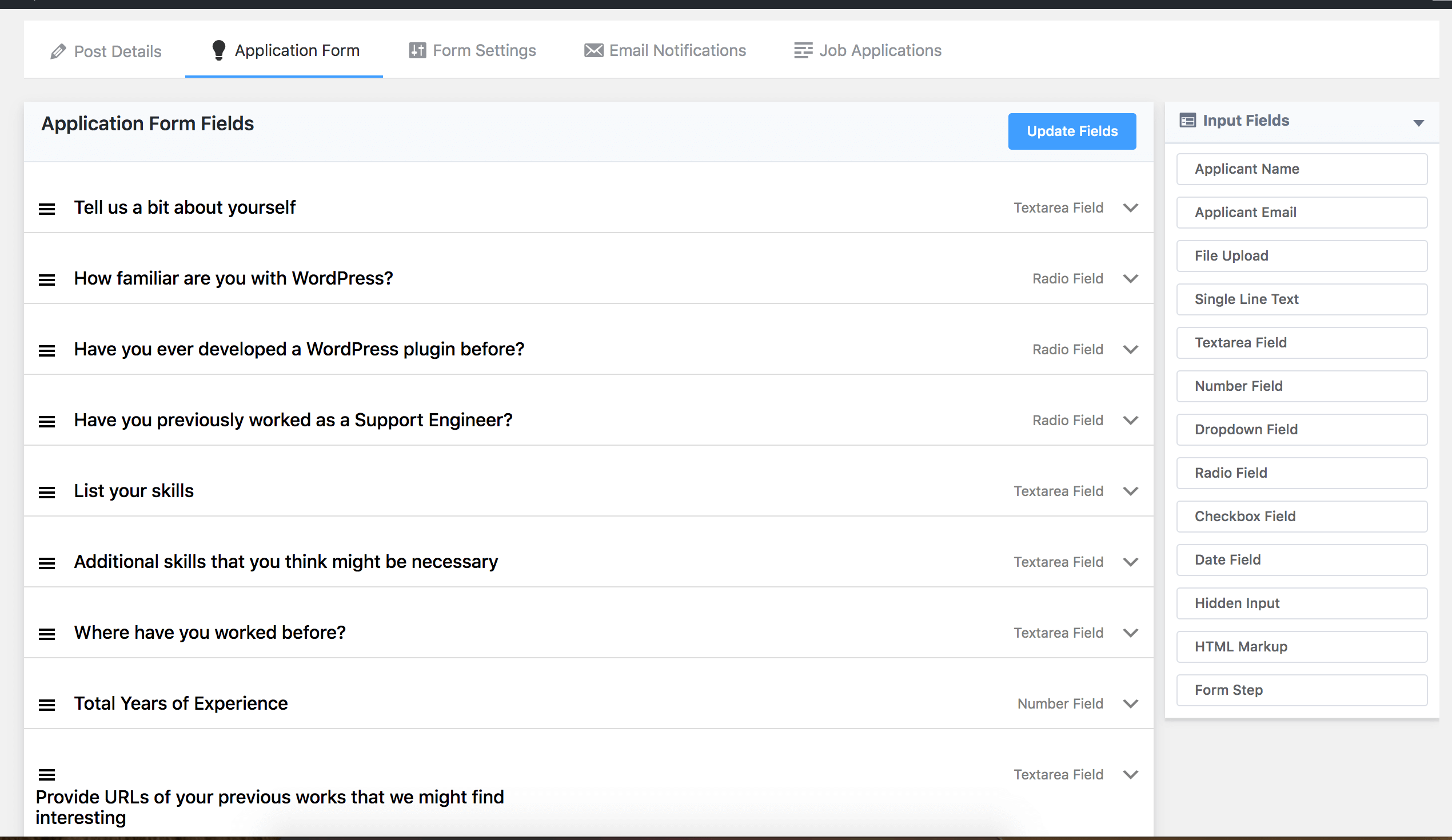
Ninja Job Board is a self-hosted WordPress Plugin where you can build a questionnaire form by drag and drop form builder.
The Following Form fields are available:
- Applicant Name
- Applicant Email
- CV Upload Field
- File Upload Field
- Single Line Text
- Texarea Field
- Number Field
- Dropdown Select Field
- Radio Choice Field
- CheckBoxes
- Date Field
- Hidden Input Field
- Markup HTML
- Form Steps to breakdown your form to several pages.
- More is coming soon.
Why another WordPress job board plugin?
The developers of Ninja Tables went through the stress, and they wanted one excellent solution for that. As a result, this plugin sees the light and is presented to the world for making others beneficial, too.
Application processing via emails sucks
It’s a real challenge for startups and small enterprises to recruit talents painlessly. Using a job portal is costly, and accepting applications via emails is distressing and messy because it’s hard to keep track of all the emails and sort and manage applicants into categories.
The easiest way to create listings
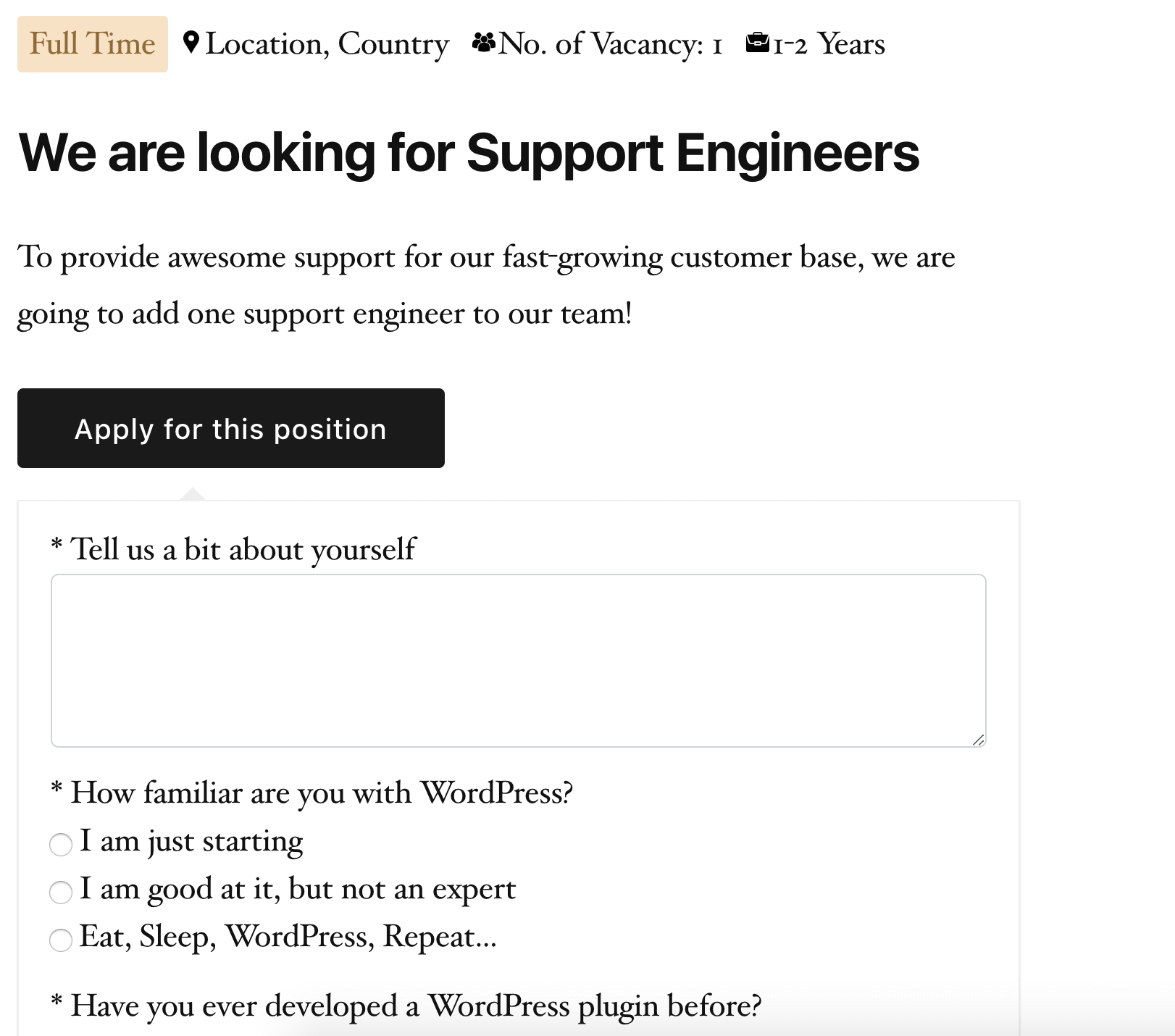
Ninja Job Board makes it plain and simple. Every time you want to hire for your company, create a job listing on your website. The listings are effective, well-organized, and above all, easy to manage.
No need to train your HR Manager
As the tool implies with simplicity, you don’t need to train your HR manager to know how to run it. The tool itself is self-explanatory means anyone can understand what’s going on right after entering it.
Application filtering and search
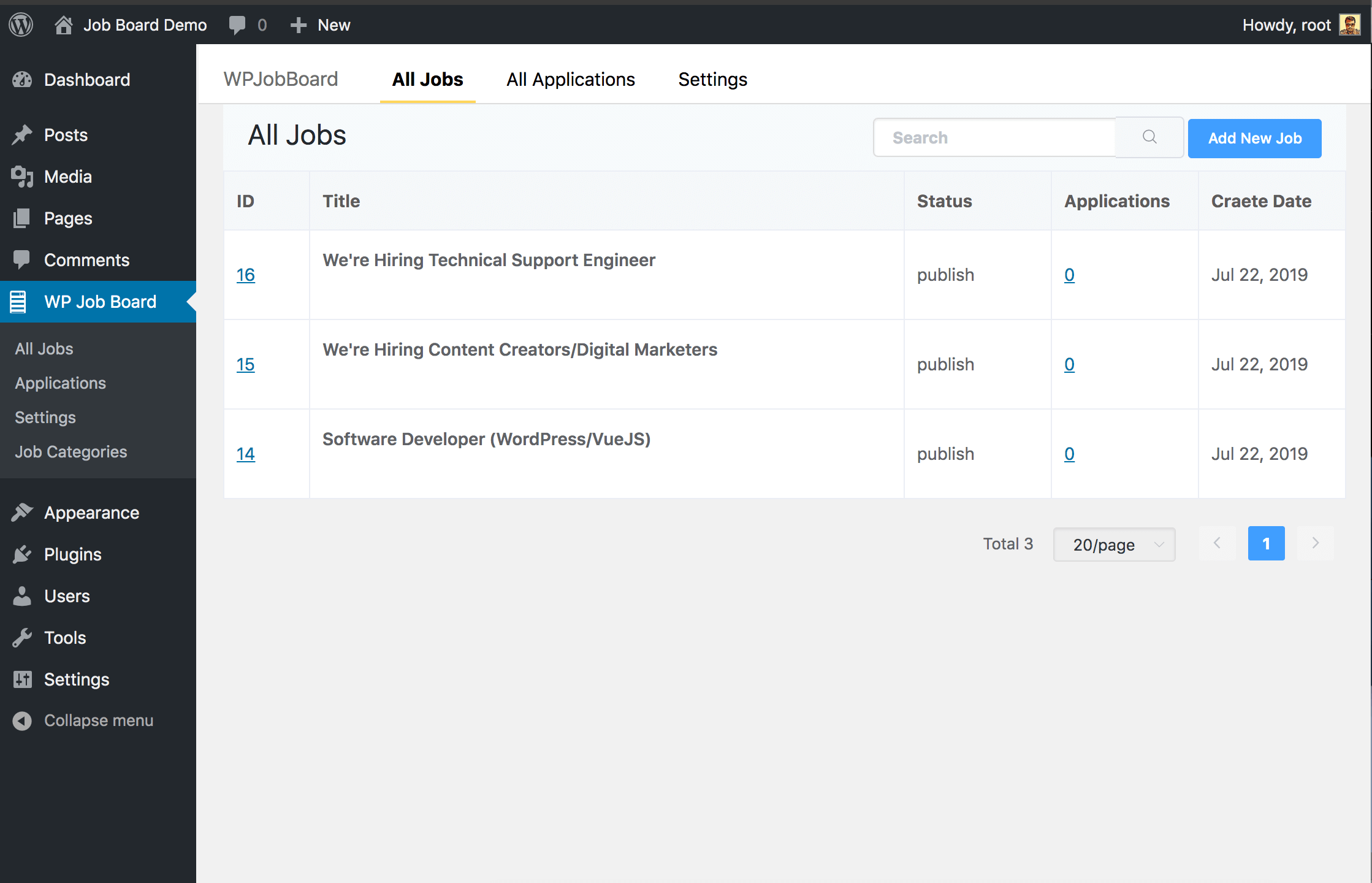
From creating a new application real fast to keeping track of every single application, Ninja Job Board is meant for success. Besides sorting the data based on categories, you can apply search and filter on the table.
A clean and eye-pleasing interface
The UI is pretty simple that encourages users to interact more without any fear of making things complicated. Additionally, the admin panel is created carefully to ensure better user experience. This is the perfect job listing plugin for smart recruiters.
Application Management
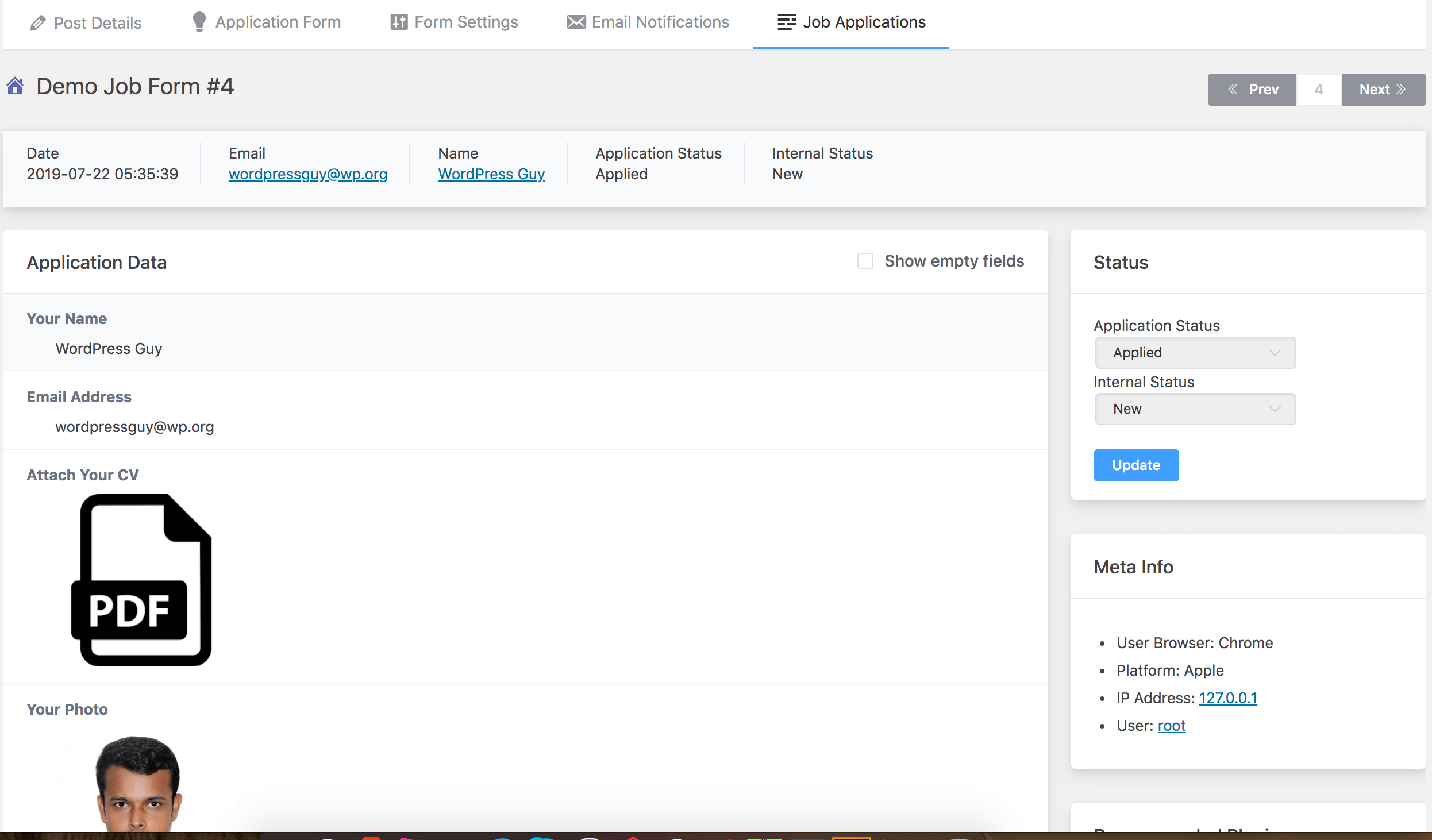
With built-in application management system, you can see the total applications of your job post. You can also set application status as well as internal status.
In individual application view page, you can see the complete submitted data, uploaded applicant cv. You can also change the application status and internal status easily. One of the important feature is, you can add notes to each application.
Email Broadcast to Applicants
Send email to Applicants as bulk and you can select filter by application status and internal status before send.
Super fast and Light Weight Form
This is a super fast form builder and it’s only loads css and js if you add the form in a page. Every line of CSS and JS is useful and there has no extra css and js. For a normal form, It’s loads less than 30KB css and js combined. This form builder plugin will not slow down your site. it’s the fastest form builder plugin in WordPress. It has also a nice interface to give detailed information of your job post.
KEY FEATURES
- Add new job posting on your WordPress site, whenever you want
- The UI is clean and simple
- Searching and filtering options available for job listings
- Make ‘Shortlists’ easily based on your criteria
- Print the application data if it’s necessary
- Intuitive form creation via readymade input fields
- Attach file option to include a CV
- Create multiple job listings at a time and check on them separately
- It’s easy to operate by anyone
- All submitted data are easily searchable and filterable
- Add a note against an application to mark it for reviewing in future
- View the uploaded CV as a PDF
- Notify the applicants and HR manager simultaneously after an application is submitted
- Schedule the application to open at a specific time
- Categorize the application based on its status
Features Tracker
- Job Posting with information (DONE)
- Application Form Builder (DONE)
- CV Management System (Done)
- Application status management (Done)
- Filter Applications based on status (Done)
- Search Applications with keywords/full text search (Done)
- Email Notification System management (Done)
- Send bulk emails to the applicants and filter by application status (Done)
- Export Data as CSV/Excel/JSON *(On development)
- Application Assesment for HR Department (On development)
This plugin is a very planned project, and we have a long term development plan for this. We already invested around 200 human working hours (+coffees) on it, and we have the intention to spend much more on it. Please let us know what features you want, and we are happy to add that in our development sprint.
The full source code is available on Github.
Other Plugins by WPManageNinja
Installation
This section describes how to install the plugin and get it working.
e.g.
- Upload the plugin files to the /wp-content/plugins/ directory, or install the plugin through the WordPress plugins screen directly.
- Activate the plugin through the ‘Plugins’ screen in WordPress
- Use the WPPay Forms -> All Forms -> Add a Job Posting and get started.
Frequently asked questions
How to create a job listing?
Go to Ninja Job Board from WordPress admin panel. Create ‘Add new job’ and give it a ‘Title’. Describe the job and add other information: no. of vacancies, years of experience, etc.
How to display the job posts on the website?
Each Job post will have it’s own permalink to show.
How to customize job applications?
You can easily customize the application process from the dashboard. Check this doc to know the application customization
Can I change an application form after it’s published?
Yes, you can change it from the backend and modify with your latest information.
What will the users see after submitting an application?
You can set a thank you page to redirect users there or use a custom URL right from the setting.
How can I show all the current open job postings?
Use the shortcode [wp_job_list] to show the open job listings.
How to notify the applicants that their application is submitted successfully?
From email setting, you can set it up who will get notified about the submissions. You can include the HR manager and other persons as well.
Changelog
1.4.0 – December 12, 2023
- Database Query Issue Fixed
1.3.3 – July 20, 2022
- Security Fix for File Index for NGINX indexed enabled servers
- Fix issues for esc_* functions
1.3.1 – January 21, 2022
- Added feature to show other job applications by same applicant
- Added a new feature to send bulk emails to the applicants.
- Fixed text-domain issues
- Fixed email sending issues
- Few other performance improvements
1.2.2 – July 23, 2019
- Added Bulk email feature where you can send emails to applicants
1.0.0 – July 22, 2019
- Initial Release
Screenshots



For developers
Is this your plugin? Show off the numbers.
Add a live badge to your site, docs or GitHub README. It updates on its own — no account needed.
FAQ
Ninja Job Board: quick answers
Straight answers, pulled from live WordPress.org data.
Live data from WordPress.org · checked Oct 6, 2026
Is Ninja Job Board free?
Yes. Ninja Job Board is free to download and use from the official WordPress.org plugin directory.
Is Ninja Job Board safe to use in 2026?
Ninja Job Board shows warning signs in 2026 — compare the alternatives below before installing. It runs on 100+ sites, is rated 4.8/5 and was last updated 3 years ago, and scores 36/100 on our health check.
How many websites use Ninja Job Board?
Ninja Job Board is active on 100+ WordPress websites and has been downloaded 8,574 times since it launched in July 2019. It was downloaded 153 times in the last 30 days.
Does Ninja Job Board work with WordPress 7.1?
Ninja Job Board is officially tested up to WordPress 6.4.12, while the latest release is 7.1.2. It may still work, but try it on a staging site first.
What PHP version does Ninja Job Board need?
Ninja Job Board requires PHP 5.6 or higher. Most hosts run PHP 8.x today, so it works on any modern WordPress hosting.
When was Ninja Job Board last updated?
The latest version, 1.4.0, was released on December 12, 2023 (3 years ago).
Who makes Ninja Job Board?
Ninja Job Board is developed and maintained by WPManageNinja.
Powered by PageForge
Want thousands of pages that rank like these? Build them in an afternoon.
This directory runs on the same engine as PageForge. Turn any spreadsheet, CSV or API into thousands of fast, SEO-ready WordPress pages — with schema, internal links and AI-written copy baked in.
- CSV, Google Sheets & API data sources
- AI content, schema & internal links per page
- Works with Elementor, Gutenberg, Yoast & Rank Math
- Free on WordPress.org — no credit card


