

Nice Select for WordPress
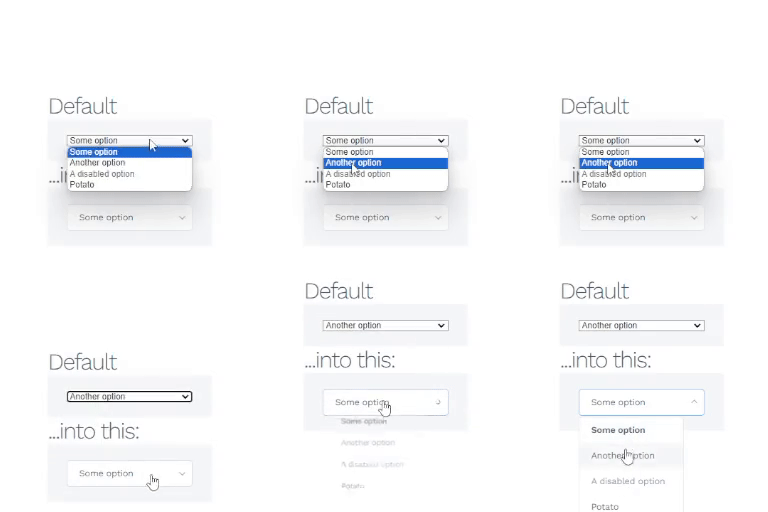
Nice Select for WordPress improves the appearance and behavior of select elements on your WordPress website, including dropdowns, with no code required.

Solid choice
Nice Select for WordPress is a solid plugin choice in 2026, with a few things worth checking first. It runs on 20+ sites and was last updated 3 months ago, and scores 63/100 on our health check.
- Tested with the latest WordPress (7.1)
- Small user base (20+ active installs)
- Very few reviews so far
How does it stack up?
Side-by-side on installs, updates, ratings & support


Daily downloads
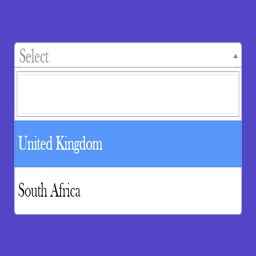
Download spikes usually follow a new release — each site that auto-updates counts as a download.
Rankings
Where Nice Select for WordPress stands todayWordPress.org search rankings
Live position in the plugin search, top 100| Keyword | Position |
|---|---|
| dropdown | >100 |
| multiselect | #24 |
| nice select | #3 |
| search | >100 |
| select | #99 |
Version adoption
Share of active sites per release.
About Nice Select for WordPress
From the official readme · v1.3.0Description
Nice Select for WordPress improves the appearance and behavior of select elements on your WordPress website, including <select multiple> dropdowns, with no code required.
Key Features:
– Sleek, customizable UI for dropdowns, styled via the admin settings page.
– Optional search box for filtering long option lists, on both single and multi-selects.
– Full <select multiple> support: selected options show as removable tags, with keyboard navigation, <optgroup> group headers, and Select All / Clear All actions – configurable to close after each pick and to cap the number of selections allowed.
– Customizable settings for selector, alignment, full width, placeholder text, and custom CSS.
– Works out of the box with popular form plugins (Contact Form 7 and others) and with fields added dynamically after page load.
License
Nice Select for WordPress is licensed under the GPLv2 or later.
Author
Developed by Devrupash
Support
For support, please visit the WordPress support forum: https://wordpress.org/support/plugin/nice-select-for-wp
Installation
- Go to your WordPress admin area.
- Navigate to “Plugins” > “Add New.”
- In the search box, enter “Nice Select for WordPress” and press Enter.
- Locate the plugin in the search results, and click “Install Now.”
- Once installed, click “Activate” to activate the plugin.
- Configure the settings via the “Nice Select” menu in the WordPress admin.
Changelog
Initial release.
1.3.0
- Style: switched the default accent color from blue to a neutral gray, so the dropdown reads as polished without leaning on a specific brand color.
- Fix: removed the discouraged
load_plugin_textdomain()call – WordPress.org has auto-loaded plugin translations since 4.6, so this was dead code. - Fix:
Domain Pathplugin header pointed at a/languages/folder that doesn’t exist in this plugin; removed the header. - Fix: plugin header’s
Plugin Name(“Nice select for WP”) didn’t match the readme’s title (“Nice Select for WordPress”); aligned them. - Housekeeping: silenced two output-escaping false positives (values were already escaped piece-by-piece before being assembled) and one nonce-verification false positive (read-only page check, not form processing) flagged by the WordPress Plugin Check tool, with inline justification for each.
1.2.3
- Fix: plugin header/readme claimed “Requires at least: 4.0”, but the settings page calls
wp_enqueue_code_editor(), which was introduced in WordPress 4.9 – a site on WP 4.0-4.8 would hit a fatal error opening the settings page. Corrected to 4.9.
1.2.2
- Fix: submitting a form without picking a real option in a select that has placeholder text set could fail server-side validation on plugins that check the submitted value against the field’s declared options (confirmed with Contact Form 7, which showed “Undefined value was submitted through this field”). The placeholder was implemented as a real, pre-selected
<option>carrying the placeholder text as its value; it now submits an empty value instead, so non-required fields pass through and required fields correctly show a normal “this field is required” message. - Fix: four settings added in 1.2.0/1.2.1 (Enable Search, and the three new multi-select settings) were missing from the uninstall cleanup list and would have been left behind in the database after uninstalling.
- Fix: leaving “Max Selections” blank saved and displayed a literal “0” instead of staying blank (functionally both meant unlimited, but the blank/placeholder text is clearer).
- Housekeeping: expanded the readme’s description, tags, and FAQ to cover search and multi-select.
1.2.1
- Add: three new multi-select settings – show/hide the Select all / Clear all links, close the dropdown after each pick instead of staying open, and a maximum-selections limit (with unselectable options greyed out once the limit is reached).
- Fix: the original
<select multiple>element was left visible above the new tag control instead of being hidden. - Fix: the multi-select’s option list rendered outside its dropdown panel instead of inside it, due to CSS inherited from the single-select’s positioning rules.
1.2.0
- Add: search box for dropdown lists (single- and multi-select), behind a new “Enable Search” setting.
- Add: proper
<select multiple>support, rendered as a removable-tag control (previously the plugin had no multi-select handling at all). - Add: Select all / Clear all actions and
<optgroup>group headers for multi-select.
1.1.2
- Fix: dropdown would flash open and immediately close when the select is wrapped in a
<label>(Contact Form 7 and many other form plugins do this). Clicking inside a<label>makes the browser auto-forward a click to its associated control, which nice-select’s own “click outside” handler then treated as a click outside the dropdown, closing it instantly.
Screenshots

For developers
Is this your plugin? Show off the numbers.
Add a live badge to your site, docs or GitHub README. It updates on its own — no account needed.
Best Nice Select for WordPress alternatives
All dropdown plugins →





FAQ
Nice Select for WordPress: quick answers
Straight answers, pulled from live WordPress.org data.
Source: WordPress.org
Is Nice Select for WordPress free?
Yes. Nice Select for WordPress is free to download and use from the official WordPress.org plugin directory.
Is Nice Select for WordPress safe to use in 2026?
Nice Select for WordPress is a solid plugin choice in 2026, with a few things worth checking first. It runs on 20+ sites and was last updated 3 months ago, and scores 63/100 on our health check.
How many websites use Nice Select for WordPress?
Nice Select for WordPress is active on 20+ WordPress websites and has been downloaded 1,368 times since it launched in March 2024. It was downloaded 71 times in the last 30 days.
Does Nice Select for WordPress work with WordPress 7.1?
Yes. The developer has tested Nice Select for WordPress up to WordPress 7.1.5, the latest release. It requires WordPress 4.9 or newer.
What PHP version does Nice Select for WordPress need?
Nice Select for WordPress requires PHP 5.2 or higher. Most hosts run PHP 8.x today, so it works on any modern WordPress hosting.
When was Nice Select for WordPress last updated?
The latest version, 1.3.0, was released on September 14, 2026 (3 months ago).
Who makes Nice Select for WordPress?
Nice Select for WordPress is developed and maintained by Rupash Das.
What are the best alternatives to Nice Select for WordPress?
The most popular alternatives to Nice Select for WordPress are Cities Shipping Zones for W… (4K+ installs), Min Max Step Quantity Limit… (3K+ installs) and Navigation menu as Dropdown… (2K+ installs).
Powered by PageForge
One template and a spreadsheet. A real page for every search.
PageForge turns each row of a CSV into a WordPress page with its own title, URL, SEO fields and schema, built on the layout you already designed. Free on WordPress.org.
- CSV and XLSX, plus Google Sheets on Professional and Enterprise
- Its own title, URL, SEO fields and schema for every page
- Works with the block editor, Elementor, Divi and Avada
- Free on WordPress.org, no credit card