



Nanflows Sliding Cart – Side Cart & Mini Cart
Side cart for WooCommerce: a sliding mini cart drawer with AJAX add to cart, a floating cart icon, a menu cart, coupons and fast checkout.

Solid choice
Nanflows Sliding Cart is a solid plugin choice in 2026, with a few things worth checking first. Was last updated 2 days ago, and scores 64/100 on our health check.
- Actively developed — last update 2 days ago
- Tested with the latest WordPress (7.1)
- Small user base (<10 active installs)
- Very few reviews so far
How does it stack up?
Side-by-side on installs, updates, ratings & support



Daily downloads
Download spikes usually follow a new release — each site that auto-updates counts as a download.
Rankings
Where Nanflows Sliding Cart stands todayWordPress.org search rankings
Live position in the plugin search, top 100| Keyword | Position |
|---|---|
| ajax cart | >100 |
| cart drawer | #69 |
| floating cart | >100 |
| mini cart | >100 |
| side cart | >100 |
About Nanflows Sliding Cart
From the official readme · v1.0.0Description
Nanflows Sliding Cart (NanCart for short) is a free side cart for WooCommerce. When a shopper adds a product, a mini cart slides in from the side of the page, without a reload and without sending them to the cart page. They can change quantities, switch size or color, remove items, apply a coupon and go straight to checkout from the cart drawer.
A sliding cart keeps shoppers on the page they were browsing, so they keep shopping instead of getting lost on the cart page. NanCart gives your store that slide-out cart in a minute, with a setup wizard and a live preview built from your own products.
It is light: one small stylesheet and one small script, loaded only where the cart is shown. No jQuery UI, no icon fonts, no page builder needed, and no calls to outside services.
Side cart and mini cart
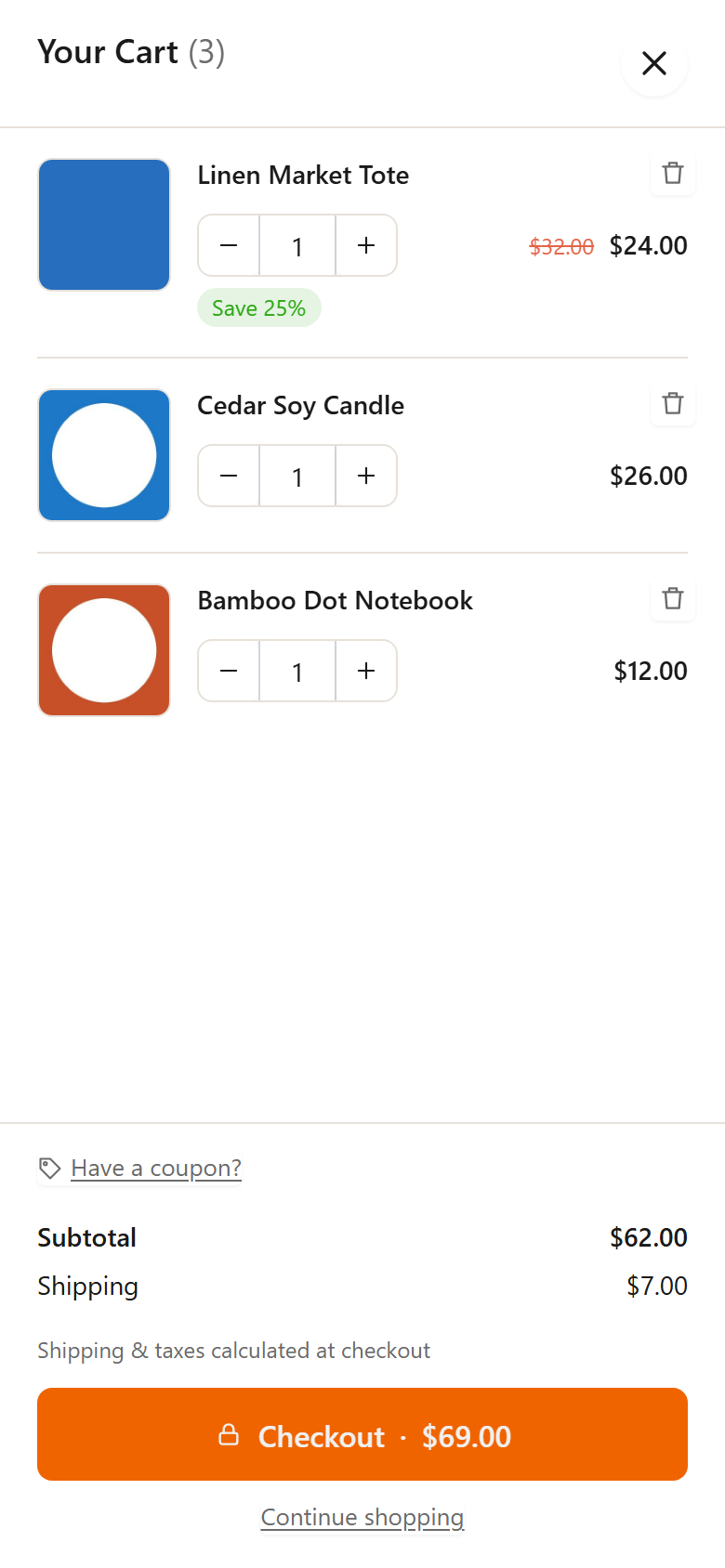
- AJAX add to cart: the cart drawer opens as soon as a product is added, on shop, category and product pages, for simple and variable products
- Change quantities, remove items and switch product variations (size, color…) inside the side cart
- Sale prices struck through, with a “Save 20%” badge
- Coupon field in the cart, open or collapsed behind a link
- Subtotal, shipping, tax and order total rows, so the amount always matches checkout
- Checkout button with the order total, plus optional “View cart” and “Continue shopping” links
- Express payment buttons (such as PayPal) in the mini cart, when your payment gateway offers them
- Empty cart message with its own title, text and button
Floating cart icon and menu cart
- Floating cart icon (cart bubble) in any corner, with the item count, your own size, shape and colors
- Seven cart icons in five styles: outline, thin, bold, solid and rounded
- Menu cart with item count and subtotal: add it from Appearance → Menus, put it in the header of a block theme, or use the
[nfsc_cart_menu]shortcode - “NanCart cart button” block for block themes and the Site Editor header
- Replaces the WooCommerce Mini-Cart block and the header cart icon of popular themes, so they open the side cart instead of the cart page
- Any link to the cart page opens the sliding cart, so the cart link already in your menu or footer just works
- Open the cart from any button or link: link it to
#nfsc-cartor give it the CSS classnfsc-open(works in Elementor, Divi and other page builders) - Hide the floating cart icon and open the cart only from your own links
Design your cart drawer
- Slide in from the left or the right, with separate desktop and mobile widths
- Animation speed, corner radius, colors for every part of the cart, a font of your choice and a custom CSS box
- Live preview next to the settings, on sample products from your store, before you save
- Setup wizard: turn it on, pick a color and side, choose the cart button, done
- Mobile friendly: the side cart fills the screen width you set on phones
Works with
- WooCommerce cart and checkout blocks, and the classic cart and checkout shortcodes
- Block themes such as Twenty Twenty-Five, and classic themes such as Storefront, Astra, Kadence, OceanWP, Divi, Flatsome, Woodmart, Porto and Savoy
- HPOS (High-Performance Order Storage)
- WPML, Polylang and the common currency switchers
- Page caching plugins: NanCart clears their cache when you save its settings or update the plugin
Access
Choose which user roles, besides administrators, may manage the cart settings.
NanCart Pro
NanCart Pro is a separate premium plugin that adds cart upsells and cross-sells, a free shipping progress bar and cart rewards (discounts and free gifts), a special add-on offer, bulk discounts, a sticky add-to-cart bar, coupon creation, Google Fonts and cart analytics. NanCart works fully on its own without it.
Credits
The “Rounded” icon style is based on Feather icons by Cole Bemis, MIT License.
Installation
- Install and activate WooCommerce.
- In your WordPress admin go to Plugins → Add New, search for “Nanflows Sliding Cart” or “side cart”, then install and activate it. Or upload the
nanflows-sliding-cartfolder to/wp-content/plugins/. - Follow the short setup wizard (NanCart → Setup wizard), or go to NanCart → Settings and adjust the look and texts while watching the live preview, then save.
Frequently asked questions
How do I add a side cart to WooCommerce?
Install and activate NanCart. The side cart works right away: add a product to the cart and the mini cart slides in. Use the setup wizard or NanCart → Settings to change its colors, side, texts and cart icon.
Does the cart open when a product is added (AJAX add to cart)?
Yes. On shop, category and product pages the product is added without a page reload and the cart drawer opens, for simple and variable products. You can turn the automatic opening off.
Can it replace my theme’s cart icon or the WooCommerce mini cart?
Yes. The WooCommerce Mini-Cart block and the header cart icon of Storefront, Astra, Kadence, OceanWP, Divi, Flatsome, Woodmart, Porto and Savoy open NanCart instead of the cart page. For any other theme, every link to the cart page opens the sliding cart, and you can add your own CSS selectors in the settings.
Can I show a cart icon in my menu?
Yes. In Appearance → Menus, add the cart from the NanCart box and drag it where you want it. You can also choose a menu under NanCart → Settings → Cart icon & menu, add the “NanCart cart button” block in the Site Editor, or place the [nfsc_cart_menu] shortcode anywhere. The menu cart shows the item count and subtotal.
Can I hide the floating cart icon?
Yes. Switch the floating icon off and the cart still opens from your menu cart, the cart button block, cart page links, #nfsc-cart links and buttons with the class nfsc-open.
Does it work with my theme and page builder?
NanCart uses its own markup and styles, so the side cart looks the same with any theme. Colors, font and corner radius can be matched to your theme. In Elementor, Divi, Beaver Builder and other builders, give any button the CSS class nfsc-open or link it to #nfsc-cart to open the cart.
Does it work with the WooCommerce cart and checkout blocks?
Yes. NanCart works with both the block-based and the classic cart and checkout pages.
Does it work on mobile?
Yes. The cart drawer has its own mobile width, works with touch and closes with a tap outside, the close button or the Escape key.
Will it slow down my store?
No. The cart loads one small minified script and stylesheet, only on pages where it is shown. It adds no extra requests to a normal page load and updates the cart with WooCommerce’s own cart fragments.
Can I add upsells or a free shipping bar to the cart?
Yes, with NanCart Pro: cart upsells, a free shipping progress bar, cart rewards, bulk discounts and more. The free side cart does not need it.
Does NanCart send data anywhere?
No. NanCart makes no requests to outside servers. Its settings (and, with NanCart Pro, cart statistics) are stored in your own WordPress database.
What is removed when I delete the plugin?
Nothing by default, so you can reinstall without losing your setup. Turn on “Delete all plugin data when uninstalled” under NanCart → Settings → General to remove all settings and data on uninstall.
Where can I get help?
Please use the support forum on WordPress.org.
Screenshots



For developers
Is this your plugin? Show off the numbers.
Add a live badge to your site, docs or GitHub README. It updates on its own — no account needed.
Best Nanflows Sliding Cart alternatives
All ajax cart plugins →





FAQ
Nanflows Sliding Cart: quick answers
Straight answers, pulled from live WordPress.org data.
Live data from WordPress.org · checked Oct 16, 2026
Is Nanflows Sliding Cart free?
Yes. Nanflows Sliding Cart is free to download and use from the official WordPress.org plugin directory.
Is Nanflows Sliding Cart safe to use in 2026?
Nanflows Sliding Cart is a solid plugin choice in 2026, with a few things worth checking first. Was last updated 2 days ago, and scores 64/100 on our health check.
How many websites use Nanflows Sliding Cart?
Nanflows Sliding Cart is active on <10 WordPress websites and has been downloaded 43 times since it launched in October 2026. It was downloaded 56 times in the last 30 days.
Does Nanflows Sliding Cart work with WordPress 7.1?
Yes. The developer has tested Nanflows Sliding Cart up to WordPress 7.1.3, the latest release. It requires WordPress 6.5 or newer.
What PHP version does Nanflows Sliding Cart need?
Nanflows Sliding Cart requires PHP 7.4 or higher. Most hosts run PHP 8.x today, so it works on any modern WordPress hosting.
When was Nanflows Sliding Cart last updated?
The latest version, 1.0.0, was released on October 14, 2026 (2 days ago).
Who makes Nanflows Sliding Cart?
Nanflows Sliding Cart is developed and maintained by nanflows.
What are the best alternatives to Nanflows Sliding Cart?
The most popular alternatives to Nanflows Sliding Cart are Advance Side Cart, Ajax Car… (5K+ installs), Groovy Menu Plugin (Free) (4K+ installs) and Modal Fly Cart & AJAX Add t… (2K+ installs).
Powered by PageForge
Want thousands of pages that rank like these? Build them in an afternoon.
This directory runs on the same engine as PageForge. Turn any spreadsheet, CSV or API into thousands of fast, SEO-ready WordPress pages — with schema, internal links and AI-written copy baked in.
- CSV, Google Sheets & API data sources
- AI content, schema & internal links per page
- Works with Elementor, Gutenberg, Yoast & Rank Math
- Free on WordPress.org — no credit card


