


B2B Product Catalog – No E-Commerce, Global RFQ & Bulk Quote
Lightweight B2B product catalog without e-commerce. Showcase products, collect global RFQs and bulk quotes with multilingual support.

Solid choice
B2B Product Catalog is a solid plugin choice in 2026, with a few things worth checking first. It runs on 100+ sites, is rated 5/5 and was last updated 3 weeks ago, and scores 75/100 on our health check.
- Actively developed — last update 3 weeks ago
- Tested with the latest WordPress (7.1)
- Small user base (100+ active installs)
- Very few reviews so far
How does it stack up?
Side-by-side on installs, updates, ratings & support



Daily downloads
Download spikes usually follow a new release — each site that auto-updates counts as a download.
Rankings
Where B2B Product Catalog stands todayWordPress.org search rankings
Live position in the plugin search, top 100| Keyword | Position |
|---|---|
| b2b | #7 |
| bulk inquiry | #3 |
| no e-commerce | #27 |
| product catalog | #25 |
| rfq | #2 |
Version adoption
Share of active sites per release.
Rating breakdown
★★★★★★★★★★ 5 from 2 reviews
About B2B Product Catalog
From the official readme · v5.3.4Description
Ditch the shopping cart. B2B Product Catalog is built for manufacturers, exporters, and wholesalers who need a clean product catalog with global RFQ and bulk quote collection — no e-commerce complexity, no payment gateways, no bloat. Multilingual-ready, lightweight, and focused on one thing: turning product browsers into qualified leads.
✨ Key Features
- Bulk RFQ Inquiry Cart — Multi-spec product selection with persistent inquiry cart. Buyers pick SKU variants with quantities and submit a single combined quote request — no account required
- Three Inquiry Modes — Each product supports None / Standard / Bulk inquiry type. Choose the right lead capture strategy per product: simple contact, external link, or full spec-based RFQ
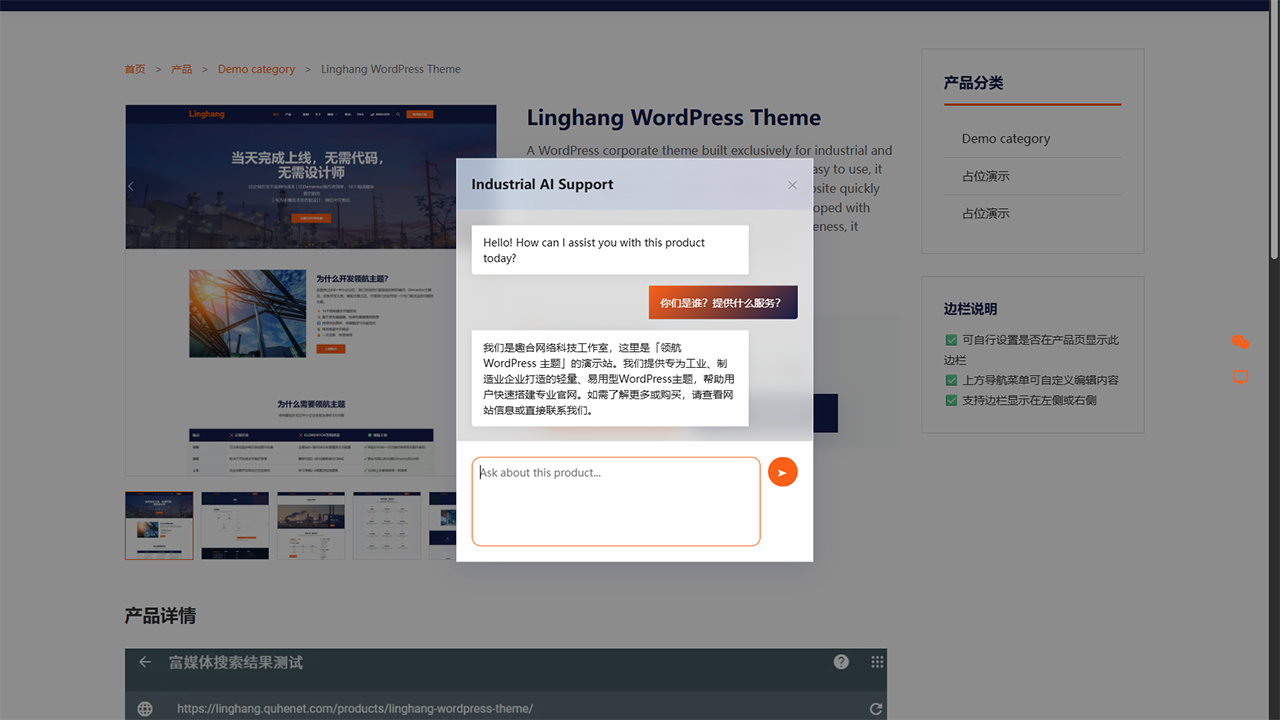
- AI-Powered Lead Capture — Built-in AI chatbot (SPEC v2 protocol) for automated customer engagement and lead qualification, with seamless fallback to inquiry forms
- AI Integration — Expose your published product catalog to compatible AI agents and MCP adapters through the WordPress Abilities API. Read-only by design, so AI can browse and search products but cannot change them
- Visual Shortcode Builder — Create product grids and category displays with real-time admin preview. No coding needed
- WordPress 7 Dynamic Blocks — Add product grids, featured products, category tabs, carousels, category entries, single featured products, and inquiry CTAs directly in the block editor
- Multilingual Support — Ready for international trade with translation files and locale-aware formatting
- SEO Content Management — Customize top and bottom content for archive, category, and tag pages independently
- Flexible Category Navigation — Choose compact top buttons or a responsive hierarchical sidebar for large product catalogs
- Widget & Sidebar Support — Add product showcases anywhere with smart CSS loading that won’t affect page speed
- Enterprise Architecture — Model-driven design, version-controlled database migrations, and clean code for custom integrations
- Security First — Strict nonce verification, rate limiting, and input sanitization across all AJAX operations
✅ Why Choose B2B Product Catalog?
- 🚫 Zero E-Commerce Overhead — No shopping cart, no checkout, no payment processing. Just products and inquiry forms — exactly what B2B businesses need
- 🌐 Global RFQ Ready — International-friendly quote forms with multilingual support. Capture inquiries from buyers worldwide, no matter the language
- ⚡ Lightweight & Fast — Purpose-built codebase without e-commerce bloat. Optimized for Core Web Vitals, won’t slow down your site
- 🔍 SEO Optimized — JSON-LD structured data, breadcrumb navigation, and clean URLs for better search rankings out of the box
- 📱 Fully Responsive — Seamless display on all devices from desktop to mobile, with adaptive product grid layouts
- 🛠️ Easy Setup & Highly Customizable — Intuitive admin with visual shortcode generator gets you online in minutes. Rich hooks and template overrides for unlimited flexibility
🚀 Core Functions
📦 Product Management
- Complete Product Profiles: Title, detailed description, featured images, and multi-image galleries
- Organized Categorization: Hierarchical categories and flexible tagging system
- Inquiry Management: Customizable inquiry buttons with AI-powered customer service integration
- SEO Optimization: Built-in meta fields for better search engine visibility
🎨 Frontend Display
- Beautiful Archive Pages: Responsive grid or table layouts with selectable top or sidebar category navigation
- Detailed Product Pages: Comprehensive product information with image galleries
- Category & Tag Pages: Organized browsing experience
- Powerful Shortcodes:
[naibabiji_b2b_products]and[naibabiji_b2b_product_categories]for flexible display - Native Product Blocks: Product Grid, Featured Products, Product Categories, Product Carousel, Category Tabs Products, Single Featured Product, and Inquiry CTA
- Sidebar Widgets: Add product showcases to any sidebar with automatic CSS loading
⚙️ Admin Dashboard
- Intuitive Interface: Clean, organized settings with tab-based navigation
- Visual Shortcode Generator: Create custom product displays with real-time preview
- SEO Content Management: Customize top and bottom content for archive, category, and tag pages
- Customizable Styles: Button colors, product layouts, category navigation, and display controls
🔧 Developer Friendly
- Rich Hooks & Filters: Extensive customization options
- Template Override Support: Easy integration with any WordPress theme
- AJAX Interfaces: Modern, interactive functionality
- Clean Code Structure: Well-documented, maintainable codebase
- Enterprise Architecture: Model-driven design for scalability
🎯 Who This Plugin Is For
B2B Product Catalog is perfect for:
– Manufacturers — Showcase production lines with multi-specs selection and collect RFQs from global buyers
– Exporters & Trading Companies — Display products in multiple languages, capture inquiries from international markets
– Distributors & Wholesalers — Present product ranges to retailers and partners without exposing pricing logic
– Industrial Suppliers — List hardware, components, or standard parts with model codes and quantity selection tables
– Service Providers — Highlight service offerings with detailed profiles and custom inquiry forms
– Corporate Websites — Create professional product galleries without e-commerce overhead, payment gateways, or cart abandonment
– Developers — Extend functionality with rich hooks, template overrides, and clean model-driven architecture
💡 Common Use Cases
- Replace WooCommerce Catalogs — Already using WooCommerce just for product display? Switch to a lightweight catalog without cart/checkout bloat
- Global RFQ & Lead Generation — Capture structured quote requests from international buyers with multilingual forms and product specs
- Multi-Specs Product Catalogs — Display products with variants (sizes, models, grades) in an interactive selection table with bulk inquiry cart
- Trade Show & Virtual Exhibits — Launch product showcases online for virtual trade shows and international exhibitions
- Partner & Dealer Portals — Share product information with authorized partners and distributors via password-protected pages
- Sales Team Enablement — Give sales teams an always-up-to-date product catalog with built-in inquiry tracking and lead management
External Services
The optional AI features connect to the Naibabiji/QuheNet AI Manager service at https://api.quhenet.com/.
This service is used only when a site administrator configures an AI Key and enables or uses AI features, such as the frontend AI chat widget or the editor AI writing assistant. The product catalog, product display, inquiry forms, shortcodes, widgets, SEO settings, and other non-AI features work without an AI Key or external AI connection.
When AI is used, the plugin may send the following data to the AI Manager service to generate a response or verify service access: the configured AI Key, site URL, request ID, visitor IP address, visitor chat message and chat history, product title, product short description, product detail excerpt, SKU, price, categories, tags, selected bulk specs, pasted product material, Company Profile, FAQ Knowledge Base, site locale, and quota/license verification data.
Data is sent to provide AI answers, product title and short description suggestions, quota checks, license verification, domain binding, and abuse prevention. The AI Manager service is operated by QuheNet.
Service terms: https://www.quhenet.com/terms/
Privacy policy: https://www.quhenet.com/privacy-policy/
Support
For technical support, please visit the plugin’s page or WordPress.org support forum.
License
This plugin is released under the GPL v2 or later license.
Installation
🚀 Quick Start Guide
- Upload & Activate: Install the plugin through WordPress admin or upload files to
/wp-content/plugins/naibabiji-b2b-product-showcase/ - Configure Settings: Go to
B2B Showcase → Settingsto customize product display, inquiries, SEO content, and archive navigation - Add Products: Create new products using the custom “Products” post type
- Display Products: Use shortcodes or widgets to showcase products on your site
- Optimize SEO: Add custom content to archive, category, and tag pages for better search rankings
💡 Pro Tip: Use the visual shortcode generator in the admin dashboard to create beautiful product displays with real-time preview!
Frequently asked questions
Does this plugin support shopping cart functionality?
No. This plugin is designed for B2B businesses, focusing on product display and inquiry functionality, without e-commerce features like shopping carts or payments.
How can I customize product templates?
You can create the following template files in your theme directory to override the default templates: – single-naibb2pr_products.php – Single product page – archive-naibb2pr_products.php – Product archive page – taxonomy-naibb2pr_product_category.php – Product category page – taxonomy-naibb2pr_product_tag.php – Product tag page
What shortcodes are supported?
The plugin provides the following shortcodes: – [naibabiji_b2b_products] – Display product grid – [naibabiji_b2b_product_categories] – Display product categories – [naibabiji_b2b_contact_form] – Display an inline contact form for collecting messages
Does the plugin support sidebar widgets?
Yes! You can use the plugin’s shortcodes in any text widget with the following features: Key Features: * Smart Style Loading – Automatically detects shortcodes in sidebar and loads CSS styles only when needed * Flexible Configuration – Supports product count, column layout, category filtering and other parameter settings * Responsive Design – Automatically adjusts to single column layout on mobile devices * Theme Compatibility – Works seamlessly with most WordPress themes Usage Steps: 1. Go to WordPress admin Appearance → Widgets 2. Add a “Text” widget to your sidebar 3. Paste the product…
How do I change the category navigation on product archive pages?
Go to B2B Showcase → Settings → Archive Content and choose Top buttons or Left navigation under Category Navigation Layout. Top buttons work well for a small catalog. Left navigation is recommended for larger or multi-level catalogs and automatically becomes an expandable panel on smaller screens.
Why don’t product styles work in the sidebar?
This issue has been fixed in v1.0.13. If you still encounter style problems, please try: Clear Cache – If using a cache plugin, clear all caches Refresh Page – Use Ctrl+F5 to force refresh the browser Check Widget Configuration – Ensure the widget is properly saved Theme Compatibility – Some themes may require additional CSS adjustments If the problem persists, please contact technical support and provide the theme name for further troubleshooting.
How do I set up bulk (multi-spec) inquiry for a product?
Edit the product and set Inquiry Type to Bulk. In the B2B Product Fields editor panel, add at least two Bulk Inquiry Specs with model codes and descriptions. You can also import or export CSV files there. Save the product. On the frontend, visitors will see a specs selection table where they can add items to an inquiry cart and submit a combined batch inquiry.
What is the difference between Inquiry Mode and Inquiry Type?
Inquiry Type is set per product (None / Standard / Bulk) and defines what kind of inquiry experience that single product offers. Inquiry Mode is a site-wide setting (External Link or Built-in Form) that only affects Standard-type products — it controls whether the inquiry button links to an external URL or opens a popup. Bulk-type products always use the built-in bulk inquiry form regardless of this setting.
Why do I see “Too many submissions” when testing bulk inquiry?
The plugin enforces a rate limit of 3 submissions per IP address within 5 minutes to prevent spam. If you need to test frequently or want a higher threshold, install a captcha plugin that integrates through the naibabiji_contact_form_validate filter.
Does this plugin support AI agents or MCP?
Yes. B2B Product Showcase exposes read-only product catalog capabilities through the WordPress Abilities API. Compatible MCP adapters can make these abilities available to AI clients such as Claude, ChatGPT, Codex, and other MCP-compatible tools. The plugin itself does not include an MCP server.
Can AI edit or delete my products?
No. The current AI integration is read-only. AI agents can read published product catalog data, but cannot create, edit, publish, or delete products through these abilities. They also cannot access inquiries, change plugin settings, or read API keys.
Changelog
5.3.4
- New: Added a Product Page setting for showing or hiding the Related Products section; it remains enabled by default for existing sites.
- New: Added independent “Show category” and “Show excerpt” controls to the Featured Products, Product Carousel, and Category Tabs Products blocks.
- Fixed: Related Products now follows the Archive Content grid-card setting for showing or hiding short descriptions and product categories.
- Changed: Clarified the Grid Card Fields setting description to state which pages it affects and that it does not override shortcode or Gutenberg block display settings.
5.3.3
- New: This plugin now detects WooCommerce and blocks activation (in either activation order) with a clear message, because both plugins default to the same product category/tag URL structure and would otherwise break product links if run together.
- New: The
[naibabiji_b2b_products]shortcode and the Shortcode Generator now support filtering by product tag, in addition to product category. - Fixed: The Product Carousel block could show an unwanted horizontal scrollbar and off-center previous/next arrow icons on some themes. The block now sets its own sizing and button styles instead of relying on the active theme’s defaults.
- Fixed: Category and tag filtering silently failed for non-Latin category/tag names (for example Chinese names), because their slugs are percent-encoded and were being cleared out by input sanitization meant for plain text.
- Improved: The product editor now shows a reminder with a one-click action when a product has no Featured Image set, since without one the product displays with no photo at all on cards and the product page.
- Improved: The Product Gallery’s empty-state message now explains that you can select or upload multiple images at once.
- Improved: Addressed findings from an official WordPress Plugin Check scan, including a deprecated core function call and unprefixed template variables.
5.3.2
- Fixed: Product detail tabs now switch content without adding URL anchors or moving the user’s page position.
5.3.1
- Fixed: Product and category images in the plugin’s blocks now preserve their original aspect ratio instead of being cropped to a fixed frame.
5.3.0
- New: Added AI Integration — read-only product catalog access through the WordPress Abilities API for compatible AI agents and MCP adapters.
- New: AI clients can browse and search published products, read product details and specifications (including bulk inquiry specs), view categories and tags, and get a catalog overview.
- Security: The AI integration is read-only. AI clients cannot create, edit, publish, or delete products, access inquiries, change plugin settings, or read API keys.
- Compatibility: Requires an authenticated WordPress user with read permission; only published product data is exposed.
5.2.5
- New: Added a Grid Card Fields setting under Archive Content to let you show or hide the short description and category on product cards for the default archive, category, and tag pages in grid layout.
- Compatibility: Confirmed compatible with WordPress 7.1.
Screenshots




For developers
Is this your plugin? Show off the numbers.
Add a live badge to your site, docs or GitHub README. It updates on its own — no account needed.
Best B2B Product Catalog alternatives
All b2b plugins →



FAQ
B2B Product Catalog: quick answers
Straight answers, pulled from live WordPress.org data.
Live data from WordPress.org · checked Oct 11, 2026
Is B2B Product Catalog free?
Yes. B2B Product Catalog is free to download and use from the official WordPress.org plugin directory.
Is B2B Product Catalog safe to use in 2026?
B2B Product Catalog is a solid plugin choice in 2026, with a few things worth checking first. It runs on 100+ sites, is rated 5/5 and was last updated 3 weeks ago, and scores 75/100 on our health check.
How many websites use B2B Product Catalog?
B2B Product Catalog is active on 100+ WordPress websites and has been downloaded 6,149 times since it launched in August 2025. It was downloaded 903 times in the last 30 days.
Does B2B Product Catalog work with WordPress 7.1?
Yes. The developer has tested B2B Product Catalog up to WordPress 7.1.3, the latest release. It requires WordPress 7.0 or newer.
What PHP version does B2B Product Catalog need?
B2B Product Catalog requires PHP 7.4 or higher. Most hosts run PHP 8.x today, so it works on any modern WordPress hosting.
When was B2B Product Catalog last updated?
The latest version, 5.3.4, was released on September 17, 2026 (3 weeks ago).
Who makes B2B Product Catalog?
B2B Product Catalog is developed and maintained by 奶爸建站笔记.
What are the best alternatives to B2B Product Catalog?
The most popular alternatives to B2B Product Catalog are Wholesale Suite (20K+ installs), B2BKing (10K+ installs) and Leadinfo (7K+ installs).
Powered by PageForge
Want thousands of pages that rank like these? Build them in an afternoon.
This directory runs on the same engine as PageForge. Turn any spreadsheet, CSV or API into thousands of fast, SEO-ready WordPress pages — with schema, internal links and AI-written copy baked in.
- CSV, Google Sheets & API data sources
- AI content, schema & internal links per page
- Works with Elementor, Gutenberg, Yoast & Rank Math
- Free on WordPress.org — no credit card


