


MyVendorHub for WooCommerce
Automate supplier notifications, Accept/Reject tracking, and multi-vendor fulfillment for your WooCommerce store.

Use with caution
MyVendorHub for WooCommerce works, but test it on a staging site before relying on it in 2026. Was last updated 2 months ago, and scores 55/100 on our health check.
- Small user base (<10 active installs)
- Very few reviews so far
How does it stack up?
Side-by-side on installs, updates, ratings & support


Daily downloads
Download spikes usually follow a new release — each site that auto-updates counts as a download.
Rankings
Where MyVendorHub for WooCommerce stands todayWordPress.org search rankings
Live position in the plugin search, top 100| Keyword | Position |
|---|---|
| dropshipping | >100 |
| fulfillment | >100 |
| suppliers | >100 |
| vendors | >100 |
| woocommerce | >100 |
About MyVendorHub for WooCommerce
From the official readme · v1.2.2Description
Selling products from suppliers? MyVendorHub organizes your inventory, pricing, and orders — automatically.
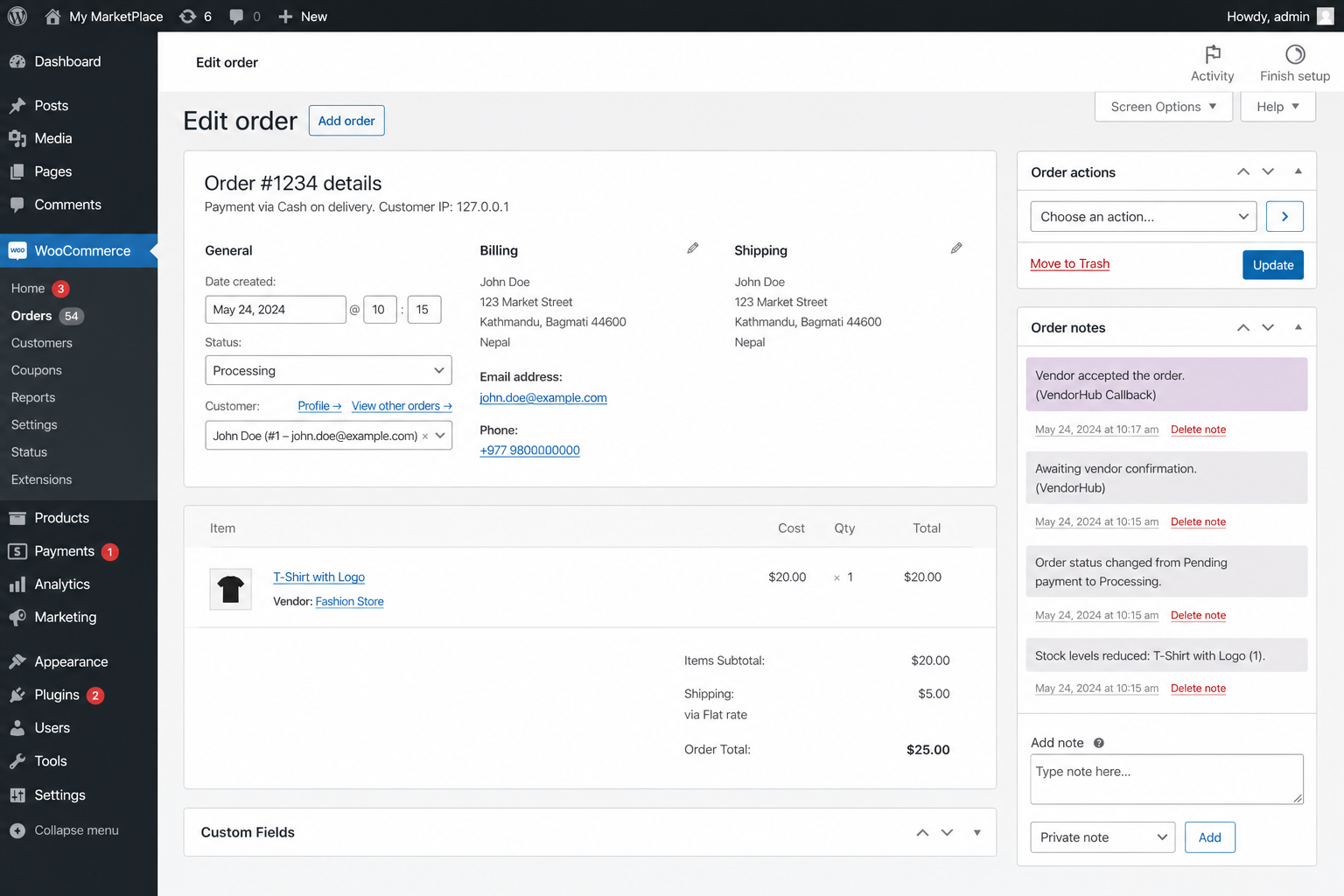
This free plugin connects your WooCommerce store to MyVendorHub. When a customer orders a supplier’s products, MyVendorHub notifies the right vendor by email or WhatsApp, tracks their Accept / Reject / Other response, and writes status updates back to your order notes — so nothing falls through the cracks.
Less spreadsheets. Less WhatsApp chaos. Fewer mistakes. More control.
What MyVendorHub does for your store
- Automatic supplier notifications — New orders are routed to the right vendor with product details, quantities, and shipping address
- Email & WhatsApp — Reach vendors on the channels they already use (WhatsApp on Growth+ plans)
- One-click Accept / Reject / Other — Vendors respond from a secure link; you get alerts when something needs attention
- Smart reminders — Configurable follow-ups for vendors who haven’t replied, optionally limited to working hours
- Supplier dashboard — Orders grouped by vendor with revenue, product details, and fulfillment status at a glance
- Vendor sync from your catalog — Pull vendor names from product meta and manage contacts in one place
- Product Scanner — Track supplier product page URLs for price, availability, and catalog changes
- Event Hub — Activity feed for notifications sent, vendor responses, reminders, and failures
- Multi-language messaging — Notify vendors in 12 languages (including Hebrew and Arabic)
- Multi-store ready — Manage multiple WooCommerce stores from one MyVendorHub account
- HPOS compatible — Works with WooCommerce High-Performance Order Storage
Merchants manage vendors, reminders, scanner, billing, and responses in the MyVendorHub web dashboard — this plugin keeps your store connected securely.
Free Starter plan available after connect (limits apply). Paid plans unlock more vendors, reminders, WhatsApp, and higher volume. See pricing on myvendorhub.com.
How it works
Install → Connect → done. No WooCommerce REST API keys are required for the standard setup — the plugin securely handles order sync, vendor sync, draft product creation, and order note/status write-back on its own.
- Install and activate this plugin (WooCommerce 6.0+ required).
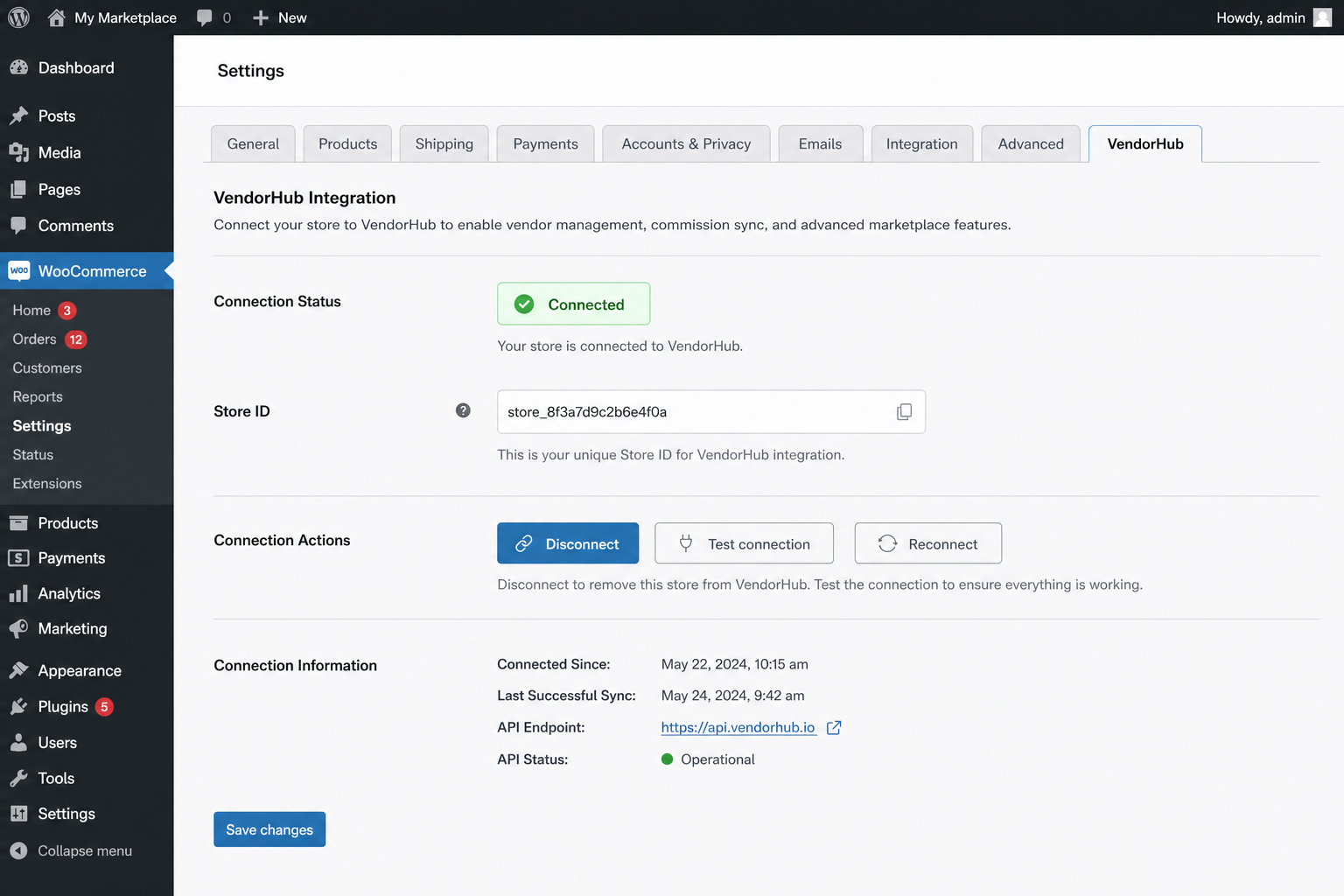
- Connect your store to MyVendorHub in WooCommerce → Settings → MyVendorHub.
- Add vendor contacts and enable notifications in the MyVendorHub dashboard.
- Place a test order — vendors are notified within seconds, and responses appear on the order in WooCommerce.
Connect your store
Recommended: one-click Connect
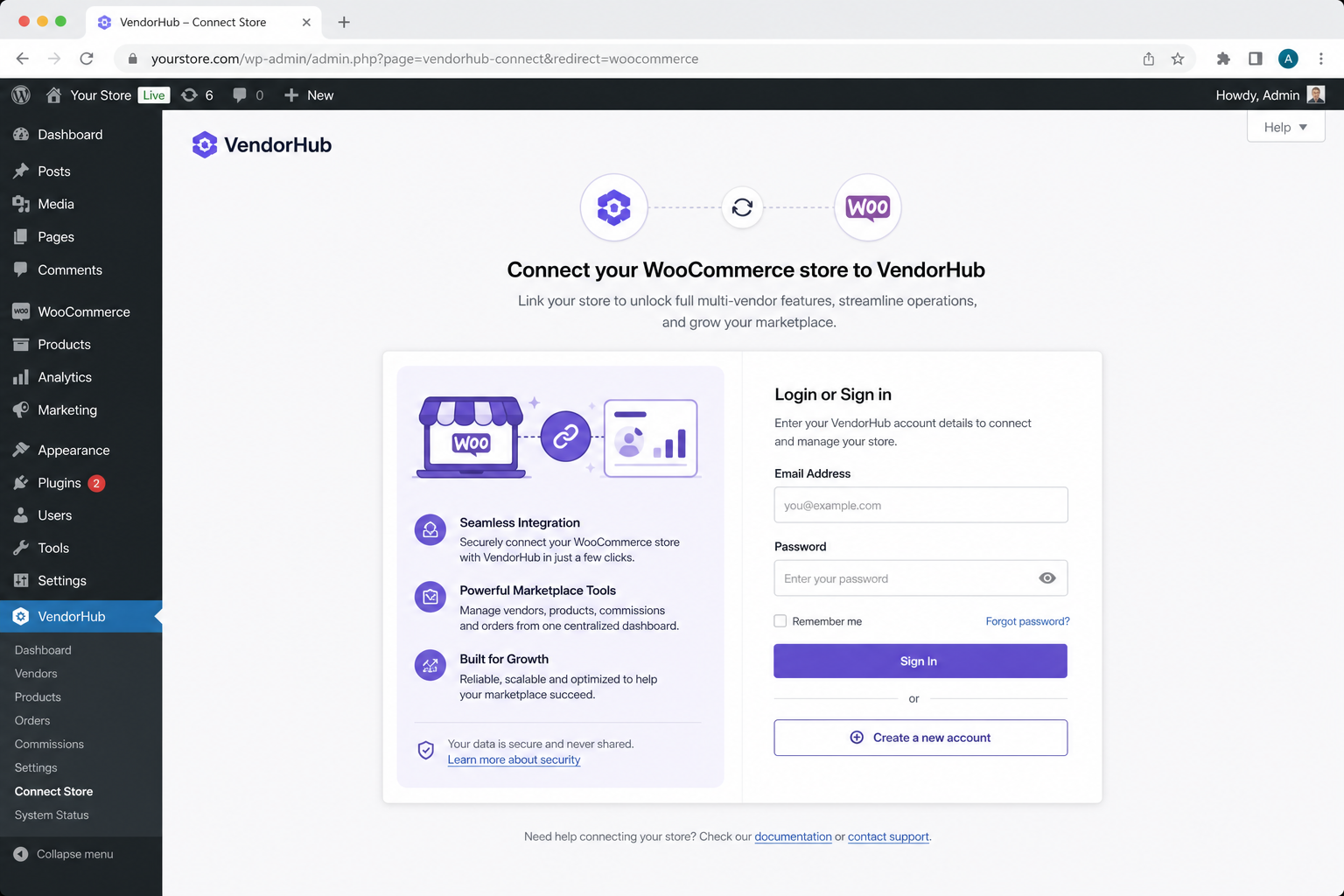
Review the permissions checklist on the settings page, then click Connect to MyVendorHub. Sign in (or create an account), and your store credentials are returned securely — no secrets are embedded in the plugin.
After connecting, use Open MyVendorHub in wp-admin to return to your dashboard without signing in again (signed SSO launch).
Manual connection (Advanced)
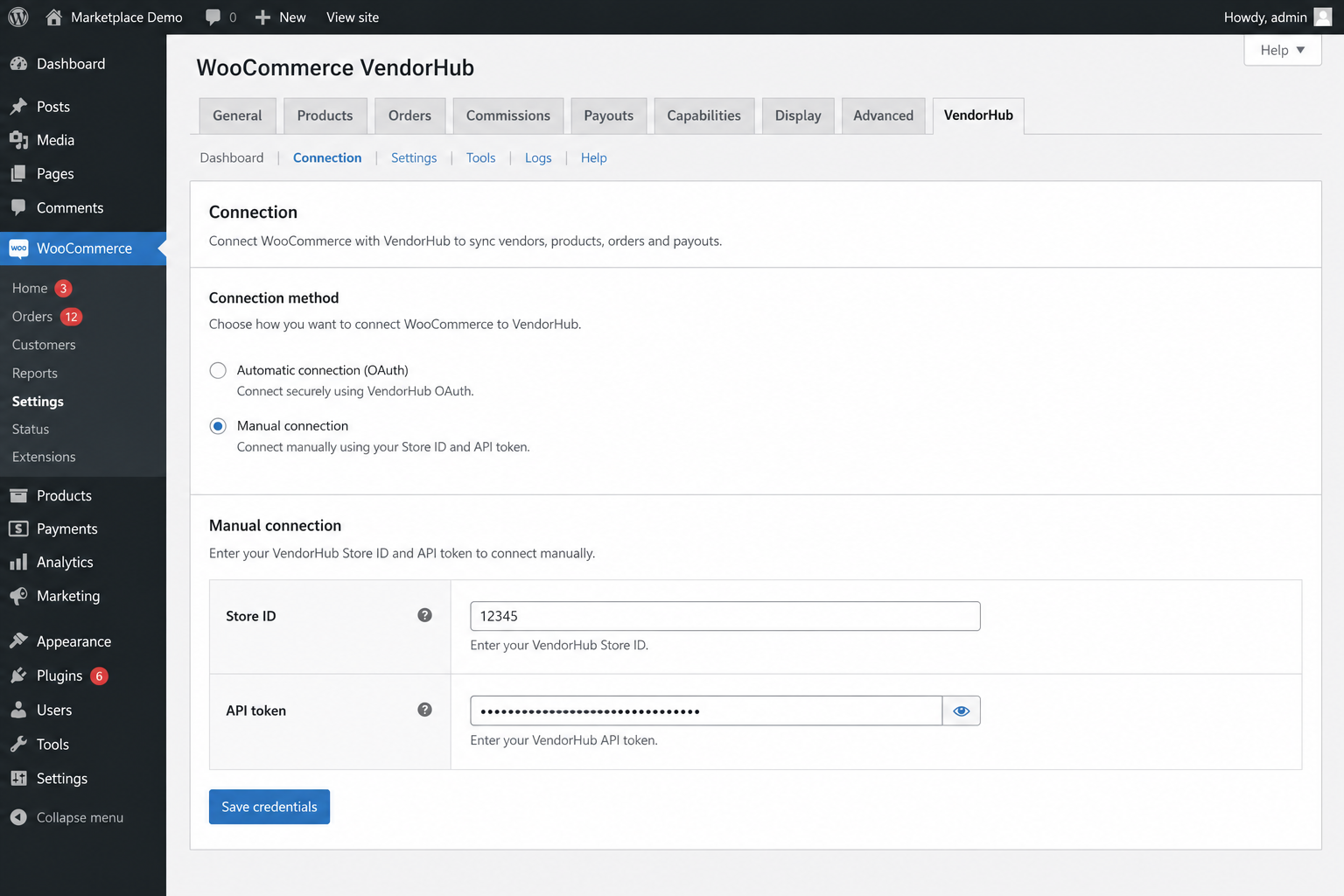
Already have a store in MyVendorHub? Copy Store ID and API token from MyVendorHub → Settings → API access, then paste them under Advanced → Manual connection in WooCommerce → Settings → MyVendorHub.
Developers (self-hosted only)
For local / self-hosted MyVendorHub environments, define VENDORHUB_WC_CONNECT_SECRET in wp-config.php to enable a Direct connect (dev) HMAC registration button. Not used for the public SaaS.
External services
This plugin connects your store to MyVendorHub cloud services over HTTPS (default host: https://www.myvendorhub.com). A MyVendorHub account is required to forward orders.
Data that may be transmitted after you connect:
- Connect — your site URL, store display name, and a per-site plugin token used to complete the handshake
- Order sync — order number, line items, SKUs, vendor names, shipping address, and customer contact details needed for fulfillment
- Inbound updates — MyVendorHub securely POSTs vendor status, notes, and tracking back to your WordPress site (HMAC-verified)
No MyVendorHub admin passwords are stored in WordPress. Only the per-store storeId and apiToken from connect are saved locally.
Privacy policy: https://www.myvendorhub.com/privacy
Learn more or try the live demo: https://www.myvendorhub.com
Installation
- In WordPress, go to Plugins → Add New, search for MyVendorHub for WooCommerce, and click Install Now — or upload the plugin ZIP.
- Activate the plugin (requires WooCommerce 6.0+).
- You are guided to WooCommerce → Settings → MyVendorHub to review permissions.
- Click Connect to MyVendorHub and sign in, or paste Store ID + API token under Advanced → Manual connection.
- In the MyVendorHub dashboard, set your admin email, sync or add vendors, and enable notifications.
- Place a test order — it should appear in MyVendorHub within seconds. Vendor responses write back to WooCommerce order notes.
Frequently asked questions
What is MyVendorHub?
MyVendorHub is a vendor order management platform for online stores. It automatically notifies suppliers when their products are ordered, tracks Accept / Reject / Other responses, sends reminders, and gives you a dashboard of vendor performance — so you spend less time on manual emails and WhatsApp threads.
Do I need a MyVendorHub account?
Yes. Without a connection the plugin shows “Not connected†and does not transmit order data. A free Starter plan is available after you connect.
Where do I manage vendors and settings?
In the MyVendorHub web dashboard at https://www.myvendorhub.com. This plugin connects your WooCommerce store; day-to-day vendor management happens in MyVendorHub. After connect, use Open MyVendorHub from the plugin settings for one-click return (no re-login).
Are WooCommerce REST API keys required?
No. Order forwarding works through this plugin alone. Optional WooCommerce REST keys can be added later in MyVendorHub for richer dashboard reads and advanced features.
How do vendors get notified?
When an order includes a vendor’s products, MyVendorHub emails them (and optionally WhatsApp on eligible plans) with order details and one-click Accept / Reject / Other buttons. You configure contacts and notification channels in the Vendors list inside MyVendorHub.
What if a vendor doesn’t respond?
Enable smart reminders in MyVendorHub Settings. You can schedule up to three follow-ups and optionally restrict them to working hours so vendors aren’t contacted at night.
Does this work with Dokan, WC Vendors, or similar plugins?
Vendor names are read from common product / line-item meta keys (_vendor, vendor, _wcv_vendor, _dokan_vendor_id). You can also set a custom vendor meta key in MyVendorHub Settings.
Does the plugin store MyVendorHub passwords?
No. Only the per-store storeId and apiToken from the connect handshake are stored in WordPress options.
What personal data is sent to MyVendorHub?
Order and fulfillment data needed for vendors to ship — including customer name, shipping address, and phone when present on the order. MyVendorHub does not sell personal data. See https://www.myvendorhub.com/privacy.
Is it compatible with HPOS?
Yes. The plugin declares compatibility with WooCommerce High-Performance Order Storage.
Changelog
Adds order custom field support for MyVendorHub order filtering (dashboard + skip vendor notifications). Update recommended if you use Settings → Order filtering by custom field.
1.2.2
- Force package refresh so staging installs the order-meta-keys discovery endpoint.
1.2.1
- Publish order custom-field discovery (order-meta-keys) for MyVendorHub Settings filtering.
- Include merchant-facing order
customFieldson order list, single-order read, and new-order ingest (required for MyVendorHub Settings → Order filtering by custom field, including dashboard exclusion and skip vendor notifications). - Add
GET /wp-json/vendorhub/v1/order-meta-keysdiscovery endpoint (HPOS-safe) so MyVendorHub can populate the custom-field filter picker.
1.2.0
- Mode B+ agent endpoints: the plugin now serves orders, product creation, and product images directly to MyVendorHub — no WooCommerce REST API keys required for the standard setup.
- Capabilities discovery endpoint so MyVendorHub detects supported features and older installs degrade gracefully.
- Read orders (list + single) in MyVendorHub’s normalized shape, including vendor names and product images (HPOS-safe).
- Create draft (or active/private) products from MyVendorHub, with image sideloading into the media library.
- Product image backfill endpoint for existing catalog items.
- Order forwarding now always includes the store timezone and product image URLs, plus a passive version/capabilities handshake.
- Updated connect permissions disclosure to cover reading orders, syncing vendors, creating draft products, and writing order notes/settings.
1.1.7
- Load plugin includes defensively so an incomplete install shows an admin notice instead of a fatal error.
- Notify MyVendorHub on plugin activation (best-effort, only for already-connected stores; never blocks activation).
1.1.5
- Harden uninstall/deactivate lifecycle callbacks so WordPress delete cannot fail with a server error if MyVendorHub is unreachable or plugin files are incomplete.
1.1.4
- Notify MyVendorHub on plugin deactivate and uninstall (signed lifecycle callbacks).
- Uninstall notifies the app before deleting stored credentials.
Screenshots
For developers
Is this your plugin? Show off the numbers.
Add a live badge to your site, docs or GitHub README. It updates on its own — no account needed.
Best MyVendorHub for WooCommerce alternatives
All dropshipping plugins →




FAQ
MyVendorHub for WooCommerce: quick answers
Straight answers, pulled from live WordPress.org data.
Live data from WordPress.org · checked Oct 7, 2026
Is MyVendorHub for WooCommerce free?
Yes. MyVendorHub for WooCommerce is free to download and use from the official WordPress.org plugin directory.
Is MyVendorHub for WooCommerce safe to use in 2026?
MyVendorHub for WooCommerce works, but test it on a staging site before relying on it in 2026. Was last updated 2 months ago, and scores 55/100 on our health check.
How many websites use MyVendorHub for WooCommerce?
MyVendorHub for WooCommerce is active on <10 WordPress websites and has been downloaded 392 times since it launched in July 2026. It was downloaded 63 times in the last 30 days.
Does MyVendorHub for WooCommerce work with WordPress 7.1?
MyVendorHub for WooCommerce is officially tested up to WordPress 7.0.7, while the latest release is 7.1.3. It may still work, but try it on a staging site first.
What PHP version does MyVendorHub for WooCommerce need?
MyVendorHub for WooCommerce requires PHP 7.4 or higher. Most hosts run PHP 8.x today, so it works on any modern WordPress hosting.
When was MyVendorHub for WooCommerce last updated?
The latest version, 1.2.2, was released on August 3, 2026 (2 months ago).
Who makes MyVendorHub for WooCommerce?
MyVendorHub for WooCommerce is developed and maintained by VendorHub.
What are the best alternatives to MyVendorHub for WooCommerce?
The most popular alternatives to MyVendorHub for WooCommerce are AliNext (4K+ installs), AppScenic (3K+ installs) and Dropify (2K+ installs).
Powered by PageForge
Want thousands of pages that rank like these? Build them in an afternoon.
This directory runs on the same engine as PageForge. Turn any spreadsheet, CSV or API into thousands of fast, SEO-ready WordPress pages — with schema, internal links and AI-written copy baked in.
- CSV, Google Sheets & API data sources
- AI content, schema & internal links per page
- Works with Elementor, Gutenberg, Yoast & Rank Math
- Free on WordPress.org — no credit card


