



MV Form Usage Finder for Contact Form 7
Search and find which pages, posts, or other content types use a specific Contact Form 7 form, by name or by form ID.

Use with caution
MV Form Usage Finder for Contac… works, but test it on a staging site before relying on it in 2026. Was last updated 2 months ago, and scores 55/100 on our health check.
- Small user base (<10 active installs)
- Very few reviews so far
How does it stack up?
Side-by-side on installs, updates, ratings & support


Daily downloads
Download spikes usually follow a new release — each site that auto-updates counts as a download.
Rankings
Where MV Form Usage Finder for Co… stands todayWordPress.org search rankings
Live position in the plugin search, top 100| Keyword | Position |
|---|---|
| cf7 | >100 |
| contact form 7 | >100 |
| forms | >100 |
| search | >100 |
| wpcf7 | #12 |
About MV Form Usage Finder for Contact Form 7
From the official readme · v1.0.0Description
MV Form Usage Finder for Contact Form 7 solves a common headache for anyone managing a site with many Contact Form 7 forms: knowing exactly where a given form is actually embedded.
Instead of manually opening every page and post to check for a [contact-form-7] shortcode, this plugin scans your content and reports every location a form is used, complete with direct edit and view links.
Key Features
- Find by form or by ID — pick a form from a dropdown of all your Contact Form 7 forms, or type in a form ID manually.
- Page builder aware — scans every postmeta value on a post, not just post_content, so it detects forms embedded via the classic editor, the block editor (including CF7’s own Gutenberg block), and any page builder — Elementor, Beaver Builder, SiteOrigin Page Builder, Bricks, Oxygen, Divi, WPBakery (including its base64-encoded Raw HTML element), and others — without needing a maintained list of builder-specific fields.
- Works with hash-based shortcode IDs — resolves and matches the SHA-1 hash identifiers Contact Form 7 5.8+ uses in shortcodes, as well as the classic numeric ID.
- Flexible content search — choose exactly which content types to scan: Pages, Posts, Products, Testimonials, Jobs, Forms, Businesses, Events, Books, and Exhibitions.
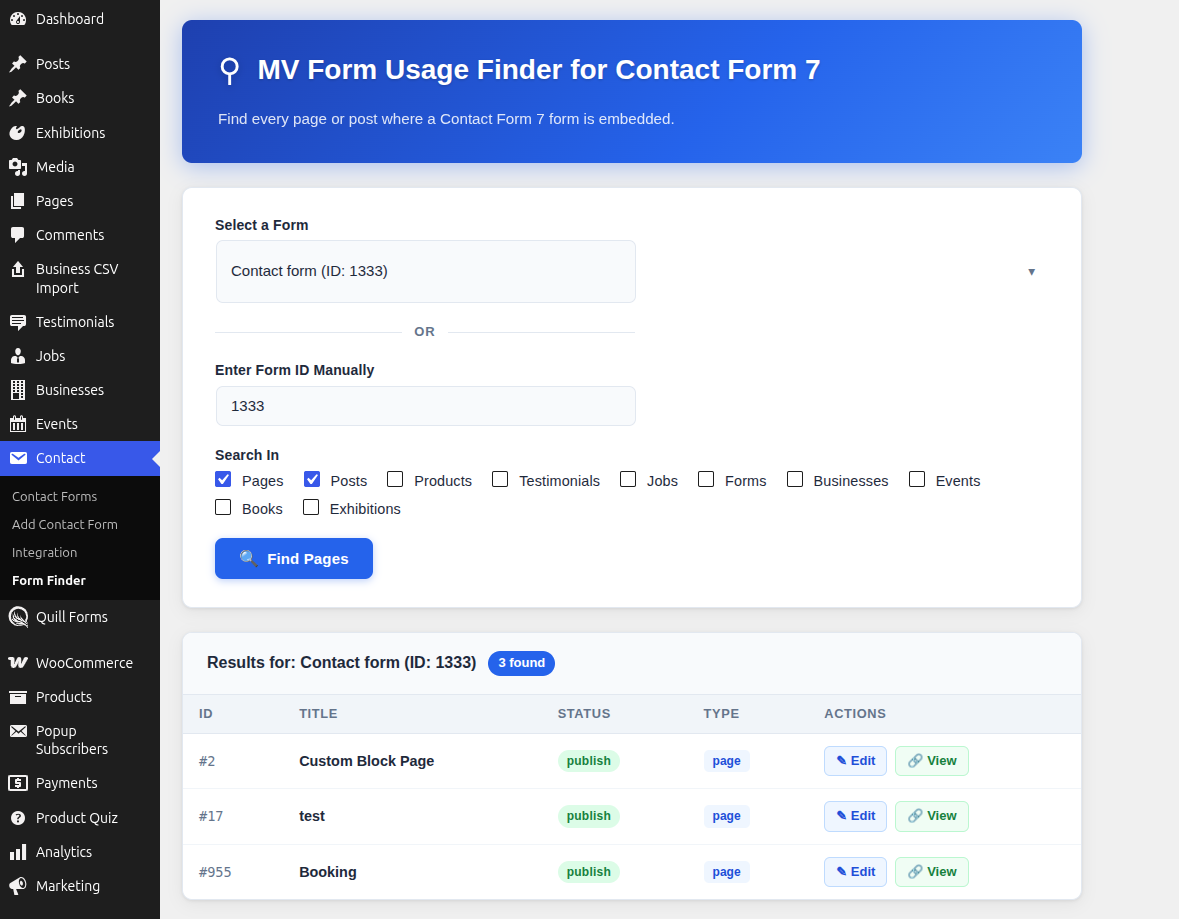
- Clear results table — see the post ID, title, publish status, content type, and quick Edit / View actions for every match.
- Result count at a glance — instantly see how many locations a form was found in.
- Works with custom post types — searches beyond core Pages and Posts to cover custom content registered by other plugins (WooCommerce Products, Testimonials, Jobs, Businesses, Events, Books, Exhibitions, and more).
- Fast, targeted scanning — only searches the content types you select, keeping results relevant and searches quick.
- Simple, single-screen workflow — no configuration required; open Contact → Form Finder and start searching.
Who is this for?
- Site builders and freelancers auditing client sites with many CF7 forms.
- Agencies maintaining large, multi-post-type WordPress sites.
- Anyone who has ever asked “where is this form actually used?”
Installation
Automatic installation
- Log in to your WordPress admin dashboard.
- Go to Plugins → Add New.
- Search for MV Form Usage Finder for Contact Form 7.
- Click Install Now, then Activate.
Manual installation
- Download the plugin ZIP file.
- Go to Plugins → Add New → Upload Plugin in your WordPress admin.
- Choose the ZIP file and click Install Now.
- Activate the plugin through the Plugins menu.
- Ensure Contact Form 7 is installed and activated, as this plugin requires it.
After activation
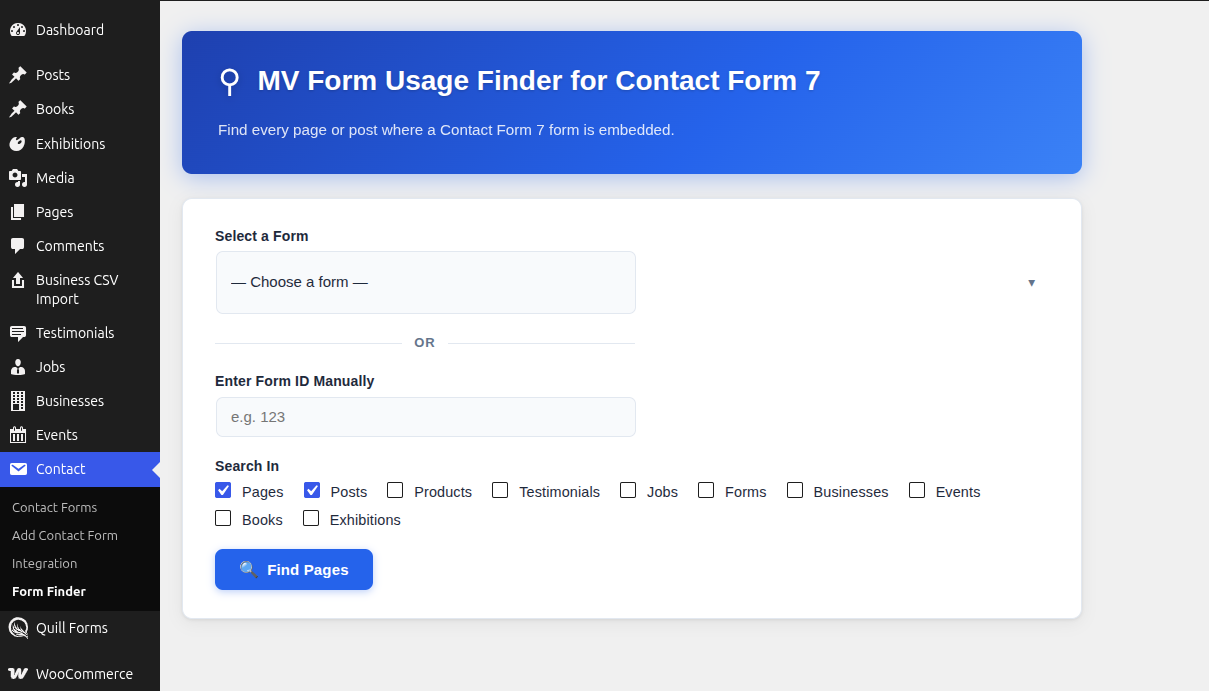
- Go to Contact → Form Finder in the WordPress admin menu.
- Select a form from the dropdown, or enter a form ID manually.
- Check the content types you want to search under Search In.
- Click Find Pages to view the results.
Frequently asked questions
Does this plugin require Contact Form 7 to be installed?
Yes. This plugin is an add-on for Contact Form 7 and requires it to be installed and active.
Can I search custom post types?
Yes. Any registered post type that stores content in the standard WordPress content field can be included in the Search In options, including custom post types added by other plugins.
What happens if a form isn’t found anywhere?
The results panel will show a zero-result message, letting you know the selected form isn’t currently embedded in any of the searched content types.
Does this plugin modify my content?
No. This plugin is read-only — it scans and reports usage but never edits your pages, posts, or forms.
Will this slow down my site?
No. Scanning only runs when you actively use the Form Finder tool in the admin area; it has no effect on your site’s front-end performance.
Changelog
Initial release of MV Form Usage Finder for Contact Form 7.
1.0.0
- Initial release.
- Search by form dropdown or manual form ID.
- Support for searching Pages, Posts, Products, Testimonials, Jobs, Forms, Businesses, Events, Books, and Exhibitions.
- Results table with ID, Title, Status, Type, and Edit/View actions.
Screenshots
For developers
Is this your plugin? Show off the numbers.
Add a live badge to your site, docs or GitHub README. It updates on its own — no account needed.
Best MV Form Usage Finder for Cont… alternatives
All cf7 plugins →




FAQ
MV Form Usage Finder for Contact Fo…: quick answers
Straight answers, pulled from live WordPress.org data.
Live data from WordPress.org · checked Sep 27, 2026
Is MV Form Usage Finder for Contac… free?
Yes. MV Form Usage Finder for Contac… is free to download and use from the official WordPress.org plugin directory.
Is MV Form Usage Finder for Contac… safe to use in 2026?
MV Form Usage Finder for Contac… works, but test it on a staging site before relying on it in 2026. Was last updated 2 months ago, and scores 55/100 on our health check.
How many websites use MV Form Usage Finder for Contac…?
MV Form Usage Finder for Contac… is active on <10 WordPress websites and has been downloaded 192 times since it launched in July 2026. It was downloaded 68 times in the last 30 days.
Does MV Form Usage Finder for Contac… work with WordPress 7.1?
MV Form Usage Finder for Contac… is officially tested up to WordPress 7.0.6, while the latest release is 7.1.2. It may still work, but try it on a staging site first.
What PHP version does MV Form Usage Finder for Contac… need?
MV Form Usage Finder for Contac… requires PHP 7.2 or higher. Most hosts run PHP 8.x today, so it works on any modern WordPress hosting.
When was MV Form Usage Finder for Contac… last updated?
The latest version, 1.0.0, was released on July 20, 2026 (2 months ago).
Who makes MV Form Usage Finder for Contac…?
MV Form Usage Finder for Contac… is developed and maintained by Mahesh Vora.
What are the best alternatives to MV Form Usage Finder for Contac…?
The most popular alternatives to MV Form Usage Finder for Contac… are Database Addon for Contact… (600K+ installs), GSheetConnector (40K+ installs) and CF7 to Webhook (30K+ installs).
Powered by PageForge
Want thousands of pages that rank like these? Build them in an afternoon.
This directory runs on the same engine as PageForge. Turn any spreadsheet, CSV or API into thousands of fast, SEO-ready WordPress pages — with schema, internal links and AI-written copy baked in.
- CSV, Google Sheets & API data sources
- AI content, schema & internal links per page
- Works with Elementor, Gutenberg, Yoast & Rank Math
- Free on WordPress.org — no credit card


