



Music Player for Easy Digital Downloads
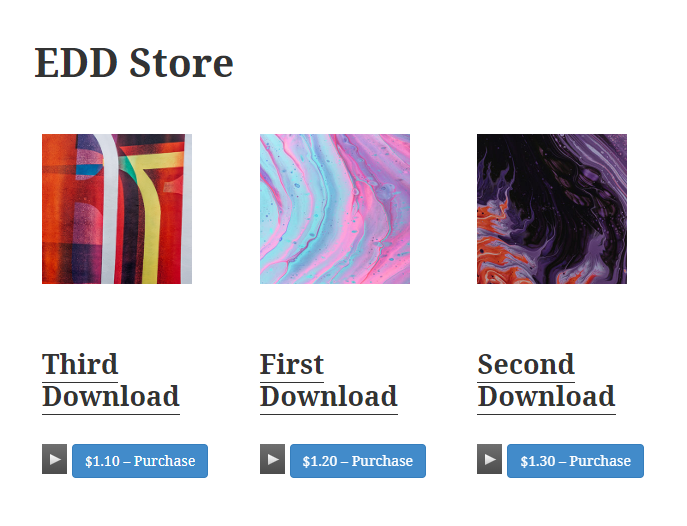
Music Player for Easy Digital Downloads includes the MediaElement.js music player in the pages of the downloads with audio files associated.

Solid choice
Music Player for Easy Digital D… is a solid plugin choice in 2026, with a few things worth checking first. It runs on 200+ sites, is rated 5/5 and was last updated 1 month ago, and scores 72/100 on our health check.
- Tested with the latest WordPress (7.1)
- Small user base (200+ active installs)
- Very few reviews so far
How does it stack up?
Side-by-side on installs, updates, ratings & support



Daily downloads
Download spikes usually follow a new release — each site that auto-updates counts as a download.
Rankings
Where Music Player for Easy Digit… stands todayWordPress.org search rankings
Live position in the plugin search, top 100| Keyword | Position |
|---|---|
| audio | #91 |
| audio player | #28 |
| easy digital downloads | #4 |
| music | #7 |
| music player | #5 |
Version adoption
Share of active sites per release.
Rating breakdown
★★★★★★★★★★ 5 from 3 reviews
About Music Player for Easy Digital Downloads
From the official readme · v1.4.9Description
Music Player for Easy Digital Downloads features:
- Includes an audio player that supports formats: OGA, MP3, WAV, WMA
- Includes multiple skins for the Music Player
- Supports all most popular web browsers and mobile devices
- Includes a widget to insert a playlist on sidebars
- Includes a block to insert the playlists on pages using Gutenberg
- Includes a widget to insert the playlists on pages using Elementor
- Includes a widget for inserting the playlists on pages with Page Builder by SiteOrigin
- Includes a control for inserting the playlists on pages with BeaverBuilder
- Includes an element for inserting the playlists on pages with Visual Composer
- Includes a module for inserting the playlists on pages with DIVI
Note: for the other editors, insert directly the playlists’ shortcodes.
Music Player for Easy Digital Downloads includes the MediaElement.js music player in the pages of the downloads with audio files associated, and in the store’s pages, furthermore, the plugin allows selecting between multiple skins.
MediaElement.js is an music player compatible with all major browsers: Internet Explorer, MS Edge, Firefox, Opera, Safari, Chrome and mobile devices: iPhone, iPad, Android. The music player is developed following the html5 standard. The music player supports the following file formats: MP3, WAV, WMA and OGA.
The basic version of the plugin, available for free from the WordPress Directory, has the features needed to include a music player in the pages of the downloads and the store.
Premium Features
- Allows playing the audio files in secure mode to prevent unauthorized downloading of the audio files.
- Allows to define the percent of the audio file’s size to be played in secure mode.
- Allows to store the generated audio files in Google Drive (when the truncate feature is enabled).
Interface
Global Settings of Music Players
The global settings are accessible through the menu option: “Settings/Music Player for Easy Digital Downloads”.
- Include music player in all all downloads: checkbox to include the music player in all downloads.
- Include in: radio button to decide where to display the music player, in pages with a single entry, multiple entries, or both (both cases by default).
- Include players in cart: checkbox to include the music players on the cart page or not.
- Player layout: list of available skins for the music player.
- Preload: to decide if preload the audio files, their metadata, or don’t preload nothing at all.
- Play all: play all players in the page (one after the other).
- Loop: plays the audio player on the product page in a loop.
- Player controls: determines the controls to include in the music player.
- Visualizer: For “all controls” mode, display the visualizer component over the player.
- Display the player’s title: show/hide the name associated to the downloadable file.
- Protect the file: checkbox to playback the songs in secure mode (only available in the pro version of the plugin).
- Percent of audio used for protected playbacks: integer number from 0 to 100, that represents the percent of the size of the original audio file that will be used in the audio file for demo (only available in the pro version of the plugin).
- Apply the previous settings to all downloads pages in the website: tick the checkbox to apply the previous settings to all downloads overwriting the downloads’ settings.
Google Analytics Integration
- Tracking id: Enter the tracking id in the property settings of Google Analytics account.
Setting up the Music Players through the downloads’ pages
The Music Players are configured from the downloads pages.
Settings Interface
- Include music player: checkbox to include the music player in the download’s page, or not.
- Include in: radio button to decide where to display the music player, in pages with a single entry, multiple entries, or both (both cases by default).
- Player layout: list of available skins for the music player.
- Preload: to decide if preload the audio files, their metadata, or don’t preload nothing at all.
- Play all: play all players in the page (one after the other).
- Loop: plays the audio player on the product page in a loop.
- Player controls: determines the controls to include in the music player.
- Visualizer: For “all controls” mode, display the visualizer component over the player.
- Display the player’s title: show/hide the name associated to the downloadable file.
- Protect the file: checkbox to playback the songs in secure mode (only available in the pro version of the plugin).
- Percent of audio used for protected playbacks: integer number from 0 to 100, that represents the percent of the size of the original audio file that will be used in the audio file for demo (only available in the pro version of the plugin).
- Select my own demo files: checkbox to use different audio files for demo, than the audio files for selling (only available in the pro version of the plugin).
- Demo files: section similar to the audio files for selling, but in this case it allows to select different audio files for demo, and their names (only available in the pro version of the plugin).
How the Pro version of the Music Player for Easy Digital Downloads protect the audio files?
If the “Protect the file” checkbox was ticked in the download’s page, and was entered an integer number through the attribute: “Percent of audio used for protected playbacks”, the plugin will create a truncated copy of the audio files for selling (or the audio files for demo) into the “/wp-content/plugins/eddmp” directory, to be used as demo. The sizes of the audio files for demo are a percentage of the sizes of the original files (the integer number entered in the player’s settings). So, the users cannot access to the original audio files, from the public pages of website.
Music Player for Easy Digital Downloads – Playlist Widget
The widget allows to include a playlist on sidebars, with the downloadable files associated to all downloads with the music player enabled, or for only some of the downloads.
The widget settings:
- Title: the title of the widget on sidebar.
- Downloads IDs: enter the ids of downloads to include in the playlist, separated by comma, or the * symbol to include all downloads.
- Player layout: select the layout of music players (the widget uses only the play/pause control)
- Preload: to decide if preload the audio files, their metadata, or don’t preload nothing at all. This attribute has a global scope, and will modify the default settings.
- Play all: play all players in the page (one after the other). This attribute has a global scope, and will modify the default settings.
- Highlight the current download: if the checkbox is ticked, and the user is in the page of a download, and it is included in the playlist, the corresponding item would be highlighted in the playlist.
- Continue playing after navigate: if the checkbox is ticked, and there is a song playing when navigates, the player will continue playing after loading the webpage, in the same position.
Note: In mobiles devices (and some browsers) where the direct action of user is required for playing audios and videos, the plugin cannot start playing dynamically.
Music Player for Easy Digital Downloads – [eddmp-playlist] shortcode
The [eddmp-playlist] shortcode allows to include a playlist on the pages’ contents, with all downloads, or for some of them.
The shortcode attributes are:
-
downloads_ids: define the ids of downloads to include in the playlist, separated by comma, or the * symbol to include all downloads:
[eddmp-playlist downloads_ids="*"] -
player_style: select the layout of music players (the playlist displays only the play/pause control):
[eddmp-playlist downloads_ids="*" player_style="mejs-classic"] -
highlight_current_download: if the playlist is included in a download’s page, the corresponding item would be highlighted in the playlist:
[eddmp-playlist downloads_ids="*" highlight_current_download="1"] -
cover: allows to include the featured images in the playlist. The possible values are: 0 or 1, 0 is the value by default:
[eddmp-playlist downloads_ids="*" cover="1"] -
continue_playing: if there is a song playing when navigates, the player will continue playing after loading the webpage in the same position:
[eddmp-playlist downloads_ids="*" continue_playing="1"] -
controls: allows to define the controls to be used with the players on playlist. The possible values are: track or all, to include only a play/pause button or all player’s controls respectively.
Note: In mobiles devices where the direct action of user is required for playing audios, the plugin cannot start playing dynamically.
Hooks (actions and filters)
- eddmp_before_player_shop_page: action called before the players containers in the shop pages.
- eddmp_after_player_shop_page: action called after the players containers in the shop pages.
- eddmp_before_players_download_page: action called before the players containers in the downloads pages.
-
eddmp_after_players_download_page: action called after the players containers in the downloads pages.
-
eddmp_audio_tag: filter called when the audio tag is generated. The callback function receives three parameters: the audio tag, the download’s id, and the file’s id;
-
eddmp_file_name: filter called when the file’s name is included with the player. The callback function receives three parameters: the file’s name, the download’s id, and the file’s id;
-
eddmp_widget_audio_tag: filter called when the audio tag is generated as a widget on sidebars. The callback function receives three parameters: the audio tag, the download’s id, and the file’s id;
-
eddmp_widget_file_name: filter called when the file’s name is included with the player as a widget on sidebars. The callback function receives three parameters: the file’s name, the download’s id, and the file’s id;
-
eddmp_purchased_download: filter called to know if the download was purchased or not. The callback function receives two parameters: false and the download’s id.
-
eddmp_ffmpeg_time: filter called to determine the duration of truncated copies of the audio files for demos when the FFmpeg application is used to generate them.
Other recommended plugins
- Music Player for WooCommerce
- Music Store – WordPress eCommerce
- CP Media Player – Audio Player and Video Player
Multilingual Support (WPML)
The plugin ships with a wpml-config.xml file in the plugin root that registers the three custom fields used by the “Select my own demo files” feature with WPML:
- _eddmp_demos_list
- _eddmp_own_demos
- _eddmp_direct_own_demos
All three are registered with action=”copy-once”, which means:
- When a new translation is created, the demo files and their activation flags are copied from the source language to the new translation at creation time.
- Once the translation exists, subsequent updates to the source language do NOT overwrite the translation. Editors can customise per-language demos (for example, to use a sample with a different voiceover or accent) without losing their changes on the next source save.
This is the conservative default that does not change behaviour for sites that do not explicitly opt in. If your site should propagate demo file changes from the source language to all translations on every update, go to WPML -> Settings -> Custom Field Translation and change the action for each of the three fields above from “Copy once” to “Copy”.
After updating the plugin (or after first activation on a site that has WPML installed), go to WPML -> Support -> Troubleshooting and click Clear cache in WPML so the new configuration is picked up.
Installation
To install Music Player for Easy Digital Downloads, follow these steps:
- Download and unzip the plugin
- Upload the entire “edd_music_player” directory to the “/wp-content/plugins/” directory
- Activate the plugin through the “Plugins” menu in “WordPress”
- Go to the downloads pages to configure the players.
or Simply install it through the plugins section in WordPress.
Frequently asked questions
Q: Why the audio file is played partially?
A: If you decide to protect the audio files, the plugin creates a truncated version of the file to be used as demo and prevent that the original file be copied by unauthorized users.
Q: Why the music player is not loading on page?
A: Verify that the theme used in your website, includes the function wp_footer(); in the template file “footer.php” or the template file “index.php”
Q: What can I do if the edd_music_player directory exists and the premium version of plugin cannot be installed?
A: Go to the plugins section in WordPress, deactivate the free version of Music Player for Easy Digital Downloads, and delete it ( Don’t worry, this process don’t modify players configured with the free version of the plugin), and finally install and activate the premium version of plugin.
Q: Can be modified the size of audio files played in secure mode?
A: In the pro version of the plugin the files for demo are generated dynamically to prevent the access to the original files. Each time save the data of a download, the files for demo are deleted and generated again, so, you simply should modify the percentage of the audio file to be used for demo in the download’s page.
Q: How do I make changes to the “Select my own demo files” propagate to all language versions when using WPML?
A: The plugin uses the “copy-once” action by default, which copies the demo files to a new translation at creation time but does not overwrite them when the source is updated. To enable full sync, go to WPML -> Settings -> Custom Field Translation and change the action for “_eddmp_demos_list”, “_eddmp_own_demos”, and “_eddmp_direct_own_demos” from “Copy once” to “Copy”. Remember to clear the WPML cache afterwards under WPML -> Support -> Troubleshooting -> Clear cache in WPML.
Changelog
1.4.9
- Adds WPML compatibility for the “Select my own demo files” feature by shipping a wpml-config.xml file that registers the relevant custom fields with action=”copy-once”.
1.4.8
- Purges the cache of third-party plugins after saving the plugin settings.
1.4.7
- Improved the plugin’s security by implementing the recommendations from the WordPress automated security review.
1.4.6
- Prevents the autcomplete forced by browsers in the plugin and player settings.
1.4.5
- Improves the Elementor integration module.
1.4.4
- Improves the integration with WordPress 7.0.
Screenshots


For developers
Is this your plugin? Show off the numbers.
Add a live badge to your site, docs or GitHub README. It updates on its own — no account needed.
Best Music Player for Easy Digital… alternatives
All audio plugins →





FAQ
Music Player for Easy Digital Downl…: quick answers
Straight answers, pulled from live WordPress.org data.
Live data from WordPress.org · checked Sep 26, 2026
Is Music Player for Easy Digital D… free?
Yes. Music Player for Easy Digital D… is free to download and use from the official WordPress.org plugin directory.
Is Music Player for Easy Digital D… safe to use in 2026?
Music Player for Easy Digital D… is a solid plugin choice in 2026, with a few things worth checking first. It runs on 200+ sites, is rated 5/5 and was last updated 1 month ago, and scores 72/100 on our health check.
How many websites use Music Player for Easy Digital D…?
Music Player for Easy Digital D… is active on 200+ WordPress websites and has been downloaded 30,119 times since it launched in January 2020. It was downloaded 214 times in the last 30 days.
Does Music Player for Easy Digital D… work with WordPress 7.1?
Yes. The developer has tested Music Player for Easy Digital D… up to WordPress 7.1.2, the latest release. It requires WordPress 3.5.0 or newer.
When was Music Player for Easy Digital D… last updated?
The latest version, 1.4.9, was released on August 14, 2026 (1 month ago).
Who makes Music Player for Easy Digital D…?
Music Player for Easy Digital D… is developed and maintained by codepeople.
What are the best alternatives to Music Player for Easy Digital D…?
The most popular alternatives to Music Player for Easy Digital D… are Presto Player (100K+ installs), Seriously Simple Podcasting (30K+ installs) and Compact WP Audio Player (20K+ installs).
Powered by PageForge
Want thousands of pages that rank like these? Build them in an afternoon.
This directory runs on the same engine as PageForge. Turn any spreadsheet, CSV or API into thousands of fast, SEO-ready WordPress pages — with schema, internal links and AI-written copy baked in.
- CSV, Google Sheets & API data sources
- AI content, schema & internal links per page
- Works with Elementor, Gutenberg, Yoast & Rank Math
- Free on WordPress.org — no credit card


