



Multiple Featured Images
You need more than one featured image for posts, pages and/or custom post types? Then this plugin is for you!

Use with caution
Multiple Featured Images works, but test it on a staging site before relying on it in 2026. It runs on 5K+ sites, is rated 4.7/5 and was last updated 6 years ago, and scores 45/100 on our health check.
- Loved by users — 4.7/5 from 28 reviews
- Momentum — downloads up 64% vs the previous 30 days
- No update in 6 years
- Only tested up to WordPress 5.5 (latest is 7.1)
How does it stack up?
Side-by-side on installs, updates, ratings & support



Daily downloads
Download spikes usually follow a new release — each site that auto-updates counts as a download.
Rankings
Where Multiple Featured Images stands todayWordPress.org search rankings
Live position in the plugin search, top 100| Keyword | Position |
|---|---|
| custom post type | >100 |
| featured image | >100 |
| multiple featured image | >100 |
| multiple featured images | >100 |
| post thumbnail | >100 |
Version adoption
Share of active sites per release.
Rating breakdown
★★★★★★★★★★ 4.7 from 28 reviews
About Multiple Featured Images
From the official readme · v0.5.0Description
You need more than one featured image for posts, pages and/or custom post types? Then this plugin is for you!
Enable multiple featured images for all post types (including custom post types and WooCommerce products) and show the images with a widget or the handy shortcode.
Features
-
Add as many featured images as you need.
-
Add the featured images to any post type (post, page or even custom post types and WooCommerce products).
-
It is possible to use different featured images for different post types. Easily you can add two new featured images to pages and three to posts, if you need it that way.
-
Fully customizable output – so it’s multilingual.
-
Handy shortcode for displaying the featured images everywhere.
-
Widget for displaying featured images in sidebars, etc.
History
For one of my customers I had to assign two featured images to pages. One featured image was used as the header image and the other as a small button for the submenu. The images had to be different too (so I couldn’t simply use different images sizes) and so I wrote this little plugin.
IMPORTANT NOTE TO THOSE UPDATING FROM 0.3: The Plugin comes with a new method for registering featured images and updates the post meta key. It is fully backwards compatible, but if you are calling the post metas directly then please update your code accordingly. The new format of the post meta key is kdmfi_YOUR_ID.
Contribute
Feel free to ask if you have problems with this plugin. But please keep in mind, that this plugin is developed in the author’s spare time – so it may take some time to answer.
Feature requests are welcome too!
Installation
-
Unzip and upload the
multiple-featured-imagesdirectory to the plugin directory (/wp-content/plugins/) -
Activate the plugin through the ‘Plugins’ menu in WordPress
-
For registration of a new featured image please use the handy filter:
add_filter( 'kdmfi_featured_images', function( $featured_images ) { $args = array( 'id' => 'featured-image-2', 'desc' => 'Your description here.', 'label_name' => 'Featured Image 2', 'label_set' => 'Set featured image 2', 'label_remove' => 'Remove featured image 2', 'label_use' => 'Set featured image 2', 'post_type' => array( 'page' ), ); $featured_images[] = $args; return $featured_images; }); -
Display the featured image in your theme (e.g. in header.php or single.php):
kdmfi_the_featured_image( 'featured-image-2', 'full' );
Changelog
Plugin comes now with a handy shortcode to display your additional featured images everywhere.
0.5.0
- Added shortcode for displaying the image
- Changed the meta key from kdmfi to kdmfi_ to enable API access again
0.4.3
- Backwards compatibility to PHP 5.3.10
- Added support for translations
0.4.2
- Bug fixes
0.4.1
- Bug fixes
0.4.0
- Completely rewritten; added Widget
0.3
- Bug fix: no output of url when a size is given
Screenshots
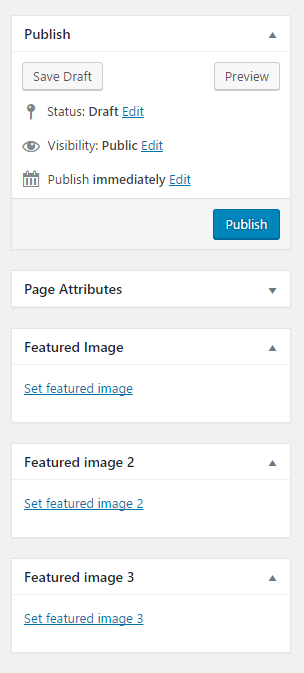


For developers
Is this your plugin? Show off the numbers.
Add a live badge to your site, docs or GitHub README. It updates on its own — no account needed.
Best Multiple Featured Images alternatives
All custom post type plugins →





FAQ
Multiple Featured Images: quick answers
Straight answers, pulled from live WordPress.org data.
Live data from WordPress.org · checked Nov 18, 2026
Is Multiple Featured Images free?
Yes. Multiple Featured Images is free to download and use from the official WordPress.org plugin directory.
Is Multiple Featured Images safe to use in 2026?
Multiple Featured Images works, but test it on a staging site before relying on it in 2026. It runs on 5K+ sites, is rated 4.7/5 and was last updated 6 years ago, and scores 45/100 on our health check.
How many websites use Multiple Featured Images?
Multiple Featured Images is active on 5K+ WordPress websites and has been downloaded 109,107 times since it launched in April 2012. It was downloaded 815 times in the last 30 days.
Does Multiple Featured Images work with WordPress 7.1?
Multiple Featured Images is officially tested up to WordPress 5.5.24, while the latest release is 7.1.4. It may still work, but try it on a staging site first.
What PHP version does Multiple Featured Images need?
Multiple Featured Images requires PHP 5.6 or higher. Most hosts run PHP 8.x today, so it works on any modern WordPress hosting.
When was Multiple Featured Images last updated?
The latest version, 0.5.0, was released on August 20, 2020 (6 years ago).
Who makes Multiple Featured Images?
Multiple Featured Images is developed and maintained by Marcus Kober.
What are the best alternatives to Multiple Featured Images?
The most popular alternatives to Multiple Featured Images are Custom Post Type Permalinks (200K+ installs), Custom Post Type Widgets (10K+ installs) and Custom Post Types and Custo… (10K+ installs).
Powered by PageForge
Want thousands of pages that rank like these? Build them in an afternoon.
This directory runs on the same engine as PageForge. Turn any spreadsheet, CSV or API into thousands of fast, SEO-ready WordPress pages — with schema, internal links and AI-written copy baked in.
- CSV, Google Sheets & API data sources
- AI content, schema & internal links per page
- Works with Elementor, Gutenberg, Yoast & Rank Math
- Free on WordPress.org — no credit card


