



MultiLine Files for Contact Form 7
Upload unlimited files to Contact Form 7 with an intuitive interface, file management, and automatic ZIP compression for email delivery.

Safe pick
Yes — MultiLine Files for Contact For… is a safe, well-maintained plugin to use in 2026. It runs on 9K+ sites, is rated 4.9/5 and was last updated 1 month ago, and scores 85/100 on our health check.
- Loved by users — 4.9/5 from 49 reviews
- Tested with the latest WordPress (7.1)
How does it stack up?
Side-by-side on installs, updates, ratings & support



Daily downloads
Download spikes usually follow a new release — each site that auto-updates counts as a download.
Rankings
Where MultiLine Files for Contact… stands todayWordPress.org search rankings
Live position in the plugin search, top 100| Keyword | Position |
|---|---|
| contact form 7 | #25 |
| file attachment | #10 |
| File Uploader | #9 |
| form plugin | #53 |
| multiple file upload | #15 |
Version adoption
Share of active sites per release.
Rating breakdown
★★★★★★★★★★ 4.9 from 49 reviews
About MultiLine Files for Contact Form 7
From the official readme · v3.1.0Description
MultiLine Files for Contact Form 7 is the ultimate solution for adding multiple file upload functionality to your Contact Form 7 forms. Whether you’re collecting documents, images, videos, or any other file types, this plugin provides a seamless, user-friendly experience that enhances your forms’ capabilities.
Why Choose MultiLine Files for Contact Form 7?
✅ Unlimited File Uploads – No restrictions on the number of files users can upload
✅ Intuitive User Interface – Clean, responsive design that works on all devices
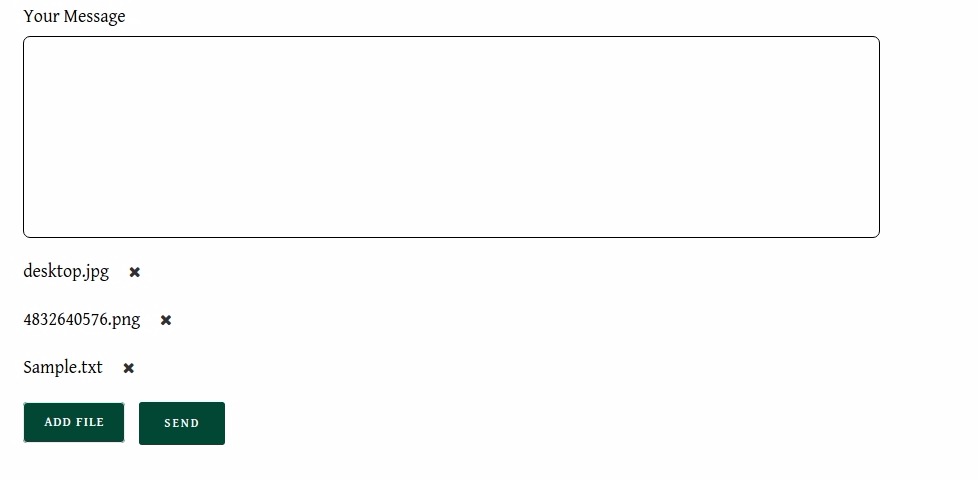
✅ Smart File Management – Users can preview, remove, and manage files before submission
✅ Automatic ZIP Compression – All files are automatically compressed into a single ZIP file for easy email delivery
✅ Advanced Security – Built-in file type validation, size limits, and security measures
✅ Easy Integration – Works seamlessly with Contact Form 7 without complex setup
✅ Fully Responsive – Perfect experience on desktop, tablet, and mobile devices
Perfect For:
- Document submission forms
- Portfolio uploads
- Job application forms
- Support ticket systems
- Content submission platforms
- Any form requiring multiple file attachments
How to change style?
If you want to change our plugin button or others file listing style and apply your custom style please add your custom css in your theme’s css file. Adding style in child theme is recommended. Here I have shown style guide for button and listing. so, you can easily update style of the elements.
-
Buttton style:
#mfcf7_zl_add_file { background-color: #004834; } -
‘X’ icon style:
.mfcf7_zl_multifilecontainer p .mfcf7_zl_delete_file i { color: azure; } -
Selected file name style:
.mfcf7-zl-multifile-name { color: black; }
Premium Features
Upgrade to Pro for Advanced Features:
- 🎯 Multiple Upload Buttons – Add multiple file upload fields in the same form
- 📊 File Limits – Set minimum and maximum file count limits
- 🎨 Custom Positioning – Change the location of the file list display
- 🗑️ Individual File Removal – Remove files one by one even when selected together
- 🚀 Priority Support – Get faster response times and dedicated support
- 🔧 Advanced Customization – More styling and configuration options
Need Help?
- 📧 Email Support: Contact us through the WordPress.org support forums
- 🐛 Bug Reports: Report issues on our GitHub repository
- 💡 Feature Requests: Suggest new features via our support channels
Privacy Policy
This plugin does not collect, store, or transmit any personal data. All file uploads are handled locally on your server and are not sent to any third-party services. Files are temporarily stored during form submission and are automatically cleaned up after processing.
Credits
Developed by Zluck Solutions with ❤️ for the WordPress community.
Donate
If you find this plugin helpful, please consider buying us a coffee to support continued development and maintenance.
Installation
Method 1: WordPress Admin (Recommended)
1. Go to Plugins → Add New in your WordPress admin
2. Search for “MultiLine Files for Contact Form 7”
3. Click Install Now and then Activate
Method 2: Manual Upload
1. Download the plugin ZIP file
2. Go to Plugins → Add New → Upload Plugin
3. Choose the ZIP file and click Install Now
4. Click Activate Plugin
Method 3: FTP Upload
1. Extract the plugin ZIP file
2. Upload the multiline-files-upload-for-contact-form-7 folder to /wp-content/plugins/
3. Activate the plugin through the Plugins menu
Configuration:
1. Go to Contact → Contact Forms in your WordPress admin
2. Edit your desired form
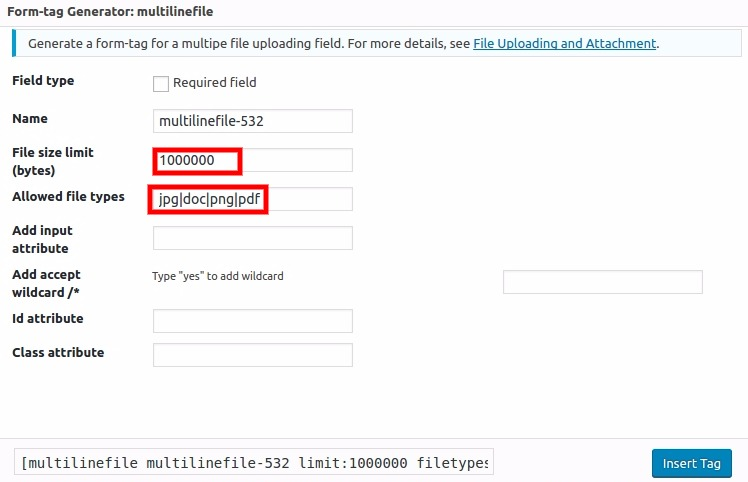
3. Click the multilinefile button in the form editor
4. Configure your settings (file types, size limits, etc.)
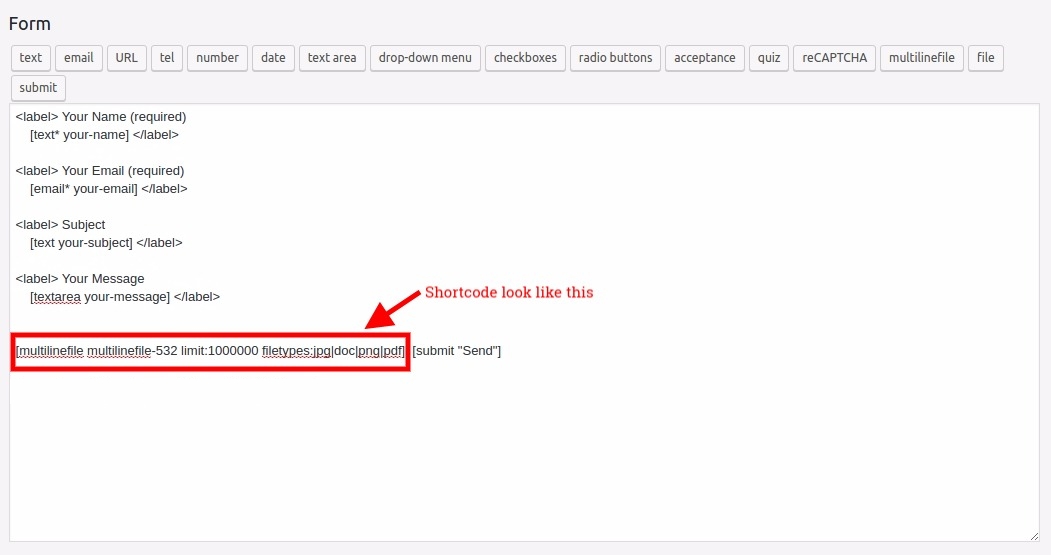
5. Insert the generated shortcode into your form
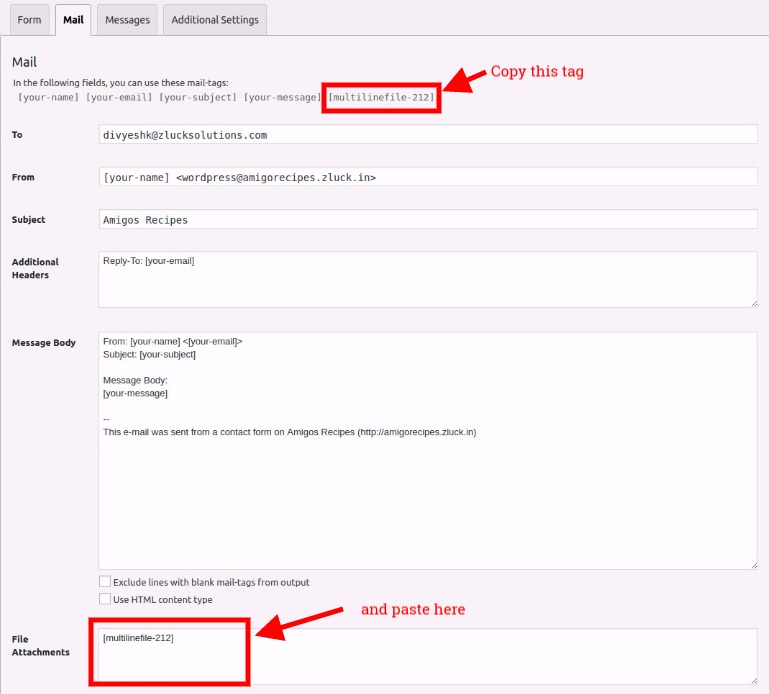
6. In the Mail tab, add the field name to File Attachments
Frequently asked questions
How do I add a multiple file upload field to my Contact Form 7 form?
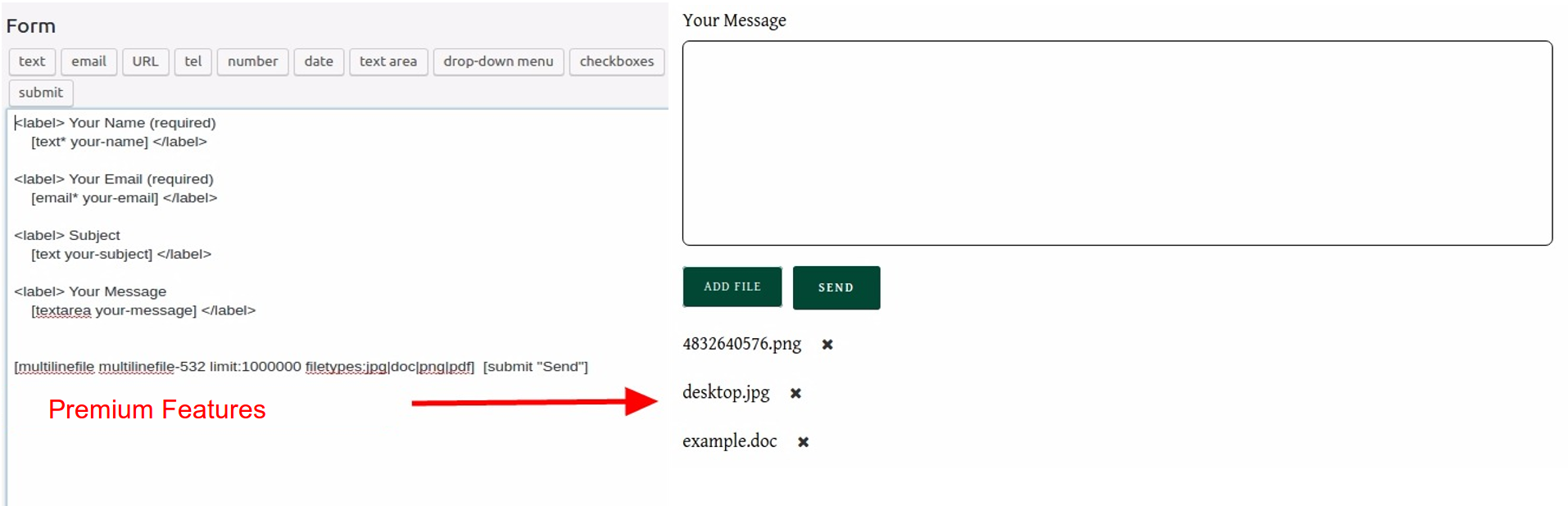
In the Contact Form 7 form editor, click the multilinefile button or manually add [multilinefile] where you want the upload field to appear. You can also use [multilinefile*] for required fields.
Can I restrict the types of files users can upload?
Yes! Use the filetypes attribute in your shortcode. For example: – [multilinefile filetypes:jpg|png|gif] – Only images – [multilinefile filetypes:pdf|doc|docx] – Only documents – [multilinefile filetypes:mp4|avi|mov] – Only videos
How do I set a maximum file size for uploads?
Use the limit attribute with file size in bytes: – [multilinefile limit:1048576] – 1MB limit – [multilinefile limit:5242880] – 5MB limit – [multilinefile limit:10485760] – 10MB limit
Is there a limit to the number of files a user can upload?
By default, there’s no limit. However, you can set limits using the minfile and maxfile options in the premium version.
How do I receive the uploaded files via email?
In your Contact Form 7 form’s Mail tab, add your field name to the File Attachments field. For example, if your field is named “documents”, add [documents] to the File Attachments field.
Will this work with my theme?
Yes! The plugin is designed to work with any WordPress theme. It uses standard WordPress styling and is fully responsive.
Can I customize the appearance of the upload button and file list?
Yes! You can add custom CSS to your theme to style the upload button and file list. The plugin provides CSS classes for easy customization. See the “How to Change Style?” section above for detailed styling examples.
Is this plugin compatible with the latest WordPress version?
Yes! The plugin is regularly updated and tested with the latest WordPress versions, Contact Form 7, and PHP versions.
Do I need any special server requirements?
The plugin requires the ZipArchive PHP extension, which is available on most hosting providers. If you’re unsure, contact your hosting provider.
Can I use this plugin on multiple sites?
Yes! The plugin is licensed under GPL, so you can use it on as many sites as you want.
Changelog
IMPORTANT UPDATE - This version includes full compatibility with WordPress 6.8.2, Contact Form 7 5.9+, and PHP 8.3. We strongly recommend updating to this version for optimal performance, security, and compatibility with the latest WordPress ecosystem.
3.1.0
- ✅ MAJOR UPDATE – Full compatibility with WordPress 6.8.2
- ✅ MAJOR UPDATE – Tested and compatible with Contact Form 7 5.9+
- ✅ MAJOR UPDATE – PHP 8.3 compatibility confirmed
- ✅ Enhanced file validation and error handling
- ✅ Improved user interface for better accessibility
- ✅ Updated documentation and help text
- ✅ Performance optimizations for faster loading
- ✅ Better mobile responsiveness
- ✅ Enhanced security measures
3.0.1
- Minor bug fixes and compatibility check with WordPress 6.7.2
- Fixed file validation edge cases
- Improved error messages
3.0.0
- Implement support for the Tag Generator v2
- Enhanced admin interface
- Better file management system
- Improved user experience
2.9.1
- Fix the undefined variable error when upgrading plugin in WordPress version 6.6.2
2.9
- Fix the Wordfence security issues
- Enhanced security validation
2.8.1
- Warning fixes and code improvements
Screenshots


For developers
Is this your plugin? Show off the numbers.
Add a live badge to your site, docs or GitHub README. It updates on its own — no account needed.
Best MultiLine Files for Contact F… alternatives
All contact form 7 plugins →





FAQ
MultiLine Files for Contact Form 7: quick answers
Straight answers, pulled from live WordPress.org data.
Live data from WordPress.org · checked Sep 26, 2026
Is MultiLine Files for Contact For… free?
Yes. MultiLine Files for Contact For… is free to download and use from the official WordPress.org plugin directory.
Is MultiLine Files for Contact For… safe to use in 2026?
Yes — MultiLine Files for Contact For… is a safe, well-maintained plugin to use in 2026. It runs on 9K+ sites, is rated 4.9/5 and was last updated 1 month ago, and scores 85/100 on our health check.
How many websites use MultiLine Files for Contact For…?
MultiLine Files for Contact For… is active on 9K+ WordPress websites and has been downloaded 128,925 times since it launched in June 2018. It was downloaded 916 times in the last 30 days.
Does MultiLine Files for Contact For… work with WordPress 7.1?
Yes. The developer has tested MultiLine Files for Contact For… up to WordPress 7.1.2, the latest release. It requires WordPress 5.6 or newer.
What PHP version does MultiLine Files for Contact For… need?
MultiLine Files for Contact For… requires PHP 7.4 or higher. Most hosts run PHP 8.x today, so it works on any modern WordPress hosting.
When was MultiLine Files for Contact For… last updated?
The latest version, 3.1.0, was released on August 14, 2026 (1 month ago).
Who makes MultiLine Files for Contact For…?
MultiLine Files for Contact For… is developed and maintained by Maulik Vora.
What are the best alternatives to MultiLine Files for Contact For…?
The most popular alternatives to MultiLine Files for Contact For… are Database Addon for Contact… (600K+ installs), Redirection for Contact For… (200K+ installs) and ReCaptcha v2 for Contact Fo… (200K+ installs).
Powered by PageForge
Want thousands of pages that rank like these? Build them in an afternoon.
This directory runs on the same engine as PageForge. Turn any spreadsheet, CSV or API into thousands of fast, SEO-ready WordPress pages — with schema, internal links and AI-written copy baked in.
- CSV, Google Sheets & API data sources
- AI content, schema & internal links per page
- Works with Elementor, Gutenberg, Yoast & Rank Math
- Free on WordPress.org — no credit card


