


Multi-Store Sync for FlexStock | Manage Multiple WooCommerce Stores from Google Sheets
As your business grows, so does the amount of repetitive work—updating products, maintaining multiple dashboards, and keeping catalogs consistent across different stores.

Solid choice
Multi-Store Sync for FlexStock is a solid plugin choice in 2026, with a few things worth checking first. Was last updated 7 hours ago, and scores 64/100 on our health check.
- Actively developed — last update 7 hours ago
- Tested with the latest WordPress (7.1)
- Small user base (<10 active installs)
- Very few reviews so far
How does it stack up?
Side-by-side on installs, updates, ratings & support


Daily downloads
Download spikes usually follow a new release — each site that auto-updates counts as a download.
Rankings
Where Multi-Store Sync for FlexSt… stands todayWordPress.org search rankings
Live position in the plugin search, top 100| Keyword | Position |
|---|---|
| Google Sheets | >100 |
| inventory management | >100 |
| product-sync | >100 |
| stock management | >100 |
| woocommerce multi store | >100 |
About Multi-Store Sync for FlexStock
From the official readme · v1.1.0Description
🚀 Get Pro | 🤝 Join Our Facebook Community
Running one WooCommerce store is simple.
Running multiple stores isn’t.
As your business grows, so does the amount of repetitive work—updating products, maintaining multiple dashboards, and keeping catalogs consistent across different stores.
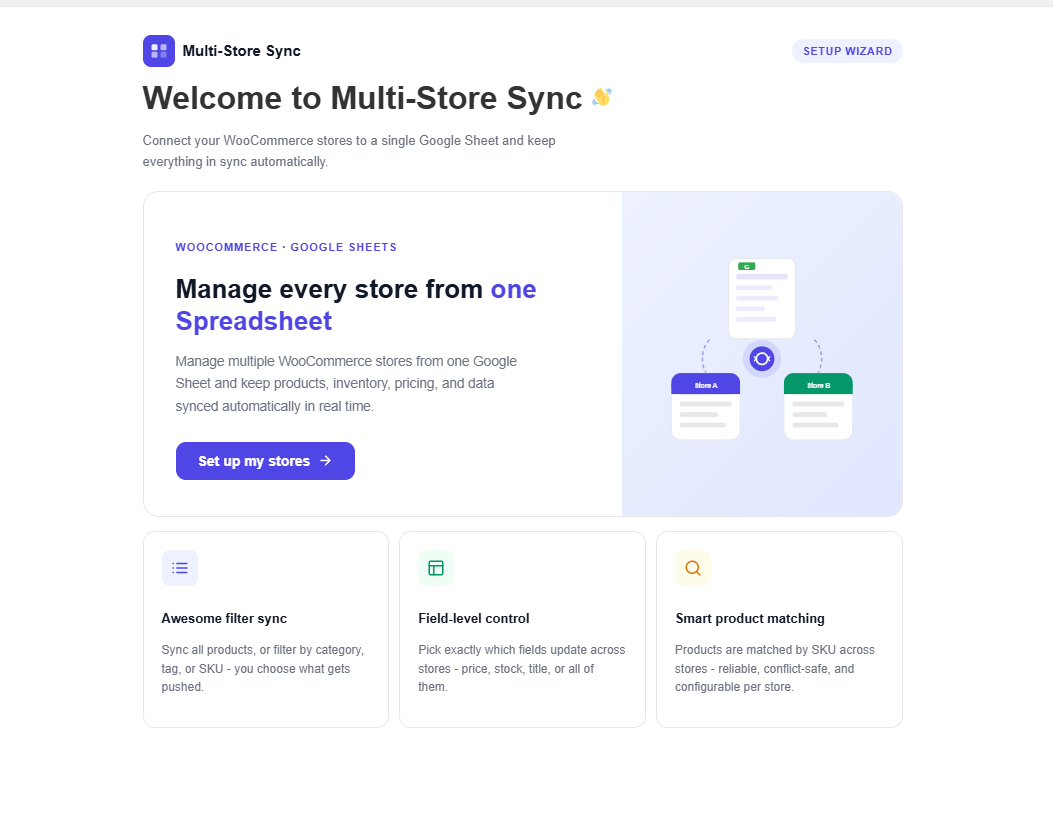
Multi-Store Sync for FlexStock helps you manage multiple WooCommerce stores from a single Google Sheets workspace by securely connecting your stores through FlexStock.
Whether you operate multiple brands, wholesale and retail stores, regional websites, franchises, or client stores, you can update products once and synchronize supported changes across your connected stores.
Unlike traditional WooCommerce inventory sync plugins, Multi-Store Sync is built around a Google Sheets-first workflow. Your spreadsheet becomes the central workspace while FlexStock handles product management and synchronization in the background.
Important: This is an official addon for FlexStock and requires the FlexStock plugin to be installed and activated.
Let’s grow, connect, and thrive together
- 🤝 Join Our Facebook Community
- 🌐 Follow Us on X (Twitter)
- 🎥 Subscribe on YouTube
- 👍 Like Our Facebook Page
Why Multi-Store Sync?
Managing products separately across multiple WooCommerce stores is time-consuming and difficult to scale.
Multi-Store Sync simplifies that workflow by letting you manage products from one central workspace.
Instead of repeating the same updates on every WooCommerce site, your team can:
- Manage multiple WooCommerce stores from one Google Sheet
- Share products securely between connected stores
- Reduce repetitive product updates
- Keep supported product data synchronized
- Maintain a consistent catalog across your business
Why Google Sheets?
Google Sheets is one of the fastest ways to manage WooCommerce products in bulk.
Instead of editing products one by one inside WooCommerce, your team can work from a familiar spreadsheet to:
- Update products in bulk
- Collaborate with teammates
- Review changes before synchronization
- Manage multiple stores from a single workspace
FlexStock provides the Google Sheets integration, product management, and synchronization engine.
Multi-Store Sync extends that workflow by connecting your WooCommerce stores and securely distributing products between them.
🚀 Get Pro | 🤝 Join Our Facebook Community
How It Works
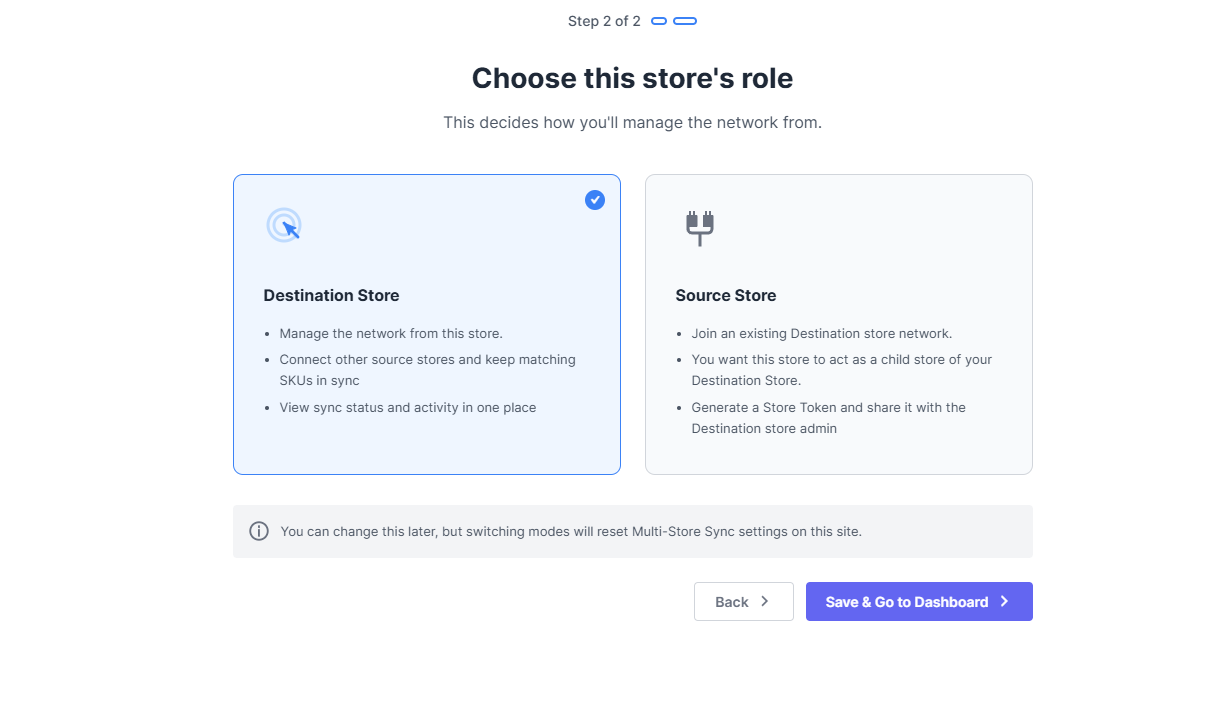
Multi-Store Sync uses a simple Source Store → Destination Store workflow.
Source Store
A Source Store owns the products and controls what is shared.
From the Source Store, you can:
- Create secure sharing tokens
- Choose which products to share
- Control which supported product fields are synchronized
- Share products with one or multiple Destination Stores
Destination Store
A Destination Store receives products from a Source Store.
Simply add the shared token, import products, and continue receiving synchronized updates through FlexStock.
This architecture gives you complete control over how products are distributed across your WooCommerce stores.
Typical Workflow
Getting started only takes a few minutes.
- Install and activate FlexStock.
- Install Multi-Store Sync.
- Connect FlexStock with Google Sheets.
- Create a sharing token in the Source Store.
- Choose which products to share.
- Connect a Destination Store using the token.
- Import products.
- Continue managing products from Google Sheets while connected stores stay synchronized.
FlexStock + Multi-Store Sync
Although they work together, each plugin has a different responsibility.
FlexStock
FlexStock manages:
- Google Sheets integration
- Product management
- Supported product fields
- Bulk product editing
- Synchronization engine
Multi-Store Sync
Multi-Store Sync manages:
- WooCommerce store connections
- Product sharing
- Sharing permissions
- Source Store and Destination Store workflow
- Product distribution across connected stores
Note: Multi-Store Sync does not unlock FlexStock features. It extends FlexStock by adding secure multi-store connectivity and product sharing. Any product field unavailable in your FlexStock edition will also be unavailable for synchronization through Multi-Store Sync.
Core Features
-
Manage Multiple WooCommerce Stores from Google Sheets:
Manage products across multiple WooCommerce stores from a single Google Sheets workspace powered by FlexStock. Update products once and synchronize supported changes across your connected stores. -
Secure Source & Destination Workflow:
Connect WooCommerce stores using secure sharing tokens. Source Stores control what is shared, while Destination Stores simply import products and receive synchronized updates. -
Share Only the Products You Need:
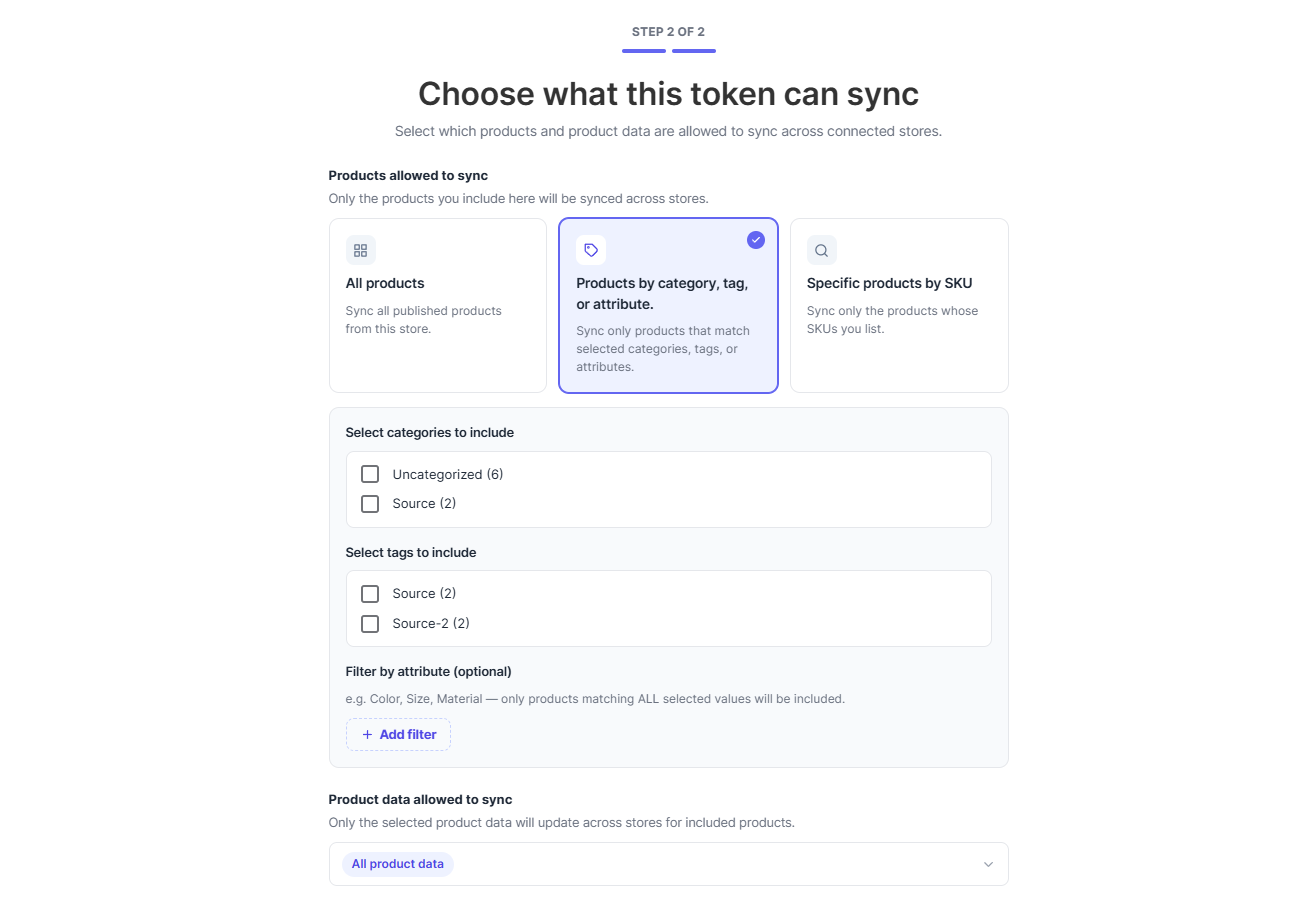
Not every connected store needs the same catalog. Choose exactly which products should be shared with each Destination Store. -
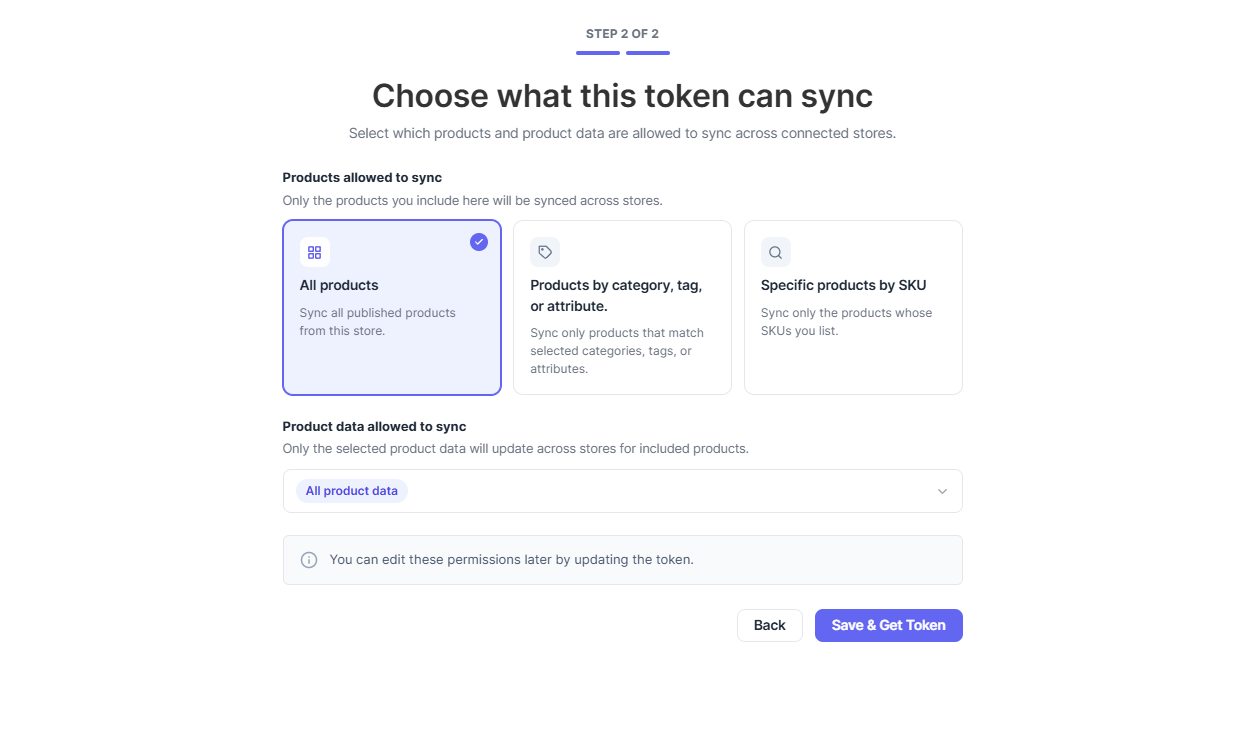
Flexible Product Sharing Modes:
Share products using the workflow that fits your business:- All Products
- Products by Category (Pro)
- Products by Tag (Pro)
- Products by Attribute (Pro)
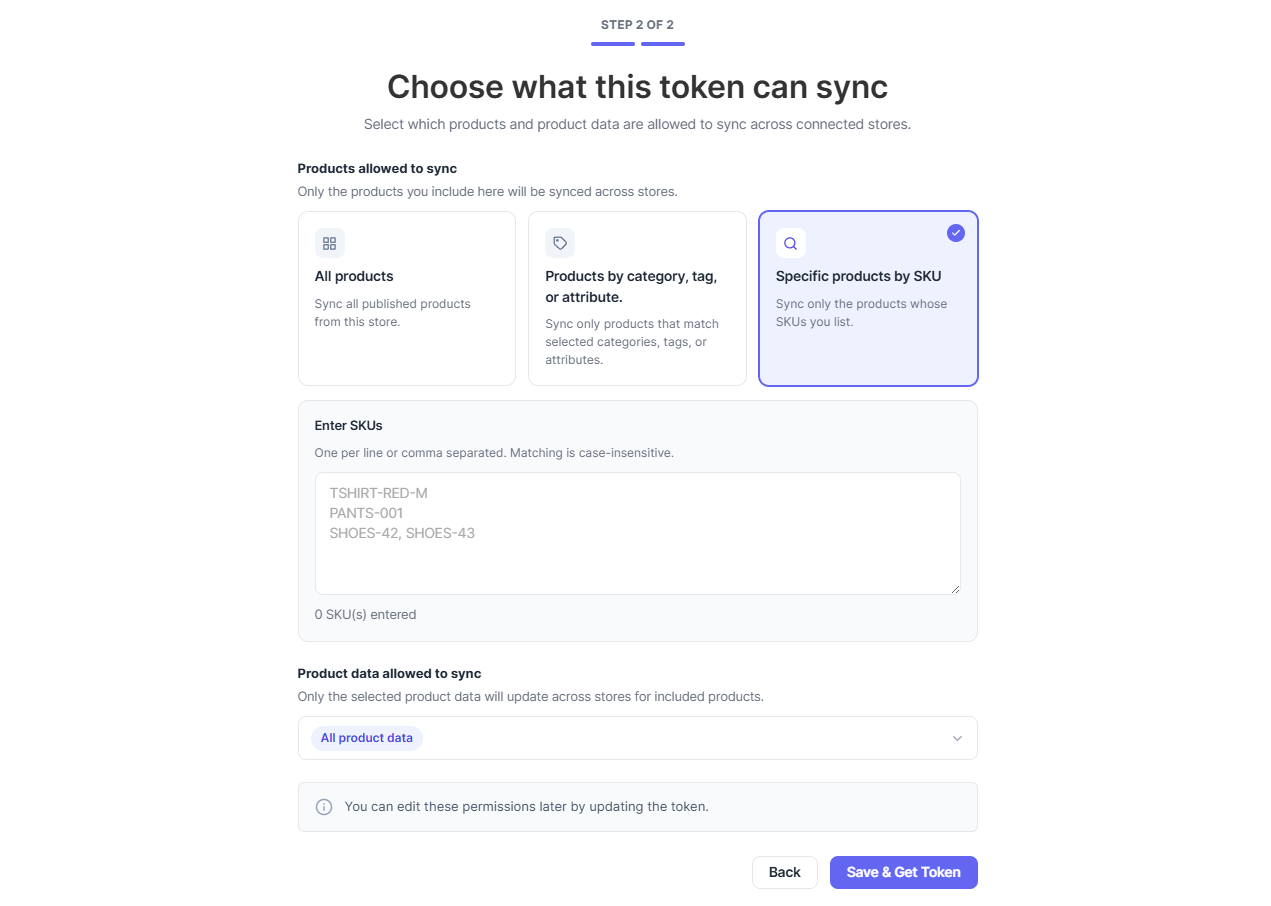
- Specific Products by SKU (Pro)
-
Product Field Control:
FlexStock controls which product fields are available for synchronization. Multi-Store Sync follows those permissions, ensuring consistent synchronization across connected stores. -
Preview Before Import:
Review products before importing them into a Destination Store, giving you greater confidence and control over your catalog. -
Bulk Product Updates:
Avoid repeating the same changes across multiple WooCommerce stores. Manage products once from Google Sheets and let FlexStock synchronize supported updates. -
Real-Time Synchronization:
Keep connected WooCommerce stores synchronized automatically whenever supported product information changes. -
Unlimited Connections (Pro):
Connect as many WooCommerce stores as your business needs with unlimited Source Stores, Destination Stores, sharing tokens, and synchronized products. -
Product Sharing Modes:
Choose how products are shared from each Source Store to connected Destination Stores.- All Products: Share every published product with connected WooCommerce stores. Available in Free.
-
Filtered Products (Pro): Share only products that match specific conditions, filtered by Category, Tag or Attribute.
-
Specific Products (Pro): Share only selected products using their SKUs. Perfect for syncing specific catalogs, featured products, seasonal collections, or dealer-exclusive inventory.
🚀 Get Pro | 🤝 Join Our Facebook Community
Free vs Pro
Free
Includes:
- Store Connections
- Sharing Tokens
- Product Synchronization
- Unlimited product variations
- All Products mode
Pro
Adds:
- Filtered Products mode
- Category Filter
- Tag Filter
- Attribute Filter
- Specific SKU Sharing
Perfect For
Multi-Store Sync is designed for businesses that manage more than one WooCommerce store.
Ideal for:
- Multi-brand businesses
- Wholesale & Retail stores
- Regional or country-specific stores
- Franchise businesses
- Manufacturers & distributors
- Marketplace operators
- WooCommerce agencies
- Maintenance companies
- Businesses managing multiple WooCommerce stores
Common Business Workflows
-
Wholesale & Retail:
Maintain separate wholesale and retail stores while managing products from one Google Sheets workspace. -
Multi-Brand Businesses:
Operate multiple brands with separate WooCommerce stores while maintaining one centralized product management workflow. -
Regional Stores:
Share products with country or region-specific WooCommerce stores while controlling exactly which products each store receives. -
Franchise Businesses:
Distribute approved products consistently across every franchise store. -
Manufacturers & Dealers:
Publish products from one Source Store and distribute them to dealer websites using secure sharing tokens. -
WooCommerce Agencies:
Manage multiple client stores faster by centralizing product updates through FlexStock and Multi-Store Sync.
🔥 More Awesome Plugins
If you like FlexStock, then consider checking out our other awesome projects:
-
🛒 Manage Order with Google Sheets:
Try FlexOrder – Bulk Order Sync with Google Sheet for WooCommerce | Manage WooCommerce orders from Google Sheets. WooCommerce order sync, e-commerce order management, and sales order management with Google Sheets. Try Flex Order now! -
🟢 Google Sheets to WP Table:
Try FlexTable – Sheets To WP Table Live Sync | Google Sheets allows you to input data on your Google sheet and show the same data on WordPress as a table effortlessly. Try Flex Table now! -
🎁 Boost Sales with a Smart Referral System:
Try EchoRewards | With Echo Reward, you can refer a friend for WooCommerce to launch your customer referral program. Echo Rewards Referral Plugin is a WooCommerce referral plugin to boost your sales. Generate coupons, reward customers, and launch the ideal refer-a-friend program for your store. -
🌓 WP Dark Mode:
Use WP Dark Mode plugin to create a stunning dark version for your WordPress website. WP Dark Mode works automatically without going into any complicated settings. -
💬 Form to Chat:
Try FormyChat | Connect Form to Chat Apps with Contact Form 7, WPForms, Gravity Form | Welcome Popup & Multi-agent Live Chat
External Services
Google Sheets API (sheets.googleapis.com)
– Purpose: Retrieves the connected Google Spreadsheet’s title so it can be displayed in the plugin settings, confirming the correct sheet is linked.
– Data sent: The spreadsheet ID and an OAuth access token.
– When it connects: Only when a spreadsheet is configured and the admin views/saves sync settings.
– Terms of Service: https://developers.google.com/terms
– Privacy Policy: https://policies.google.com/privacy
Connected Store Sync (Multi-Store Sync Addon)
– Purpose: When you connect additional WooCommerce stores you own/manage, the plugin sends stock, price, and trash/delete events between those stores to keep inventory in sync.
– Data sent: Product SKU, stock/price data, and a bearer token you generate, sent only to the store URLs you explicitly configure.
– When it connects: Only when a remote store is added and sync is triggered.
Appsero Telemetry (appsero.com + icanhazip.com)
– Purpose: Appsero SDK collects basic usage telemetry to help with debugging and product improvements. As part of this, it calls icanhazip.com solely to obtain the server’s public IP address for the telemetry payload.
– Data sent: Basic site environment info (WordPress version, PHP version, active plugins list, server IP via icanhazip.com). No personal visitor data is collected.
– When it connects: Only after the site admin explicitly opts in via the admin notice. No data is sent by default.
– When it connects: When telemetry tracking is enabled (opt-in), and also when submitting the plugin deactivation feedback form, regardless of tracking opt-in status.
- Appsero URL: https://appsero.com/
- Appsero Privacy Policy: https://appsero.com/privacy-policy/
- icanhazip.com URL: https://icanhazip.com/
- icanhazip.com is a simple public IP lookup service operated by Cloudflare.
Privacy Policy
Multi-Store Sync Addon uses Appsero SDK to collect some telemetry data upon user’s confirmation. This helps us to troubleshoot problems faster & make product improvements.
Appsero SDK does not gather any data by default. The SDK only starts gathering basic telemetry data when a user allows it via the admin notice. We collect the data to ensure a great user experience for all our users.
Integrating Appsero SDK DOES NOT IMMEDIATELY start gathering data, without confirmation from users in any case.
Learn more about how Appsero collects and uses this data.
Additionally, read the WPPOOL privacy policy.
Source Code
The source files for all compiled/minified JavaScript and CSS are publicly available in the plugin repository:
The following compiled files have human-readable sources in the repository:
– build/index.js → React source in src/ (entry: src/index.js)
– build/index.css → source in src/scss/admin.scss
Build instructions:
- Run
npm installin the root to install dependencies. - Run
npm run buildto compile the JavaScript and CSS assets. - The compiled files are output to
build/
Installation
- Install and activate FlexStock.
- Install and activate Multi-Store Sync for FlexStock.
- Connect FlexStock with Google Sheets.
- Create a sharing token from the Source Store.
- Add the token to a Destination Store.
- Import products.
- Start managing products from Google Sheets while connected stores stay synchronized.
Frequently asked questions
What is Multi-Store Sync for FlexStock?
Multi-Store Sync is the official addon for FlexStock that lets you securely connect multiple WooCommerce stores. It allows products to be shared and synchronized between Source Stores and Destination Stores while continuing to manage products from Google Sheets.
Do I need FlexStock to use this plugin?
Yes. Multi-Store Sync is not a standalone plugin. It requires FlexStock to be installed and activated.
What is a Source Store?
A Source Store is the WooCommerce store that owns the products. It creates sharing tokens, decides which products are shared, and controls which supported product fields are synchronized with connected Destination Stores.
What is a Destination Store?
A Destination Store imports products from a Source Store using a secure sharing token. After importing products, supported updates continue to synchronize automatically through FlexStock.
Does Multi-Store Sync manage products directly?
No. FlexStock manages Google Sheets, product editing, supported product fields, and the synchronization engine. Multi-Store Sync extends FlexStock by managing store connections, product sharing, and synchronization between connected WooCommerce stores.
Does every connected store need Multi-Store Sync?
Yes. Each WooCommerce store participating in the synchronization workflow should have the required plugins installed so they can connect and communicate securely.
Does every connected store need a Pro license?
Each store should have a valid license that matches the features and site limits you need. Please refer to your purchased license for the number of supported sites.
Can one Pro license unlock unlimited connected stores?
No. Your license determines how many websites can use the Pro features. If you need more connected stores, simply choose a license that matches your business.
What does the Free version include?
The Free version includes: Store Connections Sharing Tokens Product Synchronization Unlimited product variations All Products mode Category Filter Tag Filter
Why is Attribute Filter available only in Pro?
Attribute-based filtering is designed for advanced catalog management, allowing businesses to share products based on attributes such as color, size, material, or brand.
Why is Specific SKU Sharing available only in Pro?
SKU sharing gives you precise control over exactly which products are synchronized, making it ideal for large catalogs and complex multi-store operations.
Which product fields can be synchronized?
Available product fields are determined by your FlexStock edition. Multi-Store Sync follows those settings and does not unlock additional FlexStock features.
Can I choose which products are shared?
Yes. You can share: All published products Products by Category Products by Tag Products by Attribute (Pro) Specific products using SKUs (Pro)
Can I connect multiple Source Stores?
Yes. The Pro version allows unlimited Source Stores, Destination Stores, sharing tokens, and synchronized products.
Is coding required?
No. Multi-Store Sync is designed for WooCommerce users and can be configured through an intuitive interface without writing code.
Screenshots
For developers
Is this your plugin? Show off the numbers.
Add a live badge to your site, docs or GitHub README. It updates on its own — no account needed.
Best Multi-Store Sync for FlexStock alternatives
All Google Sheets plugins →





FAQ
Multi-Store Sync for FlexStock: quick answers
Straight answers, pulled from live WordPress.org data.
Live data from WordPress.org · checked Oct 18, 2026
Is Multi-Store Sync for FlexStock free?
Yes. Multi-Store Sync for FlexStock is free to download and use from the official WordPress.org plugin directory.
Is Multi-Store Sync for FlexStock safe to use in 2026?
Multi-Store Sync for FlexStock is a solid plugin choice in 2026, with a few things worth checking first. Was last updated 7 hours ago, and scores 64/100 on our health check.
How many websites use Multi-Store Sync for FlexStock?
Multi-Store Sync for FlexStock is active on <10 WordPress websites and has been downloaded 476 times since it launched in July 2026. It was downloaded 92 times in the last 30 days.
Does Multi-Store Sync for FlexStock work with WordPress 7.1?
Yes. The developer has tested Multi-Store Sync for FlexStock up to WordPress 7.1.3, the latest release. It requires WordPress 7.0 or newer.
What PHP version does Multi-Store Sync for FlexStock need?
Multi-Store Sync for FlexStock requires PHP 7.4 or higher. Most hosts run PHP 8.x today, so it works on any modern WordPress hosting.
When was Multi-Store Sync for FlexStock last updated?
The latest version, 1.1.0, was released on October 18, 2026 (7 hours ago).
Who makes Multi-Store Sync for FlexStock?
Multi-Store Sync for FlexStock is developed and maintained by WPPOOL.
What are the best alternatives to Multi-Store Sync for FlexStock?
The most popular alternatives to Multi-Store Sync for FlexStock are OttoKit: All-in-One Automat… (90K+ installs), GSheetConnector (40K+ installs) and FormsDB (20K+ installs).
Powered by PageForge
Want thousands of pages that rank like these? Build them in an afternoon.
This directory runs on the same engine as PageForge. Turn any spreadsheet, CSV or API into thousands of fast, SEO-ready WordPress pages — with schema, internal links and AI-written copy baked in.
- CSV, Google Sheets & API data sources
- AI content, schema & internal links per page
- Works with Elementor, Gutenberg, Yoast & Rank Math
- Free on WordPress.org — no credit card


