


MP AI Content Generator
Seamlessly generate AI-powered content in your WordPress editor using Google Gemini or OpenAI's ChatGPT with a simple prompt.

Consider an alternative
MP AI Content Generator shows warning signs in 2026 — compare the alternatives below before installing. It runs on 10+ sites and was last updated 1 year ago, and scores 32/100 on our health check.
- Small user base (10+ active installs)
- Very few reviews so far
- No update in over a year
- Only tested up to WordPress 6.8 (latest is 7.1)
Daily downloads
Download spikes usually follow a new release — each site that auto-updates counts as a download.
Rankings
Where MP AI Content Generator stands todayWordPress.org search rankings
Live position in the plugin search, top 100| Keyword | Position |
|---|---|
| AI based blog post generation | >100 |
| ai content generation | >100 |
| ChatGPT | >100 |
| Create Blog Post Using AI | >100 |
| Gemini | >100 |
Version adoption
Share of active sites per release.
About MP AI Content Generator
From the official readme · v1.0.1Description
The “MP AI Content Generator” plugin seamlessly integrates powerful AI capabilities from Google Gemini and OpenAI (ChatGPT) directly into your WordPress post and page editor. Say goodbye to content blocks and tedious manual writing. With this plugin, you can generate creative text, expand on ideas, or create drafts simply by providing a prompt, all without leaving your WordPress dashboard.
Boost your content creation workflow, save time, and overcome writer’s block by leveraging the power of AI right where you write.
Features:
– Integrated Editor Experience: Generate AI content directly within the Gutenberg editor (and Classic Editor for basic text insertion).
– Flexible AI Model Selection: Choose between Google Gemini AI and OpenAI’s ChatGPT (e.g., GPT-3.5 Turbo) based on your preference and API key.
– Simple Prompt Input: A dedicated meta box in the post/page editor allows you to quickly input your content generation prompts.
– Direct Content Insertion: AI-generated text is automatically inserted as new paragraphs or headings directly into your post content.
– Basic Markdown Recognition: Converts ## to <h2> headings and **text** to <strong>text</strong> for improved formatting.
– Secure API Key Management: Store your AI API keys securely in the plugin’s dedicated settings page.
– Dedicated Admin Menu: Easy access to plugin settings via a top-level menu item in your WordPress admin sidebar.
Usage
- Edit a Post or Page: Go to Posts > Add New or Pages > Add New (or edit an existing one).
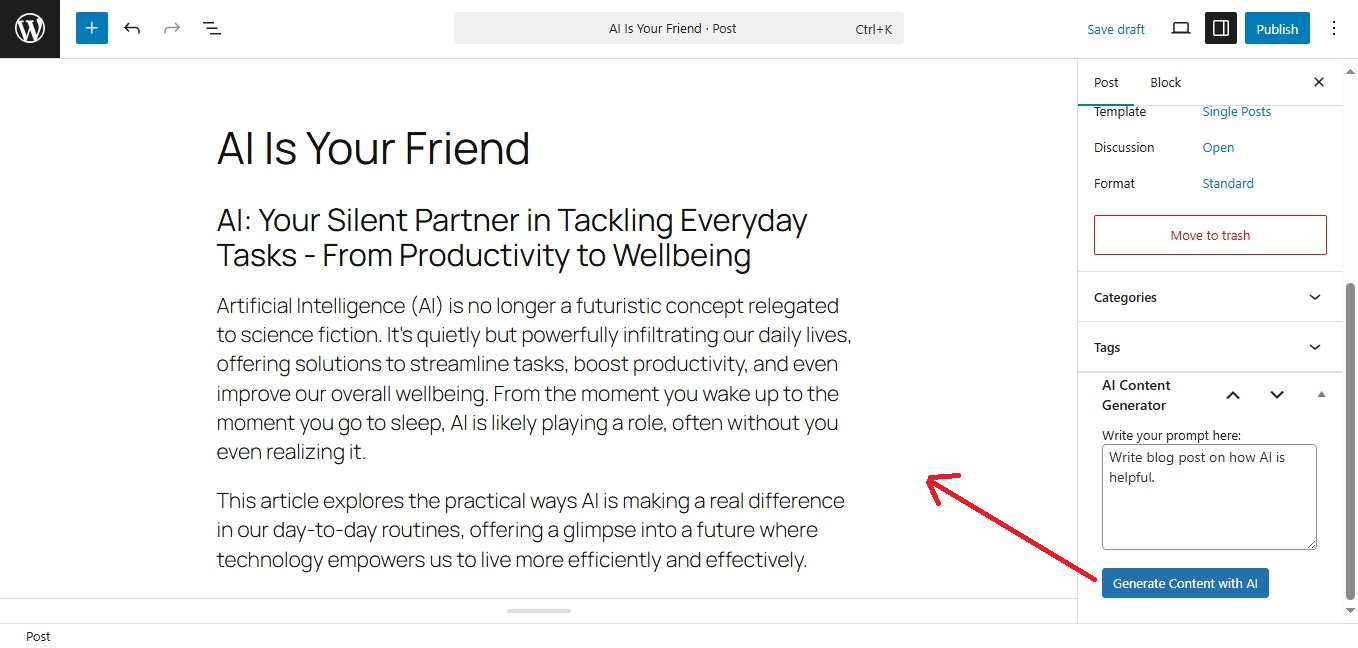
- Locate the AI Content Generator Meta Box: On the edit screen, look for the “AI Content Generator” meta box, typically found in the right sidebar.
- Enter Your Prompt: In the textarea provided, write a clear and concise prompt for the AI. For example:
– “Write a short introduction about the benefits of using AI in content creation.”
– “Generate 3 bullet points on SEO best practices.”
– “Write a conclusion for an article about remote work, emphasizing flexibility.” - Generate Content: Click the “Generate Content with AI” button. A loading indicator will appear.
- Content Appears: Once the AI finishes generating, the content will automatically be inserted into your post/page editor as new paragraphs or headings.
- Review and Edit: Review the generated content, making any necessary edits or refinements to fit your needs.
External Services
This plugin connects to external Artificial Intelligence (AI) services to generate content based on user prompts. This functionality is essential for the plugin to operate as intended.
-
Google Gemini AI
– What the service is and what it is used for: Google Gemini AI is a family of generative AI models provided by Google. This plugin uses it to process text prompts and generate creative, relevant text content to assist users in writing. The API endpoint used is https://generativelanguage.googleapis.com.
– What data is sent and when: When a user clicks the “Generate Content with AI” button, the text entered in the “Write your prompt here” textarea is sent to the Google Gemini API. This occurs only when the user explicitly initiates the content generation process. Your API key is also sent for authentication.
– Terms of Service and Privacy Policy:
– Google AI Studio Terms of Service: https://policies.google.com/terms/service-specific/ai-studio (Note: Specific AI Studio terms may be part of broader Google terms or linked from the AI Studio site.)
– Google Privacy Policy: https://policies.google.com/privacy -
OpenAI (ChatGPT)
– What the service is and what it is used for: OpenAI provides various AI models, including the GPT (Generative Pre-trained Transformer) series. This plugin uses OpenAI’s API to process text prompts and generate creative, relevant text content to assist users in writing. The API endpoint used is https://api.openai.com.
– What data is sent and when: When a user clicks the “Generate Content with AI” button, the text entered in the “Write your prompt here” textarea is sent to the OpenAI API. This occurs only when the user explicitly initiates the content generation process. Your API key is also sent for authentication.
– Terms of Service and Privacy Policy:
– OpenAI Terms of Use: https://openai.com/policies/terms-of-use
– OpenAI Privacy Policy: https://openai.com/policies/privacy-policy
Important Note: The plugin does not store the content generated by these AI services beyond inserting it into your post draft within your WordPress site. Your API keys are stored securely in your WordPress database options table and are not transmitted to any other third parties by the plugin itself.
Installation
- Upload: Download the plugin ZIP file. Go to your WordPress dashboard, navigate to Plugins > Add New > Upload Plugin, and select the downloaded ZIP file. Click “Install Now”.
- Activate: After installation, activate the plugin through the ‘Plugins’ menu in WordPress.
- Configure API Keys:
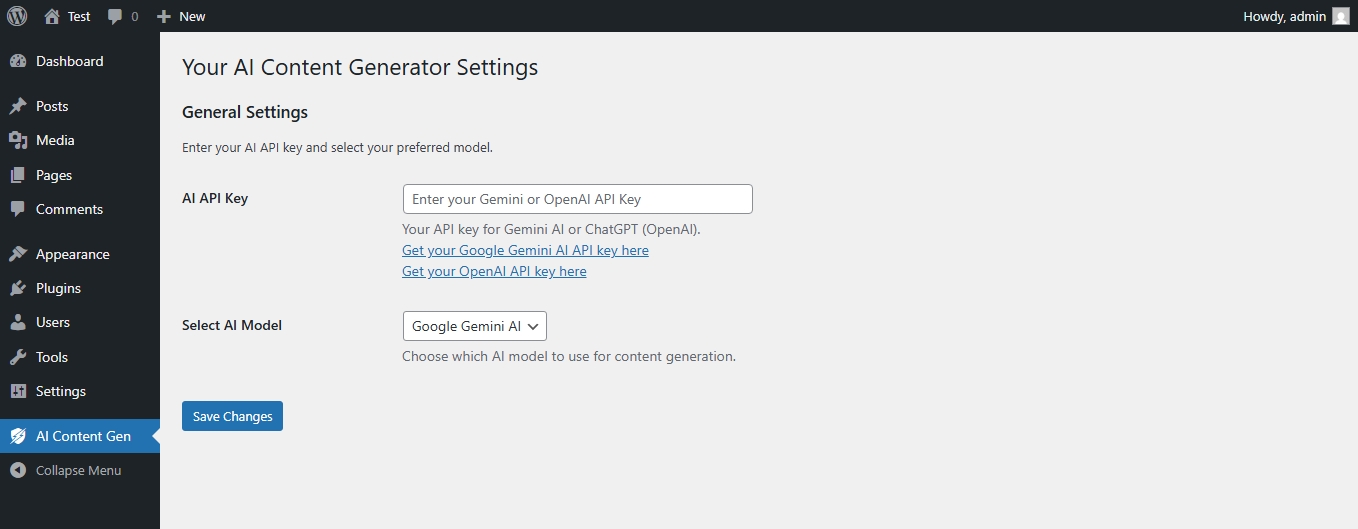
– Navigate to the new “AI Content Gen” menu item in your WordPress admin sidebar.
– Enter your Google Gemini AI API Key or your OpenAI API Key in the provided field.
– Select your preferred AI Model (Gemini or ChatGPT).
– Save your settings. - Need an API Key? Links are provided on the settings page to easily generate your API keys from Google AI Studio or OpenAI Platform.
Frequently asked questions
Where do I get an AI API key?
You can get your Google Gemini AI API key from Google AI Studio or your OpenAI API key from OpenAI Platform. Links are also available directly on the plugin settings page.
Is this plugin compatible with both the Classic Editor and Gutenberg?
Yes, it is primarily designed for Gutenberg, where it inserts content as native blocks. For the Classic Editor, it will insert plain text into the TinyMCE editor.
What if the AI generates inappropriate or incorrect content?
AI models can sometimes produce unexpected results. Always review and edit the generated content before publishing. This plugin is a writing assistant, not a fully autonomous content creator.
Does this plugin store my content or API key externally?
Your API key is stored securely in your WordPress database options table. The content generated by the AI is processed through the respective AI service (Google Gemini or OpenAI) and then returned to your WordPress site; it is not stored by the plugin itself beyond being inserted into your post draft.
Changelog
This update improves content insertion reliability in the Gutenberg editor and adds Markdown-to-block conversion. Update recommended for better compatibility and usability.
1.0.1 – 2025-06-26
- Fix: Resolved issue where content was not inserting into Gutenberg editor due to rawHandler parsing.
- Enhancement: Implemented direct creation of
core/headingandcore/paragraphblocks for improved reliability. - Enhancement: Added basic Markdown conversion for
##(H2 headings) and**(strong/bold text) before block insertion. - Improvement: Changed admin menu position from “Settings” submenu to a top-level “AI Content Gen” menu item.
1.0.0 – 2025-06-XX
- Initial release.
- Integrates Google Gemini AI and OpenAI (ChatGPT) API keys.
- Adds AI content generation meta box to post and page editors.
Screenshots
For developers
Is this your plugin? Show off the numbers.
Add a live badge to your site, docs or GitHub README. It updates on its own — no account needed.
FAQ
MP AI Content Generator: quick answers
Straight answers, pulled from live WordPress.org data.
Live data from WordPress.org · checked Oct 18, 2026
Is MP AI Content Generator free?
Yes. MP AI Content Generator is free to download and use from the official WordPress.org plugin directory.
Is MP AI Content Generator safe to use in 2026?
MP AI Content Generator shows warning signs in 2026 — compare the alternatives below before installing. It runs on 10+ sites and was last updated 1 year ago, and scores 32/100 on our health check.
How many websites use MP AI Content Generator?
MP AI Content Generator is active on 10+ WordPress websites and has been downloaded 672 times since it launched in July 2025. It was downloaded 46 times in the last 30 days.
Does MP AI Content Generator work with WordPress 7.1?
MP AI Content Generator is officially tested up to WordPress 6.8.11, while the latest release is 7.1.3. It may still work, but try it on a staging site first.
What PHP version does MP AI Content Generator need?
MP AI Content Generator requires PHP 7.4 or higher. Most hosts run PHP 8.x today, so it works on any modern WordPress hosting.
When was MP AI Content Generator last updated?
The latest version, 1.0.1, was released on July 12, 2025 (1 year ago).
Who makes MP AI Content Generator?
MP AI Content Generator is developed and maintained by Mayank Pandya.
Powered by PageForge
Want thousands of pages that rank like these? Build them in an afternoon.
This directory runs on the same engine as PageForge. Turn any spreadsheet, CSV or API into thousands of fast, SEO-ready WordPress pages — with schema, internal links and AI-written copy baked in.
- CSV, Google Sheets & API data sources
- AI content, schema & internal links per page
- Works with Elementor, Gutenberg, Yoast & Rank Math
- Free on WordPress.org — no credit card


