



Social Login, Social Sharing by miniOrange
Social Login with Discord, Facebook, Google, Twitter, LinkedIn and 40+ apps. Social share & comments. Free, fast & easy! WooCommerce Integration.

Solid choice
Social Login, Social Sharing by… is a solid plugin choice in 2026, with a few things worth checking first. It runs on 10K+ sites, is rated 4.6/5 and was last updated 1 week ago, and scores 77/100 on our health check.
- Proven at scale on 10K+ active sites
- Loved by users — 4.6/5 from 356 reviews
- Actively developed — last update 1 week ago
- Tested with the latest WordPress (7.1)
- Momentum — downloads up 32% vs the previous 30 days
How does it stack up?
Side-by-side on installs, updates, ratings & support



Daily downloads
Download spikes usually follow a new release — each site that auto-updates counts as a download.
Rankings
Where Social Login, Social Sharin… stands todayWordPress.org search rankings
Live position in the plugin search, top 100| Keyword | Position |
|---|---|
| >100 | |
| >100 | |
| #24 | |
| social login | #3 |
| X(Twitter) | #18 |
Version adoption
Share of active sites per release.
Rating breakdown
★★★★★★★★★★ 4.6 from 356 reviews
About Social Login, Social Sharing by miniOra…
From the official readme · v7.9.1Description
WordPress Social Login Plugin allows social login, social share & commenting using widely used apps like Facebook, Google, LinkedIn, Twitter, Apple, Discord, Twitch, Line, Wechat, 40 other apps available. Instead of requiring your visitors to waste time filling out the typical registration form, it allows them to register/login to your website using their social media profiles.
Integrations with popular plugins like WooCommerce, BuddyPress, MailChimp, Paid Memberships Pro, Ultimate Member, and applications like Discord & Hubspot.
| Setup | Videos | Docs | Pro Addon
Social Login allows your visitors to login, register, share, and comment with many Social Media applications.
We provide different display options with beautiful login button customizations for free! No CSS knowledge is needed!
Free Social Login Features
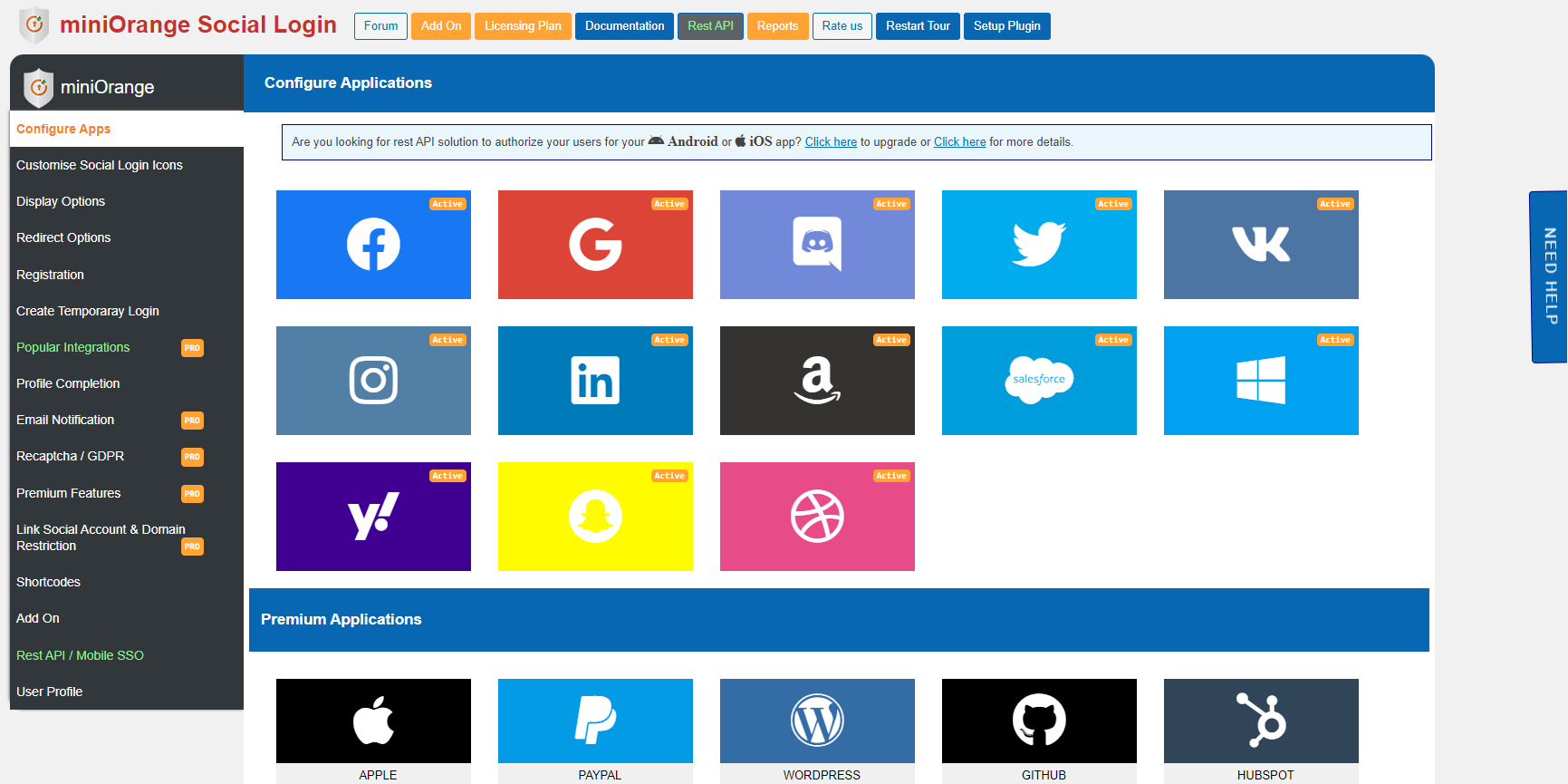
- Social Login with Facebook, Google, Discord, Twitter, Vkontakte, LinkedIn, Amazon & Yahoo,etc.
- Quick activation for Login with Google, Amazon, Vkontakte, LinkedIn, Yahoo, Snapchat and Dribbble using your own app credentials for each provider.
- Flexible display – Display Social login icons anywhere on your websites.
- Sync user data – Sync user data from multiple social network providers like Facebook, Google, Microsoft into one social login account.
- Secure Login – User Login with safe and secure authorization and authentication protocols like OAuth and OpenID.
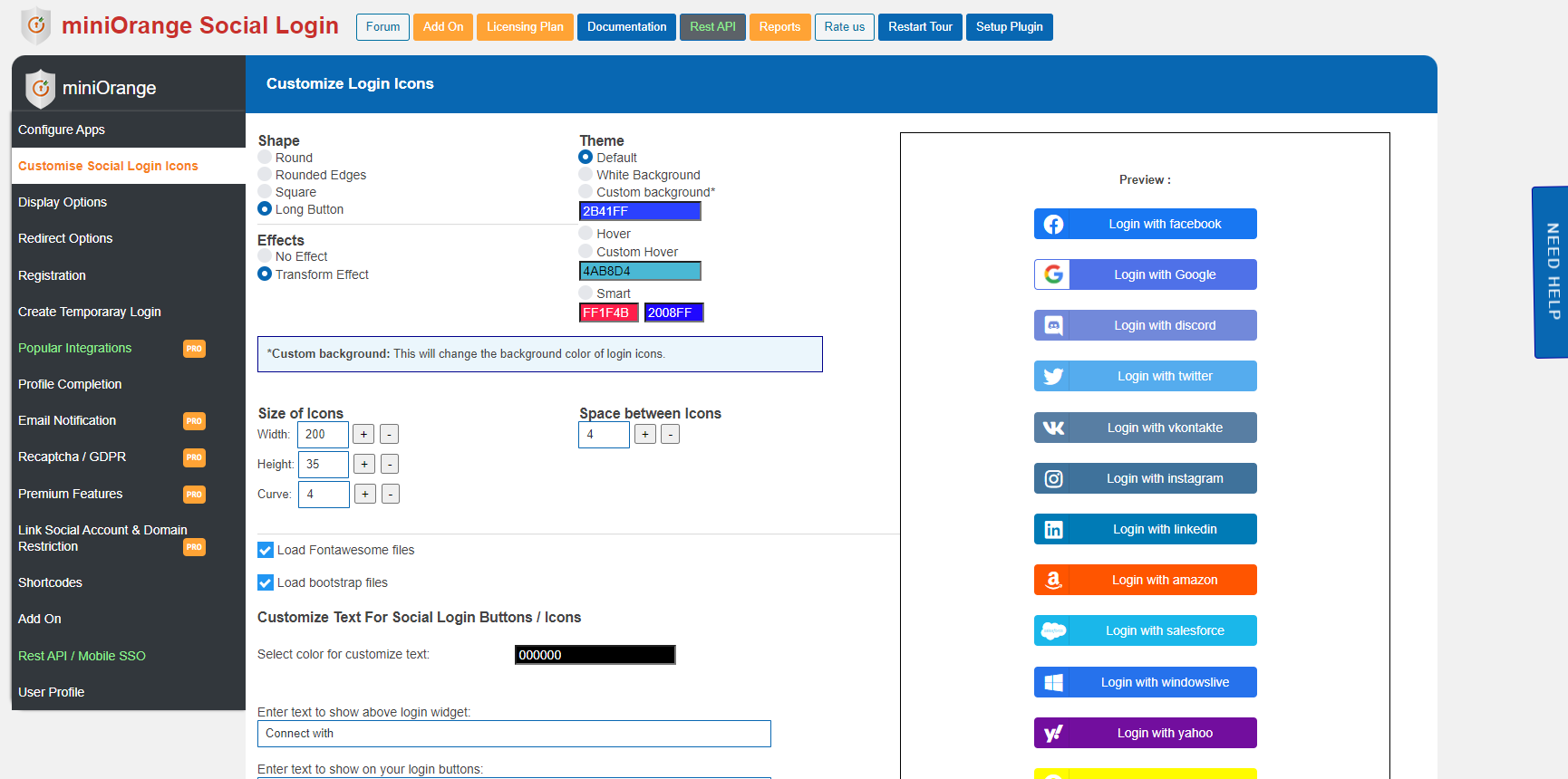
- Customizable social login icons – Choose from multiple themes, shapes and effects. Pick any size and color. Enable transform effect for social login icons.
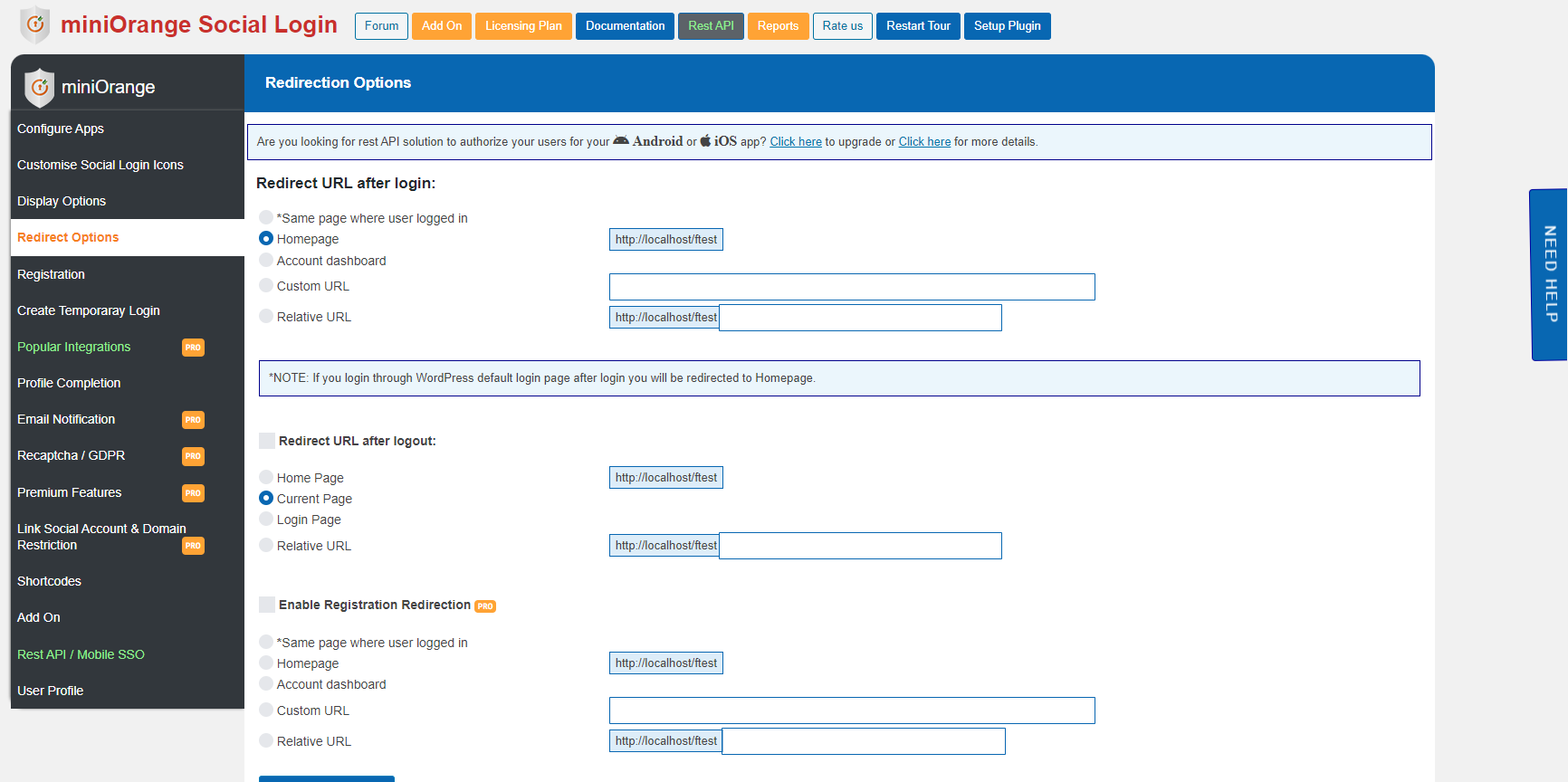
- User Redirection – Redirect users to pages you desire after any user logs in or logs out. Custom login redirect URL and custom logout redirect URL.
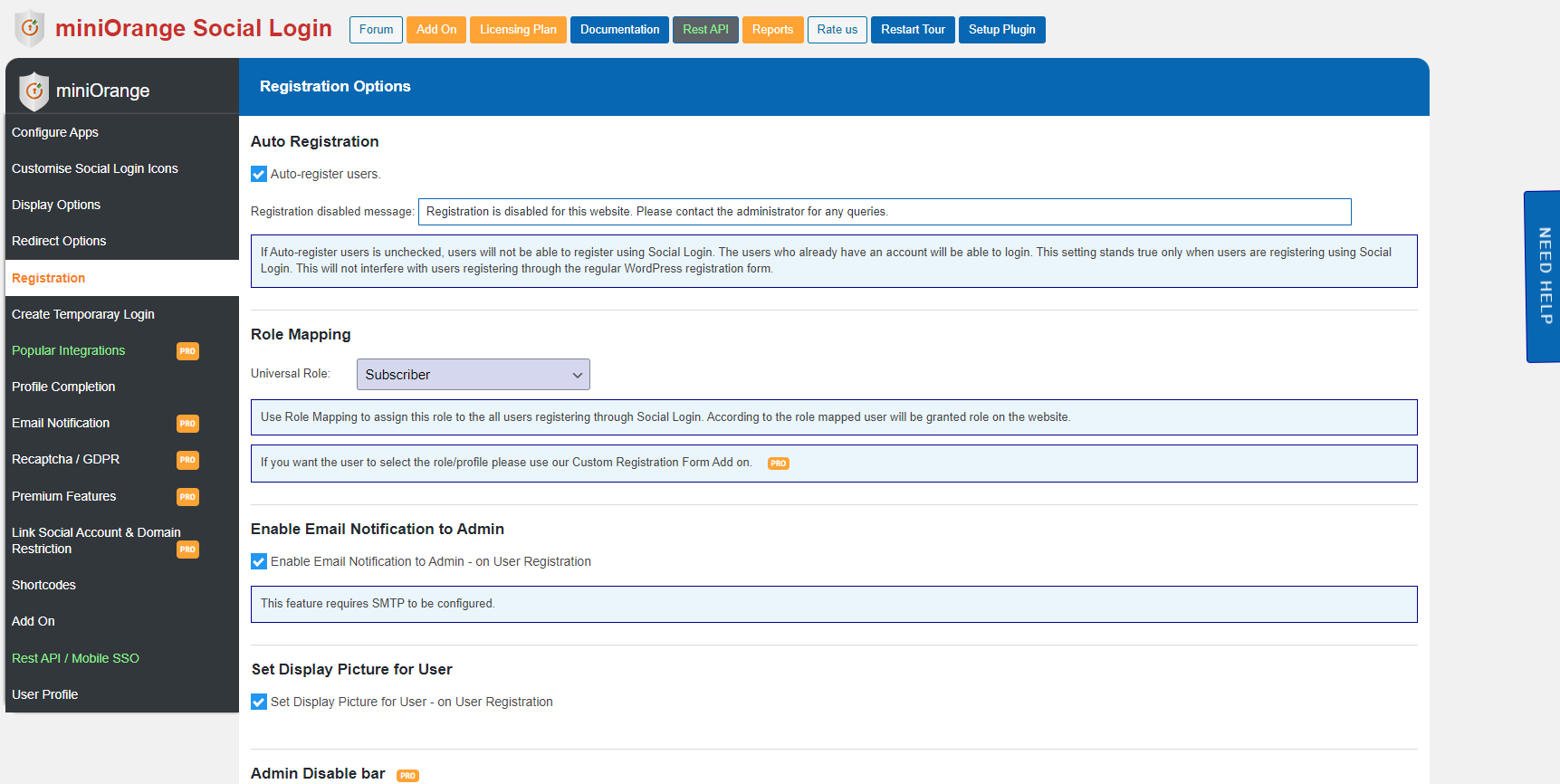
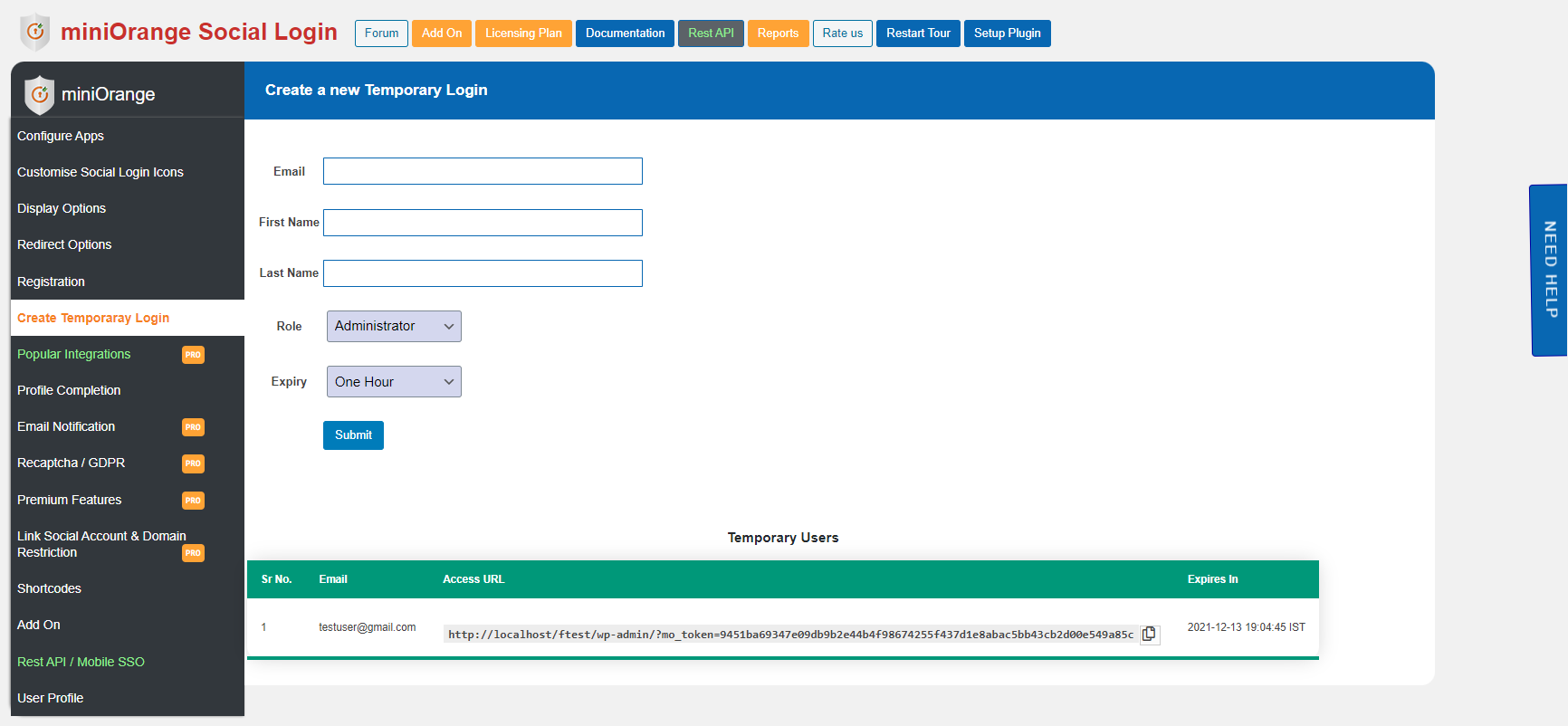
- Assign user roles – Assign WordPress roles to users on registration through social login.
- Shortcodes – Use Shortcode anywhere on your website to display social login icons.
- Take full control – Setup your social login applications with APP ID and APP Secret for Facebook, Google, Twitter, Vkontakte, LinkedIn, Amazon, & Yahoo.
- Preview – Preview custom social login icons before you publish them on your website.
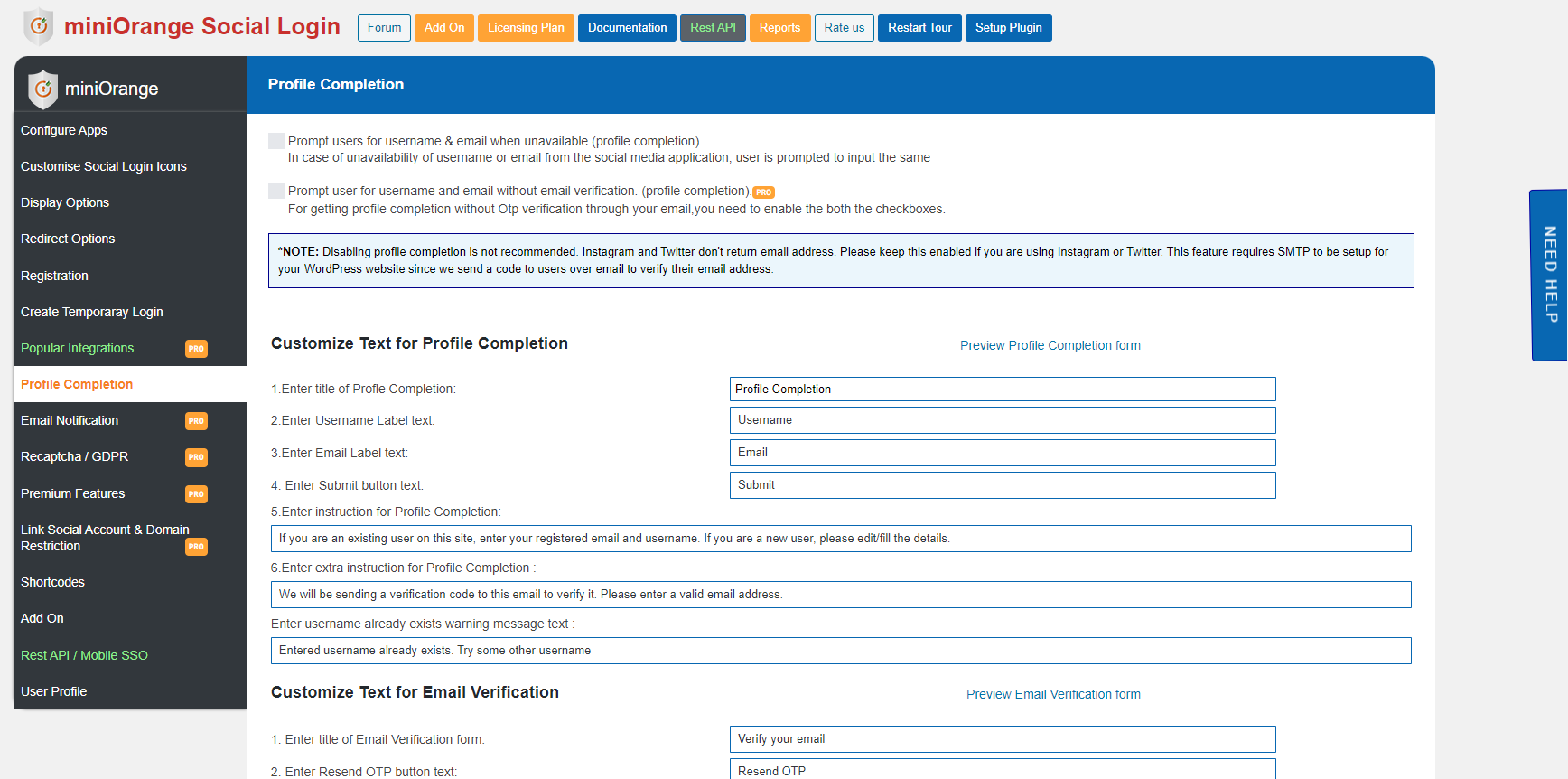
- Profile completion (username, email) – Prompt users for email-id & username if social login app doesn’t return it. Verify Emails using verification code.
- Email Notifications – Emails are sent to admin when a user registers with any social login application.
- Enable/disable user registration – Allow or restrict user registration using social login.
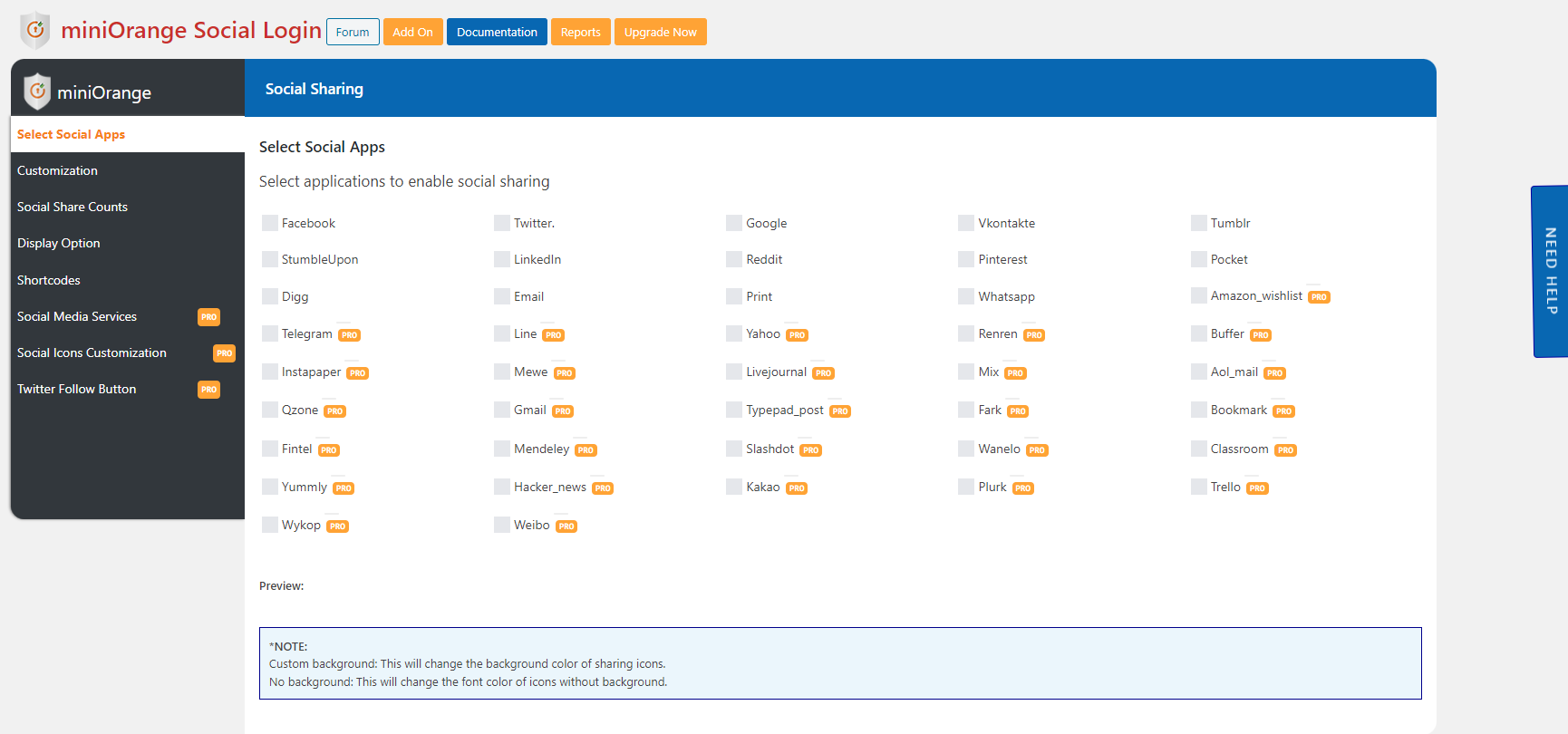
- Social Share – Social share with Facebook, Twitter, LinkedIn, Reddit, etc.
- Social Comments
- User friendly UI
- Customizable Text For Social Login Icons.
- Display Social login icons on WooCommerce Login Page.
- 24 / Support – Using email and in-plugin support form.
Social Login Providers
- Facebook login
- Google login
- Twitter login
- LinkedIn login
- Amazon login
- Vkontakte login (вконтакте логин)
- Apple login
- Discord login
- HubSpot login
- Yahoo login
- WordPress login
- Dribbble login
- Disqus login
- Flickr login
- Foursquare login
- Github login
- Kakao login (카카오 로그인)
- Line login (ラインログイン)(線路登錄)(线路登录)(เข้าสู่ระบบไลน์)
- Livejournal login
- Mail.ru login (mailru логин)
- Meetup login
- Naver login (네이버 로그인)
- Odnoklassniki login
- Paypal login
- Pinterest login
- Reddit login
- Salesforce login
- Snapchat login
- Spotify login
- Stackexchange login
- Steam login
- Teamsnap login
- Tumblr login
- Twitch login
- Vimeo login
- Wechat login (微信登錄)(微信登录)
- Weibo login (微博登錄)(微博登录)
- Yandex login (яндекс логин)
Free Social Share & Social Comments Features
- Share with social applications – Facebook, Twitter, Google+, Pinterest, Reddit, Vkontakte, Tumblr, StumbleUpon, LinkedIn, Pocket, Digg, Email, Print, and Whatsapp
- Facebook Comments – Allow social login users to comment using Facebook.
- Disqus Comments – Allow social login users to comment using Disqus.
- Shortcodes – Add social share icons on the homepage, posts, feeds, content pages, WooCommerce product pages, etc., or anywhere else on your site.
- Customize icons – Customize shape, theme, space & size of the social share icons.
- Preview – Preview the Social Share icons before publishing them to the website.
- Horizontal social share widget.
- Floating vertical social share widget.
- 24 / 7 Support – Using email and in-plugin support form.
Why miniOrange Social Login
- 10 Free Social Login apps – Login with popular social network providers namely Facebook, Google, Discord, Twitter, LinkedIn, Vkontakte, Amazon, Yahoo, Snapchat and Dribbble all available in the free plan.
- Easy Setup – Register your own app with each provider and enter its credentials in the plugin; step-by-step instructions are provided for every app.
- 24 / 7 Support – If you face any issues or if you simply require assistance with the Social Login plugin then please contact us. Whatever it may be we will solve the issue for you and get everything working as soon as possible.
- Tons of Free Features – We have a huge roster of free features. With other plugins, you will have to pay for these features.
- Icon Customizations – Flexible icon customizations for Social Login and Social Share icons. No CSS knowledge is needed! Choose from different themes, shapes, and sizes. Pick any color you want to display the social icons.
- Social Share – Social share available with all the widely used applications. Users can share anything using Facebook social share, Twitter social share, etc.
- Social Comments – Social comments allow users to post their comments with their social media accounts.
- Easy Integration – Social Login is the easiest to configure and conveniently allows you to set up and start using the plugin in seconds. Easy integration with your website with options to add Social login on the login page, registration page, and comments section.
- User Login/Registration – Enable Social Login/User Registration on WordPress Default Login, Register pages and comment form.
Social Share Providers
- Facebook Social Share
- Twitter Social Share
- LinkedIn Social Share
- Reddit Social Share
- Pinterest Social Share
- Google Social Share
- Vkontakte Social Share
- Whatsapp Social Share
- Tumblr Social Share
- StumbleUpon Social Share
- Pocket Social Share
- Digg Social Share
- Social Share with Email
- Social Share with Print
Popular Social Login Pro Integrations
- With Popular Plugins –
- WooCommerce social login integration
- BuddyPress social login integration
- Paid Memberships Pro social login integration
- MailChimp social login integration
- MemberPress display options
- Ultimate Member display options
- With Applications –
- Discord social login integration
- Hubspot social login integration
Paid Social Login Features
- 40+ Social Login Providers – Choose from 40+ applications (Facebook Login, Google Login, Discord Login etc.) for social login and user registration. Many social network providers added continuously.
- One-click activation – For Login with Discord, Apple, Facebook, Google, Amazon, Vkontakte, LinkedIn, WordPress, Yahoo, Salesforce, Stackoverflow, Mailchimp, Strava etc.
- Social login Integrations – Social integrations with popular WordPress plugins like WooCommerce, Paid Memberships Pro, BuddyPress, MailChimp and HubSpot.
- Social Login Integrations – Social login icons on WooCommerce pages, BuddyPress pages, Paid Memberships Pro pages, MemberPress pages, Ultimate Member pages.
- GDPR Compliance.
- Domain Restriction – Authorize select users by allowing or restricting users signing in or registering from specific domains e.g. ‘facebook.com’ or ‘gmail.com’.
- Email Notifications – Email sent to user/multiple admins when a user registers with any social login application.
- Recaptcha – Enable Recaptcha and ensure the safety of your website.
- User Moderation – Approve users registering through social login.
- Sync user data – Sync user data from multiple social network providers like Facebook, Google, Microsoft into one social login account.
- User Redirection – Redirect users on registration, login, and logout to pages you desire. Custom registration redirect URL, Custom login redirect URL, and custom logout redirect URL.
- Assign user roles – Assign WordPress roles to users on registration through social login.
- Use Shortcode anywhere on your website to display social login icons.
- Take full control – Setup your social login application with APP ID and APP Secret for Facebook, Google, Twitter, Vkontakte, LinkedIn, Amazon, Windows Live & Yahoo.
- Preview custom social login icons.
- Profile completion (username, email) – Prompt users for email-id & username if social login app doesn’t return it. Verify Emails using verification code.
- User Control – Enable/disable user registration through social media login.
- Customizable Text For Social Login Icons.
- Display Social login icons on WooCommerce Login Page.
- 24 / Support using email and in-plugin support form.
= WooCommerce Social Login Features [Premium]=
* WooCommerce Integration – Auto-fill first name, last name and email are pre-filled in billing details of a user and on the Woocommerce checkout page.
* Woocommerce Display Options – Display social login icons on WooCommerce login, Woocommerce registration, and Woocommerce checkout pages.
= BuddyPress Social Login Features [Premium]=
* BuddyPress Integration – Sync profile picture from social application to BuddyPress avatar. Sync user social profile to BuddyPress custom fields.
* BuddyPress Display Options – Display social login icons on the BuddyPress registration form and BuddyPress account details pages.
= Paid Memberships Pro [Premium]=
* Paid Memberships Pro – Assign Selected Paid membership level at the time of registration using social.
* Paid Memberships Pro Display Options – Display social login icons on Paid Memberships Pro checkout pages.
= Ultimate Member – Social Login Features [Premium]=
* Ultimate Member Display Options – Display social login icons on Ultimate Member login and Ultimate Member registration pages.
= MemberPress – Social Login Features [Premium]=
* MemberPress Display Options – Display social login icons on MemberPress login, MemberPress account, and MemberPress checkout pages.
= BuddyBoss Social Login Features [Premium]=
* BuddyBoss Integration – Sync profile picture from social application to BuddyBoss avatar. Sync user social profile to BuddyBoss custom fields.
* BuddyBoss Display Options – Display social login icons on BuddyBoss registration form and BuddyBoss account details pages.
Single sign-on
Single Sign-On using Social Login creates a single authentication system for multiple web properties allowing users to navigate websites with a single account.
Contact Us
Don’t hesitate to reach out to us. Send an email to info@miniorange.com if you need absolutely anything.
Website
To know more about Social Login you can visit our website at https://plugins.miniorange.com/social-login-social-sharing.
Check out our website for other plugins https://www.miniorange.com/plugins or click here to see all our listed WordPress plugins.
For more support or info email us at info@miniorange.com or Contact us. You can also submit your query from the plugin’s configuration page.
Installation
From your WordPress dashboard
- Visit
Plugins > Add New. - Search for
Social Login, Social Sharing by miniOrange. Find and InstallSocial Login, Social Sharing by miniOrange. - Activate the plugin from your Plugins page.
From WordPress.org
- Download Social Login, Social Sharing by miniOrange.
- Unzip and upload the
miniorange-login-openiddirectory to your/wp-content/plugins/directory. - Activate Social Login, Social Sharing by miniOrange from your Plugins page.
Once Activated
- Go to
Social Login, Social Sharing by miniOrangefrom the side menu and select your Social Login and Social Share apps. - Customize Social login and Social share buttons/icons.
- Add miniOrange Social Login and Social plugin through Display Options.
- For adding widgets, go to
Appearance -> Widgets. From available widgets, you will findminiOrange - Social Login,miniOrange Sharing - Horizontal, andminiOrange Sharing - Verticalwidgets. Drag it to the chosen widget area where you want it to appear. - For adding icons to page, use Shortcodes [miniorange_social_login], [miniorange_social_sharing], [miniorange_social_sharing_vertical]. Further go to Shortcode tab to customize them.
- Now visit your site and you will see login and sharing icons.
Frequently asked questions
What are the steps to download and activate the social login premium plugin?
Please follow the steps given below to download and activate the social login premium plugin: 1. Login to miniOrange dashboard here. 2. Click on the License option on the left-hand menu. 3. You will see the download the social login premium plugin link Click on Download Plugin and extract the zip. 4. Do not delete the older files just replace the old plugin files with the new plugin. 5. To activate the newly installed plugin you need a license key. Click on the View License Key button in the License option on the left-hand menu of the miniOrange dashboard. 6. Copy the Licence key. 7. Go to…
I need login with other Social Login apps like Pinterest, Yahoo, Paypal, etc. ?
Please email us at info@miniorange.com. You can also submit your app request from the plugin’s configuration page.
I can’t see any Social Login to enable. I only see Register with miniOrange?
Our very simple and easy registration lets you register with Social Login, Social Sharing by miniOrange works if you are connected to miniOrange. Once you have registered with a valid email address, you will be able to enable Social Login, Social Sharing by miniOrange.
Some of the social sharing apps are not working. Why is that?
This issue arises if your website is not publicly hosted. Facebook for example looks for the URL to generate the webpage’s preview for sharing. In that case, your website needs to be publicly hosted for Facebook social share.
I want to add Social Login/ Social Sharing to a custom location in my page. How can I achieve that?
To add Social Login or Social Sharing icons to a custom location, use a Shortcode. For further details refer to the Shortcode tab in the plugin.
I have added miniOrange social Sharing – Vertical widget to my page. How can I change its position on the page?
The vertical sharing widget for Social Sharing gives a couple of options to change its position on the page and also the space between icons. You can align the social sharing widget on the left or right side of the page. You can view these options from Appearance->Widgets or editing the widget options in Customizer.
I want to upgrade to the social login standard/premium plan. How can I upgrade?
Please contact us through the support form for the social login standard and premium plugin.
I want the user to select their role on registration
This feature is available in the Custom registration add-on which allows the users to select their role during Registration and based on that the user will be given the privileges inside.
For any other query/problem/request
Please email us at info@miniorange.com. You can also submit your query from the Social plugin’s configuration page.
Changelog
Security fixes.
7.9.1
- Security fixes.
7.9.0
- Security fixes.
- Removed pre-configured app login.
- Added compatibility with WP 7.1.
7.8.2
- Some security fixes
7.8.1
- Fixed an XSS issue
7.8.0
- Added compatibility with WP 7
- Security fixes
7.7.0
- Added filter to appname to prevent potential LFI risk
Screenshots


For developers
Is this your plugin? Show off the numbers.
Add a live badge to your site, docs or GitHub README. It updates on its own — no account needed.
Best Social Login, Social Sharing… alternatives
All facebook plugins →





FAQ
Social Login, Social Sharing by min…: quick answers
Straight answers, pulled from live WordPress.org data.
Live data from WordPress.org · checked Sep 26, 2026
Is Social Login, Social Sharing by… free?
Yes. Social Login, Social Sharing by… is free to download and use from the official WordPress.org plugin directory.
Is Social Login, Social Sharing by… safe to use in 2026?
Social Login, Social Sharing by… is a solid plugin choice in 2026, with a few things worth checking first. It runs on 10K+ sites, is rated 4.6/5 and was last updated 1 week ago, and scores 77/100 on our health check.
How many websites use Social Login, Social Sharing by…?
Social Login, Social Sharing by… is active on 10K+ WordPress websites and has been downloaded 1,722,251 times since it launched in May 2015. It was downloaded 16,947 times in the last 30 days.
Does Social Login, Social Sharing by… work with WordPress 7.1?
Yes. The developer has tested Social Login, Social Sharing by… up to WordPress 7.1.2, the latest release. It requires WordPress 4.4 or newer.
What PHP version does Social Login, Social Sharing by… need?
Social Login, Social Sharing by… requires PHP 7.0 or higher. Most hosts run PHP 8.x today, so it works on any modern WordPress hosting.
When was Social Login, Social Sharing by… last updated?
The latest version, 7.9.1, was released on September 17, 2026 (1 week ago).
Who makes Social Login, Social Sharing by…?
Social Login, Social Sharing by… is developed and maintained by miniOrange.
What are the best alternatives to Social Login, Social Sharing by…?
The most popular alternatives to Social Login, Social Sharing by… are Meta for WooCommerce (400K+ installs), Meta pixel for WordPress (400K+ installs) and Nextend Social Login and Re… (200K+ installs).
Powered by PageForge
Want thousands of pages that rank like these? Build them in an afternoon.
This directory runs on the same engine as PageForge. Turn any spreadsheet, CSV or API into thousands of fast, SEO-ready WordPress pages — with schema, internal links and AI-written copy baked in.
- CSV, Google Sheets & API data sources
- AI content, schema & internal links per page
- Works with Elementor, Gutenberg, Yoast & Rank Math
- Free on WordPress.org — no credit card


