



Migrate Store: Export and Import WooCommerce Settings
Migrate Store is a WooCommerce plugin for hassle-free migration of settings between sites, simplifying and accelerating the setup process.

Use with caution
Migrate Store: Export and Impor… works, but test it on a staging site before relying on it in 2026. It runs on 1K+ sites, is rated 5/5 and was last updated 11 months ago, and scores 59/100 on our health check.
- Loved by users — 5/5 from 25 reviews
- Only tested up to WordPress 6.9 (latest is 7.1)
Daily downloads
Download spikes usually follow a new release — each site that auto-updates counts as a download.
Rankings
Where Migrate Store: Export and I… stands todayWordPress.org search rankings
Live position in the plugin search, top 100| Keyword | Position |
|---|---|
| export shipping zones | #7 |
| woocommerce | >100 |
| WooCommerce export | #92 |
Version adoption
Share of active sites per release.
Rating breakdown
★★★★★★★★★★ 5 from 25 reviews
About Migrate Store: Export and Import WooCom…
From the official readme · v1.1.9Description
Imagine you’re setting up a new WooCommerce store. It’s exciting, but there’s a lot to do. As you’re going through the setup process, you hit a wall – the settings. General settings, shipping zones, tax options, email setup, and the list seems endless. The sheer volume and complexity of settings can be overwhelming and time-consuming.
MigrateStore offers a seamless solution to transfer your settings from an existing store to your new one. It’s like packing up your shop’s essentials into a virtual moving box and unpacking them at your new location. No more manual setup, no more time wasted, no more headaches. With MigrateStore, setting up new WooCommerce stores is as easy as a breeze. Spend less time on settings and more time on growing your business.
What options or settings does MigrateStore allow me to export/import?
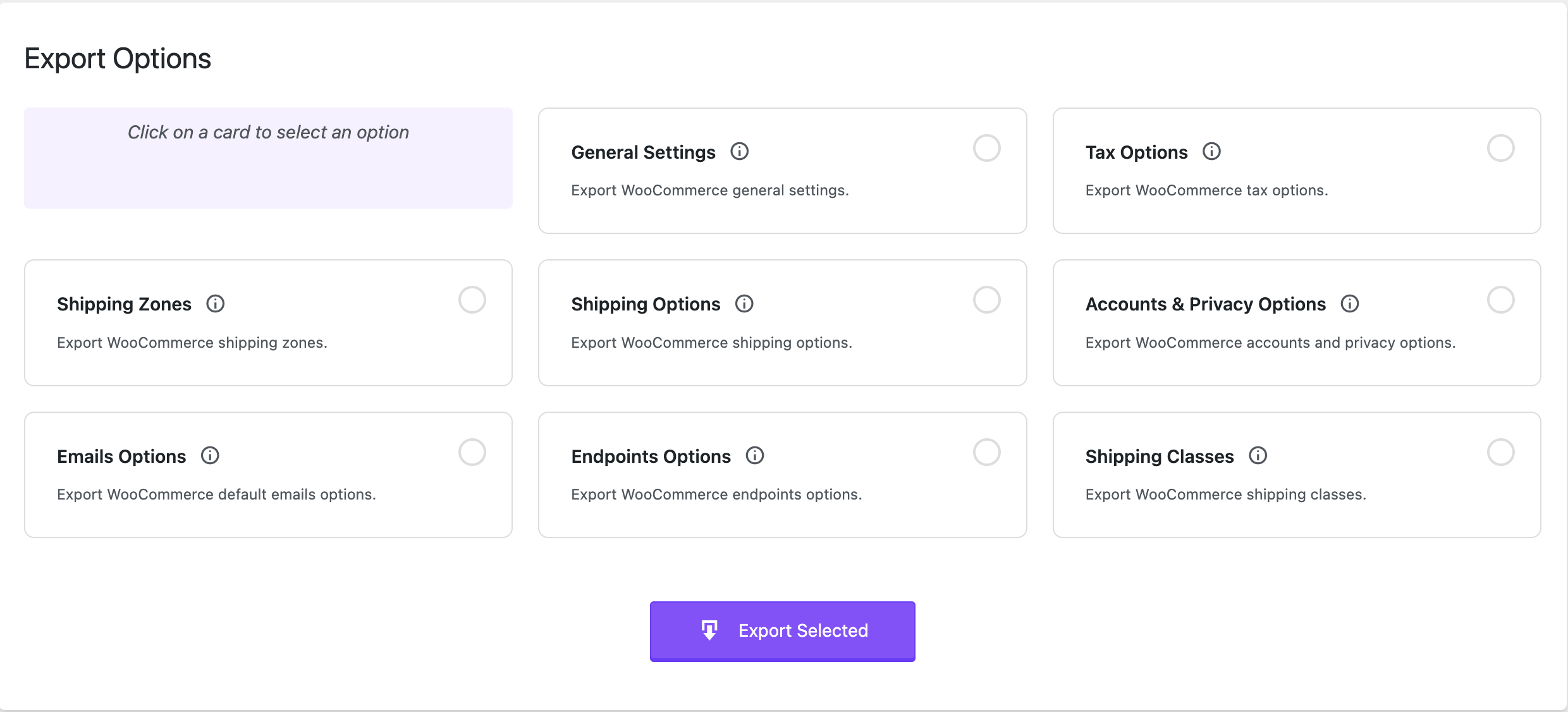
- WooCommerce → Settings → General.
- WooCommerce → Settings → Tax options.
- WooCommerce → Settings → Shipping zones (Spicy! 🌶️🌶️)
- WooCommerce → Settings → Shipping options.
- WooCommerce → Settings → Accounts & Privacy.
- WooCommerce → Settings → Emails. (WooHoo 🙌🙌) This includes:
- Email sender options
- Email template options
- Color customization
- Default email notifications including:
- New order
- Cancelled order
- Failed order
- Order on-hold
- Processing order
- Refunded order
- Customer invoice / Order details
- Customer note
- Reset password
- New account
- WooCommerce → Settings → Advanced → Page setup → Checkout endpoints & Account endpoints
- WooCommerce → Settings → Shipping → Classes
Move your WooCommerce settings smoothly and effortlessly with MigrateStore!
Consider leaving a 5 star review if you like MigrateStore.
Developers?
Feel free to fork the project on GitHub and submit your contributions via pull request.
Installation
- Upload
migratestorefolder to the/wp-content/plugins/directory. - Activate the plugin through the
Pluginsmenu in WordPress. - Navigate to
MigrateStoremenu to start using the plugin.
Frequently asked questions
The plugin isn’t working or have a bug?
Post detailed information about the issue in the support forum and we will work to fix it.
Changelog
1.1.9
- WordPress 6.9 compatibility.
1.1.8
- Fixed: Internationalization for missed string.
1.1.7
- Added: Check for ZipArchive dependency to prevent fatal errors.
1.1.6
- WooCommerce 9.7 compatibility.
1.1.5
- Added: Export and Import Shipping Classes.
- Updated: Design.
1.1.4
- WordPress 6.7 compatibility.
- Multisite compatibility.
Screenshots

For developers
Is this your plugin? Show off the numbers.
Add a live badge to your site, docs or GitHub README. It updates on its own — no account needed.
FAQ
Migrate Store: Export and Import Wo…: quick answers
Straight answers, pulled from live WordPress.org data.
Live data from WordPress.org · checked Oct 16, 2026
Is Migrate Store: Export and Impor… free?
Yes. Migrate Store: Export and Impor… is free to download and use from the official WordPress.org plugin directory.
Is Migrate Store: Export and Impor… safe to use in 2026?
Migrate Store: Export and Impor… works, but test it on a staging site before relying on it in 2026. It runs on 1K+ sites, is rated 5/5 and was last updated 11 months ago, and scores 59/100 on our health check.
How many websites use Migrate Store: Export and Impor…?
Migrate Store: Export and Impor… is active on 1K+ WordPress websites and has been downloaded 18,973 times since it launched in September 2023. It was downloaded 492 times in the last 30 days.
Does Migrate Store: Export and Impor… work with WordPress 7.1?
Migrate Store: Export and Impor… is officially tested up to WordPress 6.9.10, while the latest release is 7.1.3. It may still work, but try it on a staging site first.
What PHP version does Migrate Store: Export and Impor… need?
Migrate Store: Export and Impor… requires PHP 7.4 or higher. Most hosts run PHP 8.x today, so it works on any modern WordPress hosting.
When was Migrate Store: Export and Impor… last updated?
The latest version, 1.1.9, was released on November 30, 2025 (11 months ago).
Who makes Migrate Store: Export and Impor…?
Migrate Store: Export and Impor… is developed and maintained by Nagdy.
Powered by PageForge
Want thousands of pages that rank like these? Build them in an afternoon.
This directory runs on the same engine as PageForge. Turn any spreadsheet, CSV or API into thousands of fast, SEO-ready WordPress pages — with schema, internal links and AI-written copy baked in.
- CSV, Google Sheets & API data sources
- AI content, schema & internal links per page
- Works with Elementor, Gutenberg, Yoast & Rank Math
- Free on WordPress.org — no credit card


