


MetaTrader Web Terminal
MetaTrader Web Terminal plugin for WordPress websites

Consider an alternative
MetaTrader Web Terminal shows warning signs in 2026 — compare the alternatives below before installing. It runs on 90+ sites, is rated 1.5/5 and was last updated 5 years ago, and scores 22/100 on our health check.
- Small user base (90+ active installs)
- Very few reviews so far
- No update in 5 years
- Only tested up to WordPress 5.8 (latest is 7.1)
Daily downloads
Download spikes usually follow a new release — each site that auto-updates counts as a download.
Rankings
Where MetaTrader Web Terminal stands todayWordPress.org search rankings
Live position in the plugin search, top 100| Keyword | Position |
|---|---|
| metatrader | #1 |
| mt4 | #3 |
| mt5 | #2 |
| trading | #84 |
| webterminal | #1 |
Version adoption
Share of active sites per release.
Rating breakdown
★★★★★★★★★★ 1.5 from 2 reviews
About MetaTrader Web Terminal
From the official readme · v1.1Description
What is MetaTrader Web Terminal?
In the web terminal, you can analyze quotes of financial instruments, perform trading operations and view trading history. Pending orders, One Click Trading in the Market Depth, 30 technical indicators and 24 graphical objects — all main features of the popular MetaTrader 4 and MetaTrader 5 desktop platforms are available from a browser. The web terminal is fully compatible with the entire MetaTrader ecosystem. The application is secure since all transmitted data is heavily encrypted. The plugin can be installed only on HTTPS websites.
Web trading features
- Trading from any browser and compatibility with any operating system
- Reliable data protection
- One Click Trading
- 30 indicators for technical analysis
- Real-time quotes in Market Watch
- History of trading operations
- Graphical objects
- All types of trading operations
- 9 timeframes
Installation
To install the plugin, please follow these steps:
- Upload plugin files to the directory
/wp-content/plugins/metatrader-web-terminal - Activate the plugin in the ‘Plugins’ section of the WordPress console
Frequently asked questions
Is it free?
Yes, the web terminal plugin can be installed on any website for free. Terms of use.
What MetaTrader versions are supported by the web terminal plugin?
MetaTrader 4 and MetaTrader 5
Is it safe for web terminal users?
The website the plugin is located at has no access to the platform data, including information entered during login and demo account opening. User data are securely protected and cannot be accessed even by the owner of the website the web terminal is used on.
Can the plugin be installed on HTTP websites?
No, the plugin works only on HTTPS websites for security reasons.
Not a broker
MetaQuotes Software Corp. is a software development company and does not provide or offers any kind of financial, investment, brokerage, trading and data feed services in any local or international currency, stock market or exchange. End-User License Agreement
Screenshots

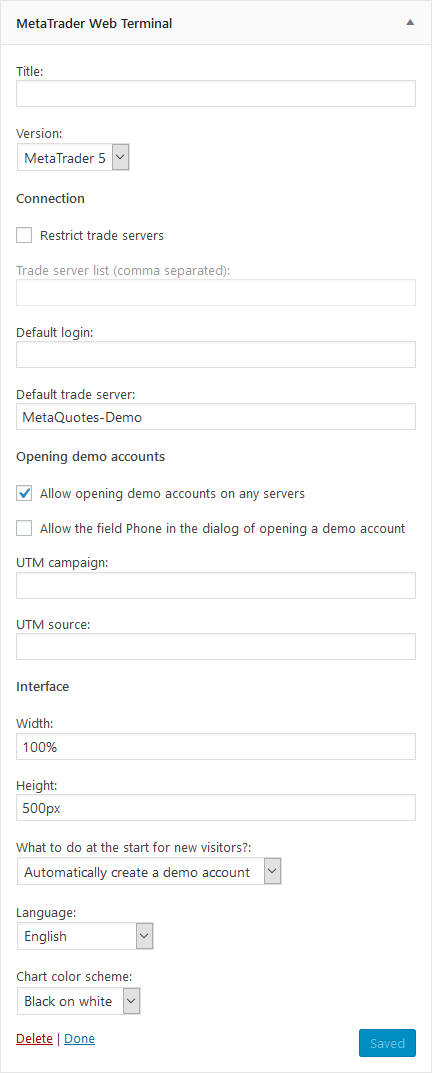


For developers
Is this your plugin? Show off the numbers.
Add a live badge to your site, docs or GitHub README. It updates on its own — no account needed.
FAQ
MetaTrader Web Terminal: quick answers
Straight answers, pulled from live WordPress.org data.
Live data from WordPress.org · checked Oct 8, 2026
Is MetaTrader Web Terminal free?
Yes. MetaTrader Web Terminal is free to download and use from the official WordPress.org plugin directory.
Is MetaTrader Web Terminal safe to use in 2026?
MetaTrader Web Terminal shows warning signs in 2026 — compare the alternatives below before installing. It runs on 90+ sites, is rated 1.5/5 and was last updated 5 years ago, and scores 22/100 on our health check.
How many websites use MetaTrader Web Terminal?
MetaTrader Web Terminal is active on 90+ WordPress websites and has been downloaded 11,674 times since it launched in April 2019. It was downloaded 105 times in the last 30 days.
Does MetaTrader Web Terminal work with WordPress 7.1?
MetaTrader Web Terminal is officially tested up to WordPress 5.8.18, while the latest release is 7.1.3. It may still work, but try it on a staging site first.
What PHP version does MetaTrader Web Terminal need?
MetaTrader Web Terminal requires PHP 5.6 or higher. Most hosts run PHP 8.x today, so it works on any modern WordPress hosting.
When was MetaTrader Web Terminal last updated?
The latest version, 1.1, was released on July 26, 2021 (5 years ago).
Who makes MetaTrader Web Terminal?
MetaTrader Web Terminal is developed and maintained by MQL5 community.
Powered by PageForge
Want thousands of pages that rank like these? Build them in an afternoon.
This directory runs on the same engine as PageForge. Turn any spreadsheet, CSV or API into thousands of fast, SEO-ready WordPress pages — with schema, internal links and AI-written copy baked in.
- CSV, Google Sheets & API data sources
- AI content, schema & internal links per page
- Works with Elementor, Gutenberg, Yoast & Rank Math
- Free on WordPress.org — no credit card


