


Menu Ghost
Target menu items by role, device, schedule, and campaign rules using a fast, native conditions interface inside the menu editor.

Use with caution
Menu Ghost works, but test it on a staging site before relying on it in 2026. It runs on 20+ sites, is rated 5/5 and was last updated 11 months ago, and scores 46/100 on our health check.
- Small user base (20+ active installs)
- Very few reviews so far
- Only tested up to WordPress 6.8 (latest is 7.1)
How does it stack up?
Side-by-side on installs, updates, ratings & supportDaily downloads
Download spikes usually follow a new release — each site that auto-updates counts as a download.
Rankings
Where Menu Ghost stands todayWordPress.org search rankings
Live position in the plugin search, top 100| Keyword | Position |
|---|---|
| conditional menus | #65 |
| menu visibility | #82 |
| navigation | >100 |
| personalization | >100 |
| user roles | >100 |
Version adoption
Share of active sites per release.
Rating breakdown
★★★★★★★★★★ 5 from 1 reviews
About Menu Ghost
From the official readme · v2.0.1Description
Menu Ghost lets you conditionally display each menu item based on factors like user role, device, date, pages, and more.
Design frictionless navigation experiences and boost conversions by only showing relevant menu items to each visitor. Menu Ghost integrates with the native WordPress menu editor and adds a modern conditions interface that feels like it belongs in core. Everything happens inside Appearance → Menus (classic themes) or Site Editor → Navigation (block themes) no shortcodes or template edits required.
What does Menu Ghost do?
Menu Ghost gives you total control over which navigation links appear and when. Build unlimited rule sets per menu item, combining audience, page, schedule, and campaign conditions. Hide seasonal promotions after a sale ends, display member-only dashboards, or show localized links based on browser language.
Key features
- Audience targeting – Show or hide menu items based on user role, login status, browser language, or detected device (desktop, tablet, mobile).
- Page & post rules – Limit links to specific pages, post types, taxonomies, archives, author archives, search results, or 404 pages.
- Scheduling controls – Activate items on selected weekdays, within date ranges, or during daily time windows.
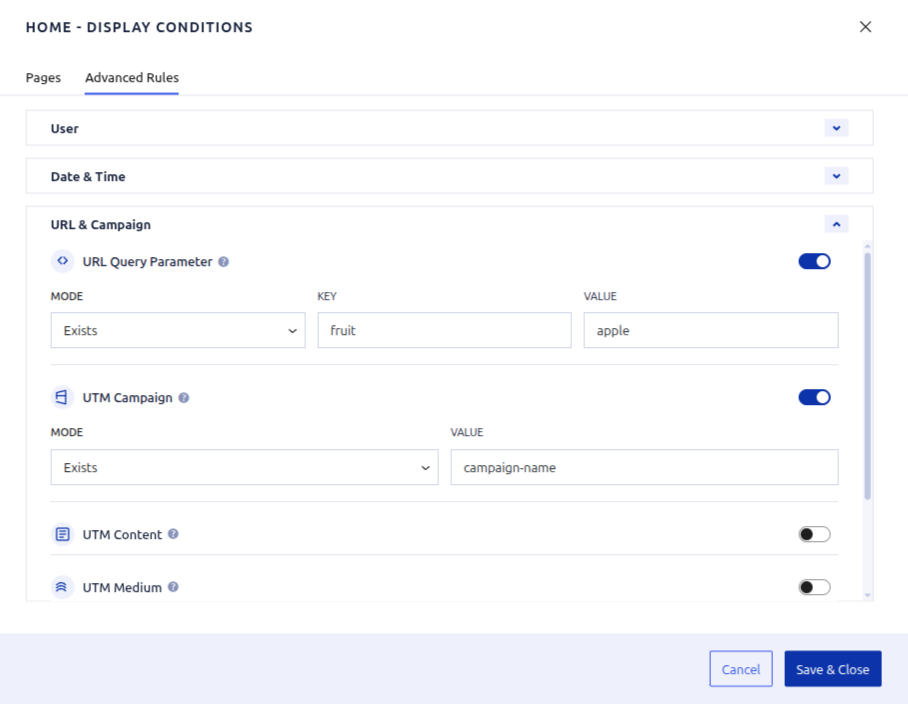
- Campaign awareness – React to query-string values, UTM parameters, or custom marketing links for landing pages.
- No-code workflow – React-powered UI inside the existing menu screen. Toggle rules with familiar WordPress components.
- Unlimited conditions – Stack include/exclude rules to create precise logic for every menu item.
- Performance friendly – All logic runs server-side with cached WordPress APIs. No front-end scripts added to your theme.
Popular use cases
- Display a “Members Area” link only to logged-in customers on desktop.
- Promote a holiday sale on every page until a specific date/time is reached.
- Replace “Book a call” with “Download brochure” on mobile visitors to boost conversions.
- Show “Return to checkout” when users view product archives, but hide it elsewhere.
- Localize navigation labels and URLs based on browser language or UTM campaigns.
Why choose Menu Ghost?
- Native experience – Built with the WordPress components library for a seamless admin UI.
- Clean code & extensibility – PHP logic follows core standards and stores data in post meta.
- Marketing ready – Understand traffic sources and tailor menus without page builders.
- SEO aware – Hide links for humans while keeping friendly markup for search engines (links still exist, only visibility changes).
The interface is built with React and uses WordPress components so it remains responsive, accessible, and familiar. All rule data is stored in post meta to keep compatibility with exports, migrations, and backups.
Rule reference
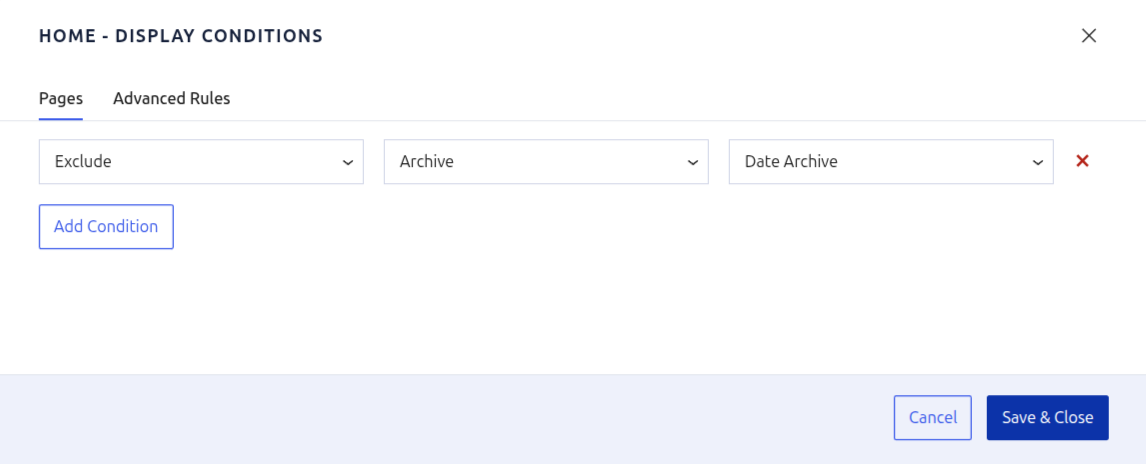
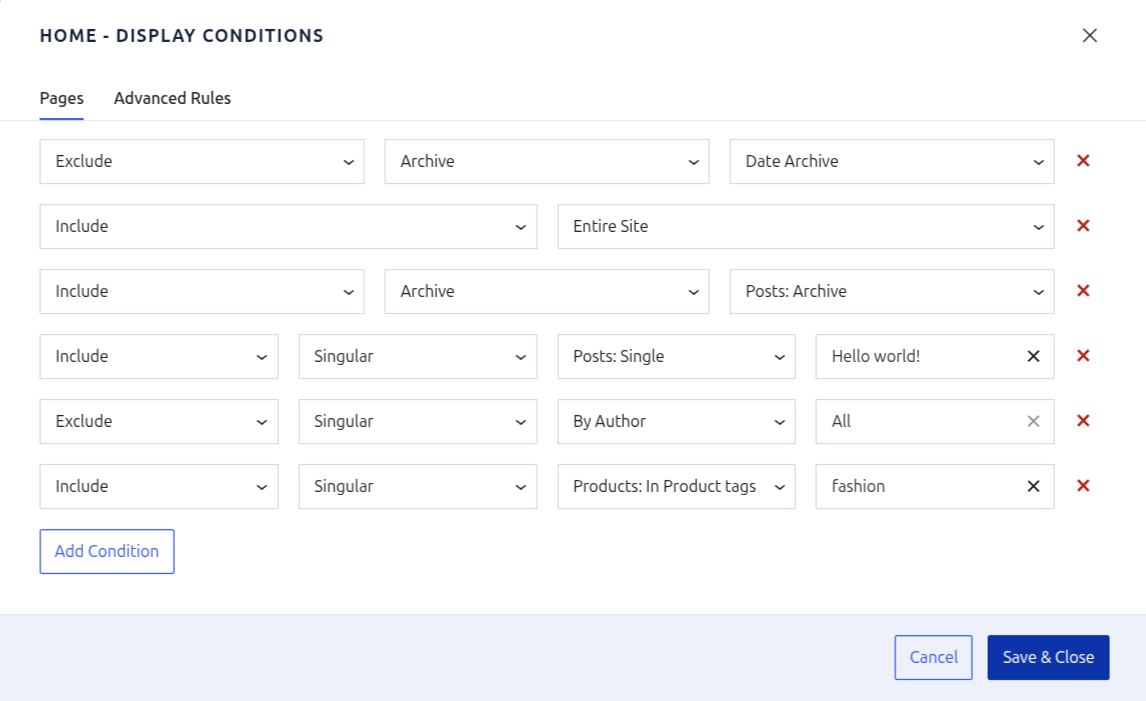
Pages tab
- Include / Exclude – Decide whether a matching condition should show or hide the menu item.
- Entire Site – Create a catch-all rule that always fires. Place it below granular rules when you need fallback behavior.
- Archive scopes – Target date archives, author archives, taxonomy listings, WooCommerce product archives, search results, or even the 404 template.
- Singular scopes – Limit links to specific posts, pages, custom post types, parent/child relationships, or taxonomy terms.
- Add Condition – Stack unlimited rules. Menu Ghost evaluates them from top to bottom, so keep broad rules toward the bottom of the list.
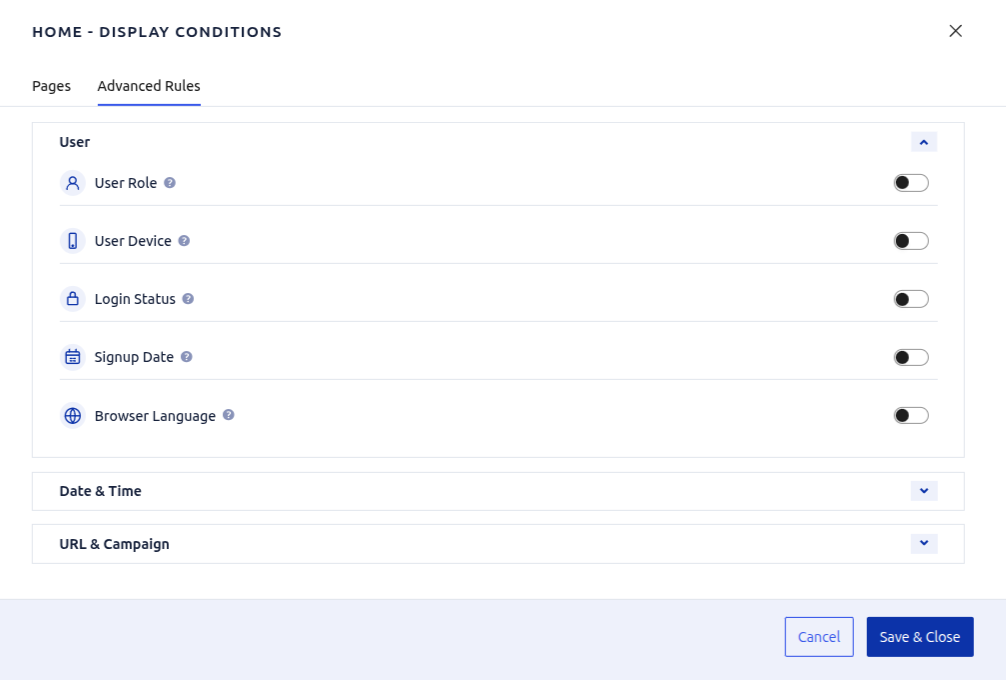
Advanced tab
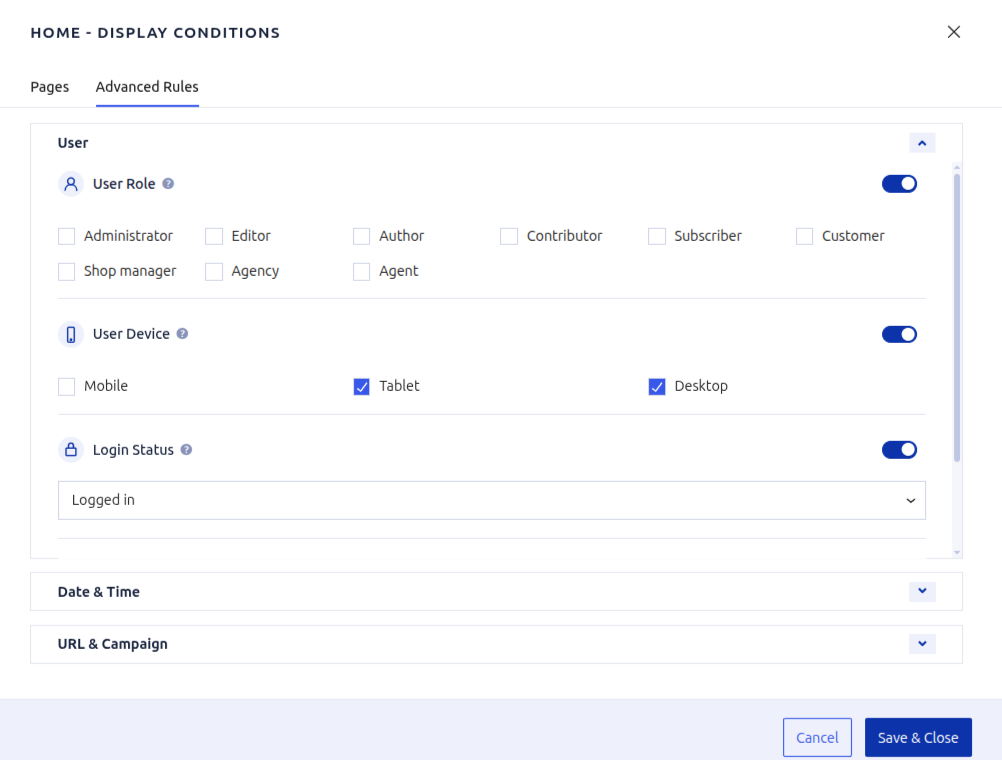
- User Role – Match any WordPress role, including custom roles added by eCommerce or membership plugins.
- User Device – Detect desktop, tablet, or mobile visitors to tailor calls to action per device.
- Login Status – Serve different menu links to logged-in versus logged-out visitors.
- Signup Date – Target members who registered before or after a specific date—ideal for onboarding flows.
- Browser Language – Show localized links when the visitor’s browser shares a preferred language.
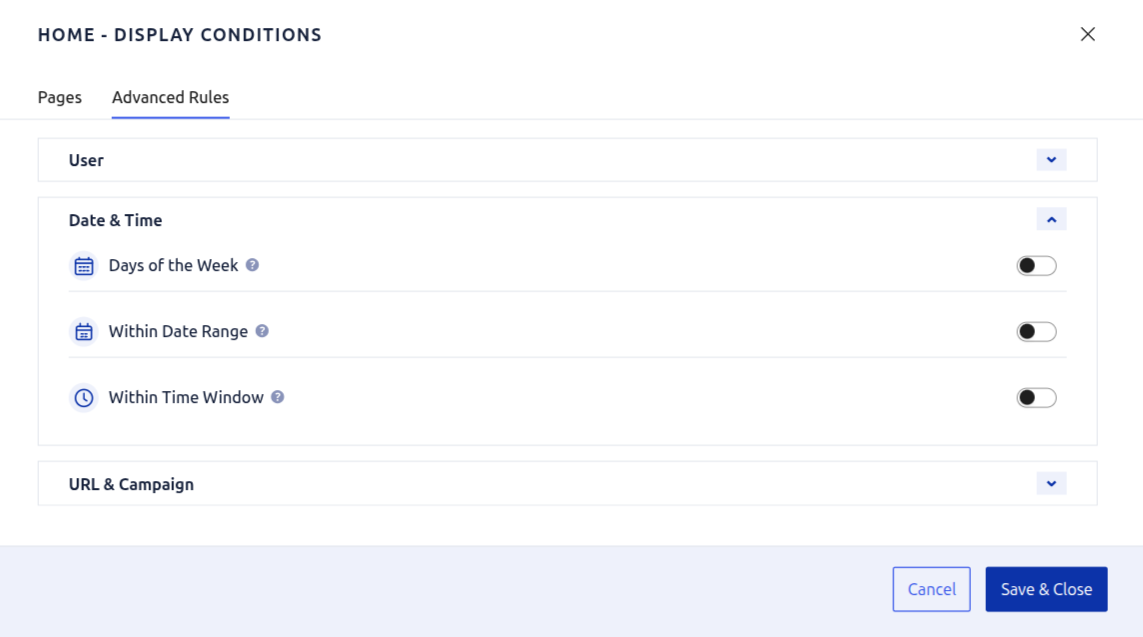
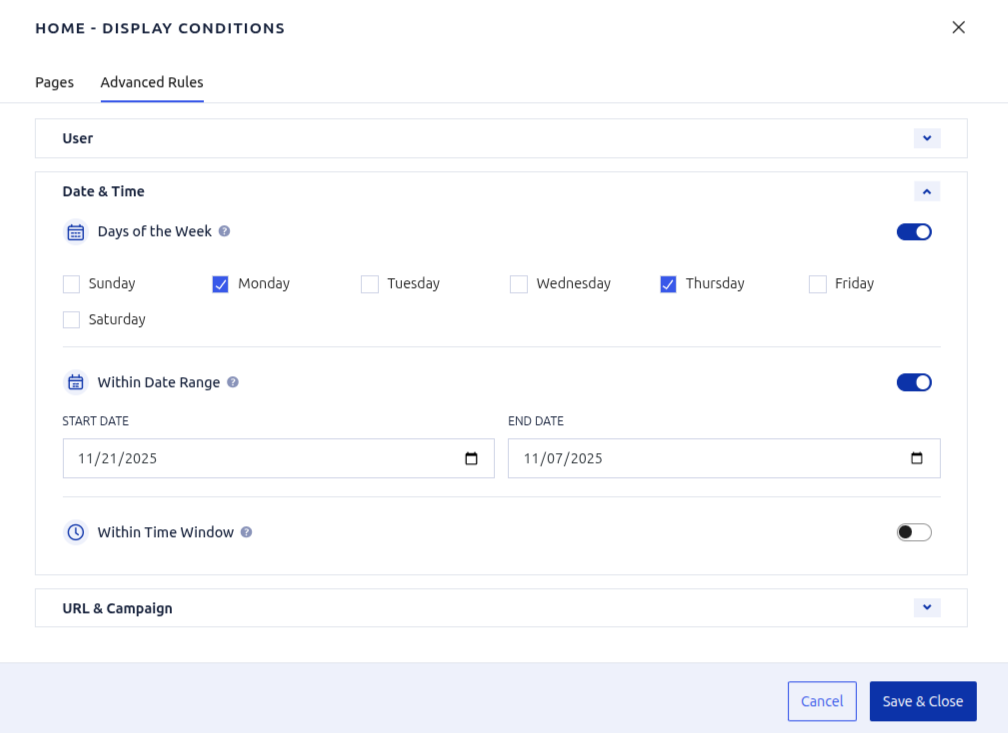
- Days of the Week – Toggle links on specific weekdays (e.g., “Weekend brunch menu”).
- Within Date Range – Schedule seasonal links to appear between two calendar dates without manual edits.
- Within Time Window – Display links only during a daily time slice, such as support hours or flash sales.
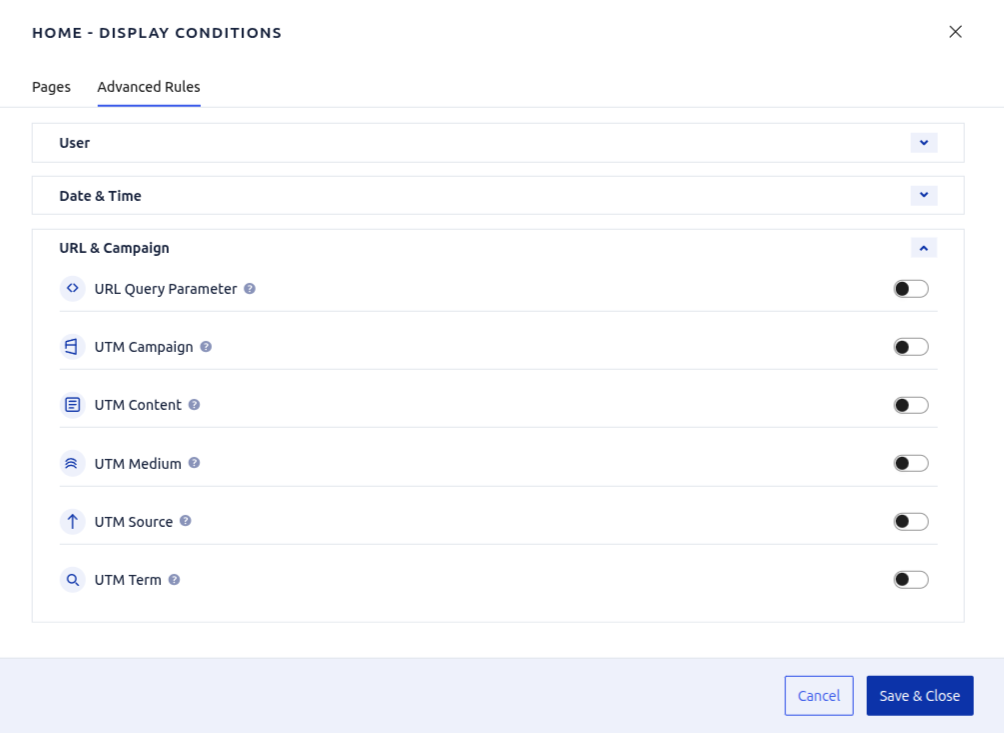
- URL Query Parameter – Require a query-string key/value (like
ref=partner) before the menu item appears. - UTM Campaign / Content / Medium / Source / Term – React to marketing URLs so visitors see campaign-specific navigation when arriving from ads or emails.
Development
The source code for Menu Ghost lives in the public repository at https://github.com/sarailoo/menu-ghost.
Installation
- Upload the
menu-ghostfolder to/wp-content/plugins/or install via the Plugins screen. - Activate Menu Ghost through Plugins → Installed Plugins.
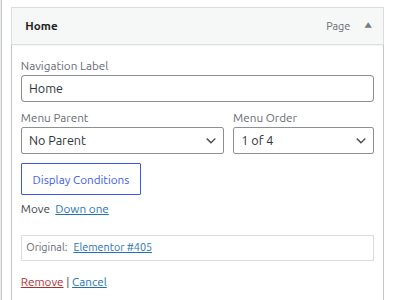
- Go to Appearance → Menus (or Site Editor → Navigation in block themes), open a menu item, and click Display Conditions to start adding rules.
Frequently asked questions
Does this plugin slow down my site?
No. Menu Ghost only evaluates rules when wp_nav_menu() renders, using cached WordPress APIs. Nothing is injected on the front end, and there are no extra tables or cron jobs.
Will it work with my theme or page builder?
Yes. Any theme or builder that leverages the core menu system automatically benefits from Menu Ghost. No template edits, hooks, or shortcodes required.
Can I show or hide links for logged-in customers only?
Absolutely. Enable “Login Status” rules to create separate navigation items for logged-in and logged-out visitors.
Can I schedule menu links for seasonal campaigns?
Use the date range or time window rules to automatically activate/deactivate links without touching menus again.
How do I localize menus for different languages?
Use the browser language condition or query-string parameters (e.g., ?lang=fr) to tailor navigation per locale.
Does Menu Ghost work with WooCommerce or membership plugins?
Yes. As long as the menu item exists in WordPress, you can apply Menu Ghost rules to it—ideal for WooCommerce account links, LMS dashboards, community forums, and more.
Where are the translations stored?
If you upload the plugin to WordPress.org, translations are managed by GlotPress. Custom translations can be placed in wp-content/languages/plugins/menu-ghost-*.mo. Bundled locales: es_ES, fr_FR, de_DE, pt_BR, ru_RU, it_IT, nl_NL, ja, zh_CN, pl_PL, fa_IR (RTL styles included).
Can I migrate settings between sites?
All data is stored in post meta, so it travels with standard WordPress export/import tools, backup plugins, or site migration services.
Changelog
2.0.1
- Bugfix: RTL style for checkboxes.
2.0.0
- Block editor themes support.
- New languages support.
- RTL support.
1.0.1
- Update readme.
- Add screenshots.
- Add plugin logo.
1.0.0
- Initial public release with menu item display rules, advanced campaign targeting, and REST-powered async selectors.
Screenshots
For developers
Is this your plugin? Show off the numbers.
Add a live badge to your site, docs or GitHub README. It updates on its own — no account needed.
Best Menu Ghost alternatives
All conditional menus plugins →| Rank | Plugin | Active installs |
|---|---|---|
| 2 |
 Different Menu in Different Pages and Posts
 plugin allows user to display 'menu of choice'…
Different Menu in Different Pages and Posts
Different Menu in Different Pages and Posts plugin allows user to display 'menu of choice'…
|
10+ |
FAQ
Menu Ghost: quick answers
Straight answers, pulled from live WordPress.org data.
Live data from WordPress.org · checked Oct 10, 2026
Is Menu Ghost free?
Yes. Menu Ghost is free to download and use from the official WordPress.org plugin directory.
Is Menu Ghost safe to use in 2026?
Menu Ghost works, but test it on a staging site before relying on it in 2026. It runs on 20+ sites, is rated 5/5 and was last updated 11 months ago, and scores 46/100 on our health check.
How many websites use Menu Ghost?
Menu Ghost is active on 20+ WordPress websites and has been downloaded 647 times since it launched in October 2025. It was downloaded 88 times in the last 30 days.
Does Menu Ghost work with WordPress 7.1?
Menu Ghost is officially tested up to WordPress 6.8.11, while the latest release is 7.1.3. It may still work, but try it on a staging site first.
What PHP version does Menu Ghost need?
Menu Ghost requires PHP 8.0 or higher. Most hosts run PHP 8.x today, so it works on any modern WordPress hosting.
When was Menu Ghost last updated?
The latest version, 2.0.1, was released on November 25, 2025 (11 months ago).
Who makes Menu Ghost?
Menu Ghost is developed and maintained by Reza Sarailoo.
What are the best alternatives to Menu Ghost?
The most popular alternatives to Menu Ghost are Different Menu in Different… (10+ installs).
Powered by PageForge
Want thousands of pages that rank like these? Build them in an afternoon.
This directory runs on the same engine as PageForge. Turn any spreadsheet, CSV or API into thousands of fast, SEO-ready WordPress pages — with schema, internal links and AI-written copy baked in.
- CSV, Google Sheets & API data sources
- AI content, schema & internal links per page
- Works with Elementor, Gutenberg, Yoast & Rank Math
- Free on WordPress.org — no credit card


