



Menu Caching
This plugin caches WordPress classic menus to improve page loading time.

Solid choice
Menu Caching is a solid plugin choice in 2026, with a few things worth checking first. It runs on 400+ sites, is rated 5/5 and was last updated 1 month ago, and scores 73/100 on our health check.
- Tested with the latest WordPress (7.1)
- Momentum — downloads up 237.1% vs the previous 30 days
- Small user base (400+ active installs)
- Very few reviews so far
How does it stack up?
Side-by-side on installs, updates, ratings & support



Daily downloads
Download spikes usually follow a new release — each site that auto-updates counts as a download.
Rankings
Where Menu Caching stands todayWordPress.org search rankings
Live position in the plugin search, top 100| Keyword | Position |
|---|---|
| caching | #6 |
| menu cache | #29 |
| menu caching | #1 |
| speed up menu | #21 |
| wordpress menu | #37 |
Version adoption
Share of active sites per release.
Rating breakdown
★★★★★★★★★★ 5 from 4 reviews
About Menu Caching
From the official readme · v1.1.5Description
We all know that database calls are the main performance bottleneck in WordPress. What most people don’t know though, is how “expensive” in terms of performance the WordPress menus are.
This plugin will cache the menu HTML and show the cached version to your visitors, saving your database from far too many unnecessary calls.
Menu data are scattered across six(!) different database tables. When a user visits a page, an odyssey throughout the database begins.
In ‘wp_terms’, ‘wp_term_taxonomy’ and ‘wp_options’ tables we’ll find menu ID, slug and theme location. Then ‘wp_posts’ and ‘wp_postmeta’ to find menu’s nav items and their metas.
In the metas, we will find its targeted object, so let’s pay ‘wp_terms’ or ‘wp_posts’ a visit again to find the menu item’s target and ‘wp_termmeta’ to find its metas.
These are a lot of tables and even more database calls! When all required data is collected, the menu HTML is created and it is shown to the user.
The same process is repeated for every menu on the page. Desktop menu, mobile menu, some menus on the footer, a menu for the customer account on the header’s right next to the cart icon…
Imagine all these menus, some of them with decades of menu items, loading in every page for every visitor on your site.
Menu changes are very rare and this makes them an easy target for caching. Caching the generated menu HTML will prevent all these unnecessary database calls and greatly improve page loading times.
Full features list
- Caches all classic WordPress menus to improve page loading time.
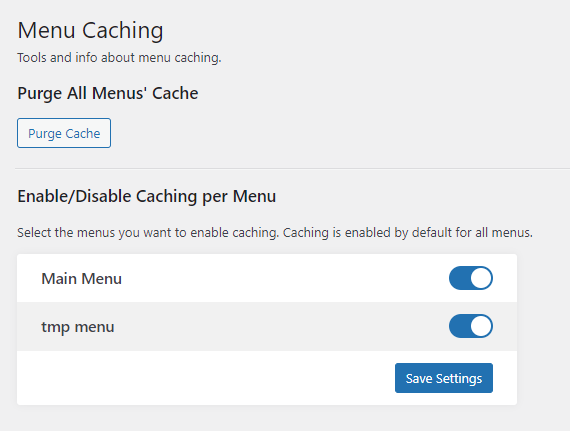
- Enable/disable caching per menu.
- Clear all menu cache with a button on the settings page.
- Every time you edit a menu, its cache is automatically purged.
- All cached data are automatically purged every 10 hours to keep everything fresh, like nonces etc.
- Compatible with caching plugins like WPRocket, W3 Total Cache etc.
- Compatible with most translation plugins. Tested ok with WPML and TranslatePress.
How it works
Every time a user visits a page with a menu, WordPress collects all menu data from the database, and then runs a walker to create the menu’s HTML. Right before this generated HTML is returned to the user, the HTML is saved in the database in a transient.
Next time a user requests this specific menu, the saved HTML will be returned, instead of creating the menu from scratch.
Test results – How effective is it anyway?
If you use a good caching plugin and a certain page is served from cache, then you won’t see a difference in loading times. BUT… there are many cases when a page is not served from cache and in that scenario you will notice a huge difference.
Some of the scenarios when a page is not served from cache:
- If you are not using a page caching plugin (Why not? Please install one!).
- No existing cached version exists of the requested page. You benefit from menu caching during the first page load on every page, before the cached version is saved.
- When users are logged-in. Even when using a per-user cache for logged-in users, menu caching is still super useful to quickly create the menu as the cache files are getting created.
- On e-commerce sites on pages that can’t be cached by default, like cart, checkout, my account, wishlist etc.
- In most e-commerce sites, when a customer adds something to cart, then serving pages from cache stops to prevent false data in the mini-cart.
- On some AJAX requests that load page content that includes menus.
Let’s see the results from some tests run on a medium-to-large e-commerce site with a mega menu with many categories, a separate mobile menu and a couple more small menus.
For admin user:
- Loading time for all menus – no menu caching: 0.46s (in average)
- Loading time for all menus – with menu caching: 0.0015s (in average)
- Speed benefit: 300+ times faster – menu loads almost instantly!
For incognito visitor:
- Loading time for all menus – no menu caching: 0.232194 sec
- Loading time for all menus – with menu caching: 0.001185 sec
- Speed benefit: ~200 times faster – menu loads almost instantly!
Of course these numbers depend on your WordPress installation, your server setup and so many parameters but the outcome will be the same.
With menu caching, instead of building the menu every time and losing precious time during page load, your menus will load instantly from cache.
Compatibility with new “block” themes
Menus on the new block themes are constructed in a different way via the block editor, and not via the classic nav builder we all love to hate. This plugin can’t optimize menus built with the new block editor. It’s not going to break anything though, it won’t do anything at all. If you use a classic theme like 99.9% of the WordPress websites out there, this plugin will be useful to you.
Roadmap
This plugin does only one specific thing, menu caching. There is no plan to add more features. Of course small improvements may be implemented, and if any bug appears, I will try to fix it. Next versions will try to expand compatibility with more popular themes.
A next update is already under development, intending to add compatibility with the Woodmart theme.
If you have any good ideas about this plugin and you want to contribute, you can make a PR in the github repo.
Installation
- Download the plugin from Official WP Plugin Repository.
- Upload Plugin from your WP Dashboard ( Plugins>Add New>Upload Plugin ) the menu-caching.zip file.
- Activate the plugin through the ‘Plugins’ menu in WordPress Dashboard.
- Plugin’s settings are located inside Tools > Menu Caching.
Frequently asked questions
How to activate menu caching?
You don’t have to do anything at all. As soon as you install and activate the plugin, menu caching starts working immediately. You can visit the plugin’s settings under Tools > Menu Caching to disable menu caching for a specific menu, or clear the cache manually.
Does it benefit my site if I use a page caching plugin?
Yes, it does. Pages in some circumstances are not served from cache, or a cached version is not available. In these scenarios menu caching greatly reduces page load time. For more info see the respective section in the description.
Can I clean the menus’ cache manually?
Yes, there is a button on the plugin’s settings under Tools > Menu Caching. You probably don’t need to, though. The cache auto-refreshes frequently, and also gets flushed after you edit a menu.
What about menus with links which contain nonces or any really special custom menu items?
Menu items like a logout link, contain a nonce for security reasons. Nonces are unique for each logged-in user session. This plugin detects automatically if a menu contains links with nonces and cache this specific menu separately for each user session. If you still have any problem with caching of a menu, or you just don’t want to cache it for any reason, you can disable caching for this specific menu from the plugin’s settings.
Where is the cached data saved?
The cached menus are saved in the database in the ‘wp_options’ table as transients with a lifetime of 10 hours.
Why cache data are refreshing every 10 hours? Can I change that?
Cache gets automatically refreshed as a preventive measure, so that it never gets stale. Also, the 10 hours period prevents nonces from expiring, in case some of your menus contain some of them. I can’t see why you might want to change it but sure you can, using the ‘dc_wp_menu_caching_lifetime’ filter. add_filter( 'dc_wp_menu_caching_lifetime', function( $original_value ) { return $time_in_seconds; } );
Do you have a problem with a specific menu after enabling this plugin?
Some themes make weird things to menus. Or maybe you use a plugin that adds extra functionality to menus, like mega menus etc. This plugin works fine with most of the themes and plugins out there, but I can’t promise compatibility with anything out there. If you notice anything weird in a menu after enabling this plugin, please head to this plugin’s settings and disable caching for this specific menu.
Is it compatible with the block-based menus?
No, it’s not because block-based menus in block themes work in an entirely different way than classic menus. It’s not going to break your site though; it won’t do anything at all, so it’s safe to use with a block theme.
Changelog
1.1.5
- Tested up to WP 7.1
1.1.4
- Tested up to WP 6.7.x
- Declare 7.4 as the minimum PHP version
- Code cleanup and types declaration
- Fix: Properly delete own transients when WPRocket cache is cleared
- Fix: Error with WPRocket latest versions
1.1.3
- Tested up to WP 6.5.x
- Tested up to PHP 8.3
- Bump minimum PHP version to 7.2 from 5.6
- Minor code optimization.
- Better prefix to JS global var to prevent conflicts in the global namespace.
1.1.2
- Tested up to 6.3.
1.1.1
- Tested up to 6.2.
1.1
- Fix error during uninstallation.
- Change hash generator to cover more cases and menu classes.
- Save no-cache checkbox state for menus with non-english slug.
Screenshots

For developers
Is this your plugin? Show off the numbers.
Add a live badge to your site, docs or GitHub README. It updates on its own — no account needed.
Best Menu Caching alternatives
All caching plugins →





FAQ
Menu Caching: quick answers
Straight answers, pulled from live WordPress.org data.
Live data from WordPress.org · checked Sep 29, 2026
Is Menu Caching free?
Yes. Menu Caching is free to download and use from the official WordPress.org plugin directory.
Is Menu Caching safe to use in 2026?
Menu Caching is a solid plugin choice in 2026, with a few things worth checking first. It runs on 400+ sites, is rated 5/5 and was last updated 1 month ago, and scores 73/100 on our health check.
How many websites use Menu Caching?
Menu Caching is active on 400+ WordPress websites and has been downloaded 11,881 times since it launched in March 2022. It was downloaded 536 times in the last 30 days.
Does Menu Caching work with WordPress 7.1?
Yes. The developer has tested Menu Caching up to WordPress 7.1.2, the latest release. It requires WordPress 5.3 or newer.
What PHP version does Menu Caching need?
Menu Caching requires PHP 7.4 or higher. Most hosts run PHP 8.x today, so it works on any modern WordPress hosting.
When was Menu Caching last updated?
The latest version, 1.1.5, was released on August 29, 2026 (1 month ago).
Who makes Menu Caching?
Menu Caching is developed and maintained by Theo Gkitsos.
What are the best alternatives to Menu Caching?
The most popular alternatives to Menu Caching are LiteSpeed Cache (7M+ installs), WP Super Cache (1M+ installs) and Speed Optimizer (1M+ installs).
Powered by PageForge
Want thousands of pages that rank like these? Build them in an afternoon.
This directory runs on the same engine as PageForge. Turn any spreadsheet, CSV or API into thousands of fast, SEO-ready WordPress pages — with schema, internal links and AI-written copy baked in.
- CSV, Google Sheets & API data sources
- AI content, schema & internal links per page
- Works with Elementor, Gutenberg, Yoast & Rank Math
- Free on WordPress.org — no credit card


