


MC Good-bye Howdy
Seven ways to replace Howdy: Random Lists, Day/Date, Daypart, or Remove.

Solid choice
MC Good-bye Howdy is a solid plugin choice in 2026, with a few things worth checking first. It runs on 100+ sites, is rated 5/5 and was last updated 1 month ago, and scores 71/100 on our health check.
- Tested with the latest WordPress (7.1)
- Small user base (100+ active installs)
- Very few reviews so far
How does it stack up?
Side-by-side on installs, updates, ratings & support


Daily downloads
Download spikes usually follow a new release — each site that auto-updates counts as a download.
Rankings
Where MC Good-bye Howdy stands todayWordPress.org search rankings
Live position in the plugin search, top 100| Keyword | Position |
|---|---|
| change howdy | #1 |
| Disable Howdy | #2 |
| howdy | #1 |
| remove howdy | #1 |
| replace howdy | #3 |
Version adoption
Share of active sites per release.
Rating breakdown
★★★★★★★★★★ 5 from 1 reviews
About MC Good-bye Howdy
From the official readme · v2.7.2Description
- So many choices, seven of them! This is the versatile way to replace “Howdy” as the greeting to those who log in as users of your website.
- Your choices include:
- Write your own greeting
- Create your own random list of greetings
- Just remove “Howdy”
- Greet by daypart (Good Morning, Good Afternoon, Good Evening)
- Show today’s day and date
- Use the pre-filled list of random international greetings
- Use the pre-filled list of random positive, feel-good phrases
Installation
- Download and activate the plugin.
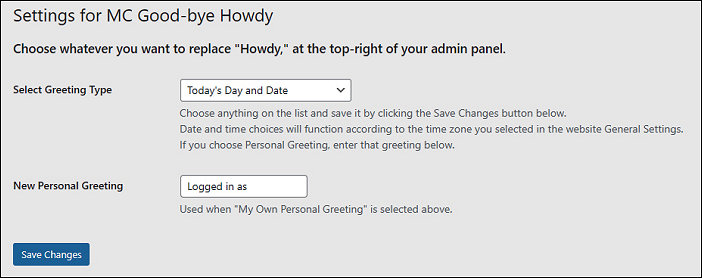
- Go to Settings -> MC Good-bye Howdy, or, find the Settings link on the active plugins list page under the plugin name.
- If you choose, type in your own personal greeting or list of greetings to randomly appear on the top-right of each admin/user page.
- Choose to remove Howdy, or select an automatic mode: show day and date, greet by day-part, international greetings, or positive phrases.
Frequently asked questions
Can I just remove “Howdy”?
Sure, make that choice and save your selection. Done.
Can I write my own greeting?
Anytime. Choose “My Own Personal Greeting” and type in what you want as the admin greeting.
Can I make my own list of random greetings?
Yep. Choose “My Own Random Greeting List” and type in the words or phrases you want to randomly appear.
What is the “Greet by Daypart” setting?
Greet users with “Good Morning,” or “Good Afternoon,” or “Good Evening,” acccording to the time of day, aligned with the timezone set for the website.
What is the “Today’s Day and Date” setting?
This will always display today’s date and date, aligned with the timezone set for the website.
What is the “Random International Greeting” setting?
Randomly display a greeting in many different languages. Greetings include: Ahlan, Aloha, Anyoung, Bonjour, Ciao, Chow, Greetings, God dag, Guten Tag, Habari, Hej, Hola, Hello, Konnichiwa, Olá, Privet, ¿Qué tal?, Salut, Selam, Shalom, Watij, and Yassou.
What is the “Random Positive Phrase” setting?
Greet the user in a positive way. Greetings include: Attaway, Do your thing, Keep it up, Love your work, Today is your day, We appreciate you, We believe in you, You can do it, You’re the best, You’re a superhero, and You rock.
Will this make me feel better?
It should. You are the admin. You and your website colleagues deserve special attention.
Changelog
2.6.4- Slight code changes. Compatible with PHP 8.0 and 8.1 2.7.0 Upgraded escape and other code 2.7.2 Code updates
-
2.5.1 Additional tweak in time recognition code
-
2.5 Updated time recognition code, with thanks to Tony Styles. Tested with WordPress 5.5.3
-
2.4 Initial Release to WordPress
Screenshots


For developers
Is this your plugin? Show off the numbers.
Add a live badge to your site, docs or GitHub README. It updates on its own — no account needed.
Best MC Good-bye Howdy alternatives
All change howdy plugins →

FAQ
MC Good-bye Howdy: quick answers
Straight answers, pulled from live WordPress.org data.
Live data from WordPress.org · checked Oct 14, 2026
Is MC Good-bye Howdy free?
Yes. MC Good-bye Howdy is free to download and use from the official WordPress.org plugin directory.
Is MC Good-bye Howdy safe to use in 2026?
MC Good-bye Howdy is a solid plugin choice in 2026, with a few things worth checking first. It runs on 100+ sites, is rated 5/5 and was last updated 1 month ago, and scores 71/100 on our health check.
How many websites use MC Good-bye Howdy?
MC Good-bye Howdy is active on 100+ WordPress websites and has been downloaded 4,182 times since it launched in October 2020. It was downloaded 158 times in the last 30 days.
Does MC Good-bye Howdy work with WordPress 7.1?
Yes. The developer has tested MC Good-bye Howdy up to WordPress 7.1.3, the latest release. It requires WordPress a recent version or newer.
What PHP version does MC Good-bye Howdy need?
MC Good-bye Howdy requires PHP 7.1 or higher. Most hosts run PHP 8.x today, so it works on any modern WordPress hosting.
When was MC Good-bye Howdy last updated?
The latest version, 2.7.2, was released on September 9, 2026 (1 month ago).
Who makes MC Good-bye Howdy?
MC Good-bye Howdy is developed and maintained by Mike Hickcox.
What are the best alternatives to MC Good-bye Howdy?
The most popular alternatives to MC Good-bye Howdy are Remove Howdy (700+ installs), WP Easy Replace Howdy (100+ installs) and Change Howdy Verbiage (20+ installs).
Powered by PageForge
Want thousands of pages that rank like these? Build them in an afternoon.
This directory runs on the same engine as PageForge. Turn any spreadsheet, CSV or API into thousands of fast, SEO-ready WordPress pages — with schema, internal links and AI-written copy baked in.
- CSV, Google Sheets & API data sources
- AI content, schema & internal links per page
- Works with Elementor, Gutenberg, Yoast & Rank Math
- Free on WordPress.org — no credit card


