



Manage User Columns
This plugin allows you to manage columns under the users page in the WordPress admin area.

Solid choice
Manage User Columns is a solid plugin choice in 2026, with a few things worth checking first. It runs on 1K+ sites, is rated 4.2/5 and was last updated 3 months ago, and scores 68/100 on our health check.
How does it stack up?
Side-by-side on installs, updates, ratings & support



Daily downloads
Download spikes usually follow a new release — each site that auto-updates counts as a download.
Rankings
Where Manage User Columns stands todayWordPress.org search rankings
Live position in the plugin search, top 100| Keyword | Position |
|---|---|
| columns | #4 |
| filter | >100 |
| registration date | #24 |
| user column | #2 |
| users | #71 |
Version adoption
Share of active sites per release.
Rating breakdown
★★★★★★★★★★ 4.2 from 5 reviews
About Manage User Columns
From the official readme · v1.0.7Description
“Manage User Columns” is a small plugin that allows you to manage the user fields displayed on the users list page in the WordPress dashboard area.
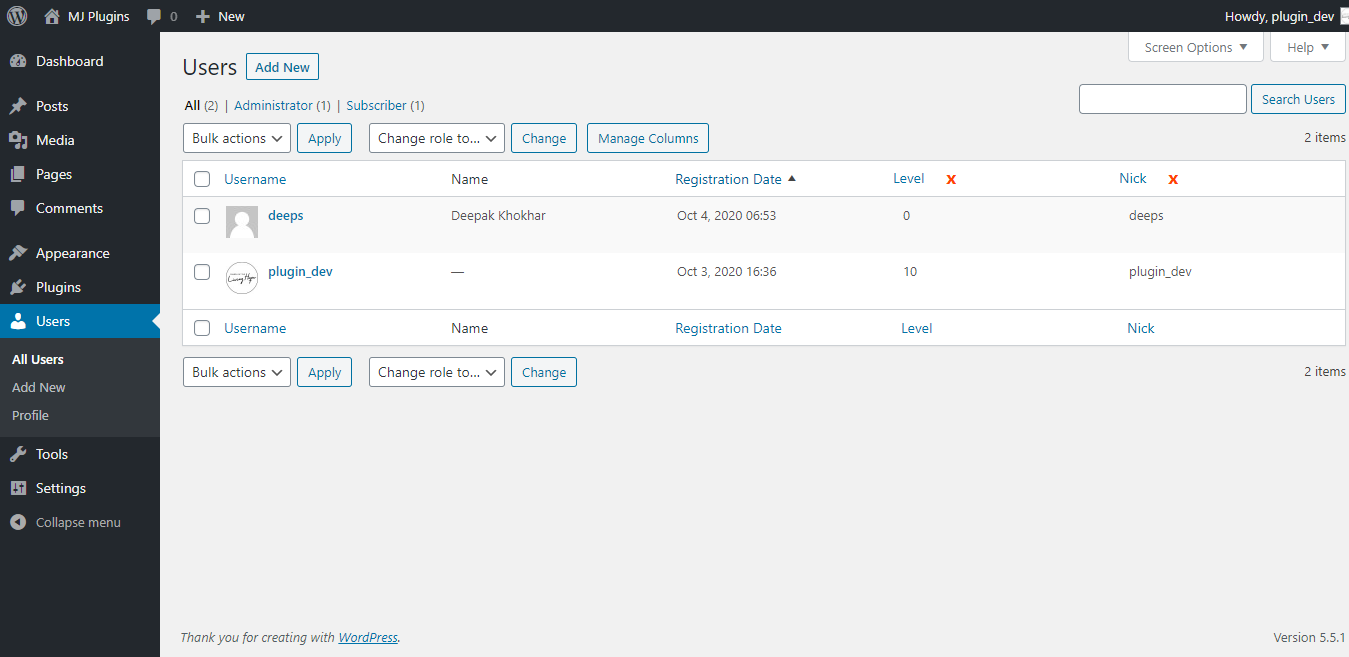
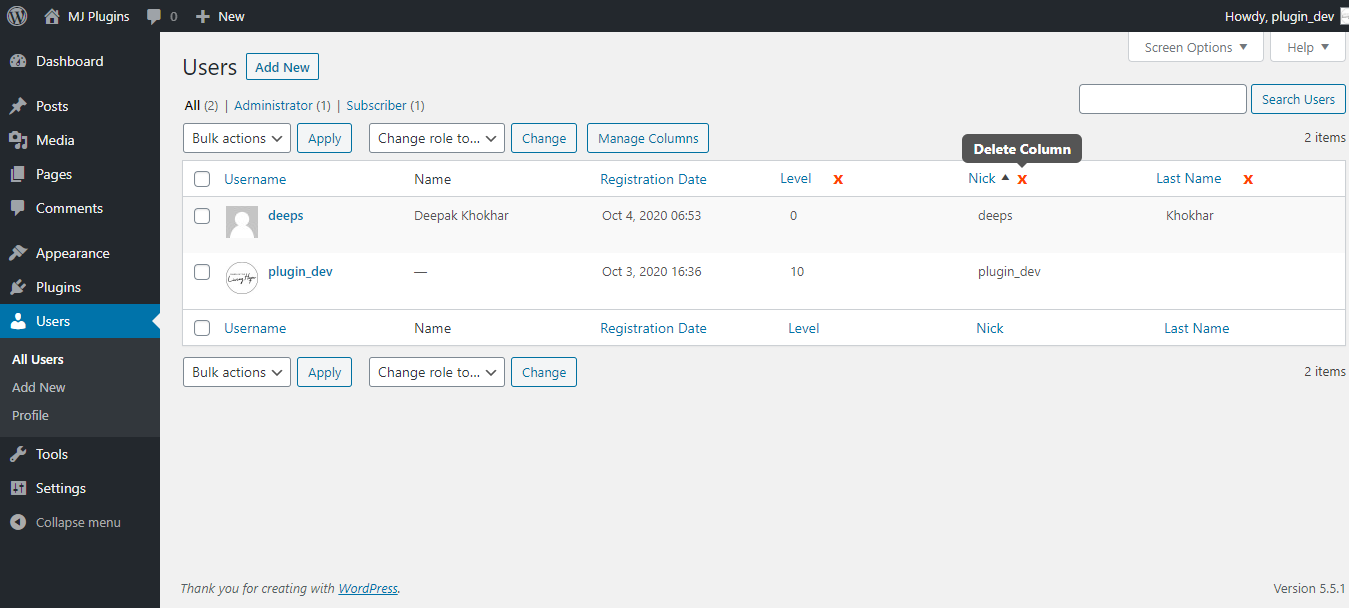
The new fields will be added as columns with other user information. All new columns will be sortable.
You can add default user fields like registration-date, custom fields added by other plugins or custom code, and remove any default or custom field from the Users list table.
Removing columns will not delete any user data. So, you are safe to toggle between these columns.
This plugin adds a new column “Registration Date” as a default column which you can enable/disable easily.
Want to filter the users too? Check this addon
Features
-
Add new columns to the Users list page in WordPress admin area.
-
Shows the user registration date with a sortable column.
-
Remove any default or newly added columns from the users page easily.
-
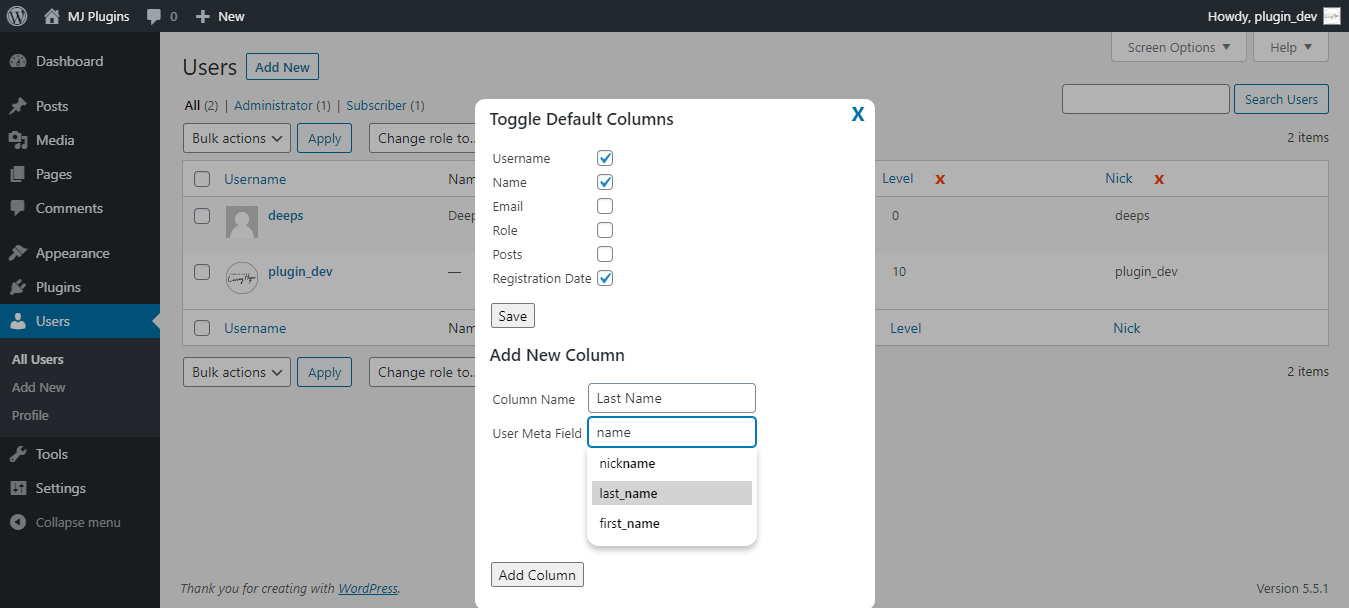
Add custom columns based on the user meta information stored in database added by custom code or 3rd party plugin.
-
All new columns will be sortable.
-
Unlimited custom columns – You can add as many custom user columns as you want. There is no restrictions.
-
All plugin configuration is on the users page itself with easy interface.
-
Searchable text box when adding a new column so you can select the correct value.
-
Array values will be displayed as simple text separated by a comma.
-
For advanced developers – Filter for modifying the column value. Use add_filter( ‘muc_filter_custom_col_val’, ‘YOUR_CUSTOM_CALLBACK_FUNCTION’, 10, 3 ); (NEW)
-
Add Filters on the users page itself.
-
Add Custom filters as you want.
-
Works with the free manage user columns plugin.
-
Different Filter types – Textbox, dropdown, and exist/blank.
-
Default filters – username, email, Registration Date, Role.
-
Example – Filter your users based on Roles and registered between a range of dates.
-
Supports Meta keys to create custom filter.
Installation
You can install the Plugin in two ways.
WordPress interface installation
- Go to plugins in the WordPress admin and click on “Add new”.
- In the Search box enter “Manage User Columns” and press Enter.
- Click on “Install” to install the plugin.
- Activate the plugin.
Manual installation
- Download and upload the plugin files to the /wp-content/plugins/manage-user-columns directory from the WordPress plugin repository.
- Activate the plugin through the “Plugins” screen in WordPress admin area.
Frequently asked questions
How do I configure the user columns?
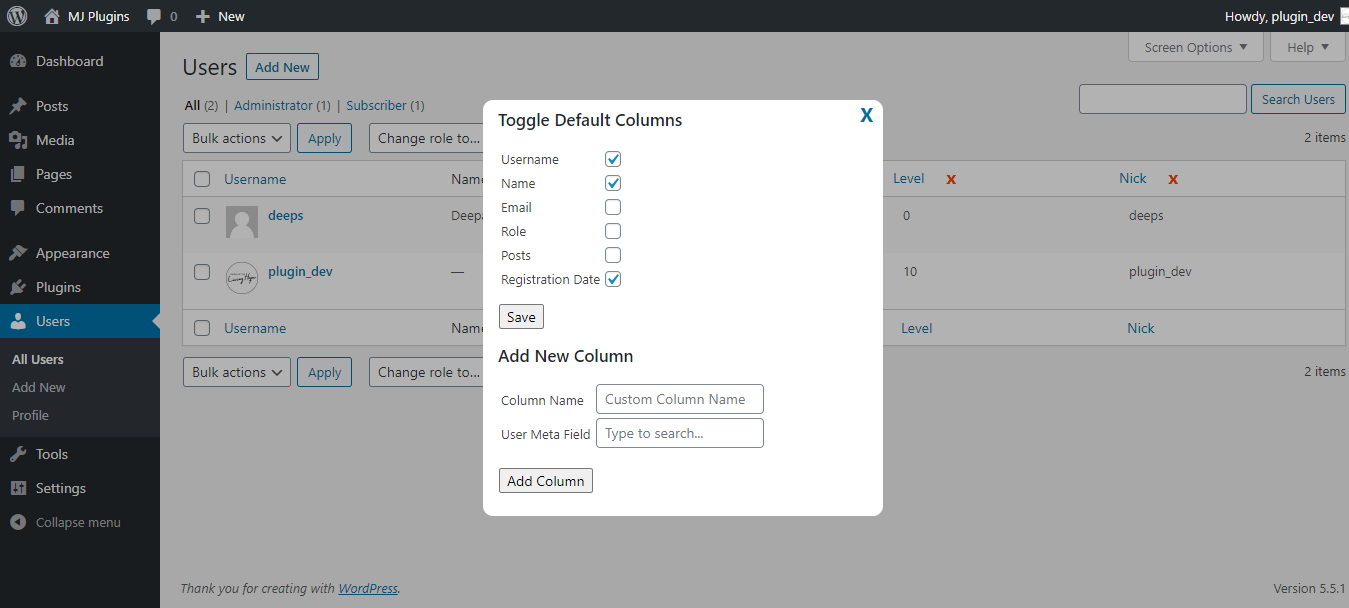
To keep it simple, the plugin doesn’t have any separate settings page. You can simply go to the users page after activating the plugin. You will find a “Manage Columns” button. Clicking on this button will open a popup where you manage the columns.
Are the columns sortable?
Yes, all new columns that you add are sortable by default.
How do I hide default columns?
To remove default columns, simply uncheck the checkbox next to each default columns and click save button.
How do I remove newly added columns?
You can simply click on the red colored delete (x) icon next to each custom column that you want to remove.
How many user columns can I add or remove?
You can add as many user columns as you want and remove any default column. There is no restrictions.
Can I add Filters to search users?
You can add filters with the PRO version.
Changelog
1.0.7
- 2026-06-19
- Fixed remove icon not showing issue.
1.0.6
- 2024-10-18
- Improved security checks.
1.0.5
- 2023-08-16
- Added support for custom value in a column instead of usermeta using apply_filter.
1.0.4
- 2021-12-30
- Fixed tooltip icon appearing issue due to conflict with other plugins styling.
- Fixed popup not closing issue.
1.0.3
- 2021-09-11
- Fixed warning for empty values on first setup.
1.0.2
- 2021-09-08
- Fixed a reported bug where sorting doesn’t work for custom added columns.
- Tested with latest WP version 5.8
Screenshots
For developers
Is this your plugin? Show off the numbers.
Add a live badge to your site, docs or GitHub README. It updates on its own — no account needed.
Best Manage User Columns alternatives
All columns plugins →


FAQ
Manage User Columns: quick answers
Straight answers, pulled from live WordPress.org data.
Live data from WordPress.org · checked Sep 27, 2026
Is Manage User Columns free?
Yes. Manage User Columns is free to download and use from the official WordPress.org plugin directory.
Is Manage User Columns safe to use in 2026?
Manage User Columns is a solid plugin choice in 2026, with a few things worth checking first. It runs on 1K+ sites, is rated 4.2/5 and was last updated 3 months ago, and scores 68/100 on our health check.
How many websites use Manage User Columns?
Manage User Columns is active on 1K+ WordPress websites and has been downloaded 23,061 times since it launched in October 2020. It was downloaded 397 times in the last 30 days.
Does Manage User Columns work with WordPress 7.1?
Manage User Columns is officially tested up to WordPress 7.0.6, while the latest release is 7.1.2. It may still work, but try it on a staging site first.
What PHP version does Manage User Columns need?
Manage User Columns requires PHP 7.4 or higher. Most hosts run PHP 8.x today, so it works on any modern WordPress hosting.
When was Manage User Columns last updated?
The latest version, 1.0.7, was released on June 19, 2026 (3 months ago).
Who makes Manage User Columns?
Manage User Columns is developed and maintained by Deepak Khokhar.
What are the best alternatives to Manage User Columns?
The most popular alternatives to Manage User Columns are Admin Columns (100K+ installs), Column Shortcodes (60K+ installs) and ACF Quick Edit Fields (30K+ installs).
Powered by PageForge
Want thousands of pages that rank like these? Build them in an afternoon.
This directory runs on the same engine as PageForge. Turn any spreadsheet, CSV or API into thousands of fast, SEO-ready WordPress pages — with schema, internal links and AI-written copy baked in.
- CSV, Google Sheets & API data sources
- AI content, schema & internal links per page
- Works with Elementor, Gutenberg, Yoast & Rank Math
- Free on WordPress.org — no credit card


