



LLMagnet – AI Visibility & AI SEO for Claude, ChatGPT & More
Make your WordPress site visible to AI. Auto-generate llms.txt, track AI bot traffic, and optimize content for answer engines.

Safe pick
Yes — LLMagnet is a safe, well-maintained plugin to use in 2026. It runs on 500+ sites, is rated 5/5 and was last updated 5 days ago, and scores 86/100 on our health check.
- Actively developed — last update 5 days ago
- Tested with the latest WordPress (7.1)
- Small user base (500+ active installs)
How does it stack up?
Side-by-side on installs, updates, ratings & support



Daily downloads
Download spikes usually follow a new release — each site that auto-updates counts as a download.
Rankings
Where LLMagnet stands todayWordPress.org search rankings
Live position in the plugin search, top 100| Keyword | Position |
|---|---|
| agent | #68 |
| Claude | #13 |
| connector | #55 |
| llms.txt | #22 |
| seo | >100 |
Version adoption
Share of active sites per release.
Rating breakdown
★★★★★★★★★★ 5 from 6 reviews
About LLMagnet
From the official readme · v3.6.0Description
Demo: TasteWP
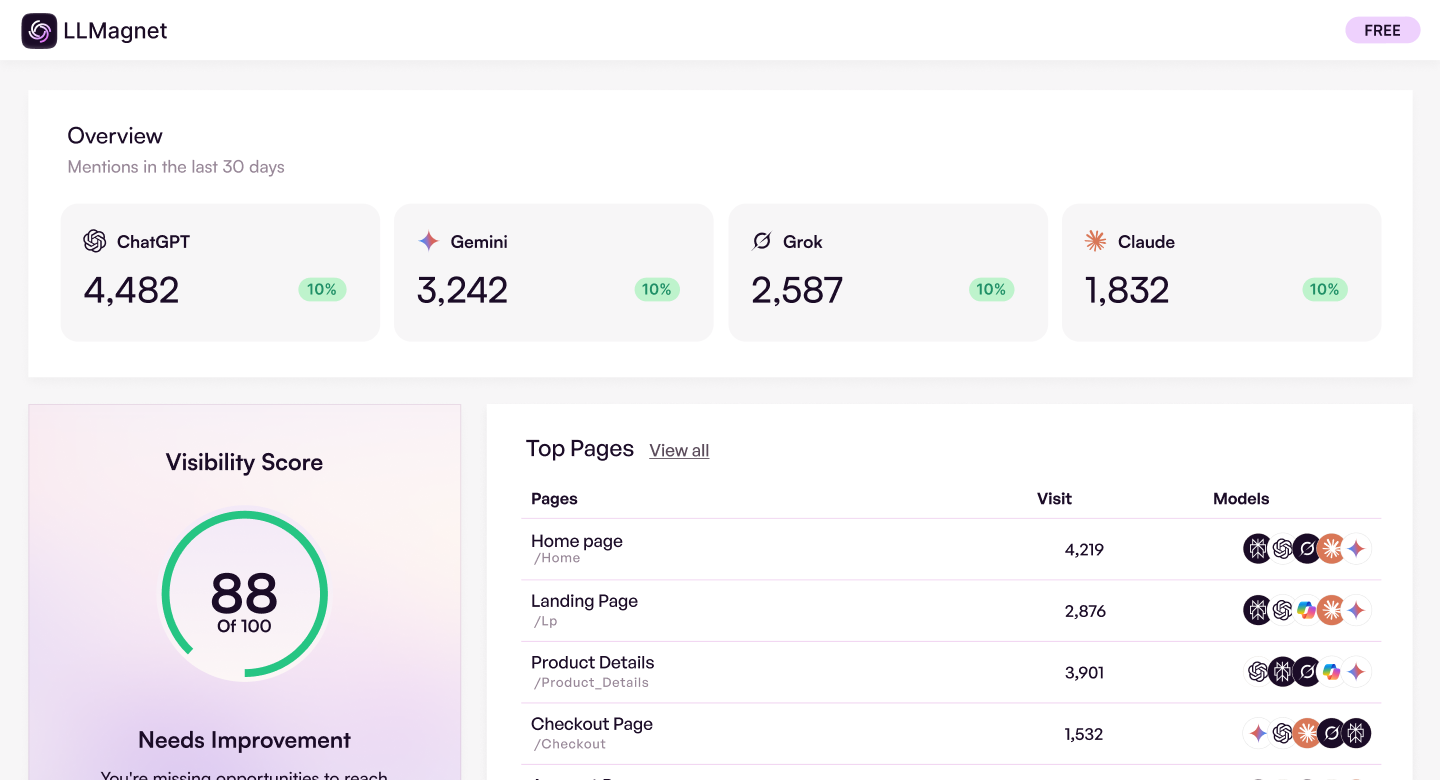
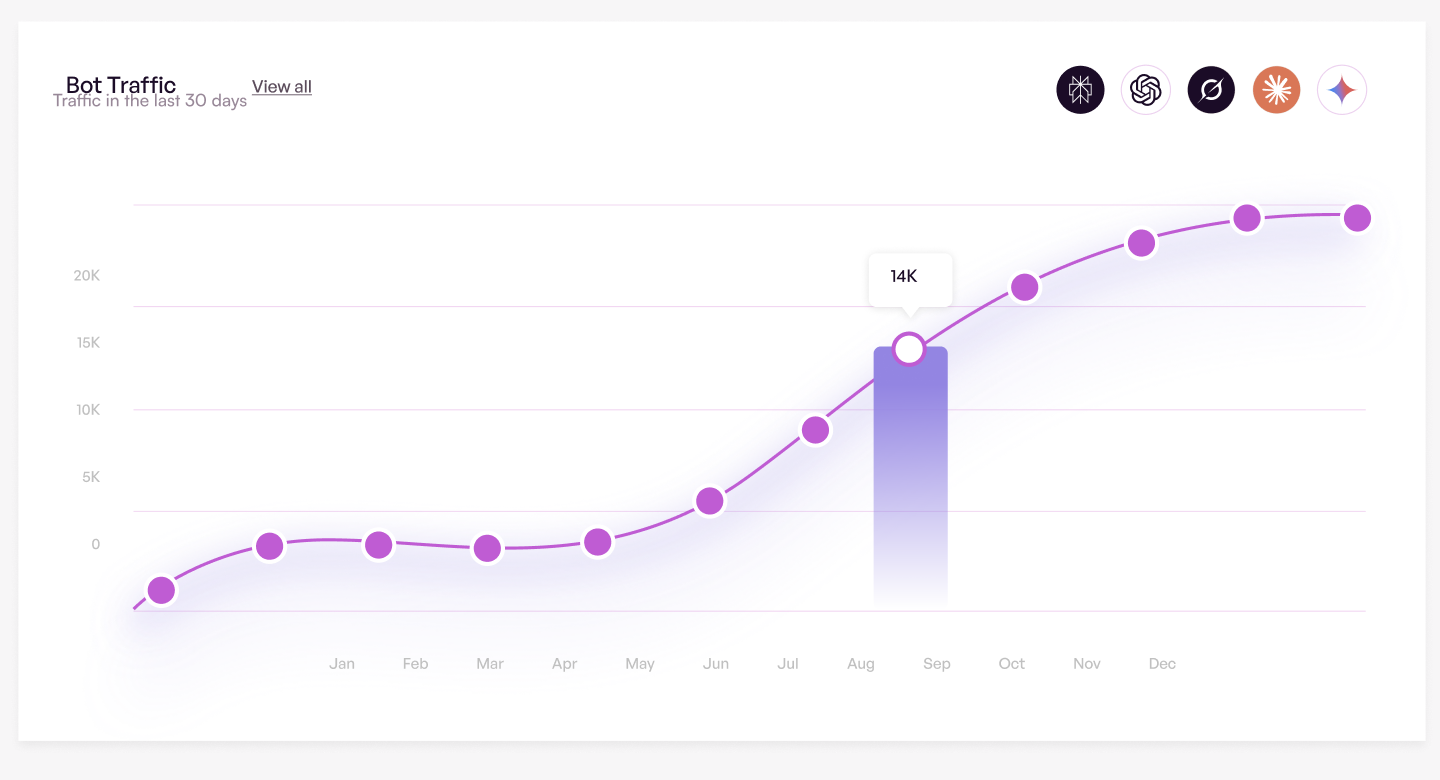
LLMagnet is AI analytics for WordPress. It tracks how often ChatGPT, Claude, Perplexity, and other AI engines crawl your site and send people back — then helps you raise that visibility for LLMs and agents.
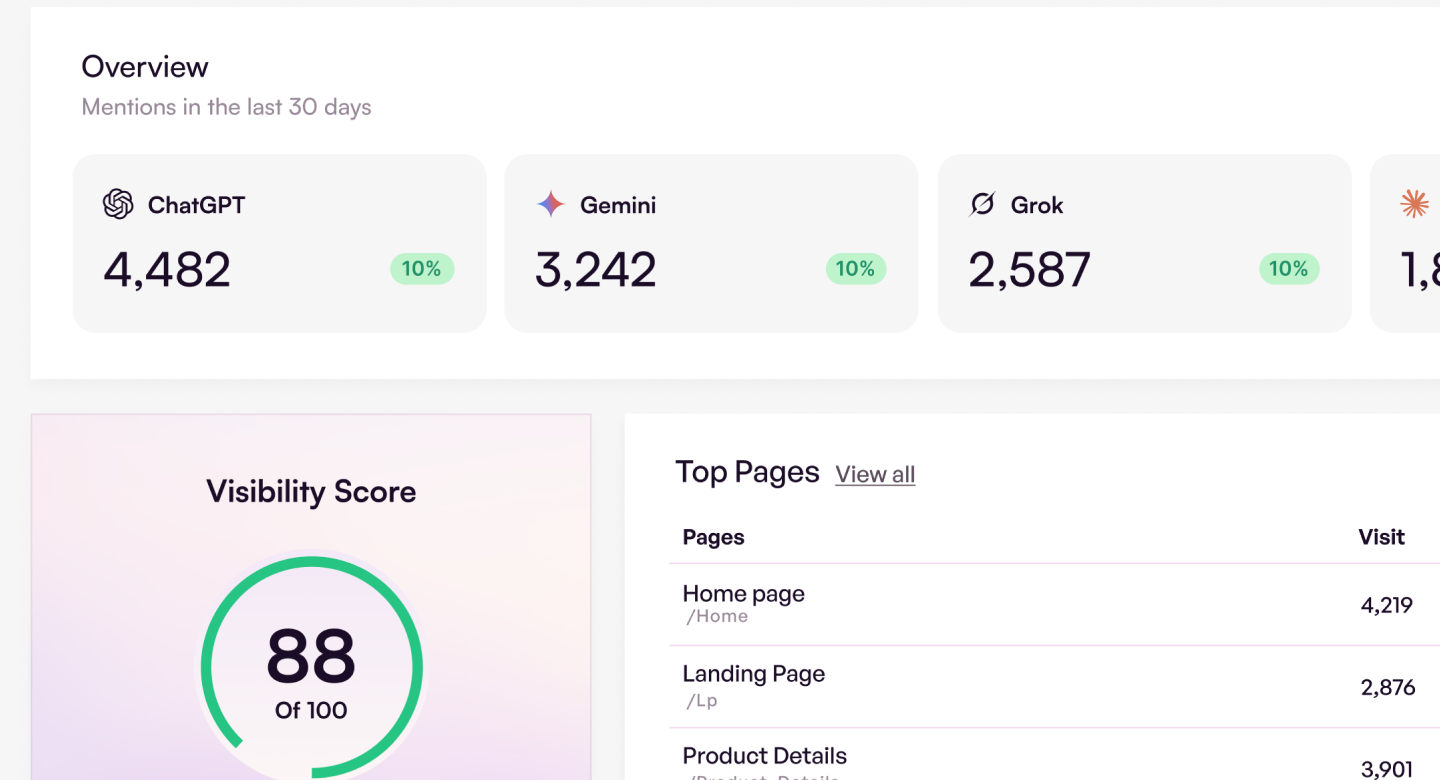
It puts the technical layer in place: /llms.txt, markdown, and the discovery files those systems expect. You see which pages they visited, get an AI Visibility Score, and get concrete suggestions to improve it.
Connect MCP and work with that data from Claude Code, Codex, Cursor, ChatGPT, and more.
Works with Rank Math, Yoast, and the rest of your SEO stack. Scores and recommendations sit inside Gutenberg and Elementor.
What’s in LLMagnet Pro
LLMagnet Pro is a separate plugin at llmagnet.com. Install it next to this one. This plugin stays fully functional without it. Pro adds:
* Schema – Scan, generate, and publish JSON-LD so search engines and AI can read the page
* WebMCP – The live in-page runtime so agents can use the site’s tools, not only discover them
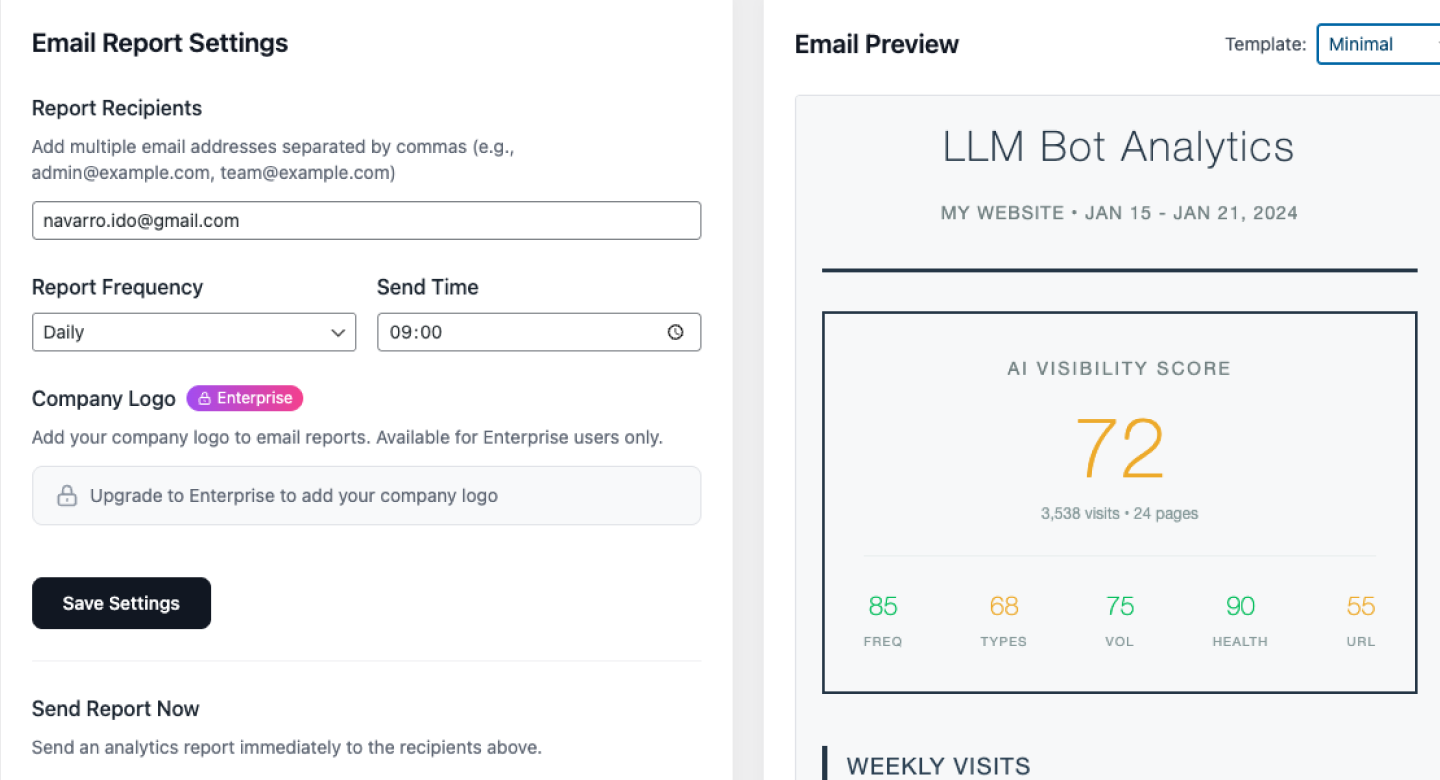
* Reports – Scheduled email reports and alerts when AI traffic changes
* WooCommerce – Catalog discovery for agents (no cart or checkout) and product-level AI analytics
* Images – Image export in llms.txt, plus ALT text help
* One-click fixes – Apply Agent Ready repairs from the audit instead of doing them by hand
How It Works
- Install & Activate – LLMagnet starts working immediately with guided onboarding
- Configure Content – Choose which post types to include
- Auto-Generation – llms.txt and llms-full.txt are served dynamically at /llms.txt and /llms-full.txt; markdown at {permalink}.md
- Track AI Visits – See which bots discover your content
- Connect Google (optional) – Link GA4 and Search Console to see AI referral traffic and search queries
- Follow Recommendations – Get actionable suggestions to improve AI visibility
SEO Plugin Compatibility
LLMagnet works seamlessly alongside your existing SEO setup:
* Rank Math & Yoast SEO – Excludes noindex posts from llms.txt, llms-full.txt, and markdown exports when those plugins mark content noindex
* Smart robots.txt Management – Registers llms.txt (and llms-full.txt when generation is enabled)
* Elementor Editor Integration – AI visibility scores in the Elementor editor. Per-page JSON-LD schema fields ship with LLMagnet Pro
* No conflicts with your current SEO workflow
Agent Ready
LLMagnet sets up the layer agents need to find, read, and use your site:
* Well-known discovery – agent-card.json, agent-skills, mcp.json, security.txt, and the API catalog
* WebMCP – /.well-known/mcp.json and agent skills so in-page agents can discover what the site can do
* Markdown endpoints – Clean {permalink}.md for every public page
* robots.txt & IndexNow – AI crawler rules, Content-Signal, and publish pings so engines recrawl faster
* Headers – Link headers for llms.txt and the agent card; optional security headers and Open Graph fill
* Agent Ready audit – A score with pass/warn/fail checks and suggested fixes
AIO / GEO / AEO Benefits
- AIO (AI Optimization) – Structured content that AI models can parse accurately
- GEO (Generative Engine Optimization) – Better representation in AI-generated answers
- AEO (Answer Engine Optimization) – Increased chances of being cited as a source
External services
The services below run only after an administrator connects, enables, or opts in. None of them run for anonymous site visitors. Bot logos are bundled. Usage analytics, product emails, and the news feed are separate opt-ins, all off by default.
Google (Analytics 4 & Search Console)
Used after you connect Google from Connections, so the dashboard can read AI referral and Search Console metrics you already have. The plugin sends OAuth requests to accounts.google.com and read-only API calls to googleapis.com / analyticsdata.googleapis.com / searchconsole.googleapis.com (sessions, landing pages, clicks, queries). Tokens stay encrypted on your site. Terms: https://policies.google.com/terms · Privacy: https://policies.google.com/privacy
IndexNow (api.indexnow.org)
Used after you enable IndexNow on Agent Ready, and only if Rank Math, AIOSEO, or Yoast Premium is not already pinging. On publish, update, or unpublish of included content, the plugin sends your host name, verification key, and changed public URLs (up to 500) to https://api.indexnow.org/indexnow so Bing and other IndexNow engines can recrawl faster. No visitor, post, or personal data. Terms: https://www.indexnow.org/terms · Privacy: https://privacy.microsoft.com/en-us/privacystatement · Engines: https://www.indexnow.org/
Agent Skills (schemas.agentskills.io)
Used after you enable Agent Skills discovery. The plugin serves /.well-known/agent-skills/index.json from your site and writes the public schema URL schemas.agentskills.io/discovery/0.2.0/schema.json into that file. Nothing is fetched from or sent to schemas.agentskills.io.
LLMagnet API (api.llmagnet.com)
Used for hosted Google OAuth (site URL, redirect URL, one-time tickets, and refresh tokens) and, after email opt-in, lifecycle contact/events. Production host is api.llmagnet.com; Google routes may fall back to llmagnet-api-server.vercel.app. Both are operated by LLMagnet. Terms: https://llmagnet.com/terms/ · Privacy: https://llmagnet.com/privacy-policy/ · Cookies: https://llmagnet.com/cookie-policy/
Brevo (via api.llmagnet.com)
Used after email opt-in (llmagnet_email_consent) for product lifecycle emails. The plugin posts admin email, site name, site URL, plugin version, onboarding status, and visibility score to api.llmagnet.com/lifecycle/* — never to api.brevo.com, and no Brevo key is shipped. Turning consent off sends an unsubscribe. Terms: https://www.brevo.com/legal/termsofuse/ · Privacy: https://www.brevo.com/legal/privacypolicy/
Mixpanel
Used after telemetry opt-in for in-plugin admin usage (page views, clicks, onboarding) plus plugin/WordPress versions, site language, and WooCommerce yes/no, identified by domain. Admin email and site URL are not sent. Session replay and autocapture are off. EU endpoint: api-eu.mixpanel.com. Terms: https://mixpanel.com/legal/terms-of-use/ · Privacy: https://mixpanel.com/legal/privacy-policy/
LLMagnet news feed (llmagnet-wp-news.vercel.app)
Used after news-feed opt-in (llmagnet_news_feed_consent) to load product news/promo JSON for administrators only. A generic GET with User-Agent: LLMagnet/{version} — no site URL, email, or identifiers. Images may load from *.public.blob.vercel-storage.com on LLMagnet admin screens. Turn off under System Information → Privacy & Data. Terms: https://llmagnet.com/terms/ · Privacy: https://llmagnet.com/privacy-policy/
Feedback
Used only when an administrator submits the in-plugin form. wp_mail sends the message to support@llmagnet.com; if diagnostics are enabled, also site URL, WordPress/PHP versions, user login/roles, active plugins, and table prefix.
Data on your server
AI bot logs (bot name, user-agent, path, timestamp) stay in wp_llm_bot_visits and wp_llm_bot_page_clicks and are never sent externally. Retention is llmagnet_data_retention_days (30, 90, 180, 365, or 0 = keep; default 365). This plugin does not set visitor cookies.
Installation
- Upload to
/wp-content/plugins/or install via Plugins → Add New - Activate LLMagnet
- Go to LLMagnet in your admin menu
- Configure your content settings and click Generate Now
- Verify at
https://your-site.com/llms.txt
Frequently asked questions
What is llms.txt?
llms.txt is an emerging standard (like robots.txt for search engines) that helps AI models understand your site structure and content.
Will this slow down my site?
No. Documents are built when requested and cached. There is no extra work on the public page for visitors.
Which AI bots can LLMagnet detect?
ChatGPT, Claude, Perplexity, Gemini, Grok, Bing AI, Mistral, DeepSeek, Llama, and more — 25 bots in total. All of them are detected, logged, and reported by name.
How many pages does the free version list?
All of them. The Pages screen lists every page that received AI bot traffic in the selected window.
Does LLMagnet work with the WordPress Abilities API / MCP?
Yes. On WordPress 6.9+ LLMagnet registers its analytics and llms.txt tools as WordPress abilities (under the llmagnet category). Install the official MCP Adapter plugin to let AI assistants like Claude securely query your AI SEO data using an Application Password. On older WordPress versions the plugin works normally; abilities are simply unavailable.
Do I need WooCommerce?
No. Core features work on any WordPress site. WooCommerce commerce analytics and UCP catalog discovery are part of the separate LLMagnet Pro add-on and also need WooCommerce to be active.
How is the site Visibility Score calculated?
It scores published content for AI crawler readiness (headings, meta description, length, image ALT coverage, and related checks). WooCommerce product visibility scores are part of the separate LLMagnet Pro add-on.
Which languages does the admin interface support?
LLMagnet ships bundled translations for the plugin admin dashboard (menus, settings screens, React admin UI, and related notices). Supported locales: Hebrew (he_IL), Arabic (ar), and Spanish (Spain) (es_ES). Set your site language under Settings → General → Site Language; WordPress loads the matching translation files automatically. Brand names (LLMagnet) and technical terms (llms.txt, MCP, JSON-LD, product names, and similar) are kept in English. Additional languages can be contributed via the WordPress.org translation project or by adding custom .mo and .json files to the plugin’s…
Does the plugin support WordPress multisite?
Yes. llms.txt, llms-full.txt, and markdown are served by WordPress for each site. The plugin does not write those files into a shared site root.
Why is there no physical llms.txt file in my site root?
LLMagnet serves /llms.txt and /llms-full.txt through WordPress. Markdown is served at {permalink}.md. A physical llms.txt already in the site root, including one written by another plugin, is left in place and is what the web server serves. Older versions of this plugin remove files they created, once, during upgrade.
Changelog
llms.txt and llms-full.txt are now served by WordPress instead of being written into the site root. llms-full.txt is included in this plugin. Account and pricing screens are no longer part of this build.
3.6.0
- llms.txt and llms-full.txt are served by WordPress at /llms.txt and /llms-full.txt. Markdown is served at each public permalink with a .md suffix. The plugin no longer writes those files into the site root.
- llms-full.txt is part of this plugin. Turn it on from LLMs.txt.
- Removed the in-admin account, pricing, and add-on screens from this build.
- Multisite can be activated. Each site is served its own documents.
- Admin bundles include a source comment. Human-readable React source remains under src/.
- Hardening: request values from the web server are sanitized before use.
- Reports: the Reports screen is not part of this plugin. Scheduled email reports are registered by LLMagnet Pro. PDF download of bot and page analytics stays on those screens.
3.5.3
- Security: lifecycle contact and event posts go to api.llmagnet.com only after telemetry opt-in; this plugin no longer fetches or stores a vendor Brevo key
- Privacy: malformed retention values can no longer become 0 (keep forever)
- Commerce: WooCommerce conversion tracking and the attribution cookie live only in the LLMagnet Pro add-on
- Agent Ready: toggle and auto fixes that this plugin owns run here; llms-full.txt and schema stay as manual guidance
- Reports: scheduled email settings live in Pro; PDF download stays in this plugin
- Admin: trial promotion is removed from the WordPress.org build; bot logos ship as plugin assets (generic agents use the bundled AI mark)
- Privacy: news and promo feeds stay off until an administrator approves loading them from the external source
- Docs: Pro extras are listed only under What’s in LLMagnet Pro; feedback goes to support@llmagnet.com
3.5.2
- Analytics: the free plugin now reports every detected AI bot by name and lists every page with AI traffic — the previous free-plan reporting limits (3 named bots, top 5 pages) are removed entirely
- Exports: any public post type can be included in llms.txt and markdown exports on the free plan
- UI: locked-looking upgrade controls replaced with clearly-labelled promotional notices for the separate Pro add-on
- Copy: trial and Pro notices mention only add-on features (llms-full.txt, schema JSON-LD, scheduled reports) — not analytics
- License: the in-plugin license screen lives in the Pro add-on; the free plugin no longer registers it
- Agent Ready: the one-click fix REST route is registered by Pro only; the get_agent_readiness MCP tool is available on every plan
- MCP: send_report_email, product AI stats, and the AI revenue funnel are registered by the Pro add-on only
- Privacy: news/promo feed requests use a generic plugin user-agent (no site URL); admin-screen feed loads are documented
- Trial: the first licensing notice uses the default 24-hour delay
- Privacy: onboarding telemetry is an explicit choice — Share usage data or Continue without sharing — and stays off unless you opt in
- Docs: added IndexNow and LLMagnet Terms of Use to External services; removed a stale repository link from the Source code section
- Source: the human-readable TypeScript/React source (
src/) and build tooling now ship inside the plugin
3.5.0
- Paid features now live in a licensed Pro runtime instead of being gated inside the free build. See What’s in LLMagnet Pro for the full split
- Free keeps: llms.txt, markdown exports, full bot analytics for all 25 crawlers, visibility score, agent-readiness audit, GA4 + Search Console, MCP read co-pilot, Elementor integration
- Pro adds: llms-full.txt, images and ALT text in exports, Schema JSON-LD scan/generate/publish, WebMCP, one-click audit fixes, scheduled reports and event alerts
- Plus adds: WooCommerce commerce analytics, UCP catalog discovery, and commerce schema
- Detection and logging remain uncapped on every plan, so your existing bot history stays complete when you upgrade — nothing is held back on the free plan
- Screens for Pro features show a promotional panel instead of blurred or placeholder data
3.4.8
- WordPress.org compliance: all local features (llms-full.txt, agent-readiness, one-click fixes, commerce analytics, UCP, email reports) are fully available without a paid license gate
- Privacy: Brevo API key provisioning no longer runs on activation or init — only after explicit telemetry opt-in
- Privacy: “Powered by LLMagnet” credit in report emails is opt-in and off by default
- Assets: Chart.js and fonts are bundled locally; removed remote CDN and Fontshare loads
- Admin: dashboard widget no longer loads the full React stylesheet on wp-admin/index.php (prevents admin layout bleed)
- Docs: added Source code and External services sections to readme.txt
- Maintenance: bundled libraries updated
3.4.7
- New: Connections — sign in with Google Analytics 4 and Search Console, pick a property, and see live traffic plus search queries
- New: Never visited filter on Pages and Products — find published content AI bots have not visited in the last 7, 30, or 90 days
- New: UCP catalog discovery (Plus/Ultra + WooCommerce) — agents can search and look up products; no cart, checkout, or payments
- Fix: noindex posts stay out of llms.txt, llms-full.txt, llms-docs, and MCP markdown (Yoast, Rank Math, All in One SEO, SEOPress, The SEO Framework)
- Fix: Connections no longer hangs after Google sign-in; pick a property from a searchable list, and disconnect anytime
- Tweak: Enterprise plan is now called Ultra
- Tweak: lifecycle emails and product analytics stay off until you opt in to sharing
Screenshots



For developers
Is this your plugin? Show off the numbers.
Add a live badge to your site, docs or GitHub README. It updates on its own — no account needed.
Best LLMagnet alternatives
All agent plugins →





FAQ
LLMagnet: quick answers
Straight answers, pulled from live WordPress.org data.
Live data from WordPress.org · checked Oct 4, 2026
Is LLMagnet free?
Yes. LLMagnet is free to download and use from the official WordPress.org plugin directory.
Is LLMagnet safe to use in 2026?
Yes — LLMagnet is a safe, well-maintained plugin to use in 2026. It runs on 500+ sites, is rated 5/5 and was last updated 5 days ago, and scores 86/100 on our health check.
How many websites use LLMagnet?
LLMagnet is active on 500+ WordPress websites and has been downloaded 8,308 times since it launched in August 2025. It was downloaded 1,404 times in the last 30 days.
Does LLMagnet work with WordPress 7.1?
Yes. The developer has tested LLMagnet up to WordPress 7.1.2, the latest release. It requires WordPress 6.0 or newer.
What PHP version does LLMagnet need?
LLMagnet requires PHP 7.4 or higher. Most hosts run PHP 8.x today, so it works on any modern WordPress hosting.
When was LLMagnet last updated?
The latest version, 3.6.0, was released on September 29, 2026 (5 days ago).
Who makes LLMagnet?
LLMagnet is developed and maintained by llmagnet.
What are the best alternatives to LLMagnet?
The most popular alternatives to LLMagnet are AI Agent by SiteGround (1M+ installs), Angie – Agentic AI (100K+ installs) and Essential Real Estate (7K+ installs).
Powered by PageForge
Want thousands of pages that rank like these? Build them in an afternoon.
This directory runs on the same engine as PageForge. Turn any spreadsheet, CSV or API into thousands of fast, SEO-ready WordPress pages — with schema, internal links and AI-written copy baked in.
- CSV, Google Sheets & API data sources
- AI content, schema & internal links per page
- Works with Elementor, Gutenberg, Yoast & Rank Math
- Free on WordPress.org — no credit card


