


Linktrade Monitor: Backlink Tracker for Link Exchanges
Backlink monitor for link exchanges: emails you when a partner removes your link or adds nofollow. Your partner list stays on your server, no account.

Solid choice
Linktrade Monitor: Backlink Tra… is a solid plugin choice in 2026, with a few things worth checking first. It runs on 10+ sites and was last updated 1 week ago, and scores 66/100 on our health check.
- Actively developed — last update 1 week ago
- Tested with the latest WordPress (7.1)
- Small user base (10+ active installs)
- Very few reviews so far
How does it stack up?
Side-by-side on installs, updates, ratings & support

Daily downloads
Download spikes usually follow a new release — each site that auto-updates counts as a download.
Rankings
Where Linktrade Monitor: Backlink… stands todayWordPress.org search rankings
Live position in the plugin search, top 100| Keyword | Position |
|---|---|
| backlink checker | #5 |
| backlink manager | #9 |
| backlink monitor | #6 |
| link exchange | #24 |
| reciprocal links | #5 |
Version adoption
Share of active sites per release.
About Linktrade Monitor: Backlink Tracker for…
From the official readme · v1.4.1Description
A link exchange is easy to agree and easy to forget. Months later the partner has redesigned, the link is gone or quietly carries rel="nofollow", and nobody notices. The same happens on your own side: a relaunch drops the link you promised, and the partner finds out before you do.
Linktrade Monitor is a backlink monitor built for link exchanges, paid links and guest posts. Add the partner page once. The plugin then checks every week whether their link to you is still there, whether it turned nofollow or sponsored, whether the page went noindex, and whether your link to them is still live. When something changes, you get one email with all changes.
Your link partners stay on your server
Most backlink monitors are online services. You open an account, enter every partner, the deal you made and the price you paid, and that list then lives on the provider’s servers. Linktrade Monitor works the other way round. It is a plugin, and everything you enter is stored in your own WordPress database.
- No account, no API key, no subscription. Install it and start.
- One kind of outgoing request. To check a link, your server fetches the partner page you entered (and, for exchanges, your own page), the same way a browser does. Nothing else is sent anywhere.
- Reports stay with you. Emails go to the address you set, through your site’s own mail setup.
- Your deals are your business. Partners, agreements, prices and notes are visible to people who can log into your WordPress, and you decide who that is.
- In and out by CSV. Import an existing list, export everything at any time. Deleting the plugin removes its tables.
- Check it yourself. The source code is public on GitHub.
What it does
- Checks both directions. Their link to you and your link to them, in one row.
- Weekly automatic check. In small portions, so it also finishes on small hosting plans. The dashboard shows when the next check runs and when the last one finished.
- Email when something changes. One summary per check: link removed, now nofollow, now sponsored, page now noindex, your own link missing, link back again.
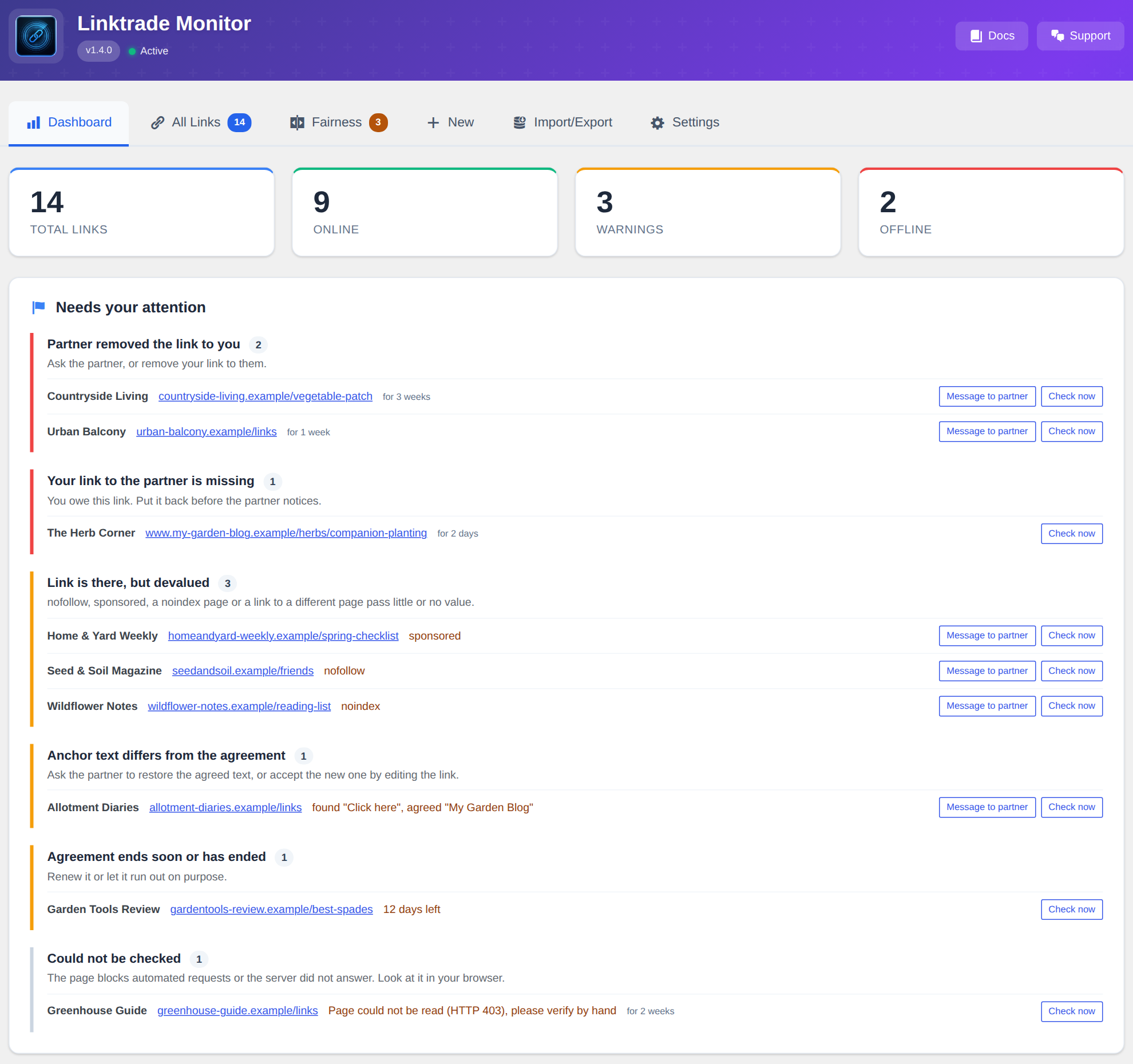
- Needs your attention. The dashboard lists what to act on, grouped by what to do: partner removed the link, your link is missing, link devalued, agreement ending, page could not be checked.
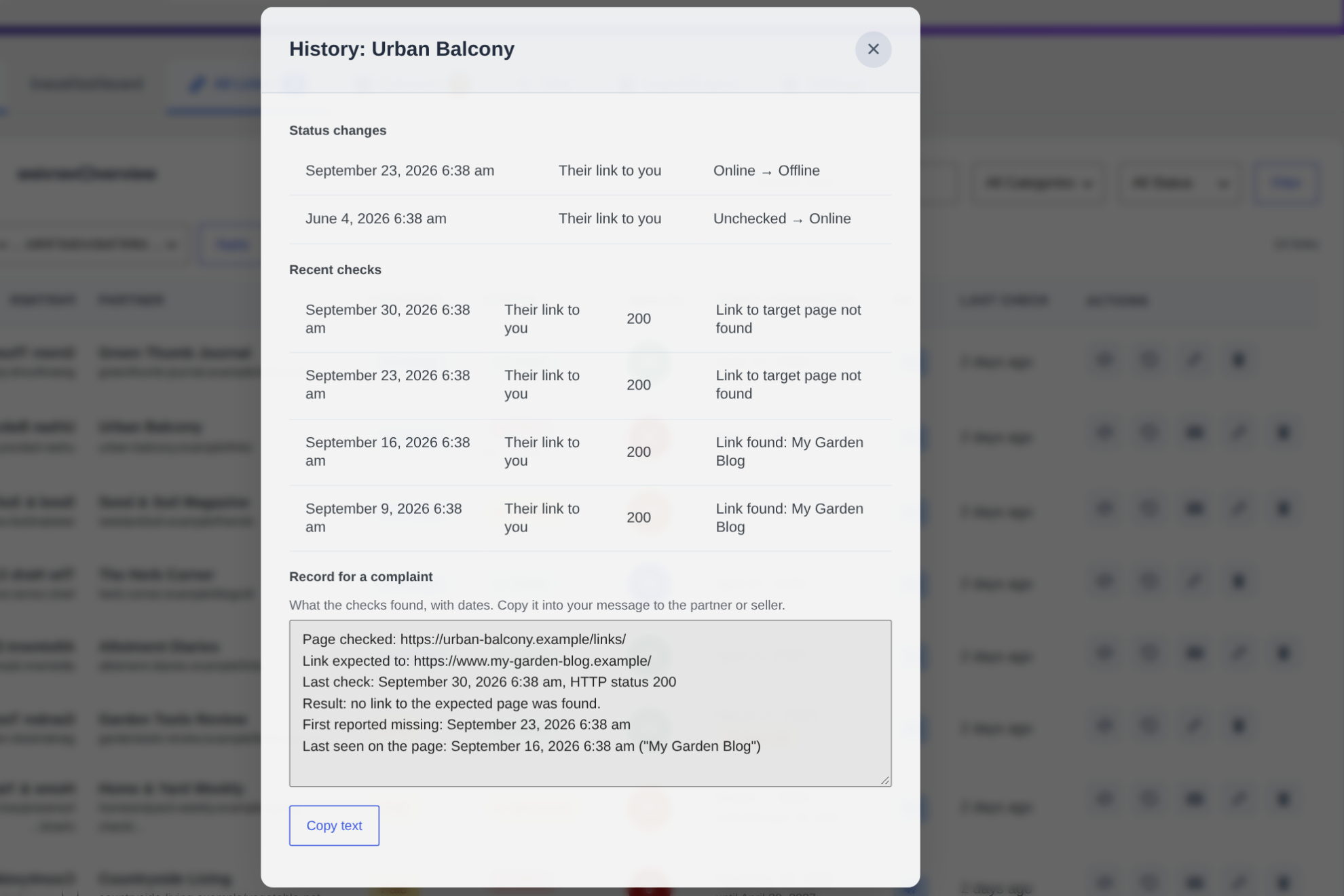
- History. Every check and every status change is recorded, so you can say since when a link has been gone.
- Check now. A button per link, and a new check whenever you change an address.
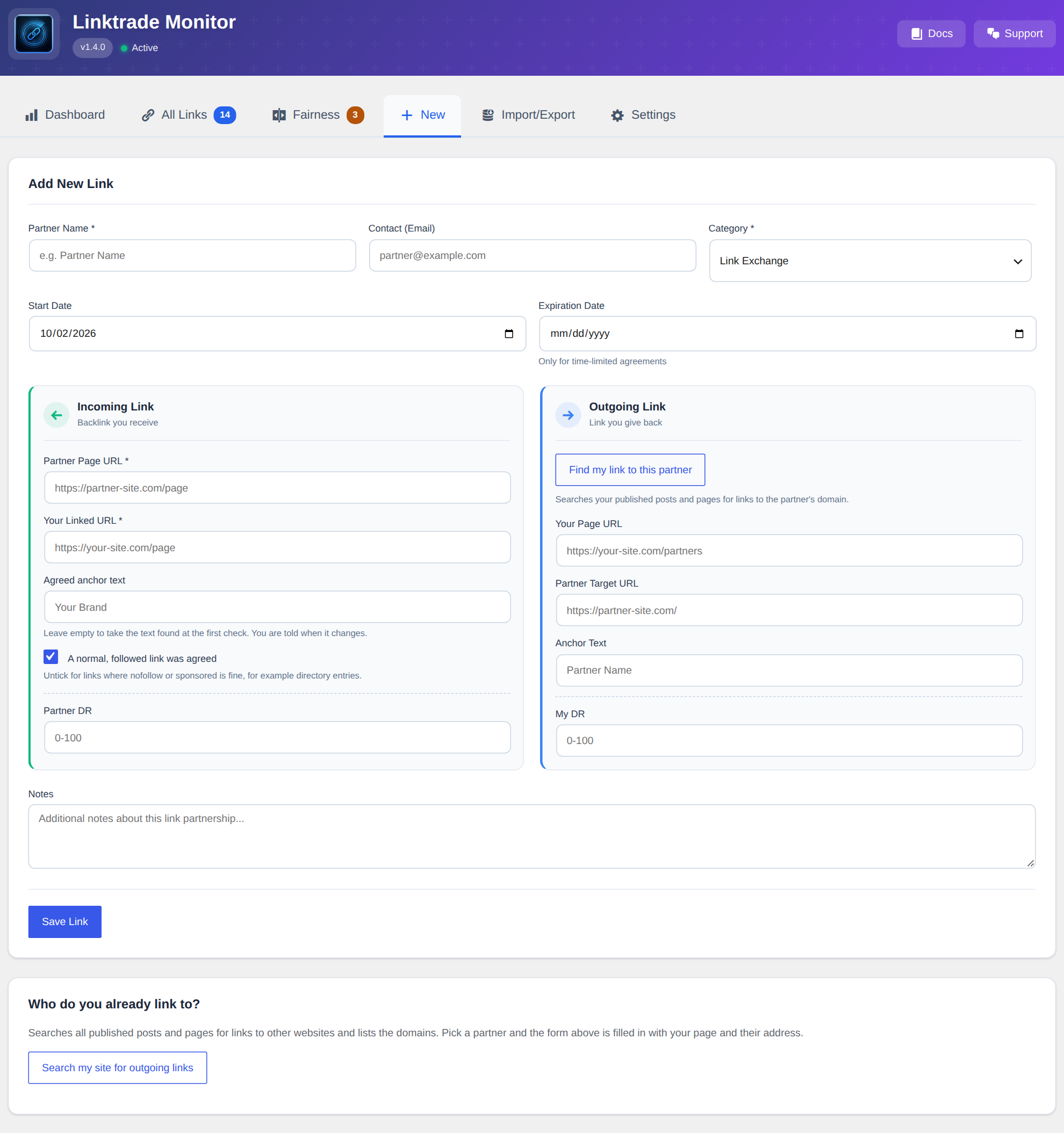
- Finds your own links. Enter the partner page and the plugin searches your published posts and pages for links to that domain.
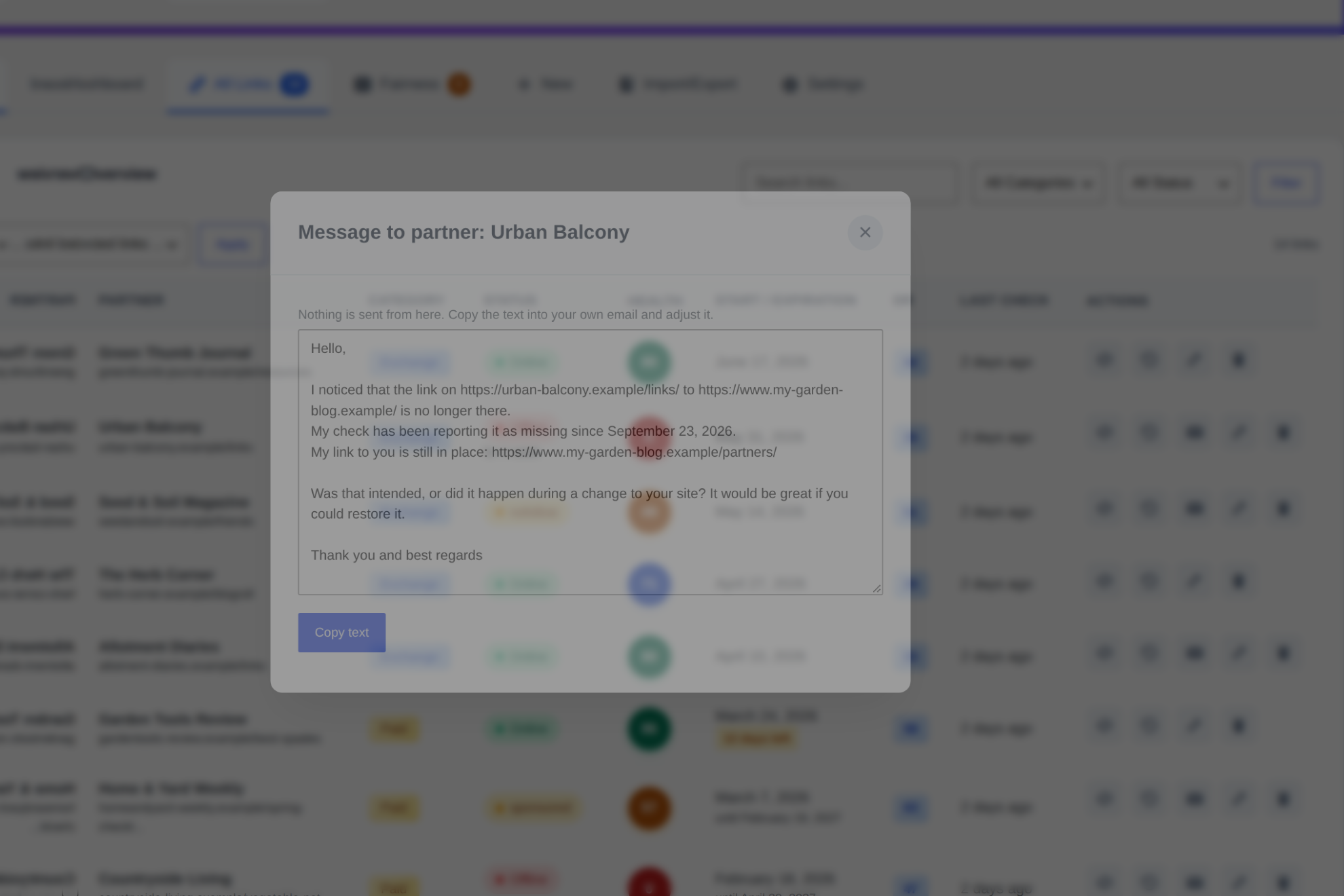
- Message to the partner. A ready-to-copy text that states what was found and since when. Nothing is sent automatically.
- Keeps the agreement. Store the agreed anchor text and whether a followed link was promised. You are told when the page no longer matches.
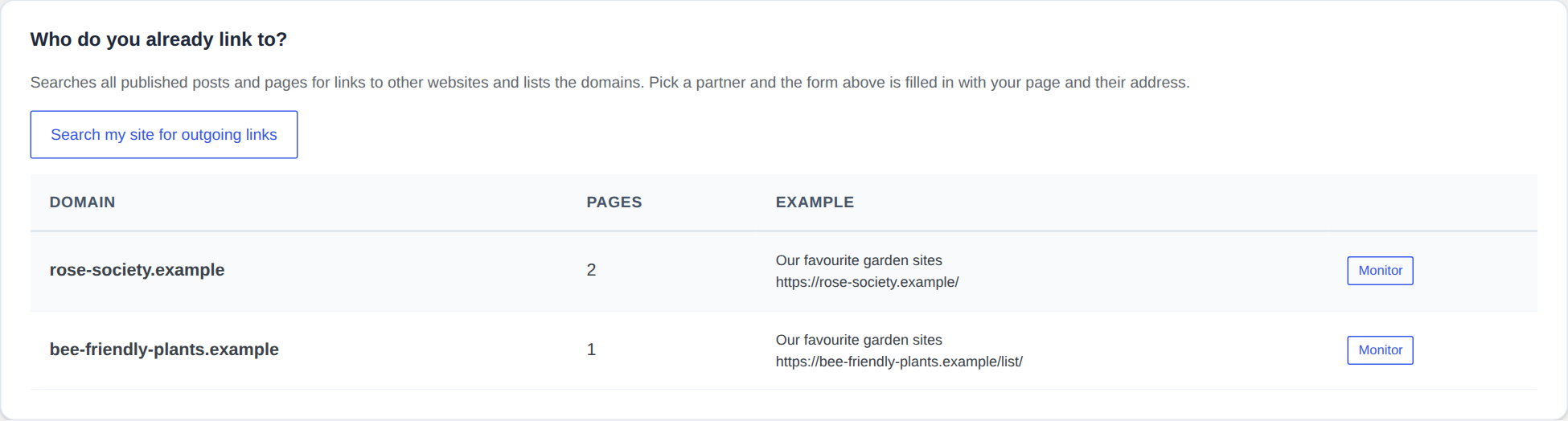
- Shows who you already link to. One search over your whole site lists the outside domains, ready to be turned into monitored partners.
- Record for a complaint. Dates, status code and the last anchor seen, ready to copy when a paid link has vanished.
- Counter in the menu and a dashboard widget, so you see open issues without opening the plugin.
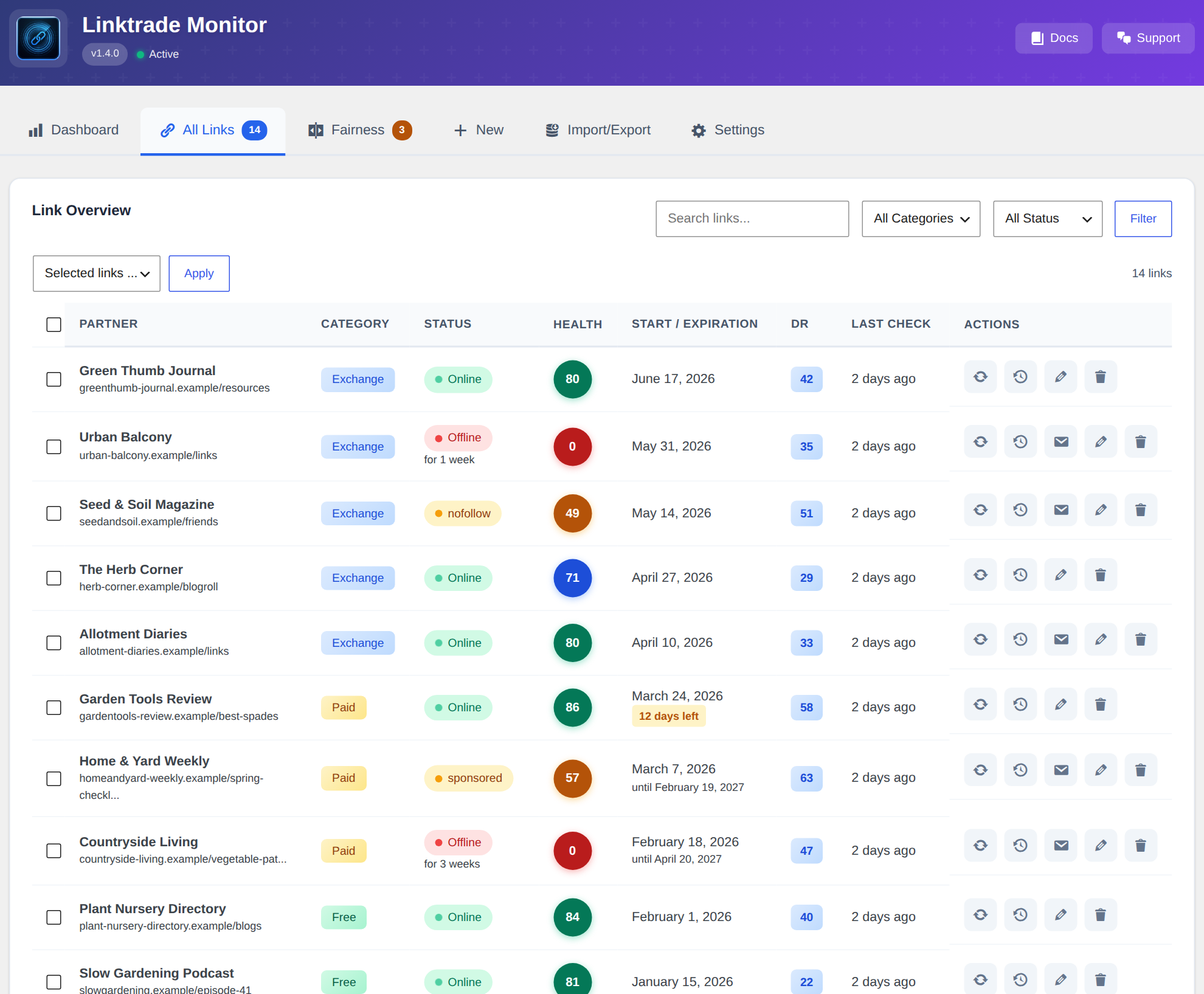
- Large lists. Pages of 50, sortable columns, search, and actions for several links at once.
- Command line.
wp linktrade checkandwp linktrade statusfor sites with a real cron job. - Privacy tools. Partner contact addresses are covered by the WordPress export and erase requests.
- No false alarms. A page that blocks automated requests, times out or answers with a server error is reported as “not verifiable”, never as “link removed”.
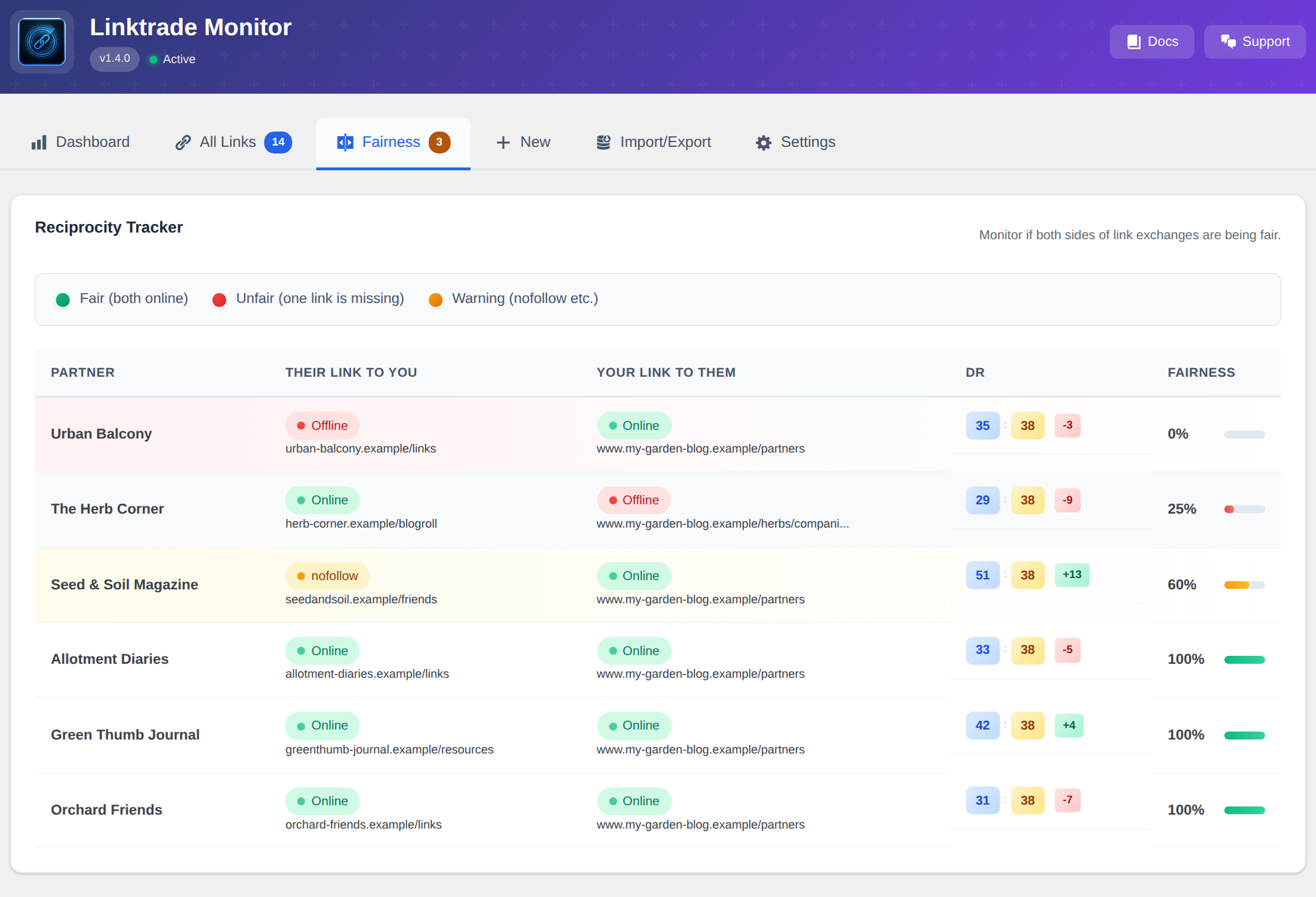
- Fairness Score for exchanges, expiry reminders for paid and time-limited links, Domain Rating fields, notes, CSV import and export.
- Site Health entry. WordPress tells you if the automatic check cannot run.
What it detects
- Link removed, or pointing to a different page of your site
rel="nofollow",rel="sponsored",rel="ugc"- Page-wide
noindex,nofollowandnonein the robots meta tag, the googlebot meta tag and the X-Robots-Tag header - Redirected partner pages, shown with the address they lead to
- Pages that only build their content with JavaScript, reported as “not verifiable” instead of “removed”
- Pages that cannot be read (bot protection, rate limits, server errors), shown separately
Who it is for
- Website owners and bloggers who exchange links
- SEOs who buy links or place guest posts and want to know they are still there
- Agencies that keep link agreements for a site
Languages
English and German. The plugin follows the language of your WordPress site.
Pro version
The free plugin is complete for one website. Linktrade Monitor Pro is for people who manage several sites or buy links regularly:
- Daily or hourly checks and “check all now”
- Projects: links of several websites in one installation
- Partners with several deals, mixed packages
- Cost and value overview for paid links
- Anchor text distribution, tags
Installation
- Upload the plugin files to
/wp-content/plugins/linktrade-monitor/ - Activate the plugin through the ‘Plugins’ menu in WordPress
- Go to ‘Linktrade’ in your admin menu
- Start adding your backlinks!
Frequently asked questions
How often are links checked?
Every link is checked when you add it and whenever you change one of its addresses. After that all links are checked once a week, a few at a time. You can also check a single link at any moment with the “Check now” button.
Will I be notified when a link disappears?
Yes. After each weekly check you get one email that lists every change: links that were removed, turned nofollow or sponsored, pages that went noindex, your own links that are missing, and links that came back. If nothing changed, no email is sent, unless you switch on the weekly summary in the settings.
The check says “Not verifiable”. What does that mean?
The page could not be read: it blocks automated requests, answered with a server error or did not answer in time. That says nothing about your link, so the last readable result stays in place. Open the page in your browser to see for yourself.
The automatic check does not seem to run.
WordPress runs scheduled tasks only when somebody visits the site. On a site with very few visitors, set up a real cron job that calls wp-cron.php. The dashboard and Tools > Site Health tell you when the check is not scheduled or overdue.
What does the Fairness Score mean?
The Fairness Score shows if both sides of a link exchange are holding up their end: 100%: Both links are online and healthy 70%: Their link is there, but on a page marked noindex 60%: Your link is dofollow, partner’s is nofollow 50%: Both links are offline 25%: Your link to them is gone, their link to you is still online 0%: Your link is online, but partner removed theirs
Where is my data stored?
In your own WordPress database. Partners, agreements, prices, notes and the history of every check are kept there and nowhere else. There is no account, no API key and no third-party service.
Does the plugin send anything to outside servers?
Only the checks themselves. To check a link, your server requests the partner page you entered (and, for exchanges, your own page), the same way a browser would. The notification email is sent through your site’s own mail setup to the address you set. Nothing else is sent anywhere, and nothing is sent to 3task.
What happens to my data if I remove the plugin?
Deactivating keeps everything. Deleting the plugin removes its tables and settings, unless Linktrade Monitor Pro is still installed, which uses the same tables. Export a CSV first if you want to keep the list.
Can I track nofollow links?
Yes. Linktrade Monitor detects nofollow, sponsored and ugc on the link and noindex or nofollow on the page, marks such links with a warning and includes the change in the email.
What’s the difference between Exchange, Paid, and Free links?
Exchange: You link to them, they link to you (tracked with Fairness Score) Paid: You pay for the backlink (tracked with expiration reminders) Free: Guest posts, mentions, directories (no reciprocal tracking needed)
Does it work with other SEO plugins?
Yes. Linktrade Monitor works alongside Yoast SEO, Rank Math, AIOSEO, and any other SEO plugin.
Does the plugin ask for a review?
Once, after 30 days of use, on its own page only. One click closes it for good.
Is there a Pro version?
Yes. Linktrade Monitor Pro adds daily and hourly checks, projects for several websites, cost tracking, tags and an anchor text overview. Visit 3task.de for details.
Changelog
Stops a false alarm when your target is the home page and the partner links to one of your other pages.
1.4.1
- Fixed: a link to any page of your site counted as “points to a different page” when the target you entered was your home page. A target without a path now means the whole site, as it did before 1.4.0.
- New: the Import / Export tab says where your data is stored and what the plugin sends out.
- Changed: the readme now explains where your data is stored and which requests the plugin makes.
1.4.0
- New: links are checked every week instead of once a month, in small portions that continue until every link is done. Before, one run checked at most 50 links and stopped.
- New: one email after each check that lists what changed (link removed, nofollow, sponsored, noindex, your own link missing, link back). Optional weekly summary when nothing changed.
- New: check history and change log per link, with “since” dates in the list.
- New: “Needs your attention” on the dashboard, grouped by what to do.
- New: “Check now” per link. Changing an address triggers a new check.
- New: “Find my link to this partner” searches your posts and pages for the reciprocal link.
- New: message to the partner, ready to copy.
- New: Site Health entry and dashboard box that show whether the automatic check is scheduled.
- New: agreed anchor text and “followed link agreed” per link, with a notice when the page differs.
- New: search of the whole site for outgoing links, to add partners with two clicks.
- New: record for a complaint in the history window.
- New: counter in the admin menu and a widget on the WordPress dashboard.
- New: the list has pages, sortable columns, a search that covers all links, and bulk check and delete.
- New: WP-CLI commands
wp linktrade checkandwp linktrade status. - New: partner contact addresses are included in the WordPress personal data export and erasure tools.
- Improved: colours meet the WCAG AA contrast of 4.5:1, keyboard focus is always visible.
- New: detects rel=”sponsored” and rel=”ugc”, robots “none” and “nofollow”, the googlebot meta tag.
- Improved: the target page is compared exactly, “/page” no longer matches “/page-2”.
- Improved: bot protection is recognised by its technical markers, not by ordinary wording in the text.
- Improved: pages that cannot be read are shown as “Not verifiable” with a date, instead of looking freshly checked.
- Improved: CSV import reads semicolon-separated files, files with a byte order mark and notes with line breaks, and names the line of every problem. Imported links are checked in the background.
- Improved: the plugin follows the language of the site. The edit window is translated.
- Fixed: an expiry reminder was marked as sent before the email went out, and was never sent again after the end date had been changed.
- Fixed: tables no longer push the page sideways on small screens.
- Changed: emoji icons replaced by WordPress icons, upgrade box on the dashboard reduced to one line.
1.3.4
- Fixed: deleting this plugin while Linktrade Monitor Pro is installed no longer
removes the shared link tables and settings. Your links stay, whichever of the
two plugins you remove. - Fixed: activating this plugin while Pro is active could stop the site with a
fatal error. The free plugin now steps aside and shows a notice. - Fixed: a partner page that had never been read, or an exchange without a
reciprocal link on record, was scored as “link removed”. Such exchanges are
now shown as “Not rated yet”. Stored scores are recalculated once on update. - Fixed: the Fairness tab counter left out the 0 percent case.
- Fixed: server errors (HTTP 5xx), timeouts and empty responses were still
written as “offline”. They now keep the last readable result. - Fixed: saving reported success even when required fields were missing or the
database refused the entry. Fields are now validated on the server. - Security: link checks only request http and https addresses and refuse
private and loopback addresses. CSV export cells that start with a formula
character are neutralised. - Changed: the readme no longer lists unlimited links and German as Pro
features. Both have always been part of the free plugin.
1.3.3
- Fixed: the Fairness Score was inverted. When a partner had removed their link
while your link to them was still online, the score showed 100 percent instead
of 0, so the very case the plugin exists to catch was sorted to the bottom of
the list and stayed out of sight. The score now reads 0 when the partner
dropped you, 25 when you dropped them, 50 when both links are gone, and 60 or
70 for the nofollow and noindex cases. - Fixed: a link to a look-alike domain was counted as your backlink, because the
match was a plain substring, so “notexample.org” matched the target
“example.org”. The check now compares the host exactly. - Added: noindex is now detected in the X-Robots-Tag HTTP header as well, not
only in the meta robots tag. - Added: bot-protection pages (Cloudflare and similar) that answer with HTTP 200
are recognised and no longer counted as a healthy or a removed link. - Improved: a link that moved to another path on the same domain is reported as a
warning with the URL that is actually linked, instead of a false “removed”. - Security: the two internal AJAX read endpoints now require the manage_options
capability, like every other endpoint.
1.3.2
- Fixed: a page that could not be read at all was reported as “offline”, which
reads as “your link was removed”. Blocked pages (HTTP 401, 403, 429), server
errors, transport errors and empty responses all ended up in that bucket, so
a partner site behind a rate limit or a CDN produced a false alarm every time
it was checked. Rate limits on WordPress.com and several CDNs answer with 403,
which made this common.
An unreadable page is not a statement about the link: the plugin now reports
a warning asking you to verify by hand, keeps every finding from the last
readable check, and records only the HTTP code and the timestamp. - Fixed: an unreadable check also overwrote the nofollow, noindex, sponsored,
redirect and anchor fields with empty defaults, and the fairness score was
calculated from those empty values. - Added: one retry for transport errors, 401, 403, 429 and 5xx before anything
is written, so a single hiccup never looks like a removed link.
1.3.1
- New: Compact 2-column form layout, reduces scrolling by 60%
- New: Side-by-side Incoming/Outgoing link sections with visual indicators
- New: 3-column partner info row for better space usage
- Improved: Visual arrows (← / →) show link direction clearly
- Improved: Color-coded columns (green for incoming, blue for outgoing)
- Improved: Responsive layout adapts to tablet and mobile screens
Screenshots
For developers
Is this your plugin? Show off the numbers.
Add a live badge to your site, docs or GitHub README. It updates on its own — no account needed.
Best Linktrade Monitor: Backlink T… alternatives
All backlink checker plugins →FAQ
Linktrade Monitor: Backlink Tracker…: quick answers
Straight answers, pulled from live WordPress.org data.
Live data from WordPress.org · checked Oct 17, 2026
Is Linktrade Monitor: Backlink Tra… free?
Yes. Linktrade Monitor: Backlink Tra… is free to download and use from the official WordPress.org plugin directory.
Is Linktrade Monitor: Backlink Tra… safe to use in 2026?
Linktrade Monitor: Backlink Tra… is a solid plugin choice in 2026, with a few things worth checking first. It runs on 10+ sites and was last updated 1 week ago, and scores 66/100 on our health check.
How many websites use Linktrade Monitor: Backlink Tra…?
Linktrade Monitor: Backlink Tra… is active on 10+ WordPress websites and has been downloaded 918 times since it launched in January 2026. It was downloaded 262 times in the last 30 days.
Does Linktrade Monitor: Backlink Tra… work with WordPress 7.1?
Yes. The developer has tested Linktrade Monitor: Backlink Tra… up to WordPress 7.1.3, the latest release. It requires WordPress 6.2 or newer.
What PHP version does Linktrade Monitor: Backlink Tra… need?
Linktrade Monitor: Backlink Tra… requires PHP 7.4 or higher. Most hosts run PHP 8.x today, so it works on any modern WordPress hosting.
When was Linktrade Monitor: Backlink Tra… last updated?
The latest version, 1.4.1, was released on October 8, 2026 (1 week ago).
Who makes Linktrade Monitor: Backlink Tra…?
Linktrade Monitor: Backlink Tra… is developed and maintained by 3task.
What are the best alternatives to Linktrade Monitor: Backlink Tra…?
The most popular alternatives to Linktrade Monitor: Backlink Tra… are Backlink Checker (20+ installs), Backlink Checker SEO (10+ installs) and AnyBacklink: Backlink Check… (<10 installs).
Powered by PageForge
Want thousands of pages that rank like these? Build them in an afternoon.
This directory runs on the same engine as PageForge. Turn any spreadsheet, CSV or API into thousands of fast, SEO-ready WordPress pages — with schema, internal links and AI-written copy baked in.
- CSV, Google Sheets & API data sources
- AI content, schema & internal links per page
- Works with Elementor, Gutenberg, Yoast & Rank Math
- Free on WordPress.org — no credit card


