


LinkTender – Broken Link Checker, Local & Lightweight
Lightweight broken link checker: find and fix dead links, 404s and broken images on your own server. No cloud, no account, no link limits.

Solid choice
LinkTender is a solid plugin choice in 2026, with a few things worth checking first. It runs on 10+ sites and was last updated 2 days ago, and scores 66/100 on our health check.
- Actively developed — last update 2 days ago
- Tested with the latest WordPress (7.1)
- Small user base (10+ active installs)
- Very few reviews so far
How does it stack up?
Side-by-side on installs, updates, ratings & support



Daily downloads
Download spikes usually follow a new release — each site that auto-updates counts as a download.
Rankings
Where LinkTender stands todayWordPress.org search rankings
Live position in the plugin search, top 100| Keyword | Position |
|---|---|
| 404 | >100 |
| Broken Link Checker | #50 |
| broken links | >100 |
| dead links | #70 |
| link checker | #75 |
Version adoption
Share of active sites per release.
About LinkTender
From the official readme · v1.2.1Description
LinkTender is a free, lightweight broken link checker for WordPress. It finds dead links, 404 errors, redirects and broken images in your posts, pages, menus, widgets, comments and custom fields, and lets you fix them in one click.
Unlike link checkers that send your URLs to a cloud service or cap free scans, LinkTender checks every link from your own server, in small, throttled background batches built to stay light on shared and managed hosting. No account, no API key, no monthly quota.
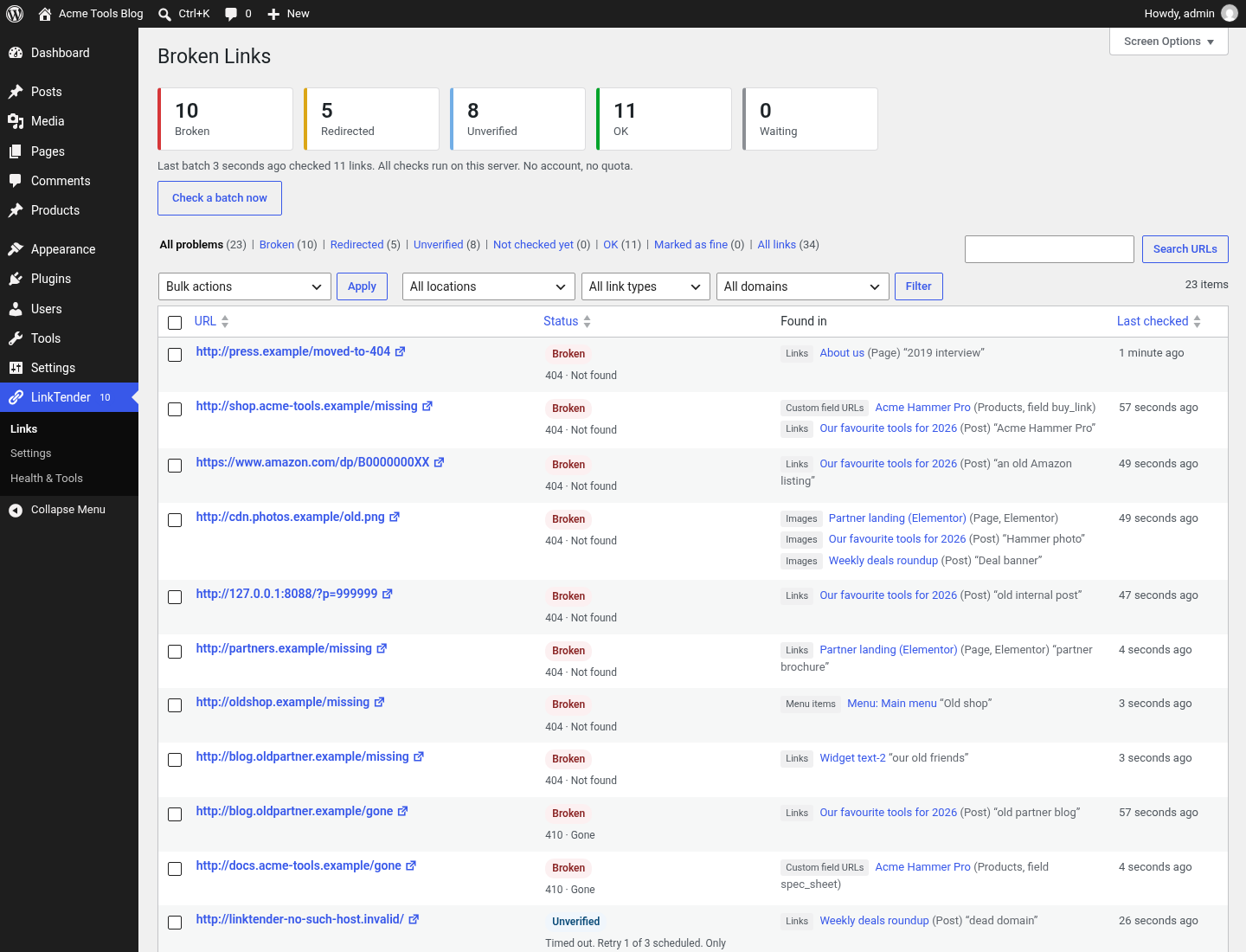
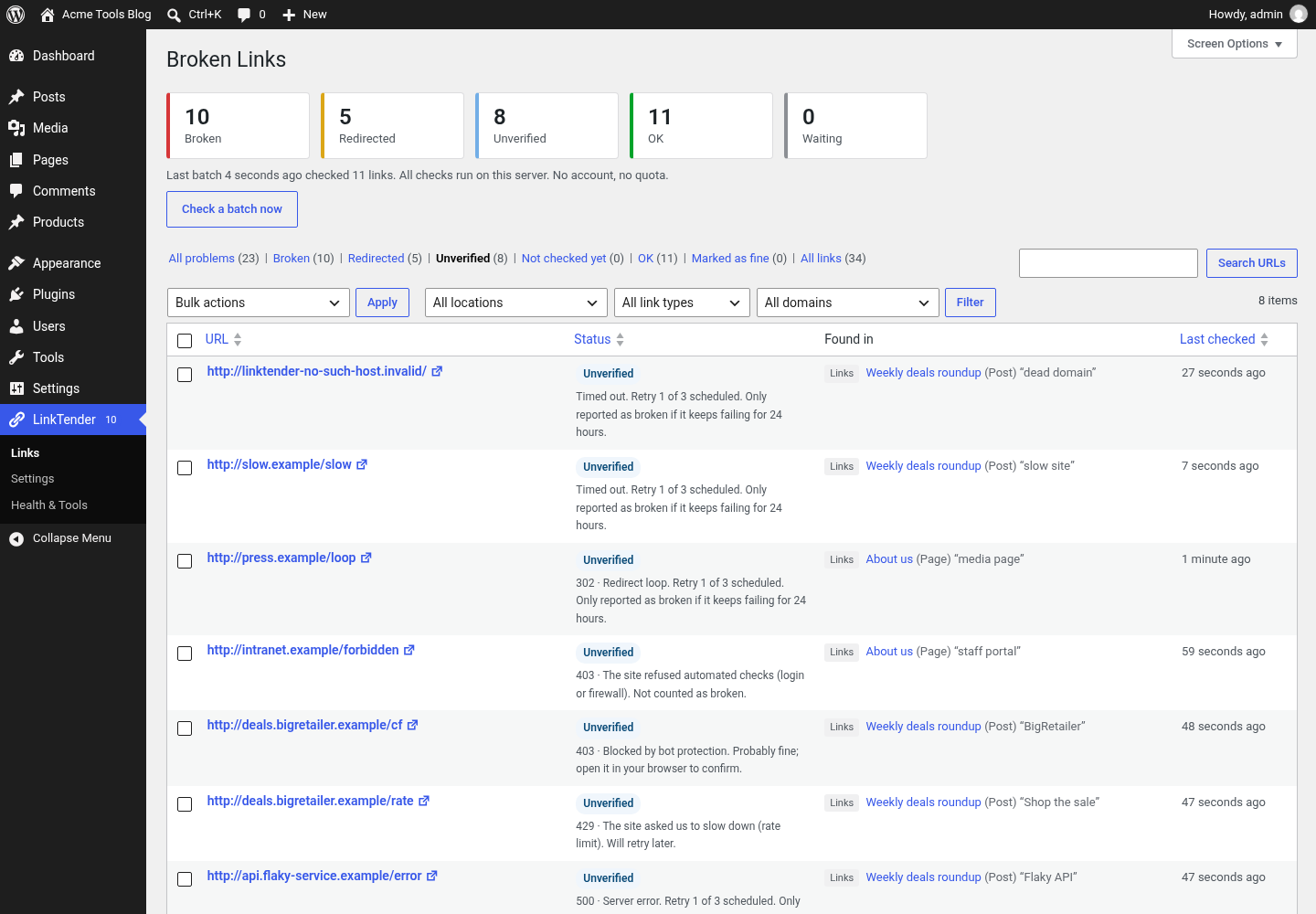
Each link is listed as broken, redirected or unverified (when a site blocks automated requests), with a clear reason. Your content is not sent to any outside service.
How link results are decided
- A link is marked Broken when the server answers 404 (Not Found) or 410 (Gone). The result is re-checked over the next 24 hours.
- Temporary problems (timeouts, 5xx server errors, DNS or connection failures) are retried three times over 24 hours (after 2, 10 and 24 hours). The link is marked Broken only if it still fails after the last retry.
- When a site blocks automated requests, the link is marked Unverified instead of Broken. This covers bot challenge pages (for example Cloudflare or Amazon’s captcha page), 401, 403 and 429 answers, and the 400 and 999 codes that Facebook and LinkedIn return to automated requests. You can open these links in your browser and click Ignore if they work.
- If your own server cannot reach the internet, or cannot reach its own site, the affected links are marked Unverified (or keep their earlier status) and are checked again later.
- Links to your dashboard (wp-admin) and login page are not checked.
Gentle on your server and database.
- Checks run in time-boxed background batches (WP-Cron, or Action Scheduler when another plugin provides it) with a lock, so two batches never overlap.
- A few links are checked at the same time, always on different domains. Requests to the same domain are spaced out, and each request has a timeout.
- Tested on a site with 20,000 posts and over 90,000 unique links: each batch stays under about 1,300 database queries and 65 MB of memory.
- HEAD requests are tried first, with a GET fallback for servers that answer HEAD badly. Up to 5 redirects are followed.
- Data lives in two small tables of its own. WordPress core tables are never altered.
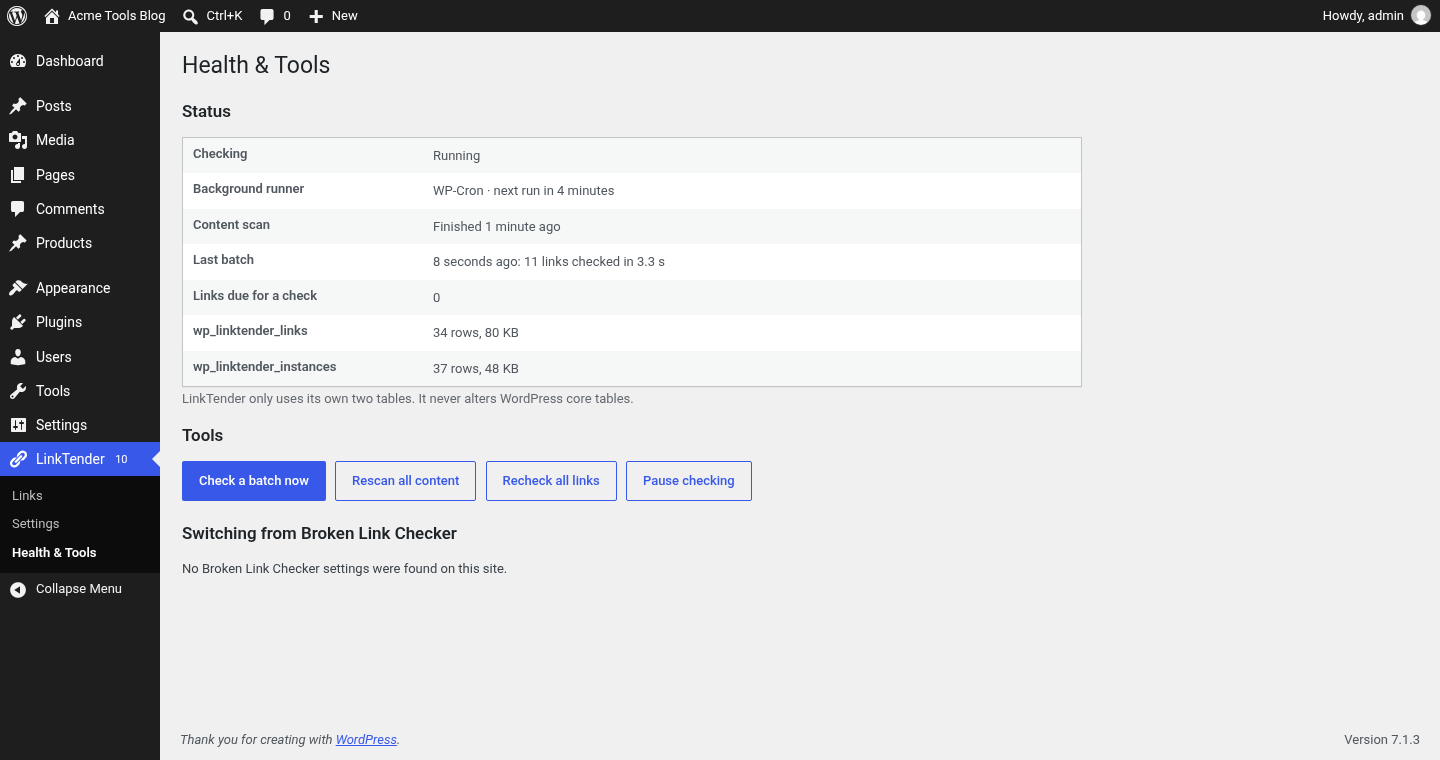
- A “Pause checking” switch and a Health screen showing table sizes, the last batch and the queue.
What gets scanned
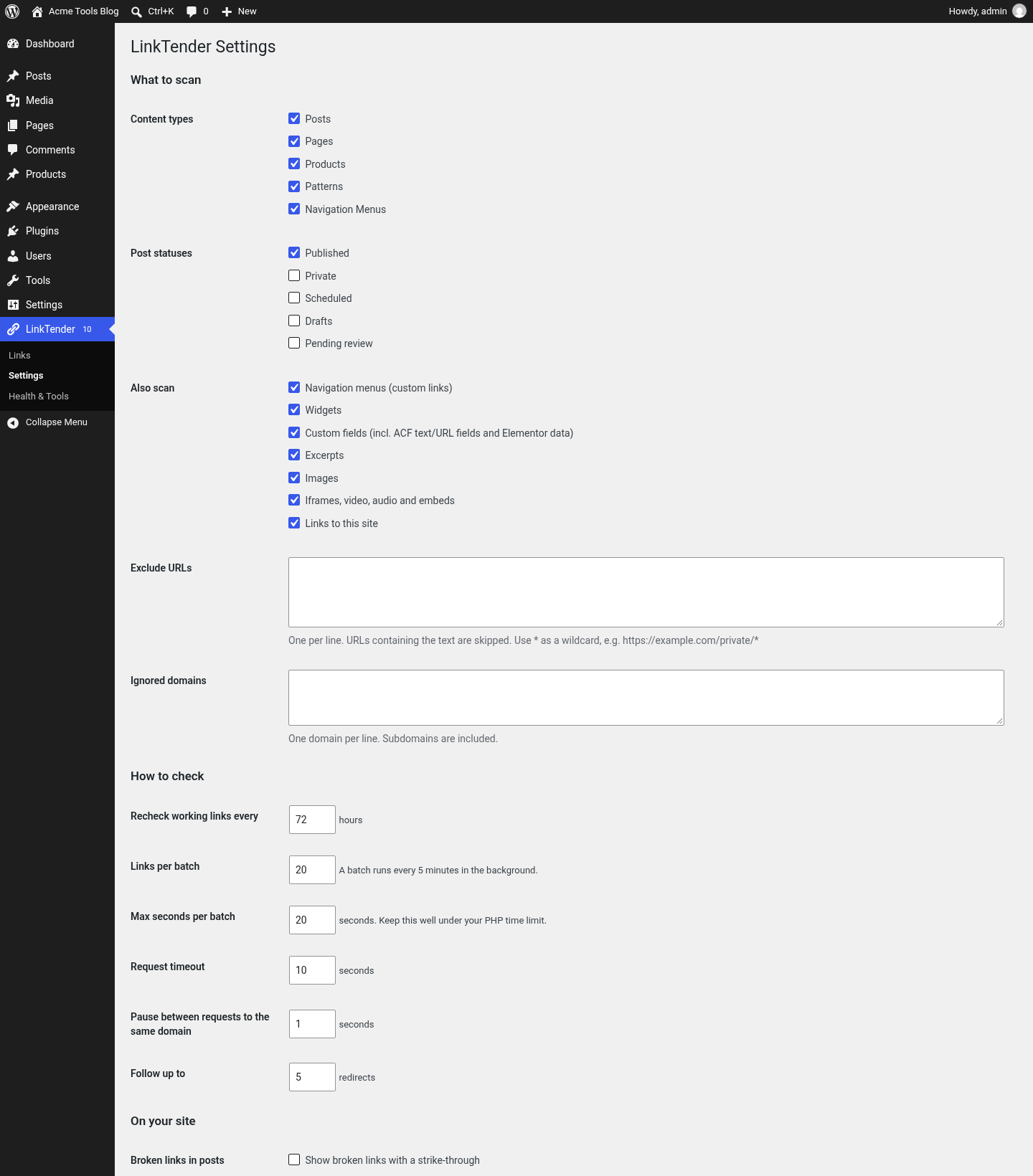
- Posts, pages and every public custom post type, plus synced patterns and navigation blocks
- Gutenberg blocks (links, buttons, images, embeds, navigation links)
- Elementor page data (text, buttons, images)
- Shortcode-based page builders such as Divi, WPBakery and Avada: URLs in shortcode settings (buttons, images, video,
link="url:...") are read as text. No shortcode is run to do this. - Approved comments (links in the comment text) and, optionally, commenters’ website links
- Custom fields, including ACF text and URL fields
- Navigation menus (custom links) and widgets, both classic and block widgets
- Excerpts, images, iframes, video, audio and embeds
Fix links in one click
- One row per URL, listing every place it appears.
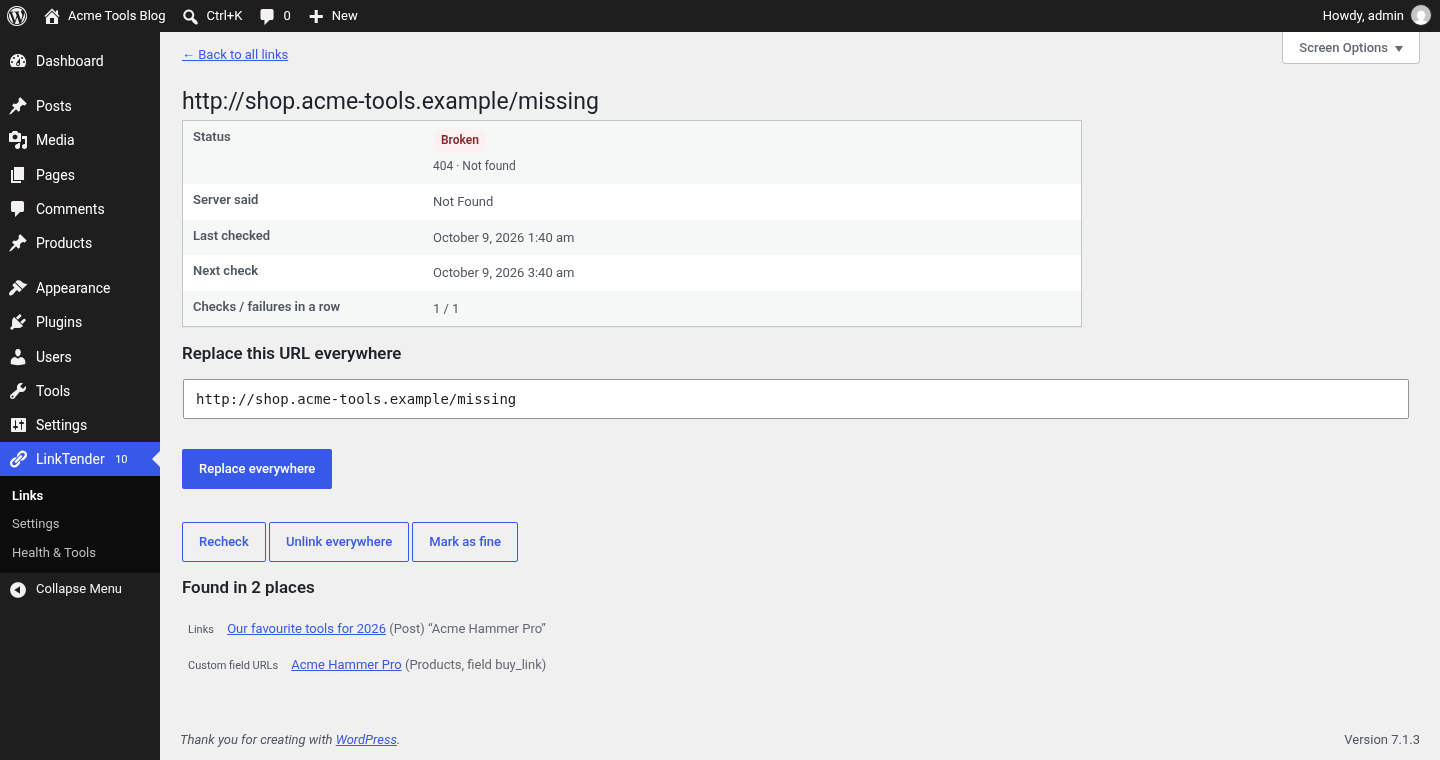
- Edit URL replaces it everywhere: post content (including shortcode settings), custom fields, Elementor data, comments, menus and widgets.
- Unlink removes the link and keeps the text.
- Use final URL updates redirected links to their destination. It is not offered when a redirect ends on a login, consent or captcha page.
- Recheck, Ignore or Ignore domain.
- Filter by status (broken, redirected, unverified), location, link type or domain, and search by URL.
Import settings from another link checker
If the Broken Link Checker plugin was used on the site before, LinkTender → Health & Tools can import its exclusion list, check interval, timeout, front-end options and dismissed links. That plugin’s data is only read, never changed.
Broken links are not changed on your public site unless you turn on the optional strike-through or rel=”nofollow”.
LinkTender Pro
LinkTender Pro is an optional paid add-on. The free plugin is complete without it: everything above works with no account and no payment.
- Email reports. Daily or weekly, to any addresses, and only when there is something to report if you prefer.
- Product and affiliate links. Store pages that still load but say the product is gone, unavailable or out of stock (including Amazon, eBay, Etsy, Walmart, Best Buy, Target and your own store domains), and product links that now redirect to the store’s home or search page.
- CSV export. Any view or selection, with the posts each link appears in. On multisite, a network-wide export.
- WP-CLI.
wp linktender scan,check,list,export,fix-redirects,report,licenseandsites. - Multisite. One network activation, a network overview of every site, and network export and rescan.
- Links built by shortcodes (optional, off by default). Runs the shortcodes in your content during the scan and checks the links in their output, for shortcodes that build links from their own data. Forms, carts, checkouts, login forms and media players are never run. URLs written in shortcode settings are already found by the free plugin.
- Redirect clean-up. Updates redirecting links to their final address in one go, with a preview. Affiliate and tracking links, cloaked links, links that end on a login page, and links that now lead to another site are never changed.
Pro runs on your own server and does not send your links anywhere. Its only outside connection is a licence and update check (the licence key, the site address and the plugin version).
The free plugin does not contact LinkTender Pro or that site. The link below is only a link.
Privacy and outgoing requests: LinkTender sends no data to us or anyone else, and it has no update checks, licence calls or tracking. Activating the plugin only creates its two tables; it prints nothing, schedules nothing and makes no outgoing requests, and front-end page views are not changed. Link checking starts only after an administrator clicks Start checking links on the LinkTender screen. Deactivating the plugin stops checking; after re-activation it waits for the button again. From then on, the only outgoing requests are the link checks themselves, which go to the URLs found in your content. An optional “Connectivity check” setting (off by default) lets LinkTender send one HEAD request to wordpress.org, at most every 10 minutes, when checks fail at the network level, to find out whether your server is online. No data is sent with it.
External services
LinkTender does not rely on any external service, and it sends no data about your site or its visitors to us or to anyone else.
- Link checks. After an administrator clicks Start checking links, LinkTender sends a HEAD request (or a GET request when a server answers HEAD badly) to each URL found in your own content, to see whether it still works. Each request goes only to the address of that link, and carries only standard browser-style request headers (no cookies, and no information about your site or its visitors). Nothing is requested before the button is clicked, and checking stops when you pause or deactivate the plugin.
- Optional connectivity check (wordpress.org), off by default. Only if you turn on the connectivity check under LinkTender → Settings (“ask wordpress.org whether this server is online”), and only when a link check fails at the network level (DNS error, refused connection or timeout), LinkTender sends one HEAD request to https://wordpress.org/ (at most once every 10 minutes) to find out whether your server is online. No data is sent with it. WordPress.org terms of service and privacy policy.
Installation
- Install and activate the plugin from Plugins → Add New, or upload the
linktenderfolder to/wp-content/plugins/. - Open LinkTender in the admin menu and click Start checking links. Nothing is scanned or checked before that. The first scan then runs in the background, and results appear as links are checked.
- Optionally, adjust what is scanned under LinkTender → Settings.
If your host disables WP-Cron (DISABLE_WP_CRON), make sure a real cron job calls wp-cron.php every few minutes.
Changelog
The readme and the LinkTender screen now mention the optional LinkTender Pro add-on. No change to how links are checked.
1.2.1
- Readme: a short description of the optional LinkTender Pro add-on, with a link to its pricing page.
- LinkTender’s own screens show one dismissible note about Pro, and LinkTender’s row on the Plugins screen has a Go Pro link. Both are hidden when LinkTender Pro is active.
- No change to how links are found, checked or fixed.
1.2.0
- Safer editing: Edit URL, Use final URL and Unlink now change only real link attributes (href, src, srcset candidates, background url(…), embed and object addresses), block settings and shortcode settings. Text and other markup are never searched and replaced, so a link to “/” can no longer alter line breaks or text such as “pros / cons”.
- Edits keep the rest of the post as it was, also for users who may not post unfiltered HTML (embeds and forms are no longer stripped by the save).
- Unlink understands blocks: a button keeps its text and loses only its link, a linked image loses the link wrapper and its link setting, and links inside other blocks whose markup would break are left alone and reported.
- Security: links are never checked when they (or a redirect on the way) point to a private, local or reserved network address, such as a cloud metadata service. Links found in comments are limited to standard web ports. Requests go to the address that was checked.
- A domain that no longer exists is now reported as broken after the retries, instead of making the server look offline.
- “Use final URL” in bulk and automatic redirect clean-up only rewrite links within the same site; redirects to another domain are skipped and reported.
- Background batches: a reliable lock that only its owner releases, a time budget that respects PHP’s time limit, and checks that never run past the end of a batch.
- Fewer rescans: saving post meta such as edit locks no longer queues work, and a rescan requested while one is running follows it instead of restarting it. The first settings save also starts a rescan when needed. Multisite: content changed on another site of the network is parsed on that site.
- Reworked admin screens: clearer status badges and explanations, link details, confirmation before ignoring a domain, and Ignore instead of “Mark as fine”.
1.1.2
- No error pages from the plugin: an expired link or a missing permission on a LinkTender action now sends you back to the LinkTender screen with an explanation, and nothing is changed. The plugin no longer calls wp_die().
- The version check and the
linktender()helper moved into their own files; the main plugin file declares no functions. - Readme: new “External services” section describing the link checks and the optional wordpress.org connectivity check.
1.1.1
- Front-end page views never write to the database: tables are created or upgraded only on activation, on admin screens and in background batches, and content that changes during a front-end request (a visitor’s comment, or WordPress creating its default navigation menu) is parsed by the next background batch.
- Nothing is tracked or scheduled before an administrator clicks Start checking links. Deactivation stops checking; after re-activation it waits for the button again. Network activation no longer schedules a background event.
- Unsupported PHP or WordPress versions now only show an explanation on the Plugins screen and Dashboard; the plugin then loads nothing.
- A notice explains when the server cannot send HTTP requests (no cURL or stream sockets).
- Admin CSS is scoped under the plugin’s own wrapper; database-size readings stay quiet on databases without information_schema (e.g. SQLite).
- Uninstall also removes the remaining plugin options and notices.
1.1.0
- New: links in approved comments are scanned, and can be edited or unlinked from the LinkTender screen. Commenters’ website links can be included with an option (off by default).
- New: URLs in shortcode settings (Divi, WPBakery, Avada and similar shortcode-based builders) are found and can be edited. Shortcodes are read as text and never run.
- Sites where checking already runs scan their content once more after the update so these links get picked up. Nothing is scanned on sites where checking has not been started.
1.0.3
- Activation only creates the plugin’s tables (with dbDelta). It prints nothing, makes no outgoing requests and schedules nothing.
- Link checking now starts only after an administrator clicks Start checking links on the LinkTender screen. Sites that already ran 1.0.x keep checking.
- The wordpress.org connectivity check is now an opt-in setting (off by default). Without it, the server counts as offline after several different domains in a row could not be reached.
- Multisite: network activation sets up every site, in batches, with no 200-site limit. Network deactivation clears the schedule on every site, uninstall cleans up every site, and deleting a site drops its tables.
- Admin CSS and JavaScript load only on the LinkTender screens (exact screen check).
- PHP and WordPress versions are checked; on an unsupported server the plugin loads nothing and shows a notice.
Screenshots
For developers
Is this your plugin? Show off the numbers.
Add a live badge to your site, docs or GitHub README. It updates on its own — no account needed.
Best LinkTender alternatives
All 404 plugins →




FAQ
LinkTender: quick answers
Straight answers, pulled from live WordPress.org data.
Source: WordPress.org
Is LinkTender free?
Yes. LinkTender is free to download and use from the official WordPress.org plugin directory.
Is LinkTender safe to use in 2026?
LinkTender is a solid plugin choice in 2026, with a few things worth checking first. It runs on 10+ sites and was last updated 2 days ago, and scores 66/100 on our health check.
How many websites use LinkTender?
LinkTender is active on 10+ WordPress websites and has been downloaded 395 times since it launched in October 2026. It was downloaded 217 times in the last 30 days.
Does LinkTender work with WordPress 7.1?
Yes. The developer has tested LinkTender up to WordPress 7.2, the latest release. It requires WordPress 6.2 or newer.
What PHP version does LinkTender need?
LinkTender requires PHP 7.4 or higher. Most hosts run PHP 8.x today, so it works on any modern WordPress hosting.
When was LinkTender last updated?
The latest version, 1.2.1, was released on November 27, 2026 (2 days ago).
Who makes LinkTender?
LinkTender is developed and maintained by linktender.
What are the best alternatives to LinkTender?
The most popular alternatives to LinkTender are Redirection (2M+ installs), Broken Link Checker by AIOS… (200K+ installs) and Smart Custom 404 Error Page (100K+ installs).
Powered by PageForge
One template and a spreadsheet. A real page for every search.
PageForge turns each row of a CSV into a WordPress page with its own title, URL, SEO fields and schema, built on the layout you already designed. Free on WordPress.org.
- CSV and XLSX, plus Google Sheets on Professional and Enterprise
- Its own title, URL, SEO fields and schema for every page
- Works with the block editor, Elementor, Divi and Avada
- Free on WordPress.org, no credit card