



LinkGenius – Affiliate Link Manager and Link Shortener
Affiliate link manager plugin to cloak, brand, disclose, track, replace and organize affiliate links with SEO-friendly redirects and tools.

Solid choice
LinkGenius is a solid plugin choice in 2026, with a few things worth checking first. It runs on 10+ sites, is rated 5/5 and was last updated 1 month ago, and scores 69/100 on our health check.
- Tested with the latest WordPress (7.1)
- Small user base (10+ active installs)
- Very few reviews so far
How does it stack up?
Side-by-side on installs, updates, ratings & supportDaily downloads
Download spikes usually follow a new release — each site that auto-updates counts as a download.
Rankings
Where LinkGenius stands todayWordPress.org search rankings
Live position in the plugin search, top 100| Keyword | Position |
|---|---|
| affiliate disclosure | #25 |
| affiliate link manager | #34 |
| affiliate links | #92 |
| link branding | #44 |
| link shortener | #15 |
Version adoption
Share of active sites per release.
Rating breakdown
★★★★★★★★★★ 5 from 1 reviews
About LinkGenius
From the official readme · v1.2.6Description
LinkGenius is a powerful affiliate link management plugin designed to simplify the management of your affiliate links. It offers a range of benefits for affiliate marketers, ensuring a seamless user experience while complying with FTC guidelines and enhancing your affiliate marketing strategy.
Here are some specific benefits of using LinkGenius for affiliate marketing:
-
Effortless Link Management: Easily add, edit, and delete affiliate links using LinkGenius. Keep your links organized and easily accessible by categorizing and tagging them as needed.
-
Compliance with FTC Guidelines: LinkGenius helps you include clear affiliate disclosures in your content, ensuring compliance with FTC guidelines and building trust with your audience.
-
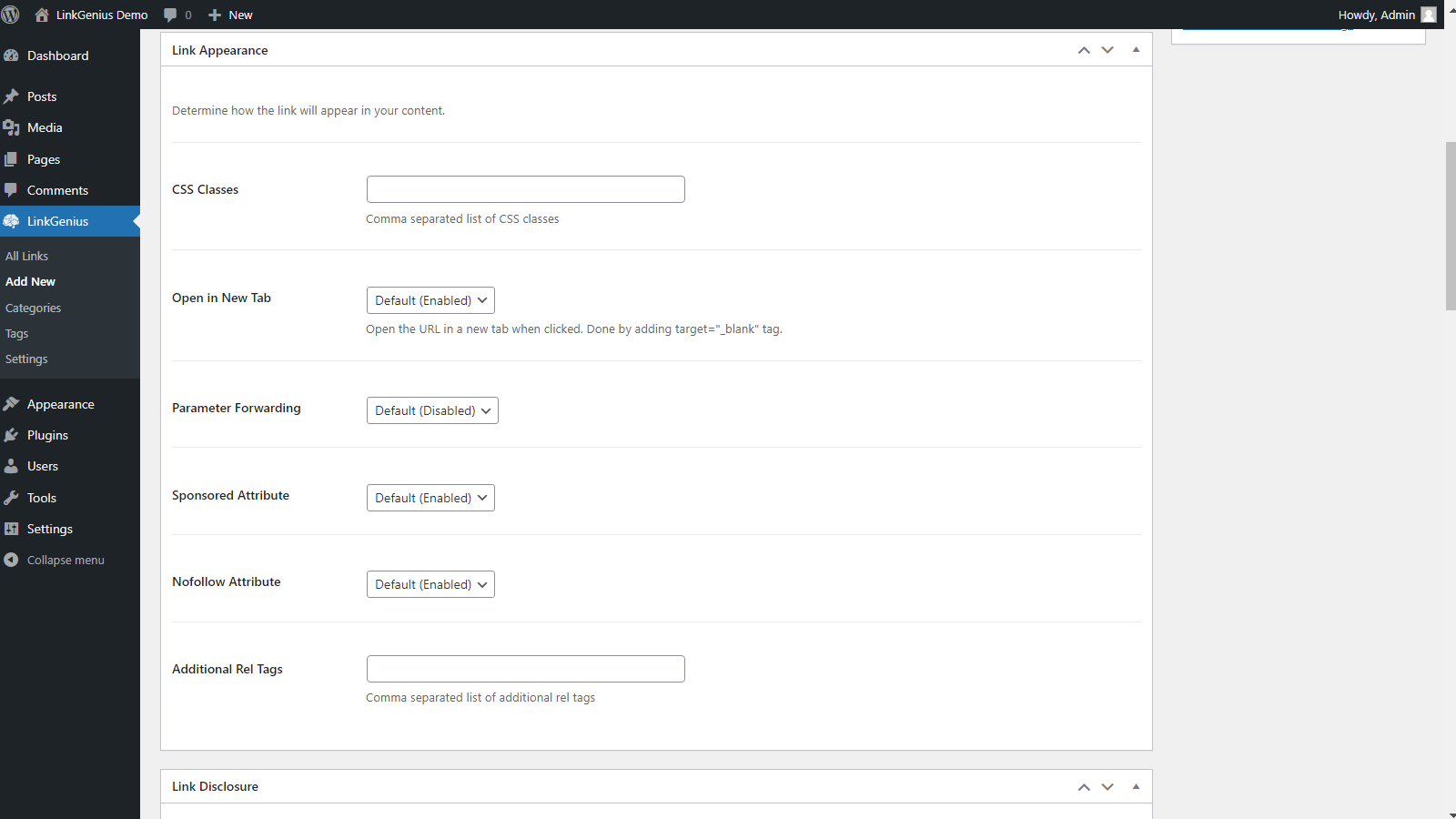
Customize link appearance: Customize the appearance of your affiliate links with LinkGenius, including attributes like opening in a new window, adding classes, UGC and sponsored attributes, and custom rel attributes, to optimize click-through rates.
-
Boost SEO: With LinkGenius, you can improve your website’s SEO by creating clean, search engine friendly, and userfriendly links.
Let’s take a closer look at some of the key features of LinkGenius:
Link Management:
Manage your affiliate links with ease using LinkGenius. Add, edit, and delete affiliate links effortlessly, keeping them organized and accessible. Manage your affiliate link lists by categorizing and tagging your links.
Easily Link to Posts or Pages
Display individual links or a list of affiliate links based on tags or categories to provide a cohesive representation of related links. Customize the layout and order of your list. LinkGenius supports creating links or link lists via multiple blocks, shortcodes, or by simply selecting text in the block editor.
Find which posts or pages contain a specific link
Quickly find which posts or pages contain a specific link using the Link Locator functionality. Remove your expired links easily from your content or replace them with new ones.
Customizable Link Appearance
Customize the appearance of your affiliate links. Add classes, or make a link open in a new window. Add UGC and sponsored attributes, or defined your own custom rel attributes.
Affiliate Disclosure
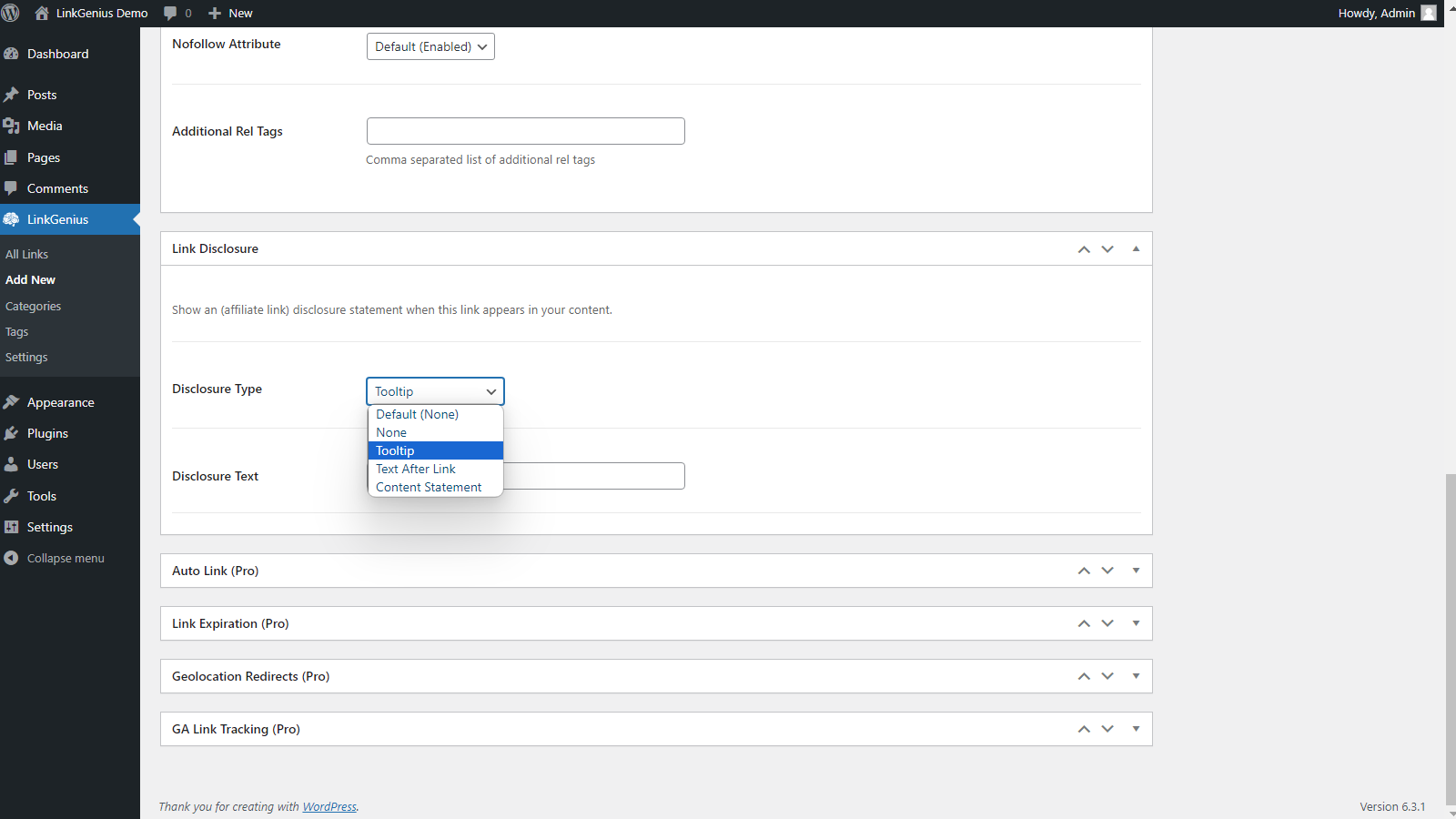
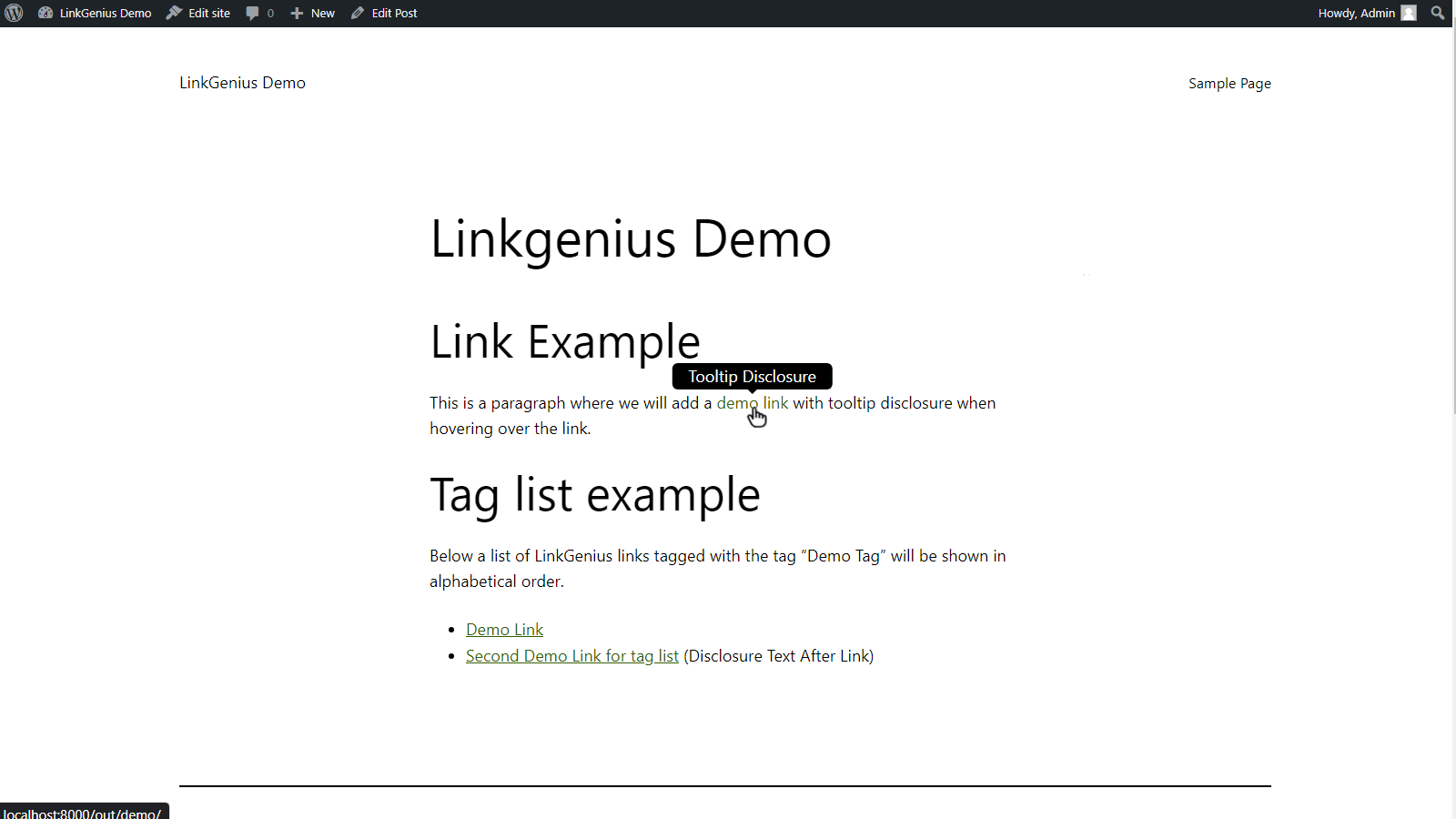
Maintain compliance with FTC guidelines and build trust with your audience by adding an affiliate disclosure statement to your content. Alternatively, you can utilize a tooltip or appended text to clearly indicate which links are affiliate links.
Link Branding
Enhance the appearance and security of your affiliate links by branding them. Create shorter, branded, and more memorable links that are less likely to be blocked by ad-blockers or marked as spam. Customize link cloaking on a per-link basis.
Multiple Redirect Types
Take full control over how your users are redirected, including 301 (Permanent), 302 (Temporary), 307 (Temporary) redirects.
Pro Features
While LinkGenius is completely free, there is also a pro version with additional features available. Go to All-affiliates.com to get more information on the pro version.
-
Automatic link insertion: Automatically insert affiliate links into your content by linking specific keywords to affiliate URLs. Exclude certain pages or posts from automatic link insertion.
-
Automatic link replacement: Automatically replace URLs in your content with either shortened or uncloaked LinkGenius (affiliate) links.
-
Expiring Links: Set an expiration date on your links and redirect users to a specific location after clicking an expired link. You can also make links expire after a certain number of clicks.
-
Geotargeting: Redirect visitors based on their country of origin to geographically appropriate affiliate URLs.
-
Device based redirects: Redirect users to alternative URLs, based on their browser, operating system, or other information in their user agent.
-
Link tracking: Track the performance of your affiliate links with ease, using LinkGenius’s link tracking capabilities powered by Google Analytics. Gain valuable insights into link performance and optimize your strategy accordingly. The server-side tracking option allows you to even track clicks from directly from social media.
-
Commission tracking: Track the commission you earn from your affiliate links by using commission postback. Do not only track the clicks but also the commission you earn from them.
-
Link health checker: Easily check the final URL of an affiliate link and store it for future comparison. Get notified if the URL changes or when URLs are unreachable.
License
LinkGenius is distributed under the terms of the GNU General Public License v2 or later: http://www.gnu.org/licenses/gpl-2.0.html
Credits
LinkGenius is developed by all-affiliates.com.
Installation
Minimum requirements: WordPress 6.0 or higher, PHP 7.4 or higher. Plugin relies on WordPress permalinks for redirect functionality, ensure they are enabled.
Install LinkGenius from within WordPress
- Visit the plugins page within your dashboard and select “Add New”;
- Search for “LinkGenius”;
- Activate LinkGenius from your Plugins page;
- Navigate to the ‘LinkGenius’ menu in your WordPress dashboard to start managing your affiliate links.
Install LinkGenius Manually
- Upload the
linkgeniusfolder to the/wp-content/plugins/directory. - Activate the plugin through the ‘Plugins’ menu in WordPress.
- Navigate to the ‘LinkGenius’ menu in your WordPress dashboard to start managing your affiliate links.
Frequently asked questions
How can I add affiliate links using LinkGenius?
After installing and activating LinkGenius, navigate to the ‘LinkGenius’ menu in your WordPress dashboard. From there, you can easily add, edit, and delete your affiliate links.
How do I use LinkGenius blocks and shortcodes?
You can insert affiliate links or lists using blocks or shortcodes: Block – Use the “LinkGenius Link” block to add a single link, or the “LinkGenius Link List” block to show a list. Shortcode – [linkgenius-link id=”123″ target=”_blank” rel=”sponsored”] adds one link. List shortcode – [linkgenius-list category=”shoes” order=”ASC”] outputs all links from a category or tag. Supported attributes include: id, category, tag, target, rel, and class. Combine attributes to customize appearance and behavior.
Can I customize the appearance of my affiliate links?
Absolutely! LinkGenius allows you to customize the appearance of your affiliate links, including attributes such as opening in a new window, additional classes, UGC and sponsored attributes, and custom rel attributes.
Is LinkGenius compliant with FTC guidelines?
Yes, LinkGenius includes a feature to add an affiliate disclosure statement to your content, ensuring compliance with FTC guidelines and building trust with your audience.
Can I organize my affiliate links into categories or tags?
Yes, LinkGenius provides the functionality to categorize your affiliate links, making it easier to organize and display related links. You can create lists of affiliate links based on tags or categories, with customizable layouts and sorting options.
What is link branding/cloaking, and why should I use it?
Link branding or link cloaking is a feature in LinkGenius that creates shorter, branded, and more memorable affiliate links. It also helps to hide the original affiliate link, making it less likely to be blocked by ad-blockers or marked as spam.
How can I track the performance of my affiliate links?
LinkGenius Pro offers link tracking capabilities using Google Analytics. You can track link performance either via JavaScript or server-side (for social media use). Customize event names and add additional parameters to gain valuable insights.
Changelog
Version 1.2.6 improves compatibility with the iframe-based WordPress editor and prevents unnecessary CMB2 Conditionals assets from loading.
1.2.6
- Updated all LinkGenius blocks to Block API version 3 for compatibility with the iframe-based WordPress editor.
- Fixed editor stylesheet loading inside the iframe editor.
- Improved CMB2 Conditionals loading so its script is only added when conditional fields are used, including fields inside groups.
- Updated the bundled CMB2 dependency to version 2.12.0.
1.2.5
- Improved PHP 7.4 compatibility by replacing
str_starts_withusage in settings menu highlighting. - Fixed
LinkBuilder::instance()singleton behavior to prevent unnecessary re-instantiation. - Fixed tooltip class merge by using the correct
classattribute key.
1.2.4
- Version Bump because download button not working on wordpress.org
1.2.3
- Security enhancements
- Translation improvements
Screenshots



For developers
Is this your plugin? Show off the numbers.
Add a live badge to your site, docs or GitHub README. It updates on its own — no account needed.
Best LinkGenius alternatives
All affiliate disclosure plugins →| Rank | Plugin | Active installs |
|---|---|---|
| 1 |
 WP Affiliate Disclosure
Automatically add a customizable, FTC-compliant disclosure statement across your WordPress…
WP Affiliate Disclosure
Automatically add a customizable, FTC-compliant disclosure statement across your WordPress…
|
1K+ |
| 3 |
 Yzukar DisclosureBox
Lightweight disclosure boxes for AI-assisted, affiliate, and sponsored content.
Yzukar DisclosureBox
Lightweight disclosure boxes for AI-assisted, affiliate, and sponsored content.
|
<10 |
FAQ
LinkGenius: quick answers
Straight answers, pulled from live WordPress.org data.
Live data from WordPress.org · checked Oct 10, 2026
Is LinkGenius free?
Yes. LinkGenius is free to download and use from the official WordPress.org plugin directory.
Is LinkGenius safe to use in 2026?
LinkGenius is a solid plugin choice in 2026, with a few things worth checking first. It runs on 10+ sites, is rated 5/5 and was last updated 1 month ago, and scores 69/100 on our health check.
How many websites use LinkGenius?
LinkGenius is active on 10+ WordPress websites and has been downloaded 4,026 times since it launched in September 2023. It was downloaded 208 times in the last 30 days.
Does LinkGenius work with WordPress 7.1?
Yes. The developer has tested LinkGenius up to WordPress 7.1.3, the latest release. It requires WordPress 6.0 or newer.
What PHP version does LinkGenius need?
LinkGenius requires PHP 7.4 or higher. Most hosts run PHP 8.x today, so it works on any modern WordPress hosting.
When was LinkGenius last updated?
The latest version, 1.2.6, was released on August 31, 2026 (1 month ago).
Who makes LinkGenius?
LinkGenius is developed and maintained by allaffiliates.
What are the best alternatives to LinkGenius?
The most popular alternatives to LinkGenius are WP Affiliate Disclosure (1K+ installs) and Yzukar DisclosureBox (<10 installs).
Powered by PageForge
Want thousands of pages that rank like these? Build them in an afternoon.
This directory runs on the same engine as PageForge. Turn any spreadsheet, CSV or API into thousands of fast, SEO-ready WordPress pages — with schema, internal links and AI-written copy baked in.
- CSV, Google Sheets & API data sources
- AI content, schema & internal links per page
- Works with Elementor, Gutenberg, Yoast & Rank Math
- Free on WordPress.org — no credit card


