



Letterness – Newsletter Popup, Signup Forms & Built-in Email Sending
Newsletter popup, signup forms and built-in email sending with automations, personalization and open and click analytics. Free and self-hosted.

Use with caution
Letterness works, but test it on a staging site before relying on it in 2026. Was last updated 4 weeks ago, and scores 59/100 on our health check.
- Actively developed — last update 4 weeks ago
- Small user base (<10 active installs)
- Very few reviews so far
How does it stack up?
Side-by-side on installs, updates, ratings & support



Daily downloads
Download spikes usually follow a new release — each site that auto-updates counts as a download.
Rankings
Where Letterness stands todayWordPress.org search rankings
Live position in the plugin search, top 100| Keyword | Position |
|---|---|
| Email Marketing | >100 |
| email subscribers | >100 |
| newsletter | >100 |
| popup | >100 |
| subscribe | >100 |
About Letterness
From the official readme · v4.1.2Description
Letterness is a complete, free newsletter and email marketing plugin for WordPress. Grow your email list with a beautiful newsletter popup and signup forms, then write and send newsletters to your subscribers straight from your dashboard, no third-party account, no monthly fee, and your subscriber list stays in your own database.
Letterness is designed, developed, and maintained by Kamran Kazmi, the creator and owner of the plugin.
Most newsletter plugins make you choose: a pretty opt-in popup from one plugin, sending from another service, automations behind a paywall. Letterness puts subscriber capture, email sending, automations, and analytics in one lightweight plugin, controlled from a single screen.
Why choose Letterness?
- Free and self-hosted. No SaaS account, no per-subscriber pricing, no sending caps beyond your own host.
- All-in-one. Capture, send, automate, and measure without stitching plugins together.
- Lightweight and fast. Front-end CSS and JavaScript load only on pages where they are actually needed, so your page speed stays intact.
- Privacy-friendly. Built-in consent capture, signed one-click unsubscribe, and analytics that store a hashed key instead of raw emails.
- Works with your setup. Any theme (classic or block), Gutenberg, Elementor, page caches, and any SMTP/ESP plugin.
Capture subscribers three ways
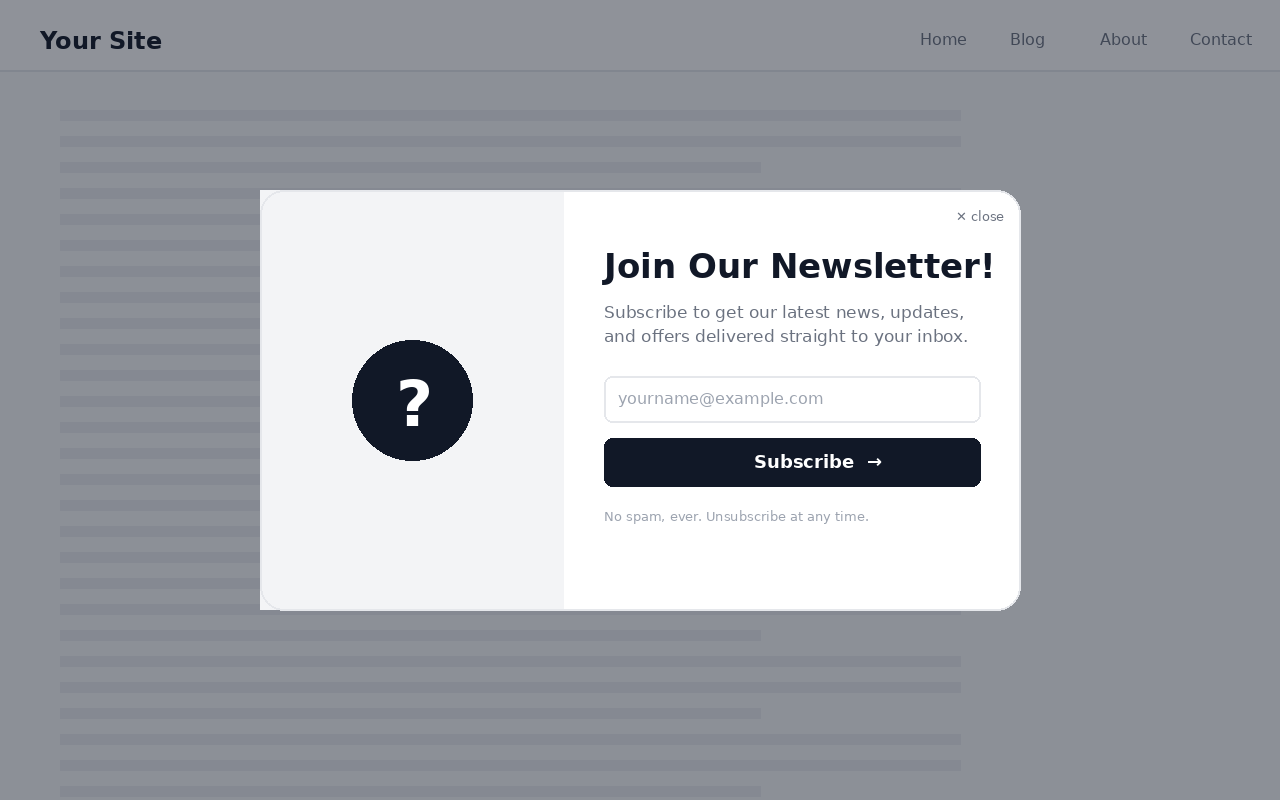
- A responsive newsletter popup with time-delay, scroll-depth, or exit-intent triggers.
- A sidebar signup card for any widget area or placed with a shortcode.
- A subscribe button for a theme menu, plus an inline signup form shortcode and a Gutenberg form block.
Send newsletters from WordPress
- Compose in the standard WordPress editor with ten responsive email templates (newsletter, blog digest, announcement, welcome, product, simple, minimal, magazine, holiday, featured).
- Personalization merge tags such as
{first_name|there},{site_name}, and{unsubscribe_url}, with fallbacks so blank values never look broken. - Save drafts, schedule for later, or send now, with throttled batch delivery and live queue status (queued, processing, sent, failed).
- Sends through WordPress
wp_mail(), so any SMTP plugin (WP Mail SMTP, FluentSMTP, Post SMTP, and others) works automatically.
Automations
- Welcome email when someone subscribes, immediately or after a delay you set.
- New-post notifications that email your subscribers when you publish, instantly or as a scheduled daily or weekly digest.
Analytics
- Open and click tracking per campaign: opens, unique opens, open rate, clicks, unique clicks, click rate, clicked links, and top link.
- A subscriber-growth chart and source breakdown for your list.
Deliverability and compliance
- List-Unsubscribe and one-click headers (RFC 8058) so Gmail and Yahoo show a native unsubscribe button.
- Visible unsubscribe link, a branded confirmation page, a re-subscribe option, and instant suppression.
- GDPR-style consent checkbox with your own text and privacy-policy link.
Audience management
- Lists, tags, and custom fields with bulk actions and filters.
- Subscriber statuses (active, pending, unsubscribed, bounced) and CSV export.
Shortcodes
[letterness_form]– inline signup form.[letterness_card]– sidebar signup card.[letterness_subscribe_button]– subscribe button.
Letterness is built to be secure, accessible, translation-ready, and RTL-friendly. For the best inbox placement on larger lists, pair it with a free SMTP plugin.
Installation
- Upload the
letternessfolder to/wp-content/plugins/, or install through Plugins > Add New and search for “Letterness”. - Activate the plugin through the Plugins screen.
- Open Letterness in the admin menu to set up triggers, design, content, automations, and sending.
- (Optional) Add the signup card under Appearance > Widgets, or place
[letterness_form],[letterness_card], or[letterness_subscribe_button]anywhere. - (Recommended) Install a free SMTP plugin for reliable delivery.
Frequently asked questions
Is Letterness really free?
Yes. Every feature described here is free, subscriber capture, unlimited storage in your own database, newsletter sending, automations, and analytics. There is no per-subscriber pricing.
Do I need a third-party email service like Mailchimp?
No. Letterness stores subscribers in your own WordPress database and sends through wp_mail(). For higher deliverability on larger lists we recommend a free SMTP plugin such as WP Mail SMTP or FluentSMTP, which Letterness detects and uses automatically.
Can I send a welcome email automatically?
Yes. Turn on the welcome automation and choose to send immediately or after a delay in minutes, hours, or days.
Can Letterness email my subscribers when I publish a new post?
Yes. New-post notifications can send instantly on publish or collect posts into a scheduled daily or weekly digest, filtered by post type and category.
Does it track opens and clicks?
Yes. Each campaign shows opens, unique opens, open rate, clicks, unique clicks, click rate, and the most-clicked links. Open tracking relies on a tracking pixel and is approximate, since many email apps block or preload images; click tracking is exact.
How do visitors unsubscribe?
Every email has a visible, signed one-click unsubscribe link and standards-based List-Unsubscribe headers, so inbox providers can show a native unsubscribe button. Unsubscribing shows a confirmation page and immediately suppresses the address.
Is it GDPR-friendly?
Letterness includes an optional consent checkbox with your own wording and privacy-policy link, records consent, and never sells or shares data. Analytics store a one-way hash of the email rather than the address itself.
Can I show a different design on mobile?
Yes. Colors, image, shape, size, and animations each have an optional mobile override, so desktop and mobile can look completely different. One “size” control scales every element responsively.
Does it work with block themes, Elementor, and page caches?
Yes. The popup shows via JavaScript and the form block is server-rendered, so it works with classic and block themes, Elementor, Gutenberg, and caching plugins. Use the shortcodes or the block to place forms anywhere.
Is the popup accessible?
Yes. The popup is a keyboard-accessible dialog: focus moves into it on open and back on close, focus is trapped inside, Escape closes it, controls are labeled for screen readers, and reduced-motion and RTL are supported.
What happens to my data when I uninstall?
Deleting the plugin removes its options, both custom tables (subscribers and newsletters), the analytics events, and any scheduled events.
Changelog
Insert articles into newsletters by URL, set a solid or gradient popup background, cleaner in-field labels and centered header, plus a simpler default heading.
4.1.2
- New: build newsletters faster by pasting an article URL, Letterness fetches the title, featured image, and summary and inserts a ready-made article block.
- New: set the popup background to a solid color or a gradient, with independent desktop and mobile controls.
- Improved: field labels now sit inside their inputs consistently (name and email both use in-field labels).
- Improved: cleaner popup header, the site name is centered and the placeholder icon was removed.
- Changed: the default popup heading is now “Join Newsletter” (fully editable as before).
4.1.1
- Fixed: shaped popups (circle, hexagon, octagon) now keep a fixed shape at every size and never distort, clip, or show a scrollbar.
- Fixed: popup content now scales to fit its shape, size, and device automatically, so every element stays responsive on desktop and mobile.
- Fixed: mobile popups are correctly sized to the viewport instead of overflowing.
- Author information updated.
4.1.0
- Design: independent desktop and mobile controls, popup shapes, and a single “size” control that scales every element responsively so shaped popups never clip.
- Targeting: show or hide by page, post type, category, URL, login state, and device.
- Consent and inline forms: consent capture, a
[letterness_form]shortcode, and a Gutenberg form block. - Audience: lists, tags, and custom fields with bulk actions and filters.
- Personalization: merge tags such as {first_name|there}, {site_name}, and {unsubscribe_url}, with fallbacks.
- Templates: ten responsive newsletter templates across common categories.
- Automations: welcome email (immediate or delayed) and new-post notifications (instant or digest) on a lightweight event/delay/action scheduler.
- Analytics: campaign open and click tracking with unique counts, rates, top links, and a per-campaign breakdown. Open tracking is approximate by nature.
- Deliverability: works with any SMTP/ESP plugin via wp_mail(), configurable batch throttling with queue states (queued, processing, sent, failed), Reply-To, and RFC 8058 List-Unsubscribe one-click headers.
- Unsubscribe: visible link, branded confirmation page, one-click support, re-subscribe option, and immediate suppression.
- Hardening: keyboard-accessible popup with focus management and Escape to close, reduced-motion and RTL support, conditional asset loading, and a full security pass (nonces, capabilities, prepared queries, escaping, signed tokens).
4.0.1
- Enqueued the preview highlight styles and script instead of printing them inline.
- Housekeeping and code-quality improvements.
4.0.0
- Public release on WordPress.org.
- Independent desktop and mobile design for the popup.
- Built-in newsletter composer with drafts, scheduling, and batched sending.
- Sidebar signup card, header subscribe button, and shortcodes.
- Secure token-based one-click unsubscribe.
- Subscriber CSV export.
Screenshots
For developers
Is this your plugin? Show off the numbers.
Add a live badge to your site, docs or GitHub README. It updates on its own — no account needed.
Best Letterness alternatives
All Email Marketing plugins →





FAQ
Letterness: quick answers
Straight answers, pulled from live WordPress.org data.
Live data from WordPress.org · checked Sep 30, 2026
Is Letterness free?
Yes. Letterness is free to download and use from the official WordPress.org plugin directory.
Is Letterness safe to use in 2026?
Letterness works, but test it on a staging site before relying on it in 2026. Was last updated 4 weeks ago, and scores 59/100 on our health check.
How many websites use Letterness?
Letterness is active on <10 WordPress websites and has been downloaded 310 times since it launched in August 2026. It was downloaded 134 times in the last 30 days.
Does Letterness work with WordPress 7.1?
Letterness is officially tested up to WordPress 7.0.6, while the latest release is 7.1.2. It may still work, but try it on a staging site first.
What PHP version does Letterness need?
Letterness requires PHP 7.4 or higher. Most hosts run PHP 8.x today, so it works on any modern WordPress hosting.
When was Letterness last updated?
The latest version, 4.1.2, was released on September 1, 2026 (4 weeks ago).
Who makes Letterness?
Letterness is developed and maintained by kamrankazmi.
What are the best alternatives to Letterness?
The most popular alternatives to Letterness are Hostinger Reach (1M+ installs), MailPoet (500K+ installs) and Newsletter (200K+ installs).
Powered by PageForge
Want thousands of pages that rank like these? Build them in an afternoon.
This directory runs on the same engine as PageForge. Turn any spreadsheet, CSV or API into thousands of fast, SEO-ready WordPress pages — with schema, internal links and AI-written copy baked in.
- CSV, Google Sheets & API data sources
- AI content, schema & internal links per page
- Works with Elementor, Gutenberg, Yoast & Rank Math
- Free on WordPress.org — no credit card


