



Lazy Signin
Lazy Sign in lets you easily create a fully customizable AJAX powered responsive login and sign-up form for your website.

Solid choice
Lazy Signin is a solid plugin choice in 2026, with a few things worth checking first. It runs on 10+ sites, is rated 5/5 and was last updated 1 month ago, and scores 69/100 on our health check.
- Tested with the latest WordPress (7.1)
- Small user base (10+ active installs)
- Very few reviews so far
- Needs PHP 8.2 or newer
How does it stack up?
Side-by-side on installs, updates, ratings & support



Daily downloads
Download spikes usually follow a new release — each site that auto-updates counts as a download.
Rankings
Where Lazy Signin stands todayWordPress.org search rankings
Live position in the plugin search, top 100| Keyword | Position |
|---|---|
| ajax | >100 |
| login | >100 |
| register form | >100 |
| signup | >100 |
| woocommerce | >100 |
Version adoption
Share of active sites per release.
Rating breakdown
★★★★★★★★★★ 5 from 1 reviews
About Lazy Signin
From the official readme · v2.3Description
Lazy Sign-In – The Smarter Way to Handle User Registration & Login
Tired of complicated login and sign-up setups? Lazy Sign-In makes it effortless to add sleek, responsive, and fully customizable login and registration forms to your website all powered by AJAX for a seamless user experience.
With just one installation, you can create both sign-up and login pages using simple shortcodes:
[lazy_signin_ajax_signup_form] for sign-up
[lazy_signin_ajax_login_form] for login
Why Lazy Sign-In?
• Unlimited Custom Fields – Add as many fields as you want to your sign-up form.
• Smart Validation – Set fields as required or unique to ensure clean, reliable data.
• Auto-Generated Credentials – Automatically generate usernames and passwords with one click.
• Custom Redirects – Send users to a specific page right after sign-up.
• User Profile Management – Let users easily update their own information anytime.
• Role Assignment – Automatically assign user roles from the backend.
The best part? Unique Field Verification. This powerful feature ensures every user detail you collect stays unique, eliminating duplicate entries and strengthening your database integrity.
With Lazy Sign-In, your users enjoy a smooth and intuitive registration process, while you get full control and flexibility on the backend.
Bring ease, speed, and reliability to your website’s sign-up and login process with Lazy Sign-In.
Features
• Easy installation
• Separate login and signup pages
• Easy customization of login and signup forms
• Ability for add/remove fields in the signup form
• Ability to redirect users to specific page
• Can keep the form fields ‘required’ and ‘unique’
• Ability to assign roles to the users
• AJAX verification
• Free support
Installation
This section describes how to install the plugin and get it working.
e.g.
- Install the plugin via WordPress or download and upload the plugin to the /wp-content/plugins/
- Activate the plugin through the ‘Plugins’ menu in WordPress
- Use the shortcode [lazy_signin_ajx_login_form] or [lazy_signin_ajax_signup_form].
Frequently asked questions
How to redirect users to a specific page after sign up?
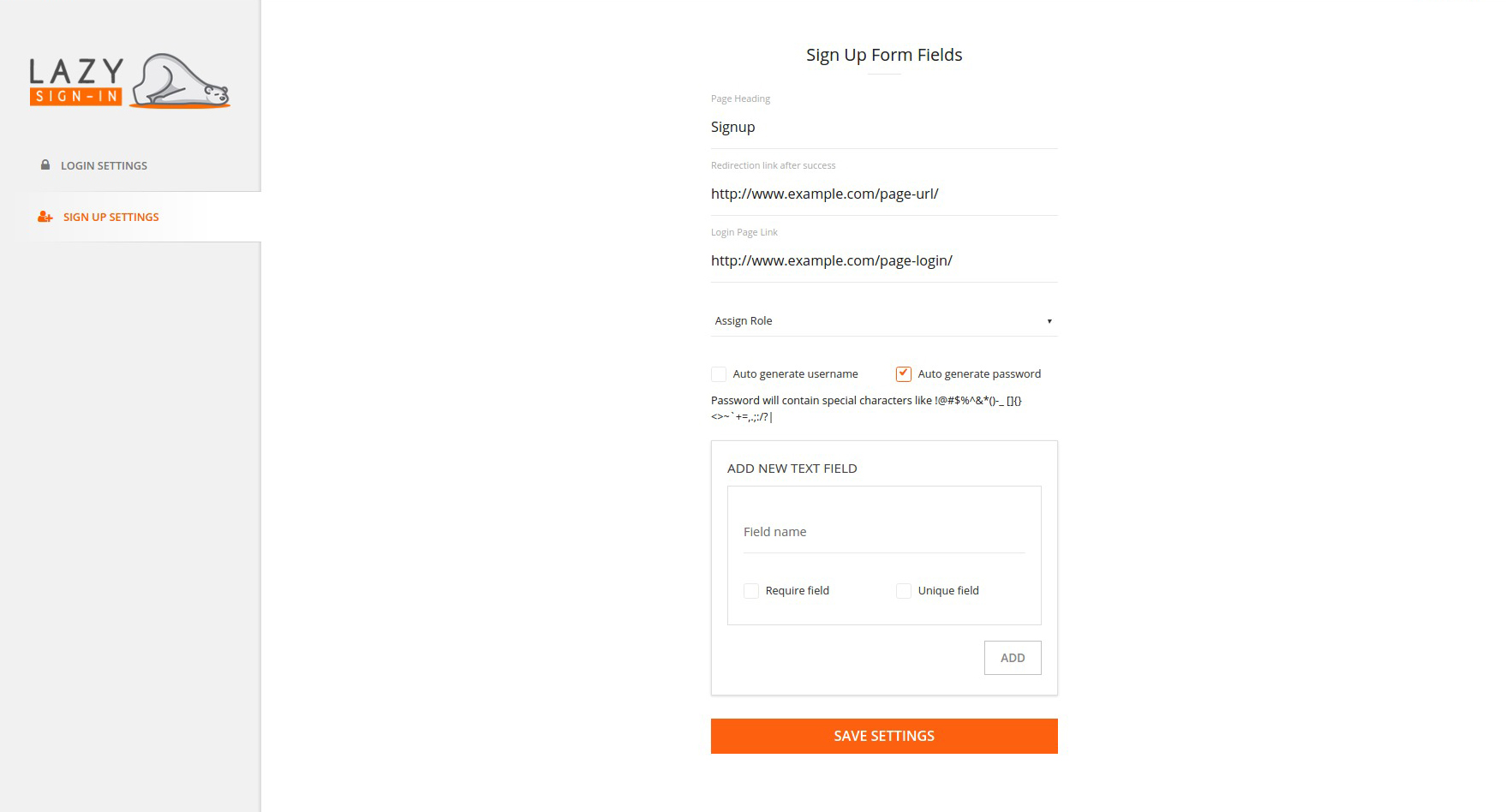
You can add the specific destination page URL from the Lazy Signup settings. Go through Lazy Sign In settings-> SIGN UP SETTINGS-> Redirection link after success. Add the link and save the changes.
How to add/remove/customize the signup form field?
Go to the Lazy Sign In settings-> SIGN UP SETTINGS. Add the field name in the ADD NEW TEXT FIELD section. If you want the new field as require, check the require field checkbox. If you want the new field as unique, check the unique field checkbox. Save the changes
How to change the registered user’s role?
Go to the Lazy Sign In settings-> SIGN UP SETTINGS. There is a drop-down menu named Assign Role. It will have the list of the roles in your site. Select the role you want to apply to the new registered user.
How unique field verification works?
The unique field will check for the registered user’s field if the same value found it would not allow the new user to register. For example, If I have the phone number field as unique, it won’t allow more than one user to register via the same phone number.
Screenshots



For developers
Is this your plugin? Show off the numbers.
Add a live badge to your site, docs or GitHub README. It updates on its own — no account needed.
Best Lazy Signin alternatives
All ajax plugins →





FAQ
Lazy Signin: quick answers
Straight answers, pulled from live WordPress.org data.
Live data from WordPress.org · checked Oct 10, 2026
Is Lazy Signin free?
Yes. Lazy Signin is free to download and use from the official WordPress.org plugin directory. The developer also sells premium add-ons or a Pro version with extra features.
Is Lazy Signin safe to use in 2026?
Lazy Signin is a solid plugin choice in 2026, with a few things worth checking first. It runs on 10+ sites, is rated 5/5 and was last updated 1 month ago, and scores 69/100 on our health check.
How many websites use Lazy Signin?
Lazy Signin is active on 10+ WordPress websites and has been downloaded 5,945 times since it launched in January 2017. It was downloaded 88 times in the last 30 days.
Does Lazy Signin work with WordPress 7.1?
Yes. The developer has tested Lazy Signin up to WordPress 7.1.3, the latest release. It requires WordPress 6.6 or newer.
What PHP version does Lazy Signin need?
Lazy Signin requires PHP 8.2 or higher. Most hosts run PHP 8.x today, so it works on any modern WordPress hosting.
When was Lazy Signin last updated?
The latest version, 2.3, was released on September 1, 2026 (1 month ago).
Who makes Lazy Signin?
Lazy Signin is developed and maintained by KrishaWeb.
What are the best alternatives to Lazy Signin?
The most popular alternatives to Lazy Signin are zipaddr-jp (50K+ installs), SearchWP Live Ajax Search (50K+ installs) and WP-Polls (40K+ installs).
Powered by PageForge
Want thousands of pages that rank like these? Build them in an afternoon.
This directory runs on the same engine as PageForge. Turn any spreadsheet, CSV or API into thousands of fast, SEO-ready WordPress pages — with schema, internal links and AI-written copy baked in.
- CSV, Google Sheets & API data sources
- AI content, schema & internal links per page
- Works with Elementor, Gutenberg, Yoast & Rank Math
- Free on WordPress.org — no credit card


