


Landingi Landing Pages
Create landing pages without any programming skills and import them to your WordPress site using this plugin.

Safe pick
Yes — Landingi Landing Pages is a safe, well-maintained plugin to use in 2026. It runs on 2K+ sites, is rated 5/5 and was last updated 1 month ago, and scores 84/100 on our health check.
- Loved by users — 5/5 from 20 reviews
- Tested with the latest WordPress (7.1)
- Needs PHP 8.1 or newer
How does it stack up?
Side-by-side on installs, updates, ratings & support



Daily downloads
Download spikes usually follow a new release — each site that auto-updates counts as a download.
Rankings
Where Landingi Landing Pages stands todayWordPress.org search rankings
Live position in the plugin search, top 100| Keyword | Position |
|---|---|
| landing page | #5 |
| landing page builder | #10 |
| landing page embed | #2 |
| landing page import | #1 |
| landing page platform | #3 |
Version adoption
Share of active sites per release.
Rating breakdown
★★★★★★★★★★ 5 from 20 reviews
About Landingi Landing Pages
From the official readme · v4.4.1Description
Take your WordPress marketing to the next level with Landingi’s powerful landing page builder plugin. Design stunning, high-converting landing pages in minutes without needing any coding experience.
Landingi seamlessly integrates with your WordPress site, allowing you to:
- Drag-and-drop your way to success and build beautiful landing pages with an intuitive builder. No coding required! 400+ fully editable templates.
- Build pages and write content with AI Assistant.
- Boost conversions with powerful A/B testing, advanced forms for capturing leads, and integrations with your favorite marketing tools.
- Track performance with Dashboard and EventTracker add-on.
- Add Unsplash stock images and Iconfinder icons to your pages.
Choose from over 170 in-app, compatible and Zapier integrations to automate your workflow:
E-mail Marketing
- ActiveCampaign
- AWeber
- CampaignMonitor
- E-goi
- Freshmail
- GetResponse
- MailChimp
- MailerLite
- Sare
- SALESmanago
- ConvertKit
- Drip
CRM
- Edrone
- BaseCRM
- HubSpot
- LiveSpace
- Pipedrive
- SalesFlare
- SalesForce
- Zoho CRM
Communication
- CallPage
- Intercom
- LiveChat
- Tawk.to
- Zendesk Chat
Analytics & Tracking
- Google Ads
- Google Analytics
- Google Tag Manager
- Facebook Pixel
- Heap Analytics
- KissMetrics
- MixPanel
- Yandex Metrica
Online Payment Systems
- PayPal
- Stripe
- PayU
Installation
- Upload the entire
landingi-pluginfolder to the/wp-content/plugins/directory. - Activate the plugin through the ‘Plugins’ page.
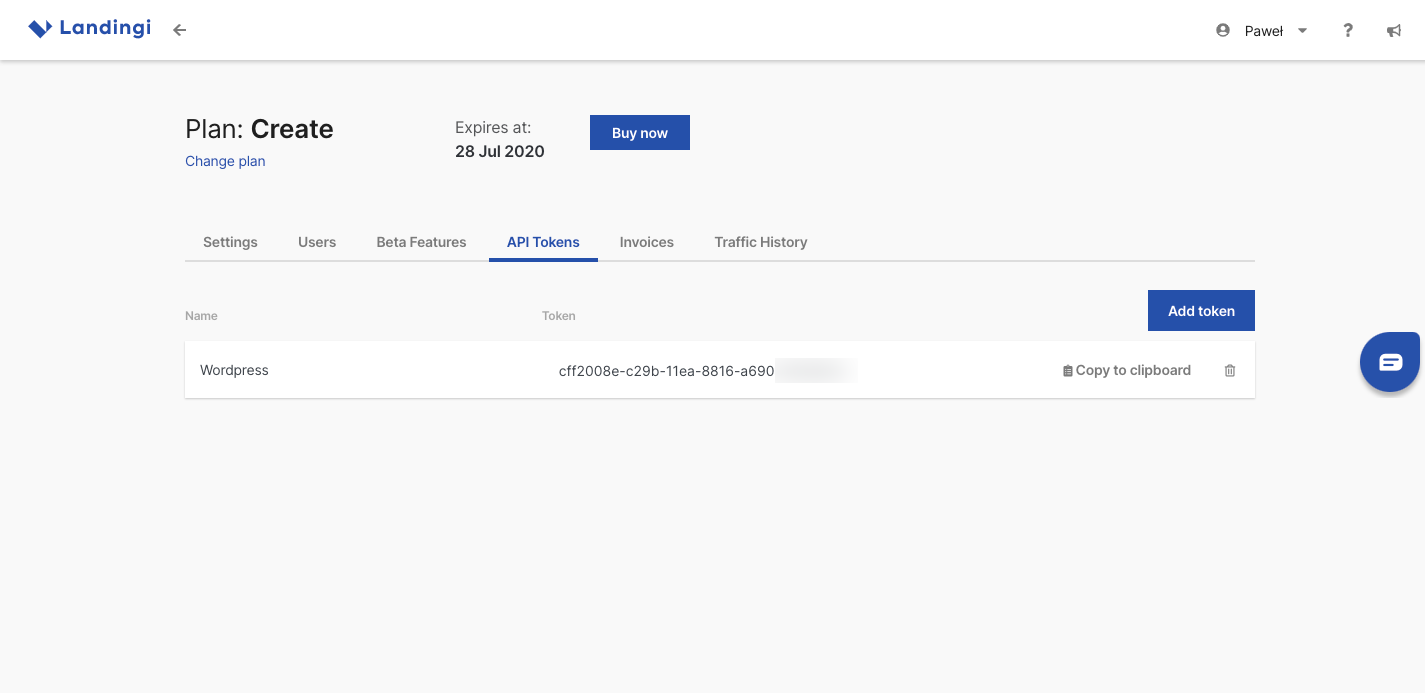
- Generate a new API Token on your Landingi account: https://new.landingi.com/account/tokens Copy generated API Token to your clipboard.
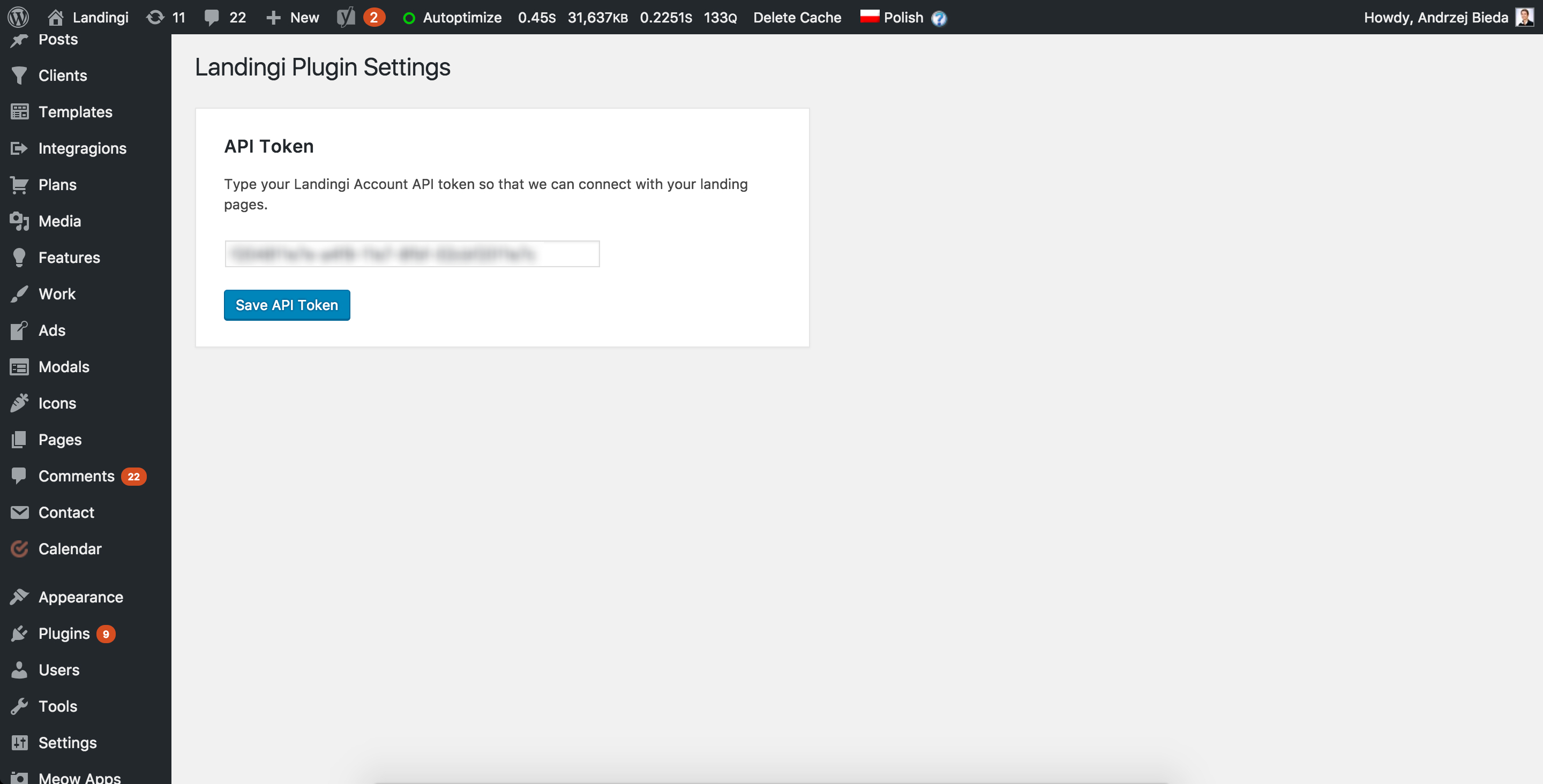
- Go back to your WordPress ‘Landingi’ » ‘Settings’ menu. Paste your API Token and click Save API Token.
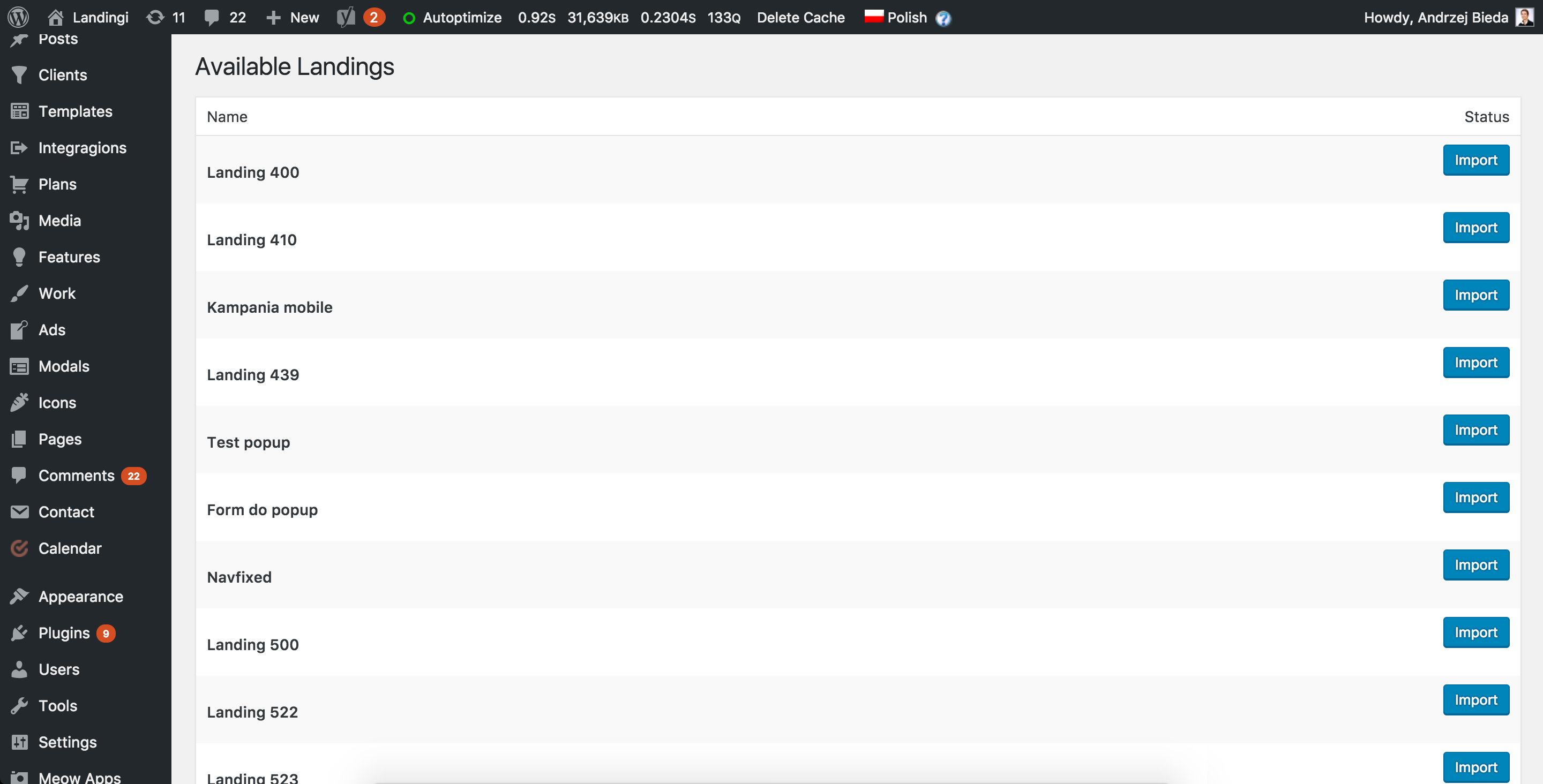
- Now you will find your landing pages on ‘Landingi’ » ‘Available Landings’ page in your WordPress admin panel.
- Click Import next to the one you want to import. Give your landing page desired URL and that is it!
You can read more detailed instruction here.
If you have any questions about the platform or plugin installation feel free to contact our support@landingi.com.
Frequently asked questions
How to use the plugin?
Please read this article »
Do I need an account on Landingi platform?
Yes. To use this plugin you need an account. If you do not have on, you can sign up here.
Can I import landing pages created on my account before installing this plugin?
Yes. You can import any of the landing pages on your account.
Can I edit already imported landing pages?
Yes. Changes introduced on the published landing page will be seen at your WordPress page address.
Does use of the plugin involves any additional fees?
No, using this plugin is completely free of charge. Still, remember that you need an active Landingi account for the landing pages to work. If you have any questions about the platform or plugin installation feel free to contact our support@landingi.com.
Where do I report security bugs found in this plugin?
You can report security bugs through the Patchstack Vulnerability Disclosure Program. The Patchstack team help validate, triage and handle any security vulnerabilities. Report a security vulnerability.
Screenshots


For developers
Is this your plugin? Show off the numbers.
Add a live badge to your site, docs or GitHub README. It updates on its own — no account needed.
Best Landingi Landing Pages alternatives
All landing page plugins →





FAQ
Landingi Landing Pages: quick answers
Straight answers, pulled from live WordPress.org data.
Live data from WordPress.org · checked Sep 26, 2026
Is Landingi Landing Pages free?
Yes. Landingi Landing Pages is free to download and use from the official WordPress.org plugin directory.
Is Landingi Landing Pages safe to use in 2026?
Yes — Landingi Landing Pages is a safe, well-maintained plugin to use in 2026. It runs on 2K+ sites, is rated 5/5 and was last updated 1 month ago, and scores 84/100 on our health check.
How many websites use Landingi Landing Pages?
Landingi Landing Pages is active on 2K+ WordPress websites and has been downloaded 80,779 times since it launched in October 2017. It was downloaded 1,236 times in the last 30 days.
Does Landingi Landing Pages work with WordPress 7.1?
Yes. The developer has tested Landingi Landing Pages up to WordPress 7.1.2, the latest release. It requires WordPress 4.0 or newer.
What PHP version does Landingi Landing Pages need?
Landingi Landing Pages requires PHP 8.1 or higher. Most hosts run PHP 8.x today, so it works on any modern WordPress hosting.
When was Landingi Landing Pages last updated?
The latest version, 4.4.1, was released on August 19, 2026 (1 month ago).
Who makes Landingi Landing Pages?
Landingi Landing Pages is developed and maintained by Landingi.
What are the best alternatives to Landingi Landing Pages?
The most popular alternatives to Landingi Landing Pages are Elementor Website Builder (10M+ installs), Website Builder by SeedProd (600K+ installs) and LightStart (400K+ installs).
Powered by PageForge
Want thousands of pages that rank like these? Build them in an afternoon.
This directory runs on the same engine as PageForge. Turn any spreadsheet, CSV or API into thousands of fast, SEO-ready WordPress pages — with schema, internal links and AI-written copy baked in.
- CSV, Google Sheets & API data sources
- AI content, schema & internal links per page
- Works with Elementor, Gutenberg, Yoast & Rank Math
- Free on WordPress.org — no credit card


