



KleverList: Simplified WooCommerce Customer Sync
KleverList allows you to integrate your WooCommerce customers into email marketing platforms like Sendy, AWeber and Mailchimp.

Consider an alternative
KleverList: Simplified WooComme… shows warning signs in 2026 — compare the alternatives below before installing. It runs on 10+ sites and was last updated 2 years ago, and scores 26/100 on our health check.
- Small user base (10+ active installs)
- Very few reviews so far
- No update in over a year
- Only tested up to WordPress 6.7 (latest is 7.1)
How does it stack up?
Side-by-side on installs, updates, ratings & support



Daily downloads
Download spikes usually follow a new release — each site that auto-updates counts as a download.
Rankings
Where KleverList: Simplified WooC… stands todayWordPress.org search rankings
Live position in the plugin search, top 100| Keyword | Position |
|---|---|
| aweber | #93 |
| Email Marketing | >100 |
| mailchimp | >100 |
| sendy | #30 |
| woocommerce | >100 |
Version adoption
Share of active sites per release.
About KleverList: Simplified WooCommerce Cust…
From the official readme · v2.5.0Description
KleverList is your ultimate solution for effortless synchronization of WooCommerce customer data with Sendy, AWeber and Mailchimp. Supercharge your email marketing campaigns by leveraging the power of segmentation and personalized communication.
With KleverList, you can seamlessly synchronize your WooCommerce customer and purchase data allowing you to easily access all the crucial information you need to create targeted and personalized email campaigns. Our plugin takes care of everything, automatically pulling user, order, and billing information, and sending them straight to your email marketing platform software.
But that’s not all – with KleverList, you have complete control over your email marketing strategy. Depending on the integration, our granular product assignment feature allows you to assign specific products to unique lists, or tags, enabling you to segment your customers based on their purchase history and behavior.
KleverList is the perfect tool for any WooCommerce store owner looking to streamline their email marketing efforts and achieve better results. Download the plugin today and take the first step towards supercharging your email marketing campaigns!
Integrations
KleverList easily integrates with the following email marketing platforms:
✅ Sendy: Connect KleverList with Sendy to synchronize WooCommerce customer data and enhance your email marketing campaigns.
✅ Mailchimp: Connect KleverList with Mailchimp and unlock a world of personalized and powerful email marketing possibilities.
✅ AWeber: Connect KleverList with AWeber and synchronize your store with this powerful platform.
Stay tuned for future updates as we continue to expand our list of supported integrations to provide you with even more options to enhance your email marketing campaigns.
Features
🚀 Streamlined Integration: Connect KleverList with your preferred email marketing platform in just a few simple steps.
🔄 Real-time Synchronization: Keep your autoresponder lists up-to-date with the latest customer information from your WooCommerce store.
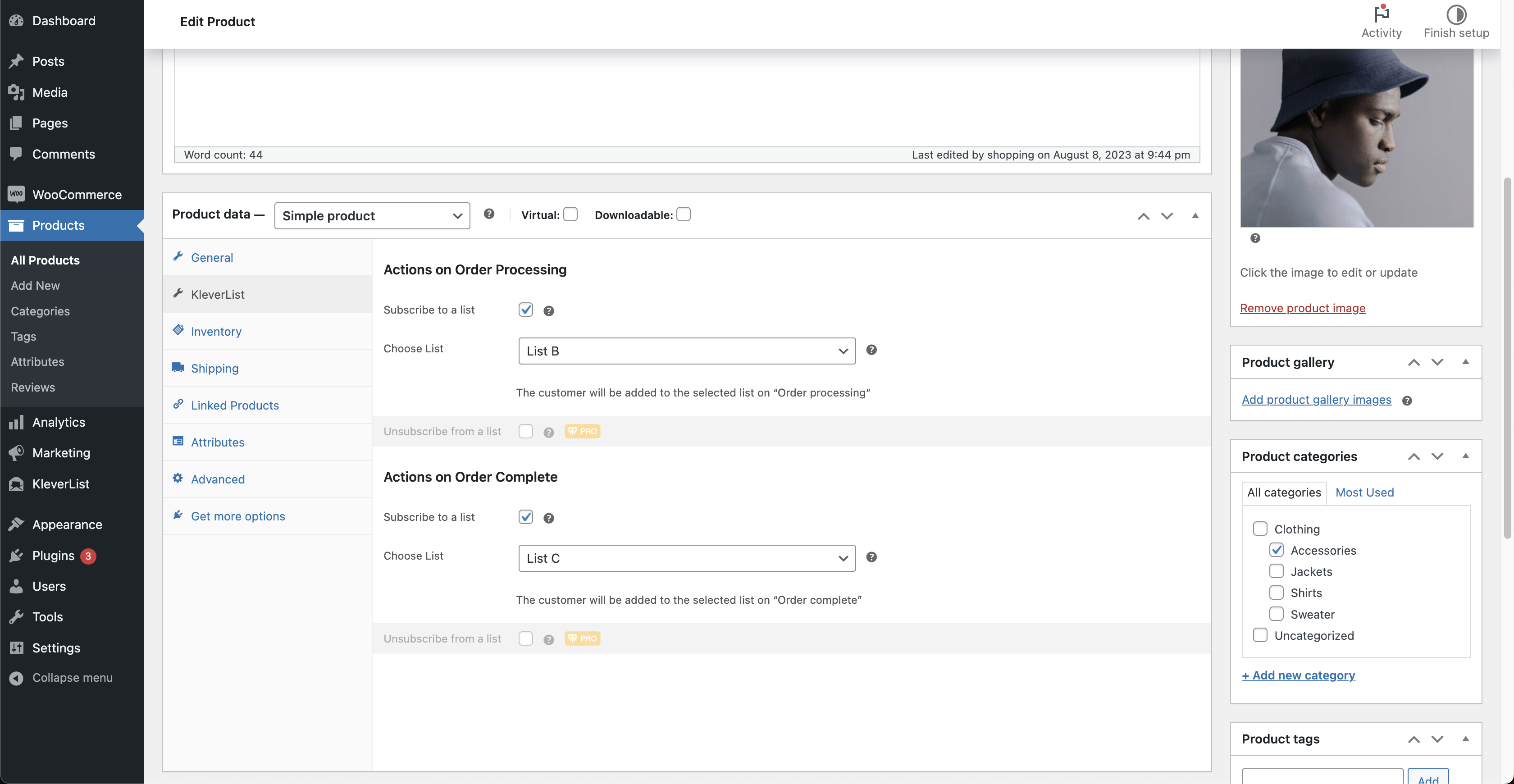
🔌 WooCommerce Product Detail Integration: Assign products to specific lists/audience, on order processing or order completion.
🧩 Mapping – Demographics: Sync essential customer information from WooCommerce to your email marketing platform.
🏷️ Tags – Behavioral: Assign a default tag to your customers, based on their purchase journey
🔃 Resubscribe Option: Smoothly resubscribe previously unsubscribed users to your email lists, or choose to keep them unsubscribed, giving you greater control over your email marketing strategy.
📦 Bulk list assignation: From the WooCommerce products page, select one or more products, and with a few clicks, assign them to a specific list or audience.
PRO Features
Available in the paid version of the plugin, on top of the Free Features:
✨ Mapping – Geographic, B2B, Behavioral, Transactional: Seamlessly map WooCommerce billing, user, and order information for optimal customer segmentation and targeting.
🏷️ Tags – Behavioral: Create and assign custom tags to your customers, based on purchased products and their purchase journey.
📨 Unsubscribe Option: Unsubscribe from a list on “Order Processing” or “Order Complete” (Sendy).
🚀 1-Click Migration Feature: Simplify the transition of your existing WooCommerce customers into your email markering platform with KleverList’s 1-Click Migration feature. Effortlessly import your customer base with a single click.
🔒 Customizable Privacy Consent: Gain explicit user consent for data sharing and comply with GDPR regulations.
–> Upgrade to KleverList PRO Here
–> See KleverList in Action!
Why Email Marketing and Segmentation Matter
In today’s digital world, email marketing has emerged as one of the most powerful and effective ways to engage with your audience. However, not all emails are created equal. To truly capture the attention and interest of your subscribers, segmentation plays a vital role.
Segmentation allows you to divide your email list into smaller, targeted groups based on specific criteria such as demographics, purchase history, or user behavior. By delivering personalized and relevant content to each segment, you can significantly boost open rates, click-through rates, and ultimately, conversions.
With KleverList, you can harness the full potential of email marketing and segmentation. Our plugin empowers you to synchronize WooCommerce customer data effortlessly, ensuring that your email marketing platform is always up-to-date with the latest information. This enables you to create highly tailored email campaigns that resonate with your audience and drive meaningful engagement.
Get Started with KleverList Today!
Unlock the power of email marketing and segmentation with KleverList. Take your WooCommerce store to new heights by delivering personalized, targeted email campaigns that drive engagement and conversions.
Download KleverList now and supercharge your email marketing strategy!
Installation
- Upload the plugin files to the
/wp-content/plugins/kleverlistdirectory, or install the plugin through the WordPress plugins screen directly. - Activate the plugin through the ‘Plugins’ screen in WordPress.
- Navigate to the KleverList integrations page in your WordPress admin panel.
- Connect KleverList with Sendy by following the provided on-screen instructions.
- Configure the mapping of WooCommerce billing and user fields to achieve optimal segmentation.
- Configure your global preferences in the settings page.
- Assign Products to Lists in the WooCommerce product detail’s page.
- Enjoy the power of KleverList to supercharge your email marketing campaigns!
Frequently asked questions
Q: Can I use KleverList with any WordPress theme?
A: Absolutely! KleverList is developed to seamlessly integrate with any WordPress theme. Simply install and activate the plugin, and you’re good to go. In case you encounter any compatibility issues, please reach out to our support team for assistance.
Q: Is KleverList GDPR compliant?
A: Yes, KleverList is fully GDPR compliant. The plugin offers (Pro Feature) customizable privacy consent options, allowing you to obtain explicit user consent for data sharing and ensure compliance with data protection regulations.
Q: Does KleverList work with other e-commerce platforms besides WooCommerce?
A: KleverList is designed specifically for WooCommerce integration.
Q: Can I send automated emails to customers using KleverList?
A: KleverList is a lightweight plugin that focuses on synchronizing WooCommerce customer data with your email marketing platform. It does not handle the sending of automated emails.
Q: What is an email marketing platform, and why do I need it for KleverList?
A: An email marketing platform is a comprehensive tool designed to create, send, and analyze email campaigns. It acts as a centralized hub for managing subscriber lists, designing visually appealing emails, and tracking campaign performance. KleverList seamlessly integrates with popular email marketing platforms like Sendy, AWeber and Mailchimp. By connecting with these platforms, you can leverage their robust features to enhance your email marketing campaigns and efficiently manage your subscriber data.
Changelog
Minor bug fixes on UI
2.5.0 (16/Nov/2024)
- All Integrations: Added the Privacy Consent checkbox for Gutenberg editor (Pro Feature)
- Updated SDK to version 2.9.0
- Testing with latest WooCommerce v9.4.1
2.4.2 (03/Sep/2024)
- AWeber: Minor modifications in the UI, correction of typos, updates of text paragraphs
- AWeber: Updated documentation links in the Settings pages
- Testing with latest WooCommerce release
2.4.1 (11/Aug/2024)
- All Integrations: Modification of Titles on Mapping and Tagging sections in the plugin Settings
- Testing and validation for the latest WooCommerce and WordPress releases
2.4 (26/May/2024)
- Added AWeber integration
- All Integrations: Added new Behavioral Segmentation toggles in the Mapping Section: First Purchase Date (Pro Feature)
2.3.3 (12/May/2024)
- Added AWeber integration (Beta)
- All Integrations: Enhancements to the Migration feature
- Minor changes on text, for better clarity
- Testing and validation for the latest WooCommerce and WordPress releases
2.3.2 (24/Feb/2024)
- All Integrations: Tags: Remove Order Processing Tag on Order Complete is now a Free feature
- All Integrations: Added links to documentation on pages (Integrations, Settings, Mapping, Tags)
- All Integrations: Updated the QuickStart page. Added a QuickStart video
- Testing and validation for WooCommerce 8.6.1 compatibility
Screenshots



For developers
Is this your plugin? Show off the numbers.
Add a live badge to your site, docs or GitHub README. It updates on its own — no account needed.
Best KleverList: Simplified WooCom… alternatives
All aweber plugins →





FAQ
KleverList: Simplified WooCommerce…: quick answers
Straight answers, pulled from live WordPress.org data.
Live data from WordPress.org · checked Oct 6, 2026
Is KleverList: Simplified WooComme… free?
Yes. KleverList: Simplified WooComme… is free to download and use from the official WordPress.org plugin directory.
Is KleverList: Simplified WooComme… safe to use in 2026?
KleverList: Simplified WooComme… shows warning signs in 2026 — compare the alternatives below before installing. It runs on 10+ sites and was last updated 2 years ago, and scores 26/100 on our health check.
How many websites use KleverList: Simplified WooComme…?
KleverList: Simplified WooComme… is active on 10+ WordPress websites and has been downloaded 1,878 times since it launched in November 2023. It was downloaded 75 times in the last 30 days.
Does KleverList: Simplified WooComme… work with WordPress 7.1?
KleverList: Simplified WooComme… is officially tested up to WordPress 6.7.9, while the latest release is 7.1.2. It may still work, but try it on a staging site first.
What PHP version does KleverList: Simplified WooComme… need?
KleverList: Simplified WooComme… requires PHP 8.0.2 or higher. Most hosts run PHP 8.x today, so it works on any modern WordPress hosting.
When was KleverList: Simplified WooComme… last updated?
The latest version, 2.5.0, was released on November 16, 2024 (2 years ago).
Who makes KleverList: Simplified WooComme…?
KleverList: Simplified WooComme… is developed and maintained by KleverPlugins.
What are the best alternatives to KleverList: Simplified WooComme…?
The most popular alternatives to KleverList: Simplified WooComme… are Optin Forms (2K+ installs), AWeber Forms by Optin Cat (300+ installs) and Connect Contact Form 7 and… (300+ installs).
Powered by PageForge
Want thousands of pages that rank like these? Build them in an afternoon.
This directory runs on the same engine as PageForge. Turn any spreadsheet, CSV or API into thousands of fast, SEO-ready WordPress pages — with schema, internal links and AI-written copy baked in.
- CSV, Google Sheets & API data sources
- AI content, schema & internal links per page
- Works with Elementor, Gutenberg, Yoast & Rank Math
- Free on WordPress.org — no credit card


