


Kirki eCommerce – Online Store, Shopping Cart & Payments
Free eCommerce plugin for WordPress. Run an online store with products, shopping cart, checkout, and payments. No transaction fees.

Solid choice
Kirki eCommerce is a solid plugin choice in 2026, with a few things worth checking first. It runs on 10+ sites and was last updated 4 days ago, and scores 66/100 on our health check.
- Actively developed — last update 4 days ago
- Tested with the latest WordPress (7.1)
- Small user base (10+ active installs)
- Very few reviews so far
How does it stack up?
Side-by-side on installs, updates, ratings & support



Daily downloads
Download spikes usually follow a new release — each site that auto-updates counts as a download.
Rankings
Where Kirki eCommerce stands todayWordPress.org search rankings
Live position in the plugin search, top 100| Keyword | Position |
|---|---|
| e-commerce | >100 |
| ecommerce | >100 |
| online store | >100 |
| payments | >100 |
| shopping cart | >100 |
Version adoption
Share of active sites per release.
About Kirki eCommerce
From the official readme · v1.0.2Description
Kirki eCommerce is a free, open source eCommerce plugin for WordPress. Build a complete online store, sell your products, and accept payments, with no transaction fees and no other plugin required.
All payment integrations are included free: PayPal, Stripe, and many more payment gateways, plus Cash on Delivery, Bank Transfer, and Check Payments.
Everything a store needs is built in: a product catalog with variants, inventory, shopping cart and checkout, payment gateways, order management, shipping, taxes, and analytics. A ready-made storefront puts your products in front of customers right away.
Setup takes care of itself. Pick your industry and where you sell, and Kirki eCommerce prepares the store behind the scenes: categories, product attributes such as colors and materials, shipping zones, and tax for your selling region.
Source code on GitHub | Share feedback | Join the community
Why Kirki eCommerce
- Complete out of the box. Shop, product, cart, checkout, and customer account pages are created for you.
- Set up for your industry. Choose your industry and selling region, and the store is configured for you, with matching product attributes and tax.
- No transaction fees. Kirki eCommerce takes no cut of your sales. You pay only what your payment provider charges.
- Every payment gateway included. PayPal, Stripe, and many more payment gateways, plus Cash on Delivery, Bank Transfer, and Check Payments, all free.
- Ready for international sales. Multi-currency pricing, regional tax rules, and EU VAT with reverse charge.
- Lightweight and standalone. Runs on its own, with any theme.
- Simple to switch. Bring your products, customers, coupons, and orders over from WooCommerce.
Build Your Catalog
Products & Variants
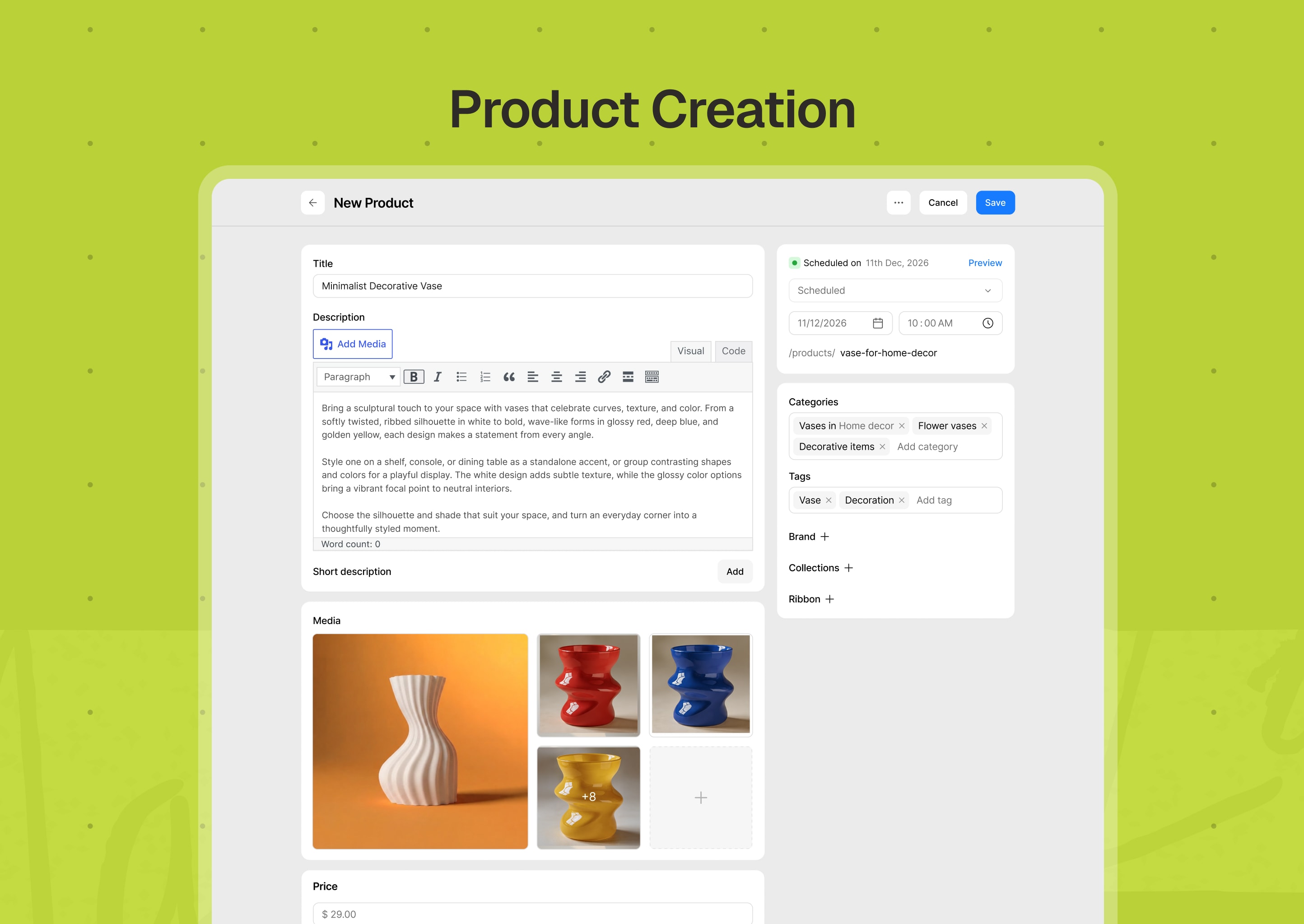
Create unlimited products, simple or with multiple variations, and present each one with galleries, variant images, and promotional ribbons.
- Generate purchasable variants from product attributes, each with its own price, SKU, stock level, and image.
- Reuse attributes, color swatches, and variation presets across your catalog.
- Organize products with categories, tags, brands, and collections.
- Edit products and variants in bulk, duplicate them, and preview before publishing.
- Schedule products to publish at a set time.
- Generate SKUs automatically with rules.
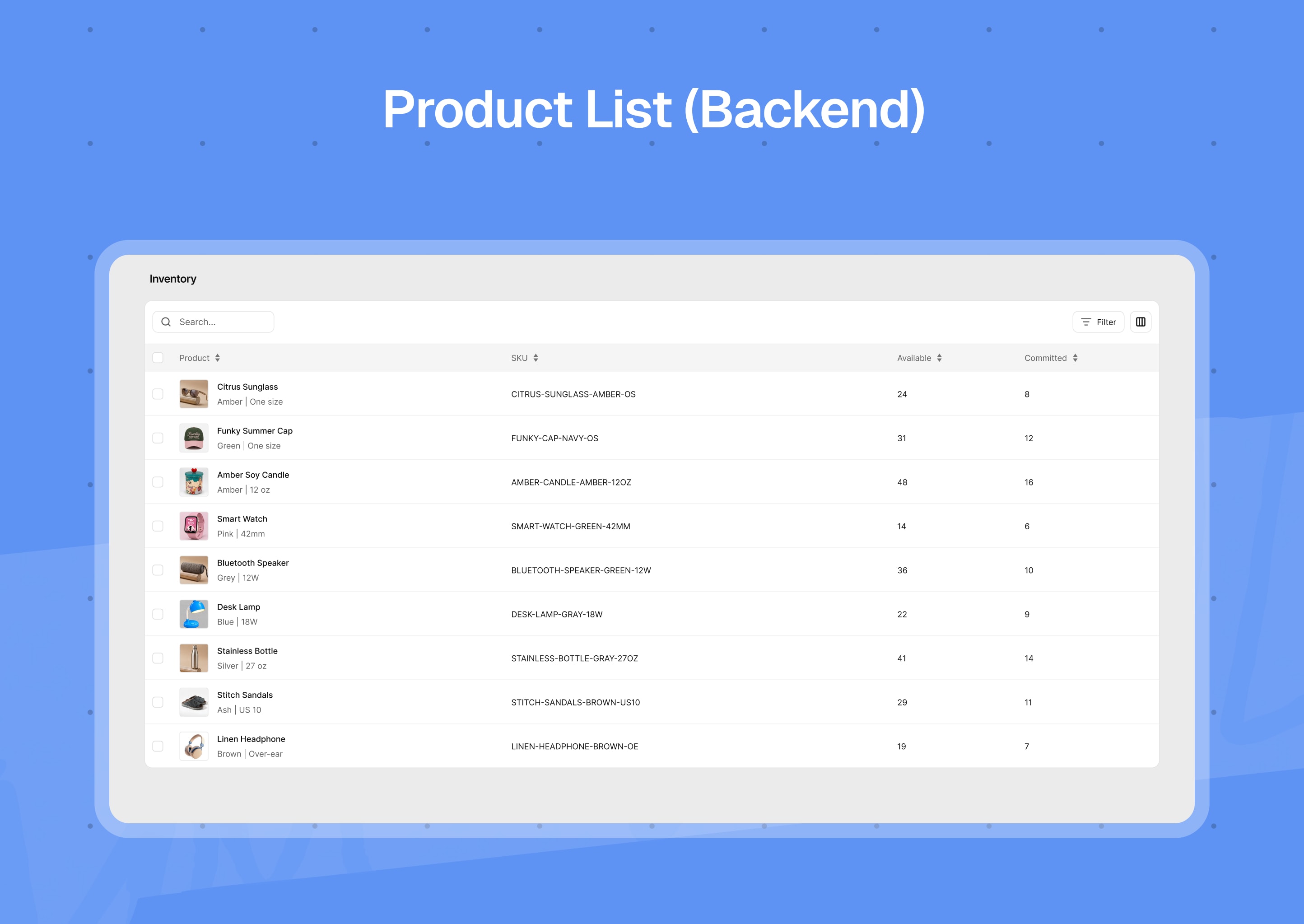
Stock & Inventory Management
Stock updates itself as orders move through your store.
- Track available and committed inventory from a dedicated inventory workspace.
- Set low-stock thresholds for the whole store, a product, or a single variant.
- Reserve stock while orders are processing, and block purchases of unavailable products.
- Allow backorders when you want to keep selling beyond available stock.
- Limit how many units a customer can buy in one order.
- Get low-stock and out-of-stock alerts by email.
Pricing & Multi-Currency
- Set regular, sale, and cost prices for each variant.
- Sell by weight, length, volume, or other units with unit-based pricing.
- Sell in multiple currencies, with a currency switcher for shoppers.
- Convert prices with exchange rates from CurrencyApi or ExchangeRate-API, synced on a schedule or manually.
- Control currency symbols, decimal places, separators, and formatting.
Sell and Get Paid
Built-in Storefront
You don’t have to build the essential shopping pages. Kirki eCommerce creates them for you, styled and ready, on any theme.
- Shop and product pages with search, filtering, galleries, and variant swatches.
- Cart, checkout, login, registration, and customer account pages.
- A wishlist for logged-in customers.
- A mini cart, available as a Gutenberg block or a shortcode.
- Storefront SEO metadata, breadcrumbs, and pagination.
Shopping Cart & Checkout
A short path from browsing to buying.
- Guest checkout, with customer accounts created or matched during checkout.
- Totals, discounts, tax, and shipping recalculated automatically as the cart changes.
- Custom checkout fields and validation rules.
- Terms and privacy consent where required.
- Guest and logged-in carts kept in sync, including applied coupons.
- Dedicated order success and failure pages.
Payment Gateways
Every payment gateway is included free, with no transaction fees. PayPal and the offline methods are ready out of the box, and every other gateway installs from the built-in gateway catalog as a free companion plugin.
- Online payments: PayPal, Stripe, Mollie, Square, Razorpay, Klarna, Paddle, PayStack, PayU, PayFast, PayMongo, AuthorizeNet, Eway, QuickPay, Redsys, 2Checkout, bKash, and SSLCommerz.
- Offline payments: Cash on Delivery, Bank Transfer, Check Payments, and custom manual payment methods.
- Payment updates arrive through webhooks, and provider fees can be recorded against each order.
- Checkout shows only the payment methods that accept the customer’s currency.
Discounts & Coupons
- Percentage, fixed-amount, and free-shipping discounts.
- Coupon codes that shoppers enter, or discounts that apply automatically.
- Targeting by product, category, customer, or country.
- Eligibility for everyone, logged-in customers, guests, or first-time buyers.
- Minimum spend or item count, usage limits, and start and end dates.
- Control over whether coupons can be combined.
Fulfill Every Order
Order Management
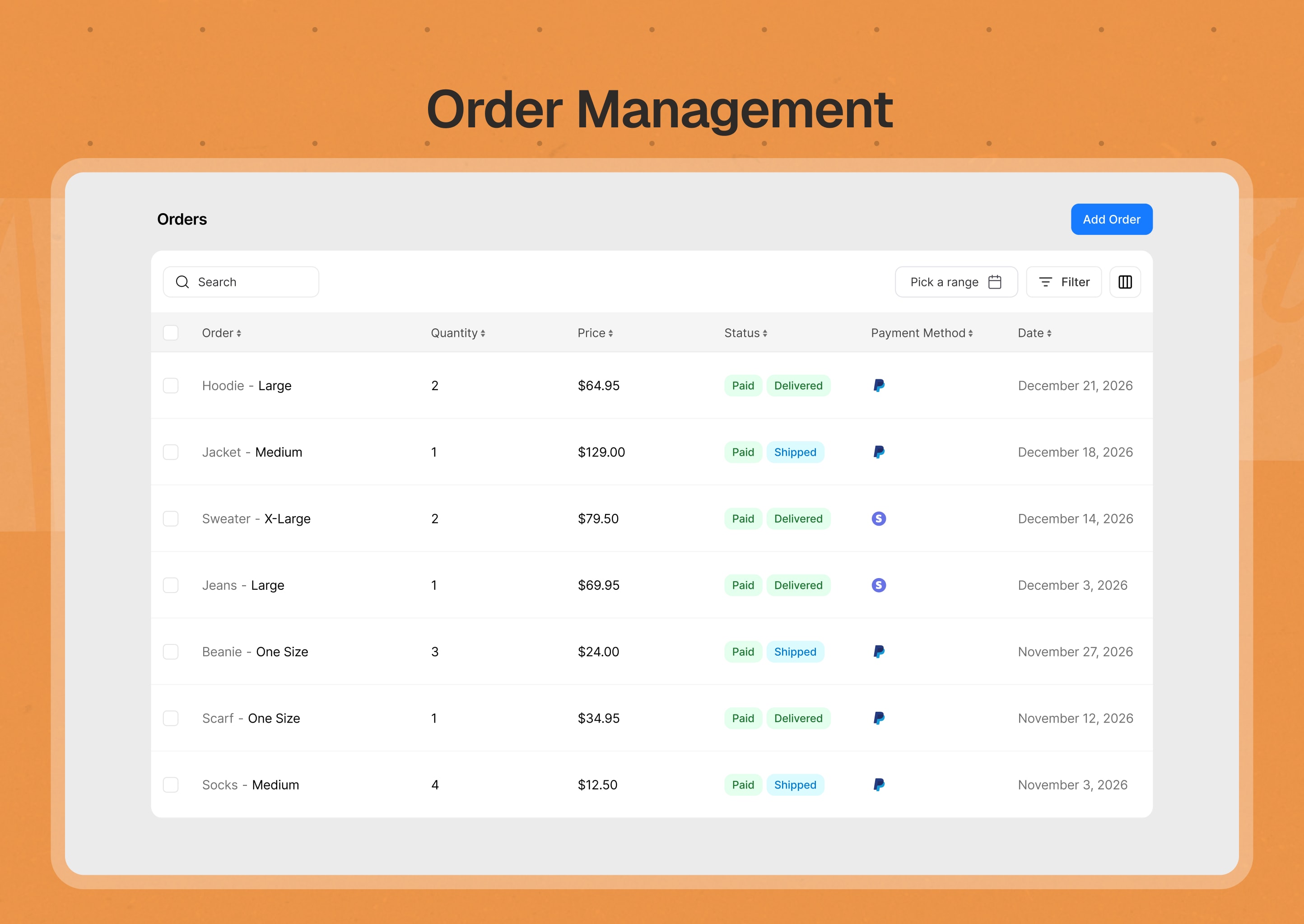
See every order in one place, from payment through fulfillment.
- Separate payment and fulfillment statuses, so you always know what needs attention.
- Manual orders, plus editing of items, addresses, and shipping on existing orders.
- Payments, invoices, cancellations, shipping, and tracking managed from the order.
- Tracking numbers with a carrier, so customers get a working tracking link.
- Notes and a chronological timeline on every order.
- Guest orders merged into customer accounts.
Shipping
- Shipping zones for different destinations.
- Flat-rate, weight-based, and local pickup methods, plus free shipping above an order amount.
- Rules based on destination, cart value, weight, product category, or shipping profile.
- Reusable shipping profiles, boxes, and package dimensions.
- Carriers with tracking link templates and logos for each zone.
Taxes & EU VAT
- Tax profiles and regional tax rules.
- EU VAT support, including reverse charge.
- Product prices that include or exclude tax.
- Tax on shipping where required.
- Customer tax IDs such as VAT, GST, or EIN.
- Tax-exempt products and variants.
Email Notifications
- Order emails to customers for new, processing, completed, cancelled, and failed orders.
- Alerts to store administrators about important store events.
- Editable subjects, headings, and content, with shortcodes for order and customer details.
- Your logo and brand colors on every email.
- Delivery through SMTP or PHP mail, queued in the background for reliability.
Grow Your Store
Analytics & Reports
One dashboard shows how your store is performing. Compare any date range with the period before it.
- Gross sales, orders, average order value, and returning customer rate.
- Sales by product, category, coupon code, payment method, and location.
- A breakdown of discounts, returns, shipping charges, and taxes.
- New versus returning customers.
- Inventory health, with out-of-stock, low-stock, and in-stock counts.
- A dashboard layout you can customize.
Customer Accounts
- Registration, login, and email verification from the storefront.
- Order history and individual order details.
- Multiple saved billing and shipping addresses.
- Profile and password management.
- Customers linked to WordPress users, with email addresses kept in sync.
Product SEO
- SEO metadata for every product, with a search result preview.
- Open Graph and social sharing information.
- Structured product data for search engines.
Easy Setup and Migration
Guided Setup
Tell Kirki eCommerce your industry and where you sell, and it sets up the store behind the scenes.
- Industry presets for stores selling fashion, home decor and furniture, beauty and personal care, food and beverage, electronics, sports and fitness, books and gifts, and more.
- Categories and product attributes that fit your industry, such as colors and materials, ready to use on your first product.
- Tax configured for the tax region you select.
- Shipping zones and legal texts based on your location.
- Optional sample products to explore before you add your own.
- Dedicated settings for store details, selling locations, payments, shipping, taxes, currencies, emails, and checkout.
Migrate from WooCommerce
Bring your store with you. Your WooCommerce data does not change.
- Move settings, attributes, categories, tags, brands, products, customers, coupons, and orders.
- Resume, retry, revert, or clean up a migration run if something goes wrong.
- Prefill the setup wizard from your WooCommerce settings.
Built for Developers
Kirki eCommerce is open source and designed to be extended.
- REST API for integrations and custom applications.
- Extension hooks, plus WordPress actions and filters.
- Companion plugin support for payment gateways and other extensions.
- Background jobs, caching, and session management.
- Translation ready.
Who It’s For
- Store owners who want a complete online store for free, with no transaction fees
- Merchants selling products with multiple variants, sizes, colors, or materials
- International sellers who need multi-currency pricing and EU tax handling
- Stores that need flexible payment options, from major payment gateways to Cash on Delivery, Bank Transfer, and Check Payments
- Developers and agencies building client stores on a REST API and extension hooks
- Store owners moving from WooCommerce with their products, customers, and orders
Support & Community
- Share feedback or feature ideas in the feedback form.
- Join the Kirki eCommerce Facebook community.
- Report a bug on GitHub Issues.
Source Code
Kirki eCommerce is open source. Find the full source code on GitHub.
The JavaScript and CSS in the assets/ folder are compiled. Their readable source is in the public GitHub repository:
resources/app/is the source of the admin app (assets/js/kirki-ecommerce.*.js,assets/js/chunks/,assets/js/pages/and the admin CSS).resources/site/is the source of the storefront script and styles (assets/js/site.jsandassets/css/site.css).
To build them, clone the repository. You need Node.js 22 or later:
- In the repository folder, run
cd resources/app && npm install && npm run build. - Then run
cd ../site && npm install && npm run build.
Each build writes the compiled files to the assets/ folder.
External Services
This plugin connects to third-party payment gateway services depending on which payment method a store owner configures. Data is only sent after a store owner has set up a gateway, and only for customers who choose that gateway at checkout.
PayPal ships with the core plugin. It is used only after the store owner enters PayPal API credentials in the payment settings.
- When a customer pays with PayPal at checkout, the plugin creates a PayPal order. It sends the item names, a description of each item (price, quantity, subtotal, discount and tax), the order number and internal order ID, the order total, item total and shipping total, the currency, the store name (site title), and the return and cancel URLs for the checkout success and failure pages.
- To get an access token for each request, the plugin sends the store owner’s PayPal client ID and client secret.
- When the customer approves the payment, the plugin asks PayPal to capture it.
- When the store owner refunds a PayPal order, the plugin sends the refund amount, the currency, the refund reason, and the internal refund ID.
-
When PayPal sends a webhook to the store, the plugin sends the webhook event, its signature headers, and the store’s webhook ID back to PayPal to verify it.
The plugin can also connect to a currency exchange rate service to convert displayed prices into other currencies. This only happens after a store owner selects a provider and enters an API key in the currency settings. Rates are then fetched automatically at the configured update frequency, or when the store owner syncs them manually. No customer or order data is sent.
CurrencyApi receives the store owner’s API key, the store’s base currency, and the list of currency codes to fetch rates for. The API key is also sent to read the account’s monthly usage quota.
ExchangeRate-API receives the store owner’s API key and the store’s base currency.
Third-Party Libraries
Kirki eCommerce is licensed under GPLv2 or later. It bundles the following GPL-compatible libraries. Each keeps its own license.
- themeum/framework: GPL-2.0-or-later
- brick/math: MIT
- brick/money: MIT
PayPal is a trademark of PayPal, Inc. CurrencyApi and ExchangeRate-API are trademarks of their respective owners. Kirki eCommerce is not affiliated with or endorsed by these companies. Their names and logos are used only to identify the services the plugin connects to.
Installation
- In your WordPress dashboard, go to Plugins → Add New Plugin.
- Search for “Kirki eCommerce”.
- Click Install Now, then Activate.
- Follow the setup wizard: enter your store name, pick your industry, and choose where you sell. Kirki eCommerce configures the rest.
- Go to Kirki eCommerce → Settings to add your payment gateway.
- Create your first product and start selling.
To install manually, download the plugin ZIP file, go to Plugins → Add New Plugin → Upload Plugin, upload the file, then install and activate it.
Changelog
1.0.2 – Nov 19, 2026
- New: Added options to customize the Home dashboard, including quick actions, key numbers, and sections.
- New: Added a Needs Your Attention section to the Home dashboard to highlight orders awaiting shipment and payments awaiting collection.
- New: Added a Restock Soon section to highlight products running low on stock.
- New: Added a template override filter hook for greater control over storefront UI customization.
- Update: Improved request validation performance by reducing overhead and processing time.
- Update: Added product images to order items migrated from WooCommerce.
- Update: Changed the shipping method form to open in a dialog instead of a separate page.
- Update: Combined the two category fields in the coupon form into a single field.
- Update: Improved page loading speed by reducing repeated currency lookups.
- Update: Prevented search engines from indexing order tracking and checkout pages.
- Update: Improved the UI of form select dropdowns.
- Update: Improved the Mark as Shipped and Add Tracking Number workflows on the merchant order details.
- Fix: Fixed an issue where older orders displayed the wrong currency after changing the store’s base currency.
- Fix: Fixed an issue that allowed customers to apply coupons even when coupon codes were disabled in checkout settings.
- Fix: Fixed the order list and Recent Orders card displaying totals in the wrong currency instead of the store’s base currency.
- Fix: Fixed an issue where order success and failure pages appeared for orders with mismatched payment statuses.
- Fix: Fixed shortcode escaping in email templates.
- Fix: Fixed email sender names and headers not using the store name.
- Fix: Fixed an issue that allowed customer addresses belonging to other customers to be saved.
- Fix: Fixed a security issue where potentially harmful stored data could execute during WooCommerce data migration.
1.0.1 – Nov 11, 2026
- New: Added bKash as a payment method.
- New: Added SSLCommerz as a payment method.
- New: Added the option to update installed payment gateways when a newer version is available.
- New: Hid payment methods at checkout that cannot accept the customer’s currency.
- New: Added automatic rechecking of unpaid bKash orders to mark completed payments as paid.
- Update: Redesigned the “Add a payment method” dialog with search and ready-made manual methods.
- Update: Removed product schema profiles. All products now use the same search engine data, and saved profiles are deleted on update.
- Update: Improved the speed of bulk updates for product variants.
- Update: Improved the speed and responsiveness of the product selection dialog.
- Update: Changed the shop page to use the page’s own title and excerpt as its heading and description.
- Update: Hid tax fields in the product form and bulk edit when tax calculation is off.
- Update: Made the Brand field in the product form addable and removable.
- Update: Improved the add currency dialog in multi-currency settings.
- Update: Added a loading preview in payment settings while the payment list loads.
- Fix: Stopped tax from being charged on variants with “Charge tax” turned off.
- Fix: Removed the “Incl. tax” label from products that do not charge tax.
- Fix: Fixed product images not showing correctly on analytics page.
- Fix: Fixed dialog titles and headings not displaying correctly.
1.0.0 – Nov 04, 2026
- Initial release
- New: Adds a setup wizard with industry and location presets, optional sample products
- New: Adds products with variants, a variation library, categories, tags, brands, collections, ribbons, scheduling, preview, duplication, bulk edit, SKUs, and trash management
- New: Adds inventory tracking with committed stock, low-stock thresholds for the store, products, and variants, backorders, out-of-stock protection, per-order quantity limits, and email alerts
- New: Adds orders with separate payment and fulfillment statuses, manual orders, order editing, notes, a timeline and activity log, tracking links, archiving, and guest order merge
- New: Adds coupons with percentage, fixed-amount, and free shipping discounts, targeting and customer eligibility rules, usage limits, validity windows, and duplication
- New: Adds cart and checkout with guest checkout, legal consents, and cart syncing between guest and logged-in sessions
- New: Adds payments with PayPal, Cash on Delivery, and Bank Transfer, and more gateways as companion plugins
- New: Adds shipping with zones, flat rate, local pickup, and weight-based methods, profiles, boxes, carriers, and rules
- New: Adds tax with profiles, regional rates, rules, EU VAT and OSS support
- New: Adds multi-currency pricing with automatic exchange rate sync and a currency switcher shortcode
- New: Adds transactional emails for customers and administrators, with a template editor, live preview, and SMTP or PHP mail delivery
- New: Adds a built-in storefront with shop, product, cart, checkout, and account pages and search
- New: Adds a wishlist for logged-in customers and a mini cart block and shortcode
- New: Adds customer accounts with order history, saved addresses, email verification, and profile management
- New: Adds an Analytics dashboard with comparison periods and a customizable advanced layout
- New: Adds WooCommerce migration
- New: Adds product SEO and schema tools
Screenshots






For developers
Is this your plugin? Show off the numbers.
Add a live badge to your site, docs or GitHub README. It updates on its own — no account needed.
Best Kirki eCommerce alternatives
All e-commerce plugins →





FAQ
Kirki eCommerce: quick answers
Straight answers, pulled from live WordPress.org data.
Source: WordPress.org
Is Kirki eCommerce free?
Yes. Kirki eCommerce is free to download and use from the official WordPress.org plugin directory.
Is Kirki eCommerce safe to use in 2026?
Kirki eCommerce is a solid plugin choice in 2026, with a few things worth checking first. It runs on 10+ sites and was last updated 4 days ago, and scores 66/100 on our health check.
How many websites use Kirki eCommerce?
Kirki eCommerce is active on 10+ WordPress websites and has been downloaded 822 times since it launched in November 2026. It was downloaded 831 times in the last 30 days.
Does Kirki eCommerce work with WordPress 7.1?
Yes. The developer has tested Kirki eCommerce up to WordPress 7.1.5, the latest release. It requires WordPress 6.8 or newer.
What PHP version does Kirki eCommerce need?
Kirki eCommerce requires PHP 7.4 or higher. Most hosts run PHP 8.x today, so it works on any modern WordPress hosting.
When was Kirki eCommerce last updated?
The latest version, 1.0.2, was released on November 19, 2026 (4 days ago).
Who makes Kirki eCommerce?
Kirki eCommerce is developed and maintained by Themeum.
What are the best alternatives to Kirki eCommerce?
The most popular alternatives to Kirki eCommerce are WCBoost – Wishlist (40K+ installs), Klarna for WooCommerce (20K+ installs) and Ecwid by Lightspeed Ecommer… (20K+ installs).
Powered by PageForge
One template and a spreadsheet. A real page for every search.
PageForge turns each row of a CSV into a WordPress page with its own title, URL, SEO fields and schema, built on the layout you already designed. Free on WordPress.org.
- CSV and XLSX, plus Google Sheets on Professional and Enterprise
- Its own title, URL, SEO fields and schema for every page
- Works with the block editor, Elementor, Divi and Avada
- Free on WordPress.org, no credit card