



JustTables – WooCommerce Product Table
JustTables is a Product Tables plugin for WooCommerce.

Solid choice
JustTables is a solid plugin choice in 2026, with a few things worth checking first. It runs on 500+ sites, is rated 3.7/5 and was last updated 3 months ago, and scores 73/100 on our health check.
- Tested with the latest WordPress (7.1)
- Small user base (500+ active installs)
Daily downloads
Download spikes usually follow a new release — each site that auto-updates counts as a download.
Rankings
Where JustTables stands todayWordPress.org search rankings
Live position in the plugin search, top 100| Keyword | Position |
|---|---|
| JustTables | #1 |
| product table | #28 |
| woocommerce | >100 |
| woocommerce product table | #38 |
| woocommerce table | #76 |
Version adoption
Share of active sites per release.
Rating breakdown
★★★★★★★★★★ 3.7 from 6 reviews
About JustTables – WooCommerce Product Table
From the official readme · v1.8.2Description
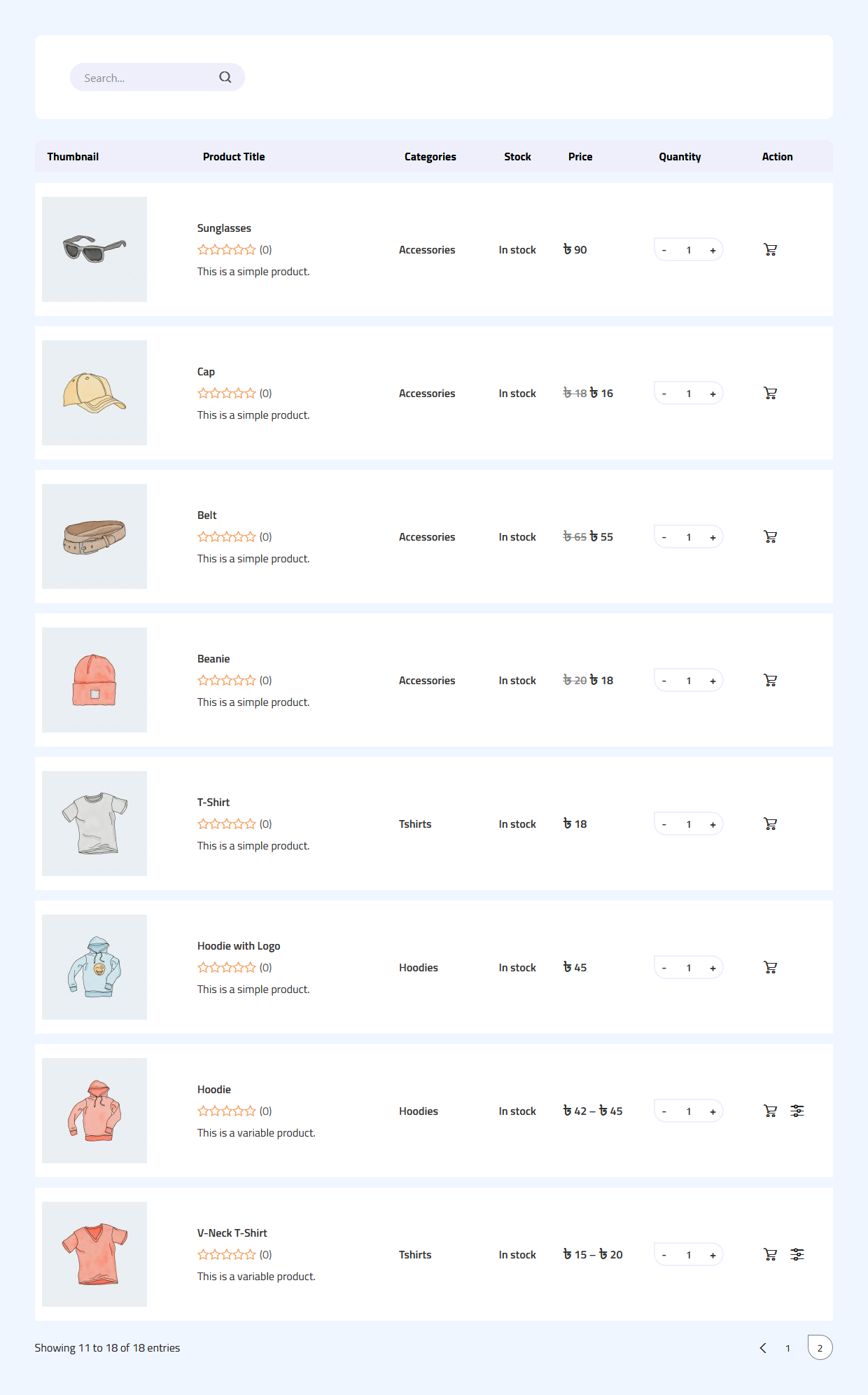
JustTables is an incredible WordPress plugin that lets you showcase all your WooCommerce products in a sortable and filterable table view. It allows your customers to easily navigate through different attributes of the products and compare them on a single page. This plugin will be of great help if you are looking for an easy solution that increases the chances of landing a sale on your online store.
Live Demo | Documentation | Purchase Pro
Basic Features:
- Display WooCommerce products in a table layout.
- 28 pre-built columns with options to enable/disable.
- Add custom columns with custom fields/custom taxonomies.
- Order table columns using drag and drop.
- Include products by specific taxonomies and terms.
- Set the number of products per page.
- Enable/disable table header.
- Enable/disable the search box.
- No coding knowledge is required.
Special Features:
- Create unlimited product tables.
- Modern design with smart interactivity.
- Ajax search and pagination.
- Ajax instant add to cart button.
- 100% responsive for any device.
- Compatible with Classic Editor, Gutenberg Editor, Elementor, Divi Page Builder, Thrive Architect, Beaver Builder, WPBakery Page Builder, Visual Composer Website Builder, King Composer, and any other available page builders or editors.
Premium Features:
✓ 29 pre-built columns with options to enable/disable.
✓ Include and exclude specific products.
✓ Include and exclude products by specific taxonomies and terms.
✓ Include and exclude products by specific authors/vendors.
✓ Display products by minimum and maximum price.
✓ Display products by product type.
✓ Display products by availability/stock status.
✓ Order products by all required options.
✓ Specify the product thumbnail size.
✓ Set behavior of title on click.
✓ Set behavior of thumbnail on click.
✓ Set behavior of author/vendor name on click.
✓ Set view product and author/vendor archive target.
✓ Add unlimited taxonomy filters for the end-users to filter products instantly.
✓ Enable/disable table header sorting option.
✓ Display export buttons.
✓ Design table with rich design options.
Video Overview:
Why should you use this plugin?
Are you running an online store using the WooCommerce plugin and wondering how you can get rid of the classic appearance of a WooCommerce store that allows displaying the products in a grid layout only?
If the answer is yes, then the JustTables WordPress plugin is here to provide you with some amazing features using which you can display all your products in a tabular format. Sometimes it is tiring for the customers when the products are listed in a grid format since Product Comparison is pretty time-consuming. On the other hand, a product table layout will give your customers a more pleasant experience while purchasing from your store as they can compare different products on a single page. Moreover, it helps them make buying decisions much more quickly.
JustTables plugin comes packed with many amazing features and a plethora of customization options that will give you many advantages over your competitors. From changing the table layout to keeping your desired fields in the table, almost all the elements are easily customizable. By utilizing those features, you will be able to convert the default layout of your store into a whole new user-friendly layout that results in a better user experience.
If you want to display extra product information for each product within a responsive table layout then look no further than this plugin. You don’t even need any coding knowledge to operate this plugin. With the help of this plugin, you can convert your potential customer to an active buyer.
So, what are you waiting for? Please give it a try now and don’t forget to let us know if you have any sort of suggestions.
Other Projects
We have a lot of plugins and extensions that might interest you. Try out other projects by following this link:
Woolentor Addons
Woolentor is a WooCommerce page builder plugin that extends the functionality of the WooCommerce store. These Elementor Addons provide additional features and options for WooCommerce stores. Woolentor is the best alternative for ShopReady, Kadence, JetWidgets, ShopEngine, and CoDesigner. The Woolentor addons come with 50+ free Elementor widgets like Wishlist Extension Addon, Product compare, Product Filters, Product Variation Swatches, Shopify Style Checkout, Product Slider and 50+ pro Elementor Widgets like Checkout Fields Editor, Partial Payment, Email Customizer for WooCommerce with ready Email Templates, WooCommerce Email Automation, Multi Step Checkout, and many much more. Also it provide 90+ WooCommerce Elementor templates, 22+ WooCommerce Modules, and Gutenberg Blocks.
HT Mega For Elementor
HT Mega is an Elementor Addons that comes with custom page builder, header builder, footer builder, mega menus, and more for your Elementor based website. The HT Mega plugin also includes a comprehensive set of Elementor widgets, readymade Elementor templates and Elementor Blocks. HT Mega plugin works like ElementsKit, Essential Addons for Elementor, Royal Elementor Addons, Premium Addons, Happy Addons, PowerPack Addons, Unlimited Elements, Qi Addons, etc. The HT Mega plugin provides 84+ free Elementor widgets like Post Grid widget, Slider widget, Accordion widget, Elementor Forms widget, Contact Form Widget, Elementor tables, and other related items. It also provides 18+ pro widgets like Filterable Gallery Widget, Event Box Widget, Breadcrumbs Widget, Elementor Facebook Review Widget, Elementor Category List Widget, etc.
Hashbar WP Notification Bar
HashBar is a WordPress Notification Bar Plugin that enables you to create unlimited notification bars on your WordPress website. You can create as many notification bars as you want and customize their content to meet your needs.
WP Plugin Manager – Deactivate plugins per page
WP Plugin Manager is the perfect solution for those who want to disable certain plugins on specific pages or posts. With this plugin, you can easily activate or deactivate plugins on a per-page or per-post basis. Whichever plugin you don’t need you can deactivate or disable that plugin with the help of WP plugin Manager.
Extensions For Cf7
Contact Form 7 is an excellent plugin for organizing your contact page. The CF7 extensions plugin includes Contact Form 7 Database, enabling Conditional Fields for Contact Form 7, etc. It allows fields to be set up as either visible or hidden depending upon the input from visitors. In addition, integrating seamlessly with Mailchimp brings leads generated every time someone fills out one form into an associated email list immediately.
Whols
Whols is an outstanding plugin for WooCommerce that allows store owners to set wholesale prices for the products of their online stores. With Whols, you can easily add custom fields to your registration form, set minimum product requirements, and control how wholesale prices are displayed on both the shop and product detail pages. Whols work like Wholesale Suite, B2Bking and B2B plugins.
Just Tables
JustTables is a WooCommerce product table plugin that helps you easily create and manage tables for your products. It includes 28 pre-built columns with options to enable/disable, and you can add custom columns with custom fields/taxonomies. Just Tables also allows you to order table columns using drag and drop and set the number of products per page.
Swatchly
Swatchly is a WooCommerce product variation swatches plugin that allows you to add color swatches to your product pages. With Swatchly, you can enable swatches for the shop, product list, and product details pages. There are three swatch types (label swatche, color swatche, image swatche), and the plugin supports multi-colored swatches.
HT Slider For Elementor
HT Slider For Elementor is a powerful and user-friendly slider addon for Elementor. You can customize the look and feel of your slider with HT Slider’s custom styling options. You also have the option to display your slides by id and category. Plus, HT Slider For Elementor comes with custom design options for slider navigation and pagination, so you can easily control the look and feel of your slider.
HT Contact form
HT Contact Form 7 Widget is an Elementor addon that allows you to easily drag and drop Contact Form 7 forms into your web pages. With the help of this plugin, you can choose your form from the drop-down list, Custom Styling Options, and add it to any page or place on your website. The HT Contact Form 7 Widget is an essential tool for anyone using Contact Form 7 on their website.
Need Help?
Is there any feature that you want to get in this plugin?
Needs assistance to use this plugin?
Feel free to Contact us
Installation
This section describes how to install the JustTables – WooCommerce Product Table plugin and get it working.
1) Install
- Go to the WordPress Dashboard “Add New Plugin” section.
- Search For “JustTables”.
- Install, then Activate it.
OR:
- Unzip (if it is zipped) and Upload
just-tablesfolder to the/wp-content/plugins/directory - Activate the plugin through the ‘Plugins’ menu in WordPress
2) Configure
- After install and activate the plugin you will get a notice to install WooCommerce Plugin (If allready install it then do not show notice).
- To install the plugin click on the “Button” Install WooCommerce.
- ‘Product Tables’ menu will be appear in WordPress Dashboard.
- Create new Product Table and relax!
Changelog
Version: 1.8.2 – Date: 30 August, 2026
- Fixed: Recommended Plugins page grid collapsed to a single column on newer WordPress versions.
- Fixed: A few minor issues.
- Tested: Compatibility with the latest version of WordPress.
- Tested: Compatibility with the latest version of WooCommerce.
Version: 1.8.1 – Date: 26 February, 2026
- Improved: Admin notice display.
Version: 1.8.0 – Date: 15 December, 2025
- Added: Table duplicate feature – easily duplicate tables from the admin list.
- Fixed: Elementor compatibility issue causing page editor to hang when editing.
- Fixed: Variable products not adding to cart properly due to logic bug.
- Fixed: JavaScript crashes when parsing invalid variation data.
- Fixed: Variation SKU and quantity limits not updating correctly when selecting variations.
- Improved: AJAX requests now have 30-second timeout for better error handling.
- Improved: User-friendly error messages for AJAX failures.
- Improved: Search clear button with smooth visibility transitions.
- Tested: Compatibility with the latest version of WordPress.
- Tested: Compatibility with the latest version of WooCommerce.
Version: 1.7.3 – Date: 13 November, 2025
- Fixed: Minor bug fix.
Version: 1.7.2 – Date: 23 October, 2025
- Improved: Minor UI update and optimizations.
Version: 1.7.1 – Date: 19 October, 2025
- Fixed: Issue with autoloader not loading properly.
Screenshots


For developers
Is this your plugin? Show off the numbers.
Add a live badge to your site, docs or GitHub README. It updates on its own — no account needed.
FAQ
JustTables: quick answers
Straight answers, pulled from live WordPress.org data.
Live data from WordPress.org · checked Nov 18, 2026
Is JustTables free?
Yes. JustTables is free to download and use from the official WordPress.org plugin directory. The developer also sells premium add-ons or a Pro version with extra features.
Is JustTables safe to use in 2026?
JustTables is a solid plugin choice in 2026, with a few things worth checking first. It runs on 500+ sites, is rated 3.7/5 and was last updated 3 months ago, and scores 73/100 on our health check.
How many websites use JustTables?
JustTables is active on 500+ WordPress websites and has been downloaded 58,986 times since it launched in February 2021. It was downloaded 485 times in the last 30 days.
Does JustTables work with WordPress 7.1?
Yes. The developer has tested JustTables up to WordPress 7.1.4, the latest release. It requires WordPress 5.0 or newer.
When was JustTables last updated?
The latest version, 1.8.2, was released on August 30, 2026 (3 months ago).
Who makes JustTables?
JustTables is developed and maintained by HT Plugins.
Powered by PageForge
Want thousands of pages that rank like these? Build them in an afternoon.
This directory runs on the same engine as PageForge. Turn any spreadsheet, CSV or API into thousands of fast, SEO-ready WordPress pages — with schema, internal links and AI-written copy baked in.
- CSV, Google Sheets & API data sources
- AI content, schema & internal links per page
- Works with Elementor, Gutenberg, Yoast & Rank Math
- Free on WordPress.org — no credit card


