


jQuery Post Splitter
This plugin will split your post and pages into multiple pages with a tag. A button to split the pages and posts is available in text editor icons.

Use with caution
jQuery Post Splitter works, but test it on a staging site before relying on it in 2026. It runs on 100+ sites, is rated 4.6/5 and was last updated 12 months ago, and scores 55/100 on our health check.
- Loved by users — 4.6/5 from 37 reviews
- Small user base (100+ active installs)
- Only tested up to WordPress 6.8 (latest is 7.1)
How does it stack up?
Side-by-side on installs, updates, ratings & support


Daily downloads
Download spikes usually follow a new release — each site that auto-updates counts as a download.
Rankings
Where jQuery Post Splitter stands todayWordPress.org search rankings
Live position in the plugin search, top 100| Keyword | Position |
|---|---|
| ajax posts | >100 |
| Next Page | >100 |
| paged posts | #5 |
| post splitter | #1 |
| splitter auto loading | #1 |
Version adoption
Share of active sites per release.
Rating breakdown
★★★★★★★★★★ 4.6 from 37 reviews
About jQuery Post Splitter
From the official readme · v3.0.5Description
-
Author: Fahad Mahmood
-
Project URI: http://androidbubble.com/blog/wordpress/plugins/jquery-post-splitter
-
License: GPL 3. See License below for copyright jots and titles.
jQuery Post Splitter is compatible with almost all themes and it can be implemented in 4 different ways from which you might will require one. For user friendliness, this plugin come up with a button “Split Page” and easy usage within the text editor. It is light weight and comparatively optimized so it will not interrupt your scripts uselessly.
- Demo URI: http://demo.androidbubble.com/jquery-post-splitter-pro
- Demo URI: http://demo.androidbubble.com/how-it-works-jps
- Demo URI: http://demo.guavapattern.com/?page_id=443
- Demo URI (Page Break Block): http://demo.guavapattern.com/?page_id=447
WordPress has an excellent, but little known, feature for splitting up long posts into multiple pages. However, a growing trend among major news and blog sites is instead to split up posts into dynamically loading sliders. While there are many slider plugins available for WordPress, none of them quite tackles this functionality. That’s where the jQuery Post Splitter comes in: it takes normal multi-page posts from WordPress and replaces them with jQuery transition, ajax and page-refresh methods.
Tags
slider, pagination, ajax, carousel, multi-page, newspaper
Video Tutorial
Basic Features
- Posts and Pages can be divided into parts with page-breaks.
- View full post optional link
- Navigation captions can be edited
- Slides counter can be displayed
- Custom HTML and CSS can be added above and below post slides
- Scroll to top option is available for long posts
- Exceptional support on wordpress.org
- Slider navigation position
- Insert
with each return key - Slider count (e.g. “2 of 4”) position
- Scroll to top after slide load? (jQuery/Ajax)
- Clean tags from all posts/pages
Advanced Features
- Default post navigation, line numbers display as pagination
- JavaScript Function on Slide, on each next and previous button you can trigger multiple JS functions
- Beautiful Styles for Slider Navigation
- SEO Trick – Display full content on first page as hidden?
- Loop slides – Creates an infinite loop of the slides
- Editable navigation captions
- Disable theme’s default post navigation
- Display full content on first page as hidden
- Combine different pages/posts with shortcode
What the slider does:
-
Provides an awesome functionality to combine many posts/pages into one with the shortcodes. Example: [JPS_CHUNK id=”62″ type=”title”]
-
Replaces WordPress’ built-in post pagination funtionality with jQuery, ajax-based carousel and page-refresh method.
-
Uses hash based URLs for easy direct linking to specific slides. This also preserves the functionality of the browser’s Back button.
-
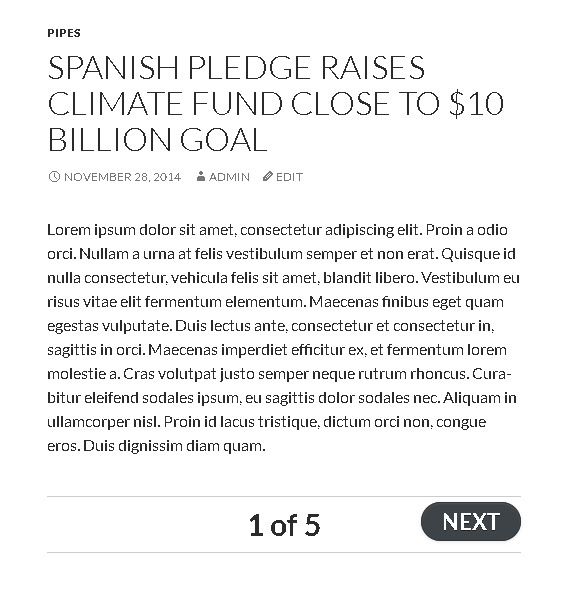
Automatically adds slide navigation and a slide counter (e.g. ‘1 of 7’) to sliders according to the preferences you set.
-
Adds the ‘Insert Page Break’ button to the TinyMCE post editor so that you can easily split your content into multiple pages/slides.
-
Provides an optional stylesheet for (very) basic styling of the slider navigation.
-
Optionally allows infinite looping of slides.
-
Optionally provides a link to view all slides on a single page.
-
Optionally allows for scrolling back to top when each slide loads.
Installation
-
Upload the ‘jquery-post-splitter’ directory to the
/wp-content/plugins/directory -
Activate the plugin through the ‘Plugins’ menu in WordPress
-
Customize your display options on the jQuery Post Splitter Settings page
-
Make paginated posts and pages using the newly visible ‘Insert Page Break’ button in the post editor
Frequently asked questions
Can we enable an infinite loop within same post category on next and previous button?
Yes, there is an option “Frog Jump” on settings page. If you turn that ON, on the last page you will get the permalink of the next alphabetically ordered and same with the previous button being on the first page while you are using infinite loop option.
Is there a way to insert Next/Prev buttons without the page break being inserted in that spot via shortcode?
This way I can insert the buttons anywhere, yet there is more content below. At this moment plugin is slicing the content and at the point of page break, it automatically inserts the button. You can do the trick with jQuery/JS instead, simply hide these buttons and trigger with jQuery. That’s better instead of touching the default functionality.
Do you have an affiliate program?
No
SEO Trick setting: I don’t understand what you mean by Display full content on first page as hidden?
SEO Trick setting was added on the request of a user earlier. He was performing this and he asked me to add this feature, according to him search engine should be able to read the full content so users can reach to the right content page. As the remaining content will be available behind next and previous buttons so they will stay and content will be considered as valid, he added.
If I use JQuery setting (instead of AJAX), do search engines see all the content on the same url? What setting is best for SEO without manipulating search engines?
Ajax part is always hidden from search engines. Ajax don’t perform unless we hit the next/prev button from the browsers/pages. jQuery and Page Refresh options are always better as jQuery brings all content to the page and page refresh is serving us with pagination, as search engines normally visit the sibling pages. Page refresh setting is the best and most of the people use it. But where internet is slow or your hosting server isn’t responding well, jQuery option is better as people don’t want to navigate a lot. So less number of pages should go to page refresh and more number of pages…
How do I split up my posts into different slides?
Just treat it like a normal WordPress multi-page post. To make this extra-easy, the plugin activates the ‘Insert Page Break’ button in the post editor. Just insert your cursor wherever you want to break between slides and click the button – Bravo! You have a new slide! For more information about WordPress’ built-in multi-page post funtionality, visit this page.
Why am I seeing an extra Next/Previous navigation element in my theme?
Your theme contains its own wp_link_pages() tag to accomodate WordPress’ built-in post pagination feature. To ensure that this does not interfere with the plugin, please remove any reference to the wp_link_pages() tag from your single.php file. Note that it is possible that the tag is inluded in a template part, rather than directly in the single.php file itself.
How can I change the way the slider looks?
The jQuery Post Splitter is designed to be syled by the user using standard CSS. On the plugin’s Settings page, you can choose to use the included styles, but even these are meant only as a basic starting point.
Changelog
Fix: Fatal error: Uncaught Error: Call to undefined function jpg_next_post_link().
3.0.3
- Improved: safer content filtering and ad restoration logic; fixed conditional checks for single/page contexts. [22/10/2025][Thanks to Ahmad Rahhal]
3.0.0
- Fix: Fatal error: Uncaught Error: Call to undefined function jpg_next_post_link(). [07/01/2024][Thanks to Dardan Thaqi]
2.9.9
- Fix: PHP Warning: Undefined variable $wp_link_pages. [31/12/2023][Thanks to Torsten]
2.9.8
- Infinite loop of the slides feature improved. [07/06/2022][Thanks to Anmar Al-Nakib]
2.9.7
- Page refresh related improvements. [06/06/2022][Thanks to Anmar Al-Nakib]
2.9.6
- Ajax based aut loading on page scroll downwards. [25/04/2022][Thanks to Alex]
Screenshots




For developers
Is this your plugin? Show off the numbers.
Add a live badge to your site, docs or GitHub README. It updates on its own — no account needed.
Best jQuery Post Splitter alternatives
All ajax posts plugins →FAQ
jQuery Post Splitter: quick answers
Straight answers, pulled from live WordPress.org data.
Live data from WordPress.org · checked Oct 13, 2026
Is jQuery Post Splitter free?
Yes. jQuery Post Splitter is free to download and use from the official WordPress.org plugin directory.
Is jQuery Post Splitter safe to use in 2026?
jQuery Post Splitter works, but test it on a staging site before relying on it in 2026. It runs on 100+ sites, is rated 4.6/5 and was last updated 12 months ago, and scores 55/100 on our health check.
How many websites use jQuery Post Splitter?
jQuery Post Splitter is active on 100+ WordPress websites and has been downloaded 44,262 times since it launched in January 2015. It was downloaded 168 times in the last 30 days.
Does jQuery Post Splitter work with WordPress 7.1?
jQuery Post Splitter is officially tested up to WordPress 6.8.11, while the latest release is 7.1.3. It may still work, but try it on a staging site first.
What PHP version does jQuery Post Splitter need?
jQuery Post Splitter requires PHP 7.0 or higher. Most hosts run PHP 8.x today, so it works on any modern WordPress hosting.
When was jQuery Post Splitter last updated?
The latest version, 3.0.5, was released on October 22, 2025 (12 months ago).
Who makes jQuery Post Splitter?
jQuery Post Splitter is developed and maintained by Fahad Mahmood.
What are the best alternatives to jQuery Post Splitter?
The most popular alternatives to jQuery Post Splitter are Post List with Load More (10+ installs), AJAX Load More By BKKER The… (10+ installs) and ClickScroll Content Loader (<10 installs).
Powered by PageForge
Want thousands of pages that rank like these? Build them in an afternoon.
This directory runs on the same engine as PageForge. Turn any spreadsheet, CSV or API into thousands of fast, SEO-ready WordPress pages — with schema, internal links and AI-written copy baked in.
- CSV, Google Sheets & API data sources
- AI content, schema & internal links per page
- Works with Elementor, Gutenberg, Yoast & Rank Math
- Free on WordPress.org — no credit card


