



JPrompt's Pixengine – Image Converter & Optimizer
Make your WordPress site blazing fast with Pixengine – The intelligent image converter and optimizer.

Consider an alternative
JPrompt's Pixengine shows warning signs in 2026 — compare the alternatives below before installing. It runs on 10+ sites and was last updated 8 months ago, and scores 38/100 on our health check.
- Small user base (10+ active installs)
- Very few reviews so far
- Only tested up to WordPress 6.9 (latest is 7.1)
How does it stack up?
Side-by-side on installs, updates, ratings & support



Daily downloads
Download spikes usually follow a new release — each site that auto-updates counts as a download.
Rankings
Where JPrompt's Pixengine stands todayWordPress.org search rankings
Live position in the plugin search, top 100| Keyword | Position |
|---|---|
| AVIF | >100 |
| image compression | >100 |
| image converter | #91 |
| Lazy Loading | >100 |
| webp | >100 |
Version adoption
Share of active sites per release.
About JPrompt's Pixengine
From the official readme · v1.1.0Description
Make your WordPress site blazing fast with Pixengine – The intelligent image converter and optimizer.
Pixengine automatically converts all uploaded images to WebP and AVIF formats with intelligent optimization, reducing file sizes by 40-70% while maintaining visual quality. Perfect for improving page speed, SEO rankings, and user experience.
Key Features
Automatic Conversion
* Auto-convert JPG and PNG uploads to WebP or AVIF
* Choose WebP only, AVIF only, or both formats
* Smart resizing for images over configurable width
* Maintains aspect ratio automatically
* Preserves transparency for PNG images
* Converts all WordPress thumbnail sizes
AVIF Support (New in 1.1.0)
* Next-generation AVIF format with superior compression
* Up to 50% smaller files than WebP
* Automatic browser detection and fallback
* Requires PHP 8.1+ or Imagick with AVIF support
Superior Compression
* Uses Imagick (when available) for best compression
* Strips unnecessary metadata (EXIF, profiles)
* Optimized settings for 40-70% file size reduction
* Fallback to GD library with optimization
* Separate quality controls for WebP and AVIF
Lazy Loading (New in 1.1.0)
* Native browser lazy loading support
* Exclude first N images (above-the-fold)
* Improves initial page load performance
* Works with post content, thumbnails, and attachments
Responsive Images (New in 1.1.0)
* Automatic srcset optimization
* Optional picture element wrapping
* Format fallback: AVIF > WebP > Original
Caching Integration (New in 1.1.0)
* Configurable cache headers via .htaccess
* Browser caching for repeat visits
* Immutable cache-control for static images
Bulk Conversion
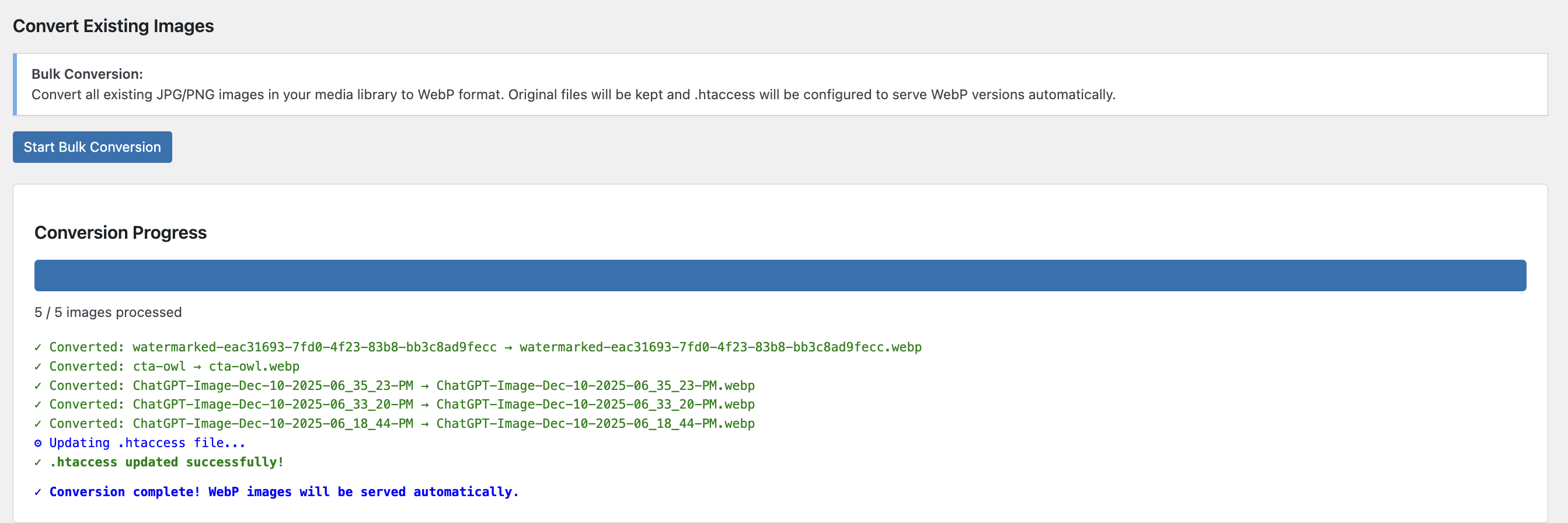
* Convert existing media library images
* Keeps original files for compatibility
* Automatic .htaccess configuration
* Browser-based optimized image delivery
* Progress tracking with detailed logging
Perfect For
- E-commerce – Faster product page loading
- Photographers – Portfolio optimization
- Bloggers – Quick page loads, better SEO
- News Sites – Handle high-volume image uploads
- Agencies – Client site optimization
- Developers – Performance-first development
Performance Benefits
- 40-70% smaller file sizes compared to JPG/PNG
- Faster page load times – Better Core Web Vitals
- Improved SEO rankings – Page speed is a ranking factor
- Reduced bandwidth costs – Smaller files = less data
- Better mobile experience – Faster loads on slow connections
- Green hosting – Lower carbon footprint
How It Works
New Uploads (Automatic):
1. Upload JPG or PNG image
2. Plugin resizes if width > 1920px (configurable)
3. Converts to WebP with optimized compression
4. Strips metadata for smaller files
5. Original deleted (saves storage)
6. All thumbnails converted to WebP
Existing Images (Bulk):
1. Click “Start Bulk Conversion”
2. Converts all JPG/PNG in media library
3. Keeps originals for compatibility
4. Updates .htaccess for automatic WebP delivery
5. Browsers that support WebP get optimized images
6. Older browsers get original JPG/PNG
Technical Details
Compression Methods:
* Primary: Imagick with method 6 (best compression)
* Fallback: GD with alpha channel preservation
* Automatic metadata stripping
* Configurable quality settings (1-100)
* Smart resizing with LANCZOS filtering
WebP Options (Imagick):
* Method 6 compression (highest quality)
* Lossy compression for better file sizes
* Alpha quality 100 (perfect transparency)
* Auto-filter optimization
* Lossless option available
Browser Compatibility:
* Automatic .htaccess rules for serving WebP
* Fallback to original JPG/PNG for older browsers
* Supports Chrome, Firefox, Edge, Safari 14+, Opera
* Mobile browsers fully supported
Privacy & Performance
- No external API calls
- All processing done on your server
- No data collection or tracking
- Minimal performance impact
- Asynchronous bulk conversion
- Progress tracking without page reload
Technical Specifications
Supported Formats
- Input: JPEG, JPG, PNG
- Output: WebP, AVIF
Compression Details
- Imagick: Method 6, lossy, auto-filter (WebP and AVIF)
- GD: Alpha blending, transparency preservation
- AVIF: Requires PHP 8.1+ or Imagick with AVIF support
- Metadata stripping: EXIF, color profiles, thumbnails
- Quality range: 1-100 (WebP: 70-80, AVIF: 60-70 recommended)
File Size Reductions
- WebP from JPEG: 40-60% reduction
- WebP from PNG: 50-70% reduction
- AVIF from JPEG: 50-70% reduction
- AVIF from PNG: 60-80% reduction
- Large images (>1920px): 60-85% reduction
Browser Support
- Chrome/Edge: Full WebP and AVIF support
- Firefox: Full WebP and AVIF support
- Safari: WebP 14+, AVIF 16+ (macOS Ventura, iOS 16)
- Opera: Full support
- IE/Legacy: Automatic fallback to JPG/PNG
Privacy Policy
This plugin does not:
* Collect any personal data
* Send images to external servers
* Use cookies
* Track users
* Make any external API calls
Support
Community support via WordPress.org forums.
Credits
Developed by JPrompt.
Installation
Automatic Installation
- Log in to your WordPress admin panel
- Go to Plugins > Add New
- Search for “Pixengine”
- Click “Install Now” and then “Activate”
- Go to Settings > Pixengine to configure
Manual Installation
- Download the plugin ZIP file
- Go to Plugins > Add New > Upload Plugin
- Select the ZIP file and click “Install Now”
- Activate the plugin
- Navigate to Settings > Pixengine
Configuration
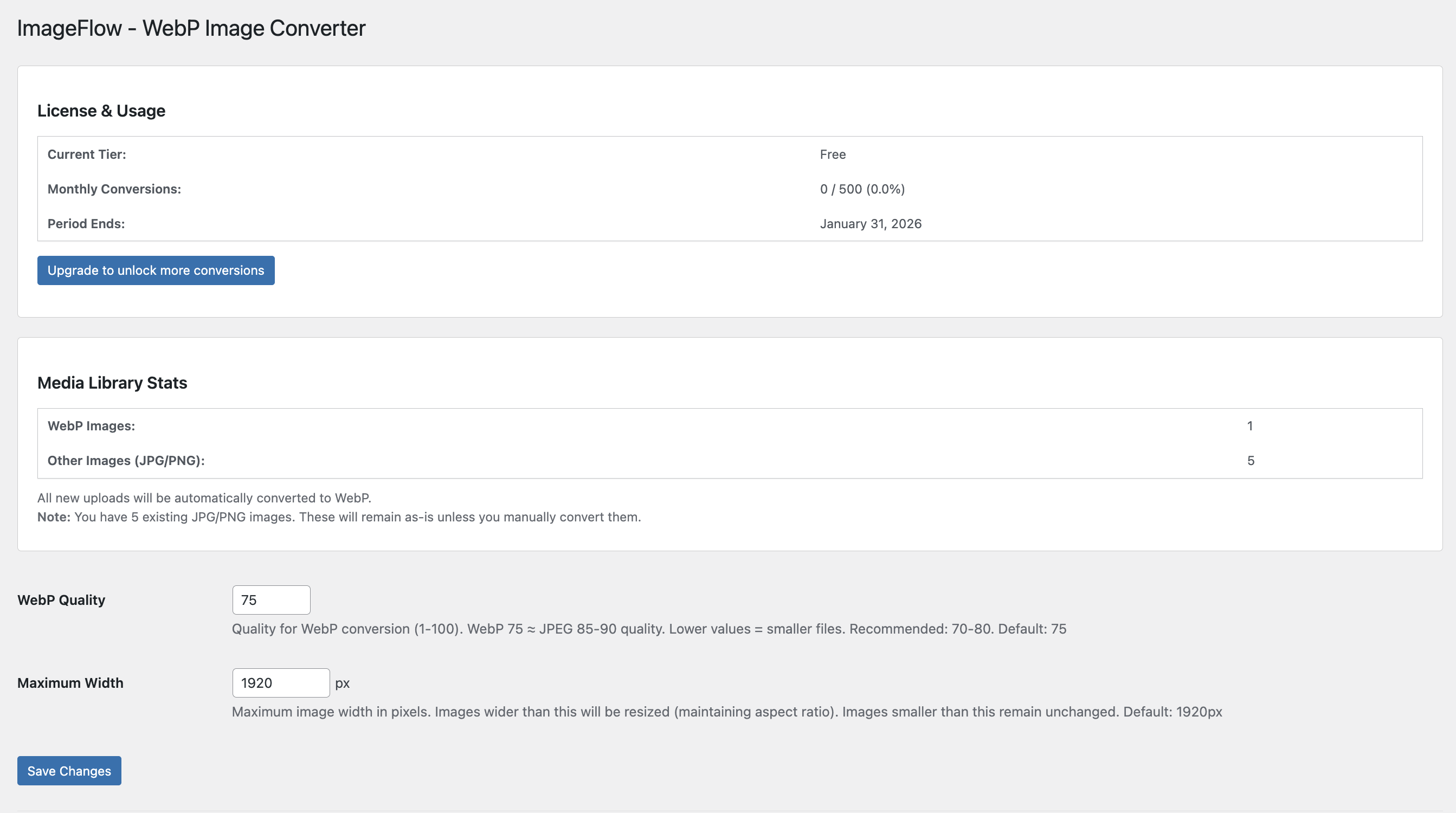
- Go to Pixengine in your admin menu
- Set your preferred quality (recommended: 75)
- Set maximum width (default: 1920px)
- For existing images, click “Start Bulk Conversion”
System Requirements
- PHP 7.4 or higher
- GD library with WebP support OR Imagick extension
- WordPress 5.8 or higher
- Apache with mod_rewrite (for .htaccess rules)
Frequently asked questions
Will this work on my server?
The plugin requires either GD library with WebP support or Imagick extension. Most modern hosting providers have at least one of these. The plugin will show an admin notice if WebP is not supported.
What happens to my original images?
For new uploads, original JPG/PNG files are deleted and replaced with WebP versions (saves storage). For bulk conversion of existing images, originals are kept alongside WebP versions for browser compatibility.
Will this break my site for older browsers?
No! When you run bulk conversion, the plugin configures .htaccess to serve WebP to supporting browsers and original JPG/PNG to older browsers. It’s completely automatic.
How much smaller will my images be?
Typically 40-70% smaller than original JPG/PNG files while maintaining the same visual quality. Results vary based on image content and quality settings.
Can I convert images larger than 1920px?
Yes! Images wider than the max width setting are automatically resized while maintaining aspect ratio. You can adjust the max width in settings.
What quality setting should I use?
We recommend 75 for most sites. WebP quality 75 is roughly equivalent to JPEG quality 85-90. You can go as low as 70 for maximum compression or up to 80-85 for highest quality.
Does this work with CDN?
Yes! The WebP files are stored in your WordPress uploads directory and will be served by your CDN just like any other image.
Can I use this with other image optimization plugins?
It’s recommended to use Pixengine as your primary image optimizer. Disable other WebP conversion plugins to avoid conflicts.
Does this support PNG transparency?
Yes! PNG transparency is fully preserved in WebP conversion using alpha channels.
Changelog
Major update! AVIF support, lazy loading, responsive images, and caching integration. Upgrade for better compression and faster page loads!
1.1.0 – 2026-02-05
- NEW: AVIF format support with superior compression
- NEW: Output format selection (WebP, AVIF, or Both)
- NEW: Lazy loading integration with native browser support
- NEW: Exclude first N images from lazy loading (above-the-fold)
- NEW: Responsive image srcset optimization
- NEW: Optional picture element wrapping for format fallback
- NEW: Advanced caching headers via .htaccess
- NEW: Configurable cache duration settings
- NEW: Separate AVIF quality control
- NEW: Newsletter subscription notice
- IMPROVED: Bulk conversion now supports both WebP and AVIF
- IMPROVED: .htaccess rules now include AVIF with priority over WebP
- IMPROVED: Admin UI with new settings sections
1.0.0 – 2026-02-03
- Initial release
- Automatic WebP conversion for new uploads
- Bulk converter for existing images
- Intelligent resizing (configurable max width)
- Imagick support for superior compression
- GD library fallback with optimization
- Metadata stripping for smaller files
- .htaccess automatic configuration
- Transparency preservation for PNG
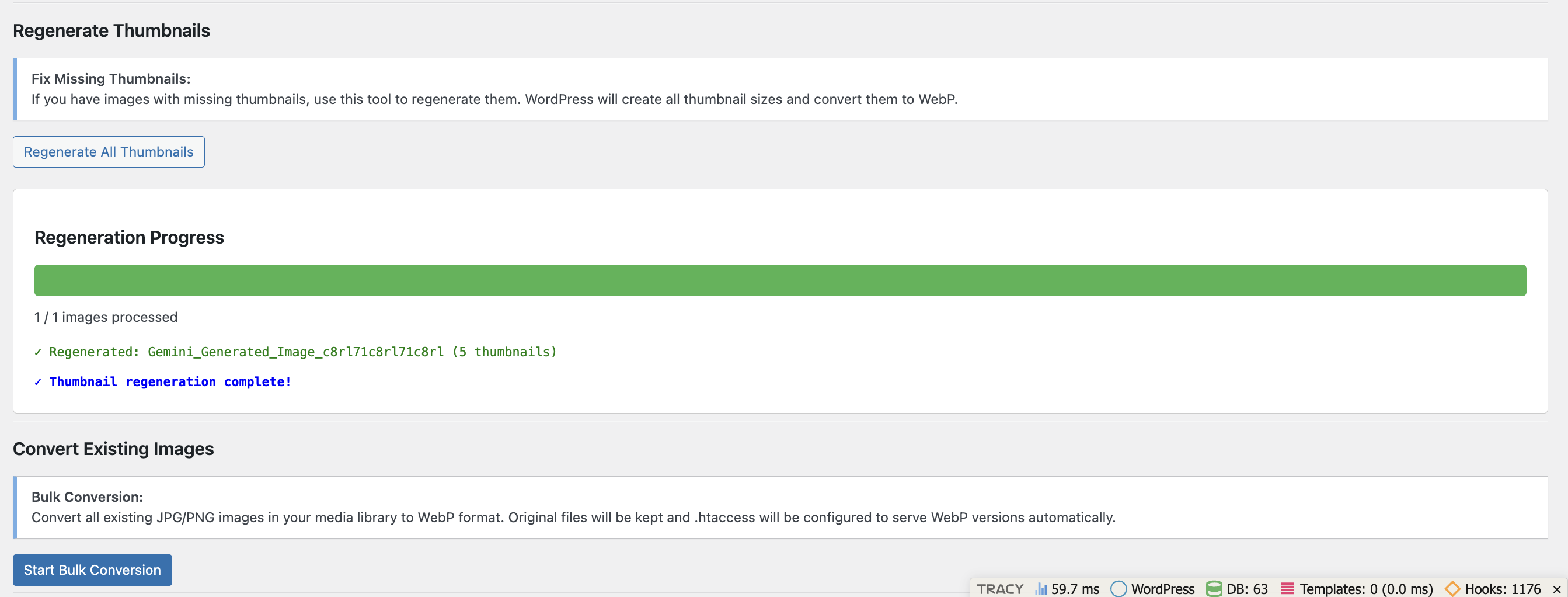
- Thumbnail regeneration tool
- Real-time conversion progress tracking
- Translation ready
Screenshots

For developers
Is this your plugin? Show off the numbers.
Add a live badge to your site, docs or GitHub README. It updates on its own — no account needed.
Best JPrompt's Pixengine alternatives
All AVIF plugins →





FAQ
JPrompt's Pixengine: quick answers
Straight answers, pulled from live WordPress.org data.
Live data from WordPress.org · checked Oct 13, 2026
Is JPrompt's Pixengine free?
Yes. JPrompt's Pixengine is free to download and use from the official WordPress.org plugin directory.
Is JPrompt's Pixengine safe to use in 2026?
JPrompt's Pixengine shows warning signs in 2026 — compare the alternatives below before installing. It runs on 10+ sites and was last updated 8 months ago, and scores 38/100 on our health check.
How many websites use JPrompt's Pixengine?
JPrompt's Pixengine is active on 10+ WordPress websites and has been downloaded 491 times since it launched in February 2026. It was downloaded 67 times in the last 30 days.
Does JPrompt's Pixengine work with WordPress 7.1?
JPrompt's Pixengine is officially tested up to WordPress 6.9.10, while the latest release is 7.1.3. It may still work, but try it on a staging site first.
What PHP version does JPrompt's Pixengine need?
JPrompt's Pixengine requires PHP 7.4 or higher. Most hosts run PHP 8.x today, so it works on any modern WordPress hosting.
When was JPrompt's Pixengine last updated?
The latest version, 1.1.0, was released on February 5, 2026 (8 months ago).
Who makes JPrompt's Pixengine?
JPrompt's Pixengine is developed and maintained by jprompt.
What are the best alternatives to JPrompt's Pixengine?
The most popular alternatives to JPrompt's Pixengine are Optimole (200K+ installs), Modern Image Formats (100K+ installs) and Robin Image Optimizer (100K+ installs).
Powered by PageForge
Want thousands of pages that rank like these? Build them in an afternoon.
This directory runs on the same engine as PageForge. Turn any spreadsheet, CSV or API into thousands of fast, SEO-ready WordPress pages — with schema, internal links and AI-written copy baked in.
- CSV, Google Sheets & API data sources
- AI content, schema & internal links per page
- Works with Elementor, Gutenberg, Yoast & Rank Math
- Free on WordPress.org — no credit card


