



Job Manager & Career – Manage job board listings, and recruitments
An ideal WordPress Job Manager plugin for recruiters to manage job board listings, career pages, and recruitments.

Safe pick
Yes — Job Manager & Career is a safe, well-maintained plugin to use in 2026. It runs on 1K+ sites, is rated 4.7/5 and was last updated 4 weeks ago, and scores 85/100 on our health check.
- Actively developed — last update 4 weeks ago
- Tested with the latest WordPress (7.1)
- Momentum — downloads up 205.6% vs the previous 30 days
How does it stack up?
Side-by-side on installs, updates, ratings & support



Daily downloads
Download spikes usually follow a new release — each site that auto-updates counts as a download.
Rankings
Where Job Manager & Career stands todayWordPress.org search rankings
Live position in the plugin search, top 100| Keyword | Position |
|---|---|
| job listing | #8 |
| job manager | #2 |
| Wordpress Job Manager | #2 |
| wp job board | #4 |
| wp-job-manager | #4 |
Version adoption
Share of active sites per release.
Rating breakdown
★★★★★★★★★★ 4.7 from 7 reviews
About Job Manager & Career
From the official readme · v1.5.2Description
You can set up the career feed by simply copy-pasting the shortcode on the respective page. Using this job board plugin add all the details like job title, description, and any other additional features based on your requirement.
As the jobs can be listed according to the locations, job types, and category, it offers extra comfort to both the admin and the user.
Major Features of the WordPress Job Manager Plugin
☞ Add and Manage Job Post
The Job Application plugin provides the space to add and manage the details related to the job like title, description, and job expiry.
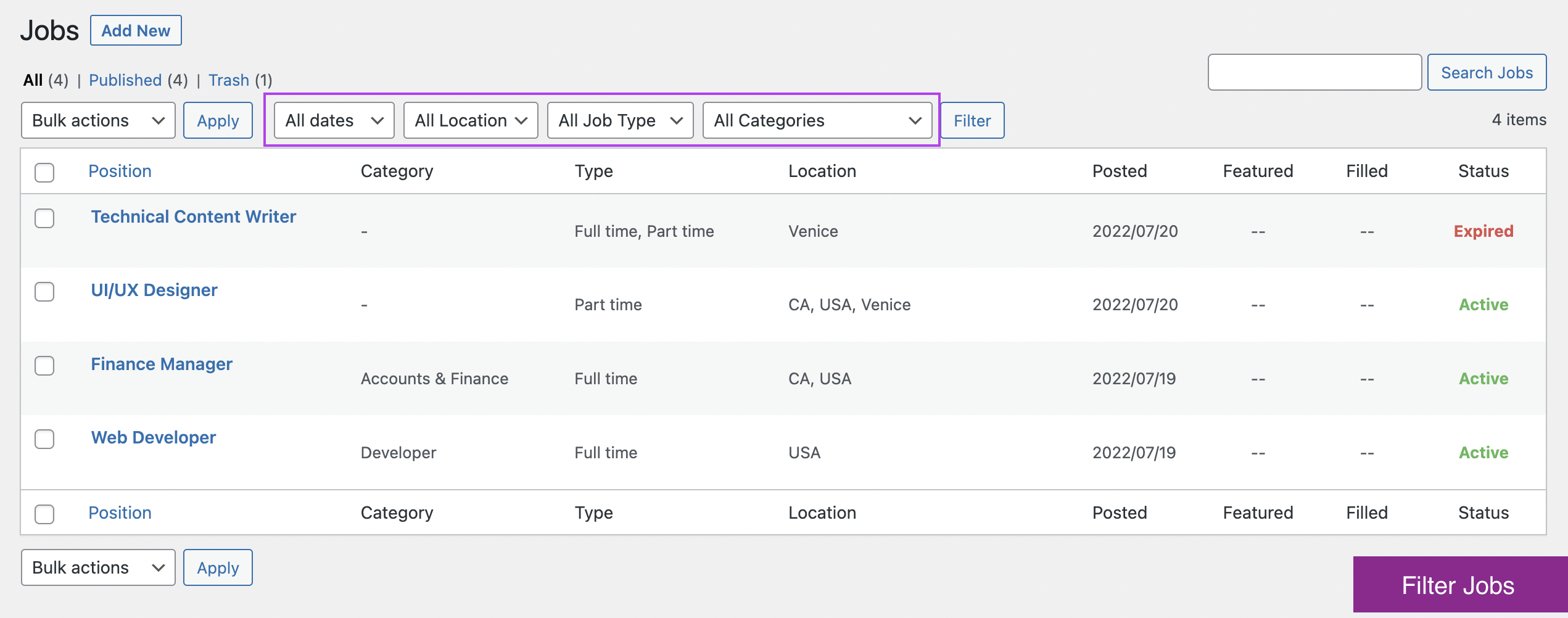
☞ List the jobs under locations, job types, and categories
This career plugin allows you to include the location, type of job, and related category in your job portal. Therefore, both the job seeker and employer can easily sort them based on these details.
☞ Multiple methods to apply for a job post
The plugin lets you create an apply form with required fields on the WordPress job board to collect data from the applicants. If in case you want to receive the application via mail, simply disable the form and provide the corresponding email address.
☞ Feature special jobs with an extra badge
Feature any urgent jobs with a special badge using the Featured Listing option. It helps to highlight a particular job from others. You can use this feature by simply selecting the Featured Job checkbox while adding or editing a job.
☞ Upload the resumes in multiple formats
This WordPress job board plugin allows the applicants to upload their resumes in multiple formats like .doc, pdf, and .docx.
☞ Display of expired or filled jobs
This option allows the admin to hide or show the expired and filled jobs. It helps the applicants get a better view of the vacancies and job listings.
☞ Social share for jobs
You can share suitable job openings within groups. Enable the Social Share button and add the platforms that you want to share.
☞ Undo all the changes in a single click
The career plugin provides a Reset To Default button in the General settings. By clicking on this button, you can undo all the changes that you have made and reset to the original.
☞ Add additional features for the job
Apart from adding the job title, and description, you can also include some additional features related to the job. There may come many situations to add extra features related to the job such as experience, salary, and so on.
☞ The feature to import the settings data
You can import the plugin data by simply copying the text from the Export textbox and replacing the data in the textbox of another install.
Join Themehigh Community to get help from similar people.
💎💎 Premium Features
The premium version of the Job Manager & Career plugin provides a number of additional features that brings your career page to its next level. Themehigh also offers regular support and updates to this recruitment plugin during the proper intervals.
You can check out the demo for a more detailed overview of the features. Live Demo
☞ Customize your career page with accordion layout
This job portal plugin for WordPress helps you to customize the job page with an Accordion layout other than the normal List layout.
☞ Add custom fields in the application form
Add additional fields in the Apply now form of each job post. The plugin offers 7 different field types for a new field. The admin can choose any one among the list and customize the Apply now form efficiently.
☞ Add additional features
This recruitment plugin for WordPress lets you add additional features for an individual job post.
☞ Improved job filter with keywords
Besides location, category, and job type, the premium version of the plugin offers additional search filters called keywords.Besides location, category, and job type, the premium version of the plugin offers additional search filters called keywords.
☞ Validated using ReCaptcha
To improve security, the WordPress job manager plugin provides ReCaptcha validation for the job application.
☞ Shows custom job application status and allows to set Emails
The job board plugin also allows you to set emails based on the custom statuses. By updating the application status, the corresponding email will be sent to the applicant.
☞ Override theme style
By enabling the override theme style, you can customize the text color, button color, background color, and much more. It helps you to set up a color pattern related to the website theme.
☞ Customize Email content and subject
Here, you can customize both the email content and subject with multiple placeholders to use as dynamic data.
For the complete list of features, Please visit Job Manager & Career plugin’s official page.
Check how it works (Live Demo)
Why ThemeHigh
Frequent updates are made to improve the plugin with a talented group of developers. Moreover, the dedicated support team will help you set up and customize your dream store with all available features and hooks.
🏆 2 Million+ Users
🏆 Quickest Turn-around Support
🏆 Most Lightweight Plugins
For more info on ThemeHigh and Job Manager & Career plugin in specific, check out the following:
- The Job Manager & Career premium plugin homepage.
- The Knowledgebase.
- Other WordPress Plugins by the ThemeHigh team.
- Follow ThemeHigh on Facebook, LinkedIn, Twitter & YouTube.
- Join our Discord Server.
Installation
Minimum Requirements
- WordPress 4.7 or greater
- PHP version 5.2.4 or greater (PHP 5.6 or greater is recommended)
- MySQL version 5.0 or greater (MySQL 5.6 or greater is recommended)
Automatic installation
- Log in to your WordPress dashboard.
- Navigate to the Plugins menu, and click “Add New”.
- Search and locate ‘Themehigh Job Manager’ plugin.
- Click ‘Install Now’, and WordPress will take it from there.
Manual installation
Manual installation method requires downloading the ‘Themehigh Job Manager’ plugin and uploading it to your web server via your FTP application. The WordPress codex contains instructions on how to do this here.
Frequently asked questions
How to create a job listing?
Login to Dashboard ➞ navigate to Job Listings ➞ click on “Add New” to add a new job listing. The added job will be displayed in the front-end where the short-code [THJM_JOBS] is used.
How to set an expiry date for an existing job post?
To set expiry date, Login to Dashboard ➞ navigate to Job Listings ➞ “All Jobs” submenu. “Edit” the required job. Navigate to the Expiry date field and set an expiry date for the job. Click on Update Once a job is expired, the users will not be able to apply for the same.
How can I control the job visibility based on job status(expired, filled-in etc)?
Login to Dashboard → navigate to Job Listings “Settings” sub-menu. From the “General Settings” tab, you can turn “on/off” the visibility for expired jobs,filled-in jobs, etc.
Changelog
1.5.2
- Added WordPress 7.1 compatibility.
- Improved block theme compatibility.
- Implemented security fixes and enhancements.
1.5.1
- Added WordPress 7.0 compatibility.
- Improved input validation for the application form fields.
- Added a “Submitting…” button state to indicate form processing and discourage repeated clicks.
1.5.0
- Added WordPress 6.9 compatibility.
1.4.10
- Added WordPress 6.8 compatibility.
1.4.9
- Fix: Updated CSP to resolve JavaScript execution issue.
1.4.8
- Added WordPress 6.7 compatibility.
Screenshots




For developers
Is this your plugin? Show off the numbers.
Add a live badge to your site, docs or GitHub README. It updates on its own — no account needed.
Best Job Manager & Career alternatives
All job listing plugins →




FAQ
Job Manager & Career: quick answers
Straight answers, pulled from live WordPress.org data.
Live data from WordPress.org · checked Oct 8, 2026
Is Job Manager & Career free?
Yes. Job Manager & Career is free to download and use from the official WordPress.org plugin directory. The developer also sells premium add-ons or a Pro version with extra features.
Is Job Manager & Career safe to use in 2026?
Yes — Job Manager & Career is a safe, well-maintained plugin to use in 2026. It runs on 1K+ sites, is rated 4.7/5 and was last updated 4 weeks ago, and scores 85/100 on our health check.
How many websites use Job Manager & Career?
Job Manager & Career is active on 1K+ WordPress websites and has been downloaded 65,959 times since it launched in September 2019. It was downloaded 1,748 times in the last 30 days.
Does Job Manager & Career work with WordPress 7.1?
Yes. The developer has tested Job Manager & Career up to WordPress 7.1.3, the latest release. It requires WordPress 4.7 or newer.
What PHP version does Job Manager & Career need?
Job Manager & Career requires PHP 5.6 or higher. Most hosts run PHP 8.x today, so it works on any modern WordPress hosting.
When was Job Manager & Career last updated?
The latest version, 1.5.2, was released on September 14, 2026 (4 weeks ago).
Who makes Job Manager & Career?
Job Manager & Career is developed and maintained by ThemeHigh.
What are the best alternatives to Job Manager & Career?
The most popular alternatives to Job Manager & Career are HireZoot (30K+ installs), Simple Job Board (10K+ installs) and WP Job Portal (8K+ installs).
Powered by PageForge
Want thousands of pages that rank like these? Build them in an afternoon.
This directory runs on the same engine as PageForge. Turn any spreadsheet, CSV or API into thousands of fast, SEO-ready WordPress pages — with schema, internal links and AI-written copy baked in.
- CSV, Google Sheets & API data sources
- AI content, schema & internal links per page
- Works with Elementor, Gutenberg, Yoast & Rank Math
- Free on WordPress.org — no credit card


