


WBULKiT – Bulk Edit Posts & Pages
Editing Date in WordPress is very painful. Be professionals with managing data in the reliable and flexible way by Wordpress Bulk Posts Editing.

Solid choice
WBULKiT is a solid plugin choice in 2026, with a few things worth checking first. It runs on 200+ sites, is rated 3/5 and was last updated 2 weeks ago, and scores 73/100 on our health check.
- Actively developed — last update 2 weeks ago
- Tested with the latest WordPress (7.1)
- Small user base (200+ active installs)
- Low rating so far — 3/5 from only 6 reviews
Daily downloads
Download spikes usually follow a new release — each site that auto-updates counts as a download.
Rankings
Where WBULKiT stands todayWordPress.org search rankings
Live position in the plugin search, top 100| Keyword | Position |
|---|---|
| custom posts bulk edit | #26 |
| post bulk edit | #25 |
| posts export | #75 |
| wordpress bulk edit | #29 |
| wordpress edit post | #76 |
Version adoption
Share of active sites per release.
Rating breakdown
★★★★★★★★★★ 3 from 6 reviews
About WBULKiT – Bulk Edit Posts & Pages
From the official readme · v5.1.2Description
Editing lots of WordPress posts one by one is slow and inefficient — especially when managing a large blog, content-heavy site, or editorial workflow.
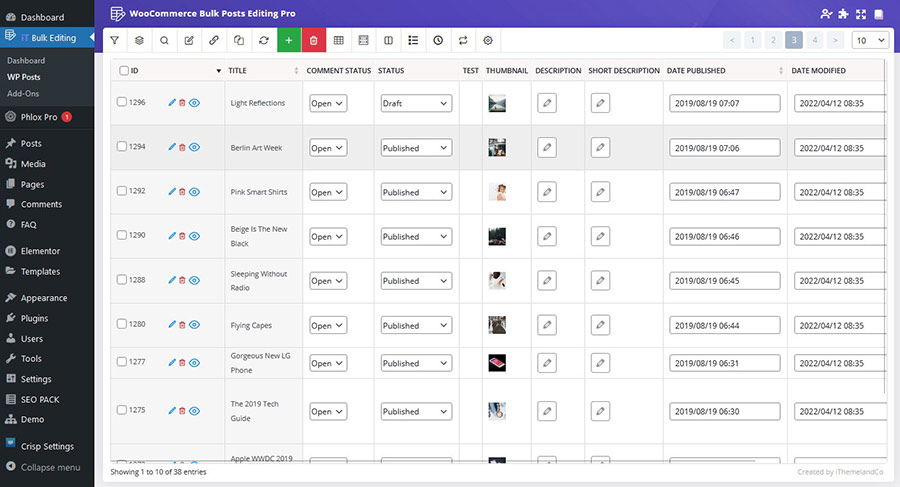
WBULKiT – Bulk Edit WordPress Posts & Pages replaces the default post editor with a spreadsheet-style interface that lets you filter, edit, and update multiple posts at once.
With WBULKiT, you can quickly update titles, statuses, categories, tags, dates, and more — cutting hours of repetitive work down to just minutes.
Whether you’re managing posts, pages, or custom post types, WBULKiT improves your workflow and gives you full control over your content management.
Schedule and execute bulk post updates in the background — even on large content libraries — without slowing down your website.
🚀 Why Choose WBULKiT?
✔️ Edit multiple posts at the same time
✔️ Save hours of manual editing
✔️ Spreadsheet-style editor for fast content changes
✔️ Advanced filters to target exactly what you need
✔️ Works with posts, pages, and custom post types
Why do you need WordPress Bulk Posts Editing?
✅ Saving your time:
- Bulk editing everything in the posts at one time
- Filter, select and change specific posts
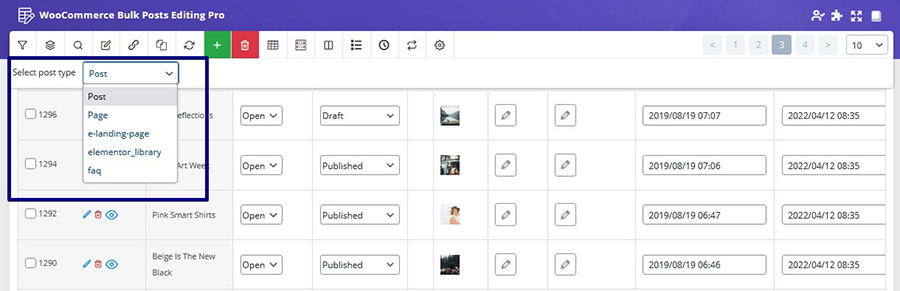
- Switch WordPress post types
- Bind editing: With this option, you can set the same value of edited posts to all selected posts. This will help you edit several posts at once and will result in a faster editing and save a huge amount of your time!
- Delete multiple post / custom post: You can select multiple posts and choose to either delete them permanently, or if you think you might need to use them later, it is possible to move them to the trash and access these posts later.
- Duplicate posts / custom posts: If you want to duplicate posts or custom posts, you can clone them and duplicate all of the selected posts with just one click.
- Save search queries for later use: You can save the most used search queries for later use (or any search query you want). This way, you don’t have to choose the search options every time, and with just two clicks you can use your most used search queries to find the posts you need.
✅ Easily scale-up your site:
- Import and export any posts according to your requirements
- Make a customized column from your posts
- Use a spreadsheet to control, manage and edit numerous posts at the same time:
- View all your posts, pages and custom psots simultaneously
- Edit posts and pages easily
- Create a lot of posts / products at once
- Copy information between posts quicker
- And more…
✅ Support all of fields
- Support all posts and custom posts fields and custom fields
- Support all of categories, tags, and taxonomies
Please check other videos in wordpress bulk posts editing channel
📊 Key Features
📋 Spreadsheet-Style Bulk Post Editor
* Edit posts, pages, or custom post types in a table view
* Update multiple post fields at once
* No need to open posts one by one
🔎 Advanced Content Filters
* Filter posts by category, tag, date range, author, status, and more
* Save time finding the exact content you want to update
* Ideal for large blogs and content libraries
⏱️ Scheduled Bulk Updates
* Schedule bulk post changes for a specific time
* Great for publishing plans, seasonal edits, or campaigns
* Automate content updates without manual timing
⚙️ Background Processing
* Run heavy bulk operations in the background
* Keeps your site responsive during big edits
* Safe and optimized for performance
📊 Big Data Ready
Handles large numbers of posts without slowing down your site
* Optimized for big catalogs of content
* Efficient for enterprise-level editing
Free vs Pro
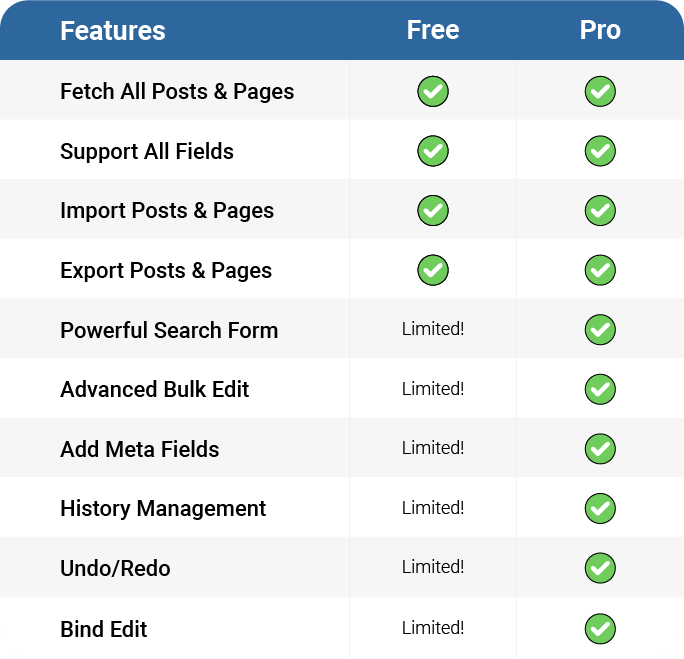
🆓 Free Version
✔️ Spreadsheet-style post editor
✔️ Edit multiple posts at once
✔️ Essential post fields (title, status, categories, tags)
✔️ Basic filters
⚠️ Powerful Search Form – Limited
⚠️ Advanced Bulk Edit – Limited
⚠️ Add Meta Fields – Limited
⚠️ History Management – Limited
⚠️ Undo / Redo – Limited
⚠️ Bind Edit – Limited
🟢 Best for small to medium blogs and quick manual post edits
🚀 Pro Version
✔️ All Free features
✔️ Advanced content filters & conditions
⏱️ Scheduled bulk updates
⚙️ Background processing for heavy operations
📊 Big Data support for large content libraries
↩️ Undo / redo changes
⭐ Priority support
🔵 Ideal for large blogs, editorial teams, and automated content workflows
Check demo version: Pro Version
External services
This plugin connects to a license server to activate the plugin and check for updates.
It sends the site admin’s email address and license key to iThemelandCo when the license is activated or when checking for updates. The server responds with activation status, update availability, or error messages.
This service is required to verify valid licenses and deliver updates.
This service is provided by “iThemelandCo”. http://ithemelandco.com/
This plugin, with the user’s consent (via a telemetry form), sends usage data and examples of how the plugin is used to our server (http://ithemelandco.com/). The data includes information on which plugin features are most frequently used, and is analyzed to improve performance and deliver updates aligned with user needs.
Installation
This section describes how to install the plugin and get it working.
e.g.
- Upload the plugin files to the
/wp-content/plugins/plugin-namedirectory, or install the plugin through the WordPress plugins screen directly. - Activate the plugin through the ‘Plugins’ screen in WordPress
- After Install and Activate this plugin a menu will be added in your admin menu named “iT WP Posts”
Frequently asked questions
How to check this plugin before purchasing that?
There are two ways to check the wordpress bulk posts editing plugin before buying: Build Test Drive Build Test-Drive(Amin Demo) and work with plugins in a real environment. For this, Please go to plugin page and then click the Live Preview button to enter the plugin demo page. In the top bar that appears, click Launch Admin Demo. A popup will appear asking you to enter your email and submit the form. The relevant link will be sent to your email now.
What are the required systems for WordPress Bulk Posts Editing Plugin?
PHP compatibility: from 7.x WordPress compatibility: from v5.x to the latest WordPress version.
Where can I see video tutorials?
Please check WordPress Bulk Posts Editing Plugin youtube channel
Where can I get the premium version of this plugin?
Please check WordPress Bulk Posts Editing Plugin
I need more information about this plugin
Please check the knowledge base
How I can translate WordPress Bulk Posts Editing to other languages?
You can use this plugin in any language, this means you can translate this plugin to another language. There is a translate file in the “Language” folder as ‘.pot’ extension. You can easily translate the plugin into the desired languages by using translation plugins such as WPML and Loco Translate.
Can we use this plugin on multiple sites?
Yes! As you know, WordPress Bulk Posts Editing is a premium product that is sold through the codecanyon store. For each purchase, you will be assigned a purchase code and you can use this purchase code on only one website, so to use the WordPress Bulk Posts Editing on your various websites, you need to separate license for each site.
What is your refund policy?
If you believe that you’ve bought the wrong product and the purchased product is useless, you can send a refund request for that. Within 30 days of purchase, iThemelandCo will Refund your money.
I have an idea, can I discuss it with you?
Please leave your message in our support system
Changelog
5.1.2
- Tested up to: WP 7.1.1
- Fixed License Issues
- Fixed Some Issues
5.1.1
- Tested up to: WP 7.0.2
- Fixed Some Issues
5.1.0
- Tested up to: WP 7.0
- Checked plugin with Plugin Check
- Fixed Some Issues
5.0.8
- Tested up to: WP 6.9
- Fixed Some Issues
5.0.7
- Added Schedule review on Schedule list
- Tested up to: WP 6.9
- Fixed Some Issues
5.0.6
- Fixed Rank Math Compatible issue
- Fixed Some Issues
Screenshots


For developers
Is this your plugin? Show off the numbers.
Add a live badge to your site, docs or GitHub README. It updates on its own — no account needed.
FAQ
WBULKiT – Bulk Edit Posts & Pages: quick answers
Straight answers, pulled from live WordPress.org data.
Live data from WordPress.org · checked Oct 5, 2026
Is WBULKiT free?
Yes. WBULKiT is free to download and use from the official WordPress.org plugin directory.
Is WBULKiT safe to use in 2026?
WBULKiT is a solid plugin choice in 2026, with a few things worth checking first. It runs on 200+ sites, is rated 3/5 and was last updated 2 weeks ago, and scores 73/100 on our health check.
How many websites use WBULKiT?
WBULKiT is active on 200+ WordPress websites and has been downloaded 24,555 times since it launched in September 2020. It was downloaded 358 times in the last 30 days.
Does WBULKiT work with WordPress 7.1?
Yes. The developer has tested WBULKiT up to WordPress 7.1.2, the latest release. It requires WordPress 6.9 or newer.
What PHP version does WBULKiT need?
WBULKiT requires PHP 8.0.3 or higher. Most hosts run PHP 8.x today, so it works on any modern WordPress hosting.
When was WBULKiT last updated?
The latest version, 5.1.2, was released on September 21, 2026 (2 weeks ago).
Who makes WBULKiT?
WBULKiT is developed and maintained by ithemelandco.
Powered by PageForge
Want thousands of pages that rank like these? Build them in an afternoon.
This directory runs on the same engine as PageForge. Turn any spreadsheet, CSV or API into thousands of fast, SEO-ready WordPress pages — with schema, internal links and AI-written copy baked in.
- CSV, Google Sheets & API data sources
- AI content, schema & internal links per page
- Works with Elementor, Gutenberg, Yoast & Rank Math
- Free on WordPress.org — no credit card


