


IP City Cluster
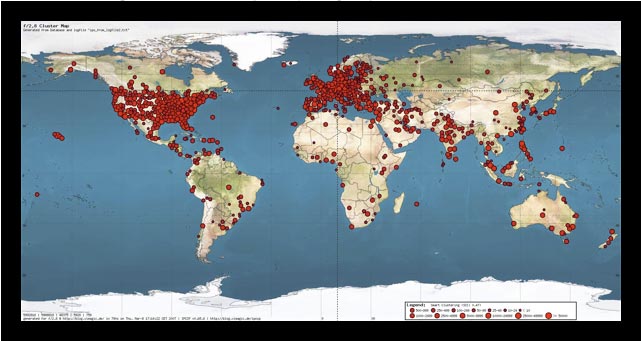
The IP City Cluster Plugin (IPCCP) generates a geographical cluster map based on where from people access you website.

Consider an alternative
IP City Cluster shows warning signs in 2026 — compare the alternatives below before installing. It runs on 10+ sites and was last updated 18 years ago, and scores 23/100 on our health check.
- Small user base (10+ active installs)
- Very few reviews so far
- No update in 18 years
- Only tested up to WordPress 2.5 (latest is 7.1)
How does it stack up?
Side-by-side on installs, updates, ratings & support



Daily downloads
Download spikes usually follow a new release — each site that auto-updates counts as a download.
Rankings
Where IP City Cluster stands todayWordPress.org search rankings
Live position in the plugin search, top 100| Keyword | Position |
|---|---|
| city | >100 |
| cluster map | >100 |
| heat map | #50 |
| image | >100 |
| ip | >100 |
Version adoption
Share of active sites per release.
About IP City Cluster
From the official readme · v0.b5.8Description
The IP City Cluster Plugin (IPCCP) generates a geographical cluster map based on where from people access you website (or to be precise: based on the IP they got from their provider). It requires a statistics plug-in (that keeps a database or logfile) which keeps track of the IP. Key features include a preview with a lightbox way of zooming, image maps for city names and hit counters for both the preview and zoomed image, template output, smart clustering and user control over color, sizes and such.
Some of you might be familiar with the ClustrMap Service. I signed up this month and was instantly hooked. After a week or two I had two issues though. One: why didn’t I sign up ealier (or how am I going to convince them to read my logfile)? Secondly you had to pay for the advanced service. Not my cup of tea (not to mention that you are always dependent on their service being up 😉 – I decided to look into writing my own cluster map WordPress plug-in. Key problem was of course the lookup of IPs. Fortunately MaxMind offers a free database and the required API to get City name, country name as well as longitude and latitude corresponding to an IP address.
See screenshots for an example.
Options
All IPCCP options are accessible through the corresponding admin options panel. First of all make sure to enter the correct SQL table and key name (if it’s anything else than “IP”). There are three ways to generate a new picture:
– pressing Redraw in the admin panel
– calling an URL with the addition of ?recluster=true
– using the scheduling feature (which automatically generates the cluster map after a specified amount of time – or to be precise, it automatically generates the cluster map, by the next call IPCCP-call after the user specified time. But give the amount of spammers and bots that are crawling over public sites. this should be close the the specified time itself. Doesn’t it give you some satisfaction, that they are actually doing some good for you 🙂 Just be aware of the CPU time required for the generation before scheduling IPCCP too often (or adding your terabyte long logfile).
Know Issues
The new “all cities per cluster” feature is not supported by all browsers. actually it’s probably only supported by Safari (or Konquerer or the like) and probably it’s not correct (X)HTML either. But it sure looks cool when it works 🙂
[Update] It also works in IE7! Maybe it’s only Firefox that got trouble displaying multiline titles?
License
This WordPress plug is released under the GPL and is provided with absolutely no warranty (as if?). For support leave a comment and we’ll see what the community has to say.
Version History
- 13.feb.2007 – v0.b5.8
> – optimised code: drastically increased speed of IP lookup
> – optimised code: now checking syntax of database IPs as well - 13.mar.2007 – v0.b5.7 [minor update]
> – bugfix: counting of visits fixed - 08.mar.2007 – v0.b5.6 [minor update]
> – optimised code: using less RAM [optimised filtering]
> – optimised code: runs faster with large datasets [kicked array_merge()]
> – increased verbosity while generating the cluster map - 06.mar.2007 – v0.b5.5 [major update]
> – new feature: JPG quality
> – new feature: non-linearity in clustering
> – bundled new GeoIP database (March.2007) - 23.feb.2007 – v0.b5.4 [minor update]
> – new feature: more details in subtitle & legend
> – optimised code: loading image map only on needed pages/posts
> – bugfix: scheduled task now works as claimed - 22.feb.2007 – v0.b5.3 [major update]
> – new feature: print all city names in a cluster
> – optimised code: rewrote smart clustering [you might have to readjust the SCC]
> – optimised code: lightbox JS [hardcoding of URL only in one place now]
> – bugfix: template now correctly saved - 20.feb.2007 – v0.b5.2 [major update]
> – new feature: verbosity while generating the cluster map
> – new option: Performance vs Memory efficiency
> – new option: legend [on/off]
> – optimised code: reading of large files now reliable and fast
> – optimised code: _getSize rewritten
> – corrected behaviour: when called with no data
> – corrected behaviour: when first called
> – corrected behaviour: _updateOptions and value validation updated
> – bugfix: image map not precise
> – bugfix: correct readout of international characters in city names - 18.feb.2007 – v0.b5.1 [minor update]
> – extended logfile support [Use any logfile and apply filter] - 17.feb.2007 – v0.b5 first public release [WhooHoo!]
> – new option: cron like automated generation [by setting a minimum time]
> – slightly modified admin panel
> – bugfix: rare change of user specified values for the template - 16.feb.2007 – v0.a4 new option: recluster by cron
> – new option: recluster by url
> – finished admin panel - 15.feb.2007 – v0.a3 lightbox + image maps [Woohooo!!!]
> – rendering of small and big images - 14.feb.2007 – v0.a2 smart clustering [using an adaptive clustering distance]
> – added logfile support [fetching IPs from file]
> – new option: image map support
> – new option: show your place - 13.feb.2007 – v0.a1 Preliminaries [fetch entries from SQL, group by IP, get places, group by places ]
> – figured out how long/lat corresponds to planar maps
> – figured out how to draw [using GD]
> – clustering of neighbouring citys into bigger ones
Installation
Requirements
As mentioned above the expected requirement is an SQL database with IPs. Most statistics plug-ins will keep track of that (f.e. Counterize). On a technical level I think PHP5 should do the trick. IPCCP is not using any WordPress specific calls and should work with any version (tested up to 2.3.2).
[Note:] Running IPCCP on a large data set might require some calculation time, which could exceed the maximum PHP execution time (usually 30sec). Therefore IPCCP can try to extend this execution time, which will require the server to not run in PHP safemode. Check with you friendly system administer if you don’t have the appropriate access level. It took more than 5 minutes to generate the picture above (admittedly on my ancient webserver – but you get the point).
Setup
Setup itself is the usual 1-2-3 of downloading, expanding into /wordpress/wp-content/plugins and activating. Check the IPCCP options panel in the admin section and set those values to your liking. You’ll see a first preview there. Provided are both the direct function call (for sidebar’s, footer and such) <?php if(function_exists(ipccp)) ipccp(); ?> and the token word access [IPCCP] for posts or pages. You might want to check MaxMinds website once in a while, as they offer monthly updates to their database. Simply download the GeoLiteCity databases and drop them into the GeoIP folder within the IPCCP plug-in folder.
[Note:] Make sure the webserver has write permissions on those files:
/wordpress/wp-content/plugins/ipccp/images/ipccp_out*
[Note:] You could also add
anywhere in your template to activate the reclustering. Use carefully though!
Screenshots


For developers
Is this your plugin? Show off the numbers.
Add a live badge to your site, docs or GitHub README. It updates on its own — no account needed.
Best IP City Cluster alternatives
All city plugins →





FAQ
IP City Cluster: quick answers
Straight answers, pulled from live WordPress.org data.
Source: WordPress.org
Is IP City Cluster free?
Yes. IP City Cluster is free to download and use from the official WordPress.org plugin directory.
Is IP City Cluster safe to use in 2026?
IP City Cluster shows warning signs in 2026 — compare the alternatives below before installing. It runs on 10+ sites and was last updated 18 years ago, and scores 23/100 on our health check.
How many websites use IP City Cluster?
IP City Cluster is active on 10+ WordPress websites and has been downloaded 7,112 times since it launched in January 2008. It was downloaded 37 times in the last 30 days.
Does IP City Cluster work with WordPress 7.1?
IP City Cluster is officially tested up to WordPress 2.5.1, while the latest release is 7.1.5. It may still work, but try it on a staging site first.
When was IP City Cluster last updated?
The latest version, 0.b5.8, was released on June 5, 2008 (18 years ago).
Who makes IP City Cluster?
IP City Cluster is developed and maintained by tmb.
What are the best alternatives to IP City Cluster?
The most popular alternatives to IP City Cluster are Cities Shipping Zones for W… (4K+ installs), RY City Select for WooComme… (2K+ installs) and User Location and IP (300+ installs).
Powered by PageForge
One template and a spreadsheet. A real page for every search.
PageForge turns each row of a CSV into a WordPress page with its own title, URL, SEO fields and schema, built on the layout you already designed. Free on WordPress.org.
- CSV and XLSX, plus Google Sheets on Professional and Enterprise
- Its own title, URL, SEO fields and schema for every page
- Works with the block editor, Elementor, Divi and Avada
- Free on WordPress.org, no credit card