


IP Address Approval
The IP Address Approval system provides an easy way for you to Allow or Block access to your website to protect your site from unwanted visitors.

Consider an alternative
IP Address Approval shows warning signs in 2026 — compare the alternatives below before installing. It runs on 100+ sites, is rated 3.7/5 and was last updated 1 year ago, and scores 37/100 on our health check.
- Small user base (100+ active installs)
- Very few reviews so far
- No update in over a year
- Only tested up to WordPress 6.8 (latest is 7.1)
How does it stack up?
Side-by-side on installs, updates, ratings & support


Daily downloads
Download spikes usually follow a new release — each site that auto-updates counts as a download.
Rankings
Where IP Address Approval stands todayWordPress.org search rankings
Live position in the plugin search, top 100| Keyword | Position |
|---|---|
| geo location | >100 |
| geo redirect | #78 |
| geo security | >100 |
| ip blocker | #25 |
| stop spam | >100 |
Version adoption
Share of active sites per release.
Rating breakdown
★★★★★★★★★★ 3.7 from 3 reviews
About IP Address Approval
From the official readme · v1.9.2Description
The IP Address Approval system provides an easy way for you to Allow or Block access to your website to protect your site from unwanted visitors. You can use the IP Address Approval system on both Internet(public) websites and Intranet(private network) websites. This super easy to use editor gives you all the control you need without the hassle of having to write your own code.
Free Version:
- Block IP Addresses
- Block IP Address Ranges
- Restrict Access on ALL Pages
- Restrict Access on ALL Post Pages
- Sites Covered: Use on 1 website
Pro Version:
- Block IP Addresses and IP Address Ranges
- Open or Close your website
- If your website is ‘closed’ you can remain Open for IP Addresses and IP Address Ranges
- Geo Locations: Use Geo Locations to allow or block access to your website.
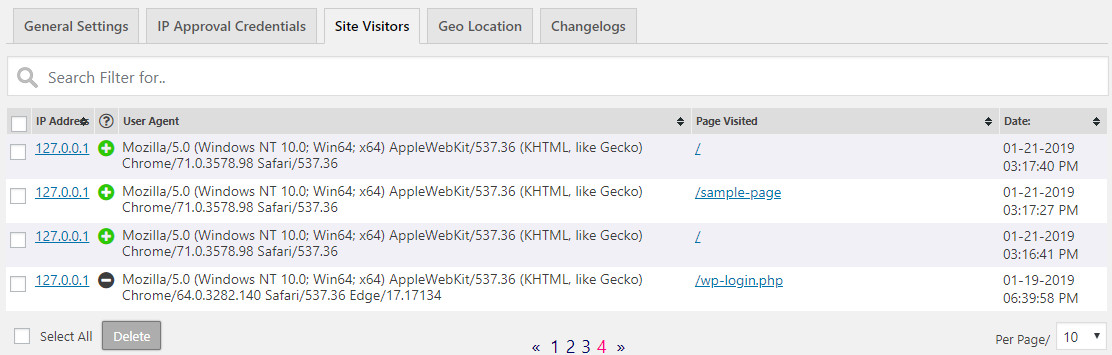
- Site Visits: View the IP Address, User Agent, the Page Visited and Time of the Visit.
- Manage Site Visitors Log results
- Block Proxy, VPN or Tor visitor connections
- Redirect Proxy, VPN or Tor page
- Block Hosting or Data Center visitor connections
- Redirect Hosting or Data Center page
- Manage Multiple Websites
- Restrict Access on ALL Pages
- Restrict Access on ALL Post Pages
- Restrict Access on the Admin Login Page
- Sites Covered: Add the IP Approval service to up to 10 websites.
Arbitrary Section
Please Note: You need to Create a User Account on our website https://www.ip-approval.com, and add your IP Approval Credentials to the Plugin, before it will work. This is done by an API (application program interface) to connect this plugin to our server at https://www.ip-approval.com. This is required.
Information we log in our database
– Blog Owners Name
– Username
– Email
– Blog ID
– Domain URL
– Current Theme Name
– WordPress Version
– Plugin Version
Explicit and Authorized Consent; By clicking the ‘Connect Account’ button on the IP Approval Credentials tab you explicitly agree to provide the Blog Owners Name, Username, Email, Blog ID, Current Theme Name, WordPress Version and Plugin Version to the IP Address Approval service. Note that this helps us troubleshoot any issues you may encounter, as well as verifying the API Connection.
To learn about our privacy policy, please visit: https://www.ip-approval.com/privacy-policy
Installation
- Install using the WordPress “Add Plugin” feature — search for “IP Approval“. OR Upload the ip-approval zip file, and you can also manually install the plugin by adding the ip-approval plugin file folder to your plugins folder,
/wp-content/plugins/. - Activate the plugin on the Plugin Page
- Visit the “IP Approval” Settings page, found in the menu
- Add your IP Approval Credentials
- Customize the settings
Frequently asked questions
Where can I get support or news about updates?
The best place for support is our Contact page or at the official support forum. You can also follow us on Twitter and on Facebook for updates and news.
Where can I see a demo of this in action?
A demo can be found here. Click the Demo Navigation Link on that page.
I’ve enabled the plugin, why isn’t it working?
Please make sure the WORDPRESS SITE SETTINGS > Enabled option is selected. Please make sure the Standard Pages option or Post Pages option is selected. Add the IP Address or GEO Location(if using the paid version) to the banned list, and save your changes.
What is the plugin license?
The basic plugin is released under a GPL license.
Changelog
2024-3-26 Changes: Added a Credentials Check. If your Credentials do not match what we have on our end, you will see a notice at the top of the Admin panel. Changes: Ready for WordPress 6.5.
1.9.2
- 2024-6-11
- Bug Fixes: Minor bug fixes (loading spinner).
1.9.0
- 2024-3-26
- Changes: Added a Credentials Check. If your Credentials do not match what we have on our end, you will see a notice at the top of the Admin panel.
- Changes: Ready for WordPress 6.5.
1.8.3
- 2023-7-23
- Bug Fixes: Catch instances where the User Agent is not provided.
1.8.2
- 2023-7-23
- Bug Fixes: We fixed a typo, no harm done.
- Changes: Ready for WordPress 6.3.
1.8.1
- 2023-3-20
- Bug Fixes: We fixed a typo, no harm done.
Screenshots




For developers
Is this your plugin? Show off the numbers.
Add a live badge to your site, docs or GitHub README. It updates on its own — no account needed.
Best IP Address Approval alternatives
All geo location plugins →




FAQ
IP Address Approval: quick answers
Straight answers, pulled from live WordPress.org data.
Live data from WordPress.org · checked Oct 14, 2026
Is IP Address Approval free?
Yes. IP Address Approval is free to download and use from the official WordPress.org plugin directory.
Is IP Address Approval safe to use in 2026?
IP Address Approval shows warning signs in 2026 — compare the alternatives below before installing. It runs on 100+ sites, is rated 3.7/5 and was last updated 1 year ago, and scores 37/100 on our health check.
How many websites use IP Address Approval?
IP Address Approval is active on 100+ WordPress websites and has been downloaded 8,409 times since it launched in January 2020. It was downloaded 107 times in the last 30 days.
Does IP Address Approval work with WordPress 7.1?
IP Address Approval is officially tested up to WordPress 6.8.11, while the latest release is 7.1.3. It may still work, but try it on a staging site first.
When was IP Address Approval last updated?
The latest version, 1.9.2, was released on June 11, 2025 (1 year ago).
Who makes IP Address Approval?
IP Address Approval is developed and maintained by IP Address Approval.
What are the best alternatives to IP Address Approval?
The most popular alternatives to IP Address Approval are IP Geolocation (200+ installs), GEO my WordPress (10+ installs) and Geo-Location (10+ installs).
Powered by PageForge
Want thousands of pages that rank like these? Build them in an afternoon.
This directory runs on the same engine as PageForge. Turn any spreadsheet, CSV or API into thousands of fast, SEO-ready WordPress pages — with schema, internal links and AI-written copy baked in.
- CSV, Google Sheets & API data sources
- AI content, schema & internal links per page
- Works with Elementor, Gutenberg, Yoast & Rank Math
- Free on WordPress.org — no credit card


