



Ignore Or Disable Plugin Update
Allows to ignore a single plugin update for a certain number of days, or until its next version.

Solid choice
Ignore Or Disable Plugin Update is a solid plugin choice in 2026, with a few things worth checking first. It runs on 200+ sites, is rated 5/5 and was last updated 2 months ago, and scores 72/100 on our health check.
- Tested with the latest WordPress (7.1)
- Small user base (200+ active installs)
- Very few reviews so far
How does it stack up?
Side-by-side on installs, updates, ratings & support



Daily downloads
Download spikes usually follow a new release — each site that auto-updates counts as a download.
Rankings
Where Ignore Or Disable Plugin Up… stands todayWordPress.org search rankings
Live position in the plugin search, top 100| Keyword | Position |
|---|---|
| disable updates | #25 |
| disable updates manager | #21 |
| Plugin Updates | #38 |
| update control | #17 |
| updates manager | #64 |
Version adoption
Share of active sites per release.
Rating breakdown
★★★★★★★★★★ 5 from 1 reviews
About Ignore Or Disable Plugin Update
From the official readme · v1.8Description
There are cases where we might not want to update a plugin right away.
- It can be a major version jump, possibly with edge-case bugs or deprecated features.
- It can be a minor version jump, which doesn’t always justify a diff to make sure custom hooks still work.
- It can just be because we want to wait a few days, to let other people confirm that everything works correctly (or to check that nobody is screaming “broken site” in the support forum).
Whatever the reason, it could be helpful to temporarily hide these updates. Unlike other update management plugins, Ignore Or Disable Plugin Update works on a version-per-version basis.
Ignore Or Disable Plugin Update adds an “Ignore update” link in the WP Plugins listing page, and on the WP Updates page.
You will be able to:
- Ignore a plugin update for a chosen amount of days
- Ignore a plugin update until the next version
- Permanently ignore all future updates for any plugin
- Completely disable all plugin updates
- Unignore plugin updates at any time by going in the “Plugins”->”Ignored Updates” WP menu
- Control admin notifications
- [Premium] Automatically delay the apparition of plugin updates
- [Premium] Integrate WordFence to get security warnings on your installed plugins (WordFence plugin and plan not required)
- [Premium] See warnings from the “Plugins” and “Updates” pages
- [Premium] Automatically unignore vulnerable versions
- [Premium] Prevent ignoring vulnerable versions
- [Premium] Get informed in real time by email
Multisite
The free version of the plugin is not compatible with multisite. For multisite compatibility, you will need the Premium Business Plan.
Plugin auto-updates
Our plugin will respect your plugin auto-update settings. You won’t be able to ignore specific plugin versions if auto-updates are activated.
Installation
- Visit the Plugins page within your dashboard and select “Add New”
- Search for “Ignore Or Disable Plugin Update”
- Click “Install”
Frequently asked questions
Will this plugin slow down my site?
It will have no impact on site speed whatsoever. The plugin only launches for users that have the ability to update plugins.
Changelog
Not available at the moment
1.8
- Tested up to WordPress 7.1
- Security hardening
- Fix: Load the WordPress plugin helper before calling
get_plugins() - Updated some external libraries to benefit from enhancements and bug fixes
- [Premium] moved the signed webhook endpoint to the WordPress REST API and removed the legacy custom rewrite route
1.7.3
- Improved visibility of the “Ignore update” link in the plugin action links
- Use preventDefault() instead of javascript:void(0)
- Ensured our “Ignore update” link is removed when a plugin is updated via ajax
1.7.1
- Tested up to WordPress 7.0
- Fix: broken inline CSS
- Security hardening
- Fix: Recalculate ignored update counters from stored data to prevent count drift when re-ignoring or deleting multiple entries
- Updated some external libraries to benefit from enhancements and bug fixes
1.7
- Tested up to WordPress 6.9
- Updated some external libraries to benefit from enhancements and bug fixes
- Security hardening
- Renamed some template variables to ensure they can’t be mistaken for global variables
- Deprecation of the Borderless and WordPress Admin popup themes
- Since SweetAlert2 is no longer a protestware, we reverted back to it
- [Premium] Fix: Background color of the warning message when a plugin has a detected vulnerability
1.6.1
- Fix: The “Ignore all future versions” link now properly works again
1.6
- Updated some external libraries to benefit from enhancements and bug fixes
- Dropped support for PHP<7.4
- [Premium] New: When manually ignoring an update, it is now possible to provide a reason (e.g., breaking changes, incompatibility, etc.).
Screenshots
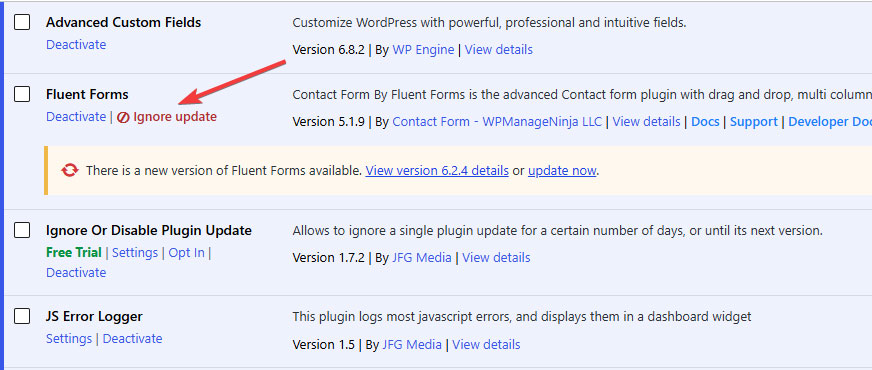


For developers
Is this your plugin? Show off the numbers.
Add a live badge to your site, docs or GitHub README. It updates on its own — no account needed.
Best Ignore Or Disable Plugin Upda… alternatives
All disable updates plugins →


FAQ
Ignore Or Disable Plugin Update: quick answers
Straight answers, pulled from live WordPress.org data.
Live data from WordPress.org · checked Oct 6, 2026
Is Ignore Or Disable Plugin Update free?
Yes. Ignore Or Disable Plugin Update is free to download and use from the official WordPress.org plugin directory.
Is Ignore Or Disable Plugin Update safe to use in 2026?
Ignore Or Disable Plugin Update is a solid plugin choice in 2026, with a few things worth checking first. It runs on 200+ sites, is rated 5/5 and was last updated 2 months ago, and scores 72/100 on our health check.
How many websites use Ignore Or Disable Plugin Update?
Ignore Or Disable Plugin Update is active on 200+ WordPress websites and has been downloaded 4,864 times since it launched in January 2024. It was downloaded 172 times in the last 30 days.
Does Ignore Or Disable Plugin Update work with WordPress 7.1?
Yes. The developer has tested Ignore Or Disable Plugin Update up to WordPress 7.1.2, the latest release. It requires WordPress 5.3 or newer.
What PHP version does Ignore Or Disable Plugin Update need?
Ignore Or Disable Plugin Update requires PHP 7.4 or higher. Most hosts run PHP 8.x today, so it works on any modern WordPress hosting.
When was Ignore Or Disable Plugin Update last updated?
The latest version, 1.8, was released on August 18, 2026 (2 months ago).
Who makes Ignore Or Disable Plugin Update?
Ignore Or Disable Plugin Update is developed and maintained by JFG Media.
What are the best alternatives to Ignore Or Disable Plugin Update?
The most popular alternatives to Ignore Or Disable Plugin Update are Easy Updates Manager (300K+ installs), Disable All WordPress Updat… (10K+ installs) and Disable Updates for WordPre… (10K+ installs).
Powered by PageForge
Want thousands of pages that rank like these? Build them in an afternoon.
This directory runs on the same engine as PageForge. Turn any spreadsheet, CSV or API into thousands of fast, SEO-ready WordPress pages — with schema, internal links and AI-written copy baked in.
- CSV, Google Sheets & API data sources
- AI content, schema & internal links per page
- Works with Elementor, Gutenberg, Yoast & Rank Math
- Free on WordPress.org — no credit card


