


SSL Mixed Content Fix
A fix for mixed content! This Plugin creates protocol relative urls by removing http + https from links. Works in Front- and Backend!

Use with caution
SSL Mixed Content Fix works, but test it on a staging site before relying on it in 2026. It runs on 8K+ sites, is rated 4.1/5 and was last updated 2 years ago, and scores 42/100 on our health check.
- No update in 2 years
- Only tested up to WordPress 6.6 (latest is 7.1)
How does it stack up?
Side-by-side on installs, updates, ratings & support


Daily downloads
Download spikes usually follow a new release — each site that auto-updates counts as a download.
Rankings
Where SSL Mixed Content Fix stands todayWordPress.org search rankings
Live position in the plugin search, top 100| Keyword | Position |
|---|---|
| force ssl | #43 |
| https | >100 |
| insecure content | #15 |
| mixed content | #13 |
| ssl | #62 |
Version adoption
Share of active sites per release.
Rating breakdown
★★★★★★★★★★ 4.1 from 34 reviews
About SSL Mixed Content Fix
From the official readme · v3.2.8Description
Try it out on your free dummy site: Click here => https://tastewp.com/plugins/http-https-remover.
(this trick works for all plugins in the WP repo – just replace “wordpress” with “tastewp” in the URL)
UPDATE: This plugin will be maintained again! It changed ownership and we’re currently collecting ideas how to further improve it. If you have any cool ideas, please let us know in Support Forum. Thank you!
Major updated in the latest release (3.0):
– Plugin has a proper settings page now
– Many bugs fixed
– Code optimized, causing performance to increase a lot
Main features:
- Works in Front- and Backend
- Makes every Plugin compatible with https
- Compatible with WPBakery & Disqus
- Fixes Google Fonts issues
- Makes your website faster
What does this Plugin do?
With protocol relative url’s you simply leave off the http: or https: part of the resource path. The browser will automatically load the resource using the same protocol that the page was loaded with.
For example, an absolute url may look like
src="http://domain.com/script.js"
If you were to load this from a https page the script will not be loaded – as non-https resources are not loaded from https pages (for security reasons).
The protocol relative url would look like
src="//domain.com/script.js"
and would load if the web page was http or https.
Tipp: Check your Settings -> General page and make sure your WordPress Address and Site Address are starting with “https”.
Add the following two lines in your wp-config.php above the line that says “Stop Editing Here”:
define('FORCE_SSL', true);
define('FORCE_SSL_ADMIN',true);
What is Mixed Content?
Mixed content occurs when initial HTML is loaded over a secure HTTPS connection, but other resources (such as images, videos, stylesheets, scripts) are loaded over an insecure HTTP connection. This is called mixed content because both HTTP and HTTPS content are being loaded to display the same page, and the initial request was secure over HTTPS. Modern browsers display warnings about this type of content to indicate to the user that this page contains insecure resources.
Note: You should always protect all of your websites with HTTPS, even if they don’t handle sensitive communications.
Example
Without Plugin:
src=”http://domain.com/script01.js”
src=”https://domain.com/script02.js”
src=”//domain.com/script03.js”
With Plugin:
src=”//domain.com/script01.js”
src=”//domain.com/script02.js”
src=”//domain.com/script03.js”
If using Cache Plugins
If the plugin isn’t working like expected please purge/clear cache for the changes to take effect!
Installation
- Upload
http-https-removerfolder to your/wp-content/plugins/directory. - Activate the plugin from Admin > Plugins menu.
- Once activated your site is ready!
Frequently asked questions
How do I know if my site has mixed content?
If a green padlock appears, then your site is secure with no mixed content. In Chrome or Safari, there will be no padlock icon in the browser URL field with mixed content. In Firefox the padlock icon will reflect a warning with mixed content.
What if I am using a CDN?
Change all your CDN references to load with // (this will adapt based on how the page is loaded)
Changelog
Release Date - 28 April 2017 Fixed some Google API Issues
3.2.8
- Tested with WordPress 6.6
- Minor performance improvements
- Improvements for PHP 8 utilization
3.2.7
- [NOTE] Upgraded analyst module to latest version
- [NOTE] Tested with WordPress v6.4.2
- [NOTE] Tested up to PHP v8.3
3.2.6
- Updated carousel module
- Updated opt-in module
- Resolved issues with PHP 8.2
- Tested up to WP 6.4
3.2.5
- Forced “Try it out” module to be disabled by default, user can still enable it manually.
3.2.4
- Tested with WP 6.3 RC
- Updated all shared modules to their latest versions
3.2.3
- Adjusted PHP compatibility
- Tested with WP 6.1.1
Screenshots
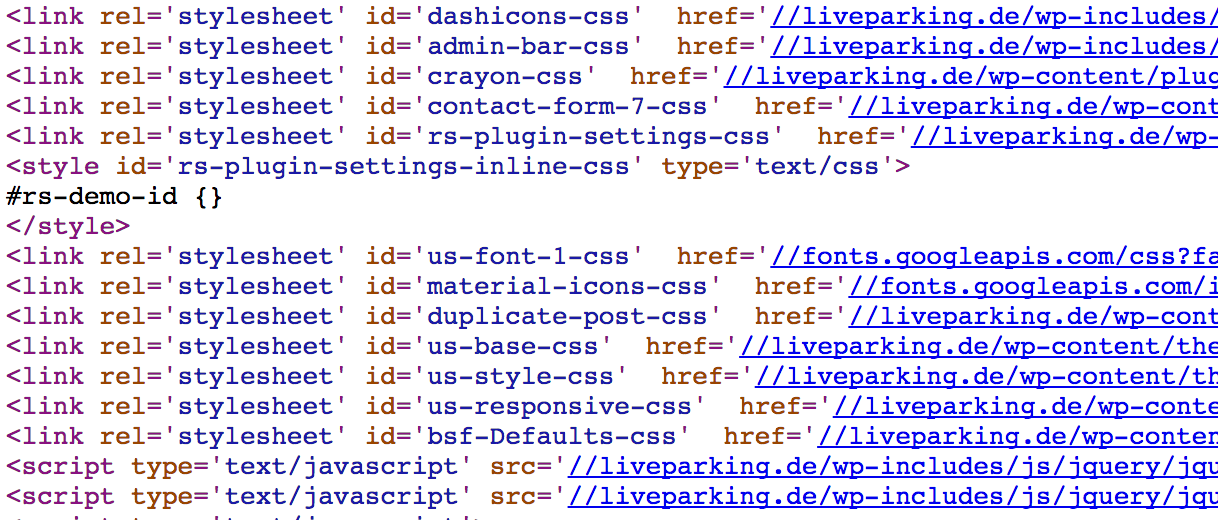
For developers
Is this your plugin? Show off the numbers.
Add a live badge to your site, docs or GitHub README. It updates on its own — no account needed.
Best SSL Mixed Content Fix alternatives
All force ssl plugins →

FAQ
SSL Mixed Content Fix: quick answers
Straight answers, pulled from live WordPress.org data.
Live data from WordPress.org · checked Sep 26, 2026
Is SSL Mixed Content Fix free?
Yes. SSL Mixed Content Fix is free to download and use from the official WordPress.org plugin directory.
Is SSL Mixed Content Fix safe to use in 2026?
SSL Mixed Content Fix works, but test it on a staging site before relying on it in 2026. It runs on 8K+ sites, is rated 4.1/5 and was last updated 2 years ago, and scores 42/100 on our health check.
How many websites use SSL Mixed Content Fix?
SSL Mixed Content Fix is active on 8K+ WordPress websites and has been downloaded 326,773 times since it launched in October 2016. It was downloaded 470 times in the last 30 days.
Does SSL Mixed Content Fix work with WordPress 7.1?
SSL Mixed Content Fix is officially tested up to WordPress 6.6.9, while the latest release is 7.1.2. It may still work, but try it on a staging site first.
When was SSL Mixed Content Fix last updated?
The latest version, 3.2.8, was released on July 17, 2024 (2 years ago).
Who makes SSL Mixed Content Fix?
SSL Mixed Content Fix is developed and maintained by Steve85b.
What are the best alternatives to SSL Mixed Content Fix?
The most popular alternatives to SSL Mixed Content Fix are Easy HTTPS Redirection (SSL) (100K+ installs), WP Force SSL & HTTPS SSL Re… (80K+ installs) and SSL Zen (10K+ installs).
Powered by PageForge
Want thousands of pages that rank like these? Build them in an afternoon.
This directory runs on the same engine as PageForge. Turn any spreadsheet, CSV or API into thousands of fast, SEO-ready WordPress pages — with schema, internal links and AI-written copy baked in.
- CSV, Google Sheets & API data sources
- AI content, schema & internal links per page
- Works with Elementor, Gutenberg, Yoast & Rank Math
- Free on WordPress.org — no credit card


