


Hostel
Create your hostel, small hotel or BnB site with WordPress. Manage rooms, booking, unavailable dates, and more.

Use with caution
Hostel works, but test it on a staging site before relying on it in 2026. It runs on 20+ sites, is rated 4.5/5 and was last updated 7 months ago, and scores 49/100 on our health check.
- Small user base (20+ active installs)
- Only tested up to WordPress 6.9 (latest is 7.1)
How does it stack up?
Side-by-side on installs, updates, ratings & support


Daily downloads
Download spikes usually follow a new release — each site that auto-updates counts as a download.
Rankings
Where Hostel stands todayWordPress.org search rankings
Live position in the plugin search, top 100| Keyword | Position |
|---|---|
| bnb | #16 |
| booking | >100 |
| hostel | #1 |
| Hotel | >100 |
| reservations | >100 |
Version adoption
Share of active sites per release.
Rating breakdown
★★★★★★★★★★ 4.5 from 12 reviews
About Hostel
From the official readme · v1.1.8Description
Create your hostel, small hotel, or BnB site with WordPress.
Hostel is online booking system with easy back-end management.
You can publish the booking forms, room calendars, and room lists with shortcodes so the plugin fits any WordPress theme.
Features
- Manage your booking mode: accept Paypal, manual payments, or don’t allow online booking
- Manage email notifications
- Manage rooms, beds, and prices
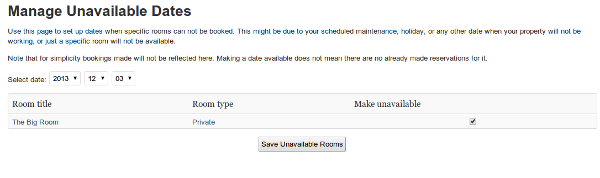
- Set unavailable dates when you are on vacations or just don’t want to accept guests in some rooms
- Manage bookings, process payments, contact customers
- List your rooms by using shortcodes
- Supports iCal / .ics to synchronize bookings with online systems. You can export and import bookings to/from all popular booking sites like Booking.com, AirBnB.com, Hotels.com etc.
- Localization / translation – ready
- Mobile / touch – friendly
There are more and better features + premium support in the PRO version. Check it on our new site: wp-hostel.com
Getting Started
- Go to Hostel link in your admin menu to manage your rooms and rates.
- Use the shortcodes to install a list of your rooms or to add the booking code to a post or page where you have described your rooms.
- Set up unavailable dates if you have such.
Shortcodes
-
[wphostel-list] will display a table with your available rooms. A date selector on the top lets the user choose dates of their visit and then the rooms list is updated. If you have enabled booking in your Hostel settings page, the table will also show “Book” button when appropriate. The button will automaically load the booking form. You can pass the attribute “max_days” to specify the maximum day interval that can be selected to show the table.
-
[wphostel-booking] displays a generic booking form with a drop-down selector for choosing room, and a date selector. If you use the [wphostel-list] shortcode you most probably do not need this one because the booking form is automatically generated.
For translating the plugin check the Help page under the Hostel menu in your administration.
Community Translations
The following translations are currently available. Please note they are maintained by volunteer translators and we can’t guarantee their accuracy.
Spanish: wphostel-es_ES.mo | wphostel-es_ES.po
Installation
- Unzip the contents and upload the entire
hosteldirectory to the/wp-content/plugins/directory - Activate the plugin through the ‘Plugins’ menu in WordPress
- Go to “Hostel” in your menu and manage the plugin
Frequently asked questions
Can I import bookings from sites like Booking.com etc?
Yes. Each room supports multiple iCal URLs. You can get the iCal URL from your control panel at the sites that provide it. Most popular booking sites do provide you with iCal URL
I have problems with receiving emails
Hostel just sends the emails to your WP installaiton so if emails are not delivered this is most likely a problem with your installation. We suggest installing a free plugin like WP Mail SMTP or Postman SMTP to test and improve your emails delivery. Hostel will automatically send its emails through any SMTP plugin you have installed.
Changelog
Version 1.1.7
- Security fixes
Version 1.1.5
- Tables in the administration pages are now made responsive so you can work with them in all mobile devices
- Added class “wphostel-book-button” to the “Make Reservation” button to allow styling
- Replaced CURL with WP HTTP API
- Prevent XSS and removed unwanted slashes in Manage Bookings
- Added DB indexes for better performance
Version 1.1
- Improved the Unavailable dates management. Now you can select a date range to make it unavailable at once. Any partially overlapping periods will also be shown there for each room so you can easily switch to them and cleanup the unavailability.
- Added iCal / .ics support for easier synchronization with other services
- Added possibility to use your own versions of the views / templates and modify the plugin pages without losing your changes on upgrade. See the plugin’s internal Help page for more details.
- Two new arguments added to the [wphostel-list] shortcode: form_horizontal and show_table. Check the internal Help page for details.
- Added option to limit the period in the future available for booking
- Now you can choose whether guests can book from today or tomorrow
- Changed the Paypal postback endpoints accordingly to latest Paypal security changes
- Security fixes – sanitization of vars, etc.
- You can now sync bookings with external services through iCal URLs – see the Edit Room page for details
- Added sorting on the Bookings page
Version 1.0
- Booking ID added in the Bookings table to help finding a booking for cancellation, referrence etc
- Added email log for all notification emails sent out from the plugin. Emails are logged from version 0.9.3 ahead.
- Added “show_titles” argument to the [wphostel-list] shortcode. It allows you to show the room titles in the rooms listing table.
- Fixed the datepicker CSS bug
- Added debug mode to see SQL errors in case you have any problems with the plugin
- Disallow selecting dates in the past when booking
- Added payment error log to see why Paypal payment was not marked successfully
- Added option to use Paypal PDT instead of IPN
- Added option to allow other user roles than admin to work with the plugin
- Fixed bug, the attribute “show_titles” of the wphostel-list shortcode did not initially take effect when page is loaded
Version 0.9
- Changed the booking form design to avoid styling issues
- Added setting to auto-cleanup unconfirmed/unpaid bookings after given interval of time
- Added setting for required minimum stay (X days)
- Added {{room-name}} variable for the email contents
- Added “max_days” attribute for the [wphostel-list] shortcode
- Your custom date format will now be used accross the date selector fields
- The datepicker can now be localized and styled using the configuration fields on the options page
- Optionally send notification emails when marking booking as paid from admin
Version 0.8
- Reworked all forms to work only with Ajax. This will let you use multiple
- Removed the requirement and setting for booking form URL. This is no longer needed
- Improved the booking form validations
- “Per room” price is now available. When this is selected number of beds become irrelevant because your guests are booking the entire room.
- Fixed bug: tables were not properly created on installation
- Setting a custom currently is available
- Added ajax loading of the beds in the booking form to prevent confusing numbers on the private rooms.
- Fixed bug in [wphostel-book] shortcode
Screenshots



For developers
Is this your plugin? Show off the numbers.
Add a live badge to your site, docs or GitHub README. It updates on its own — no account needed.
Best Hostel alternatives
All bnb plugins →FAQ
Hostel: quick answers
Straight answers, pulled from live WordPress.org data.
Live data from WordPress.org · checked Sep 29, 2026
Is Hostel free?
Yes. Hostel is free to download and use from the official WordPress.org plugin directory.
Is Hostel safe to use in 2026?
Hostel works, but test it on a staging site before relying on it in 2026. It runs on 20+ sites, is rated 4.5/5 and was last updated 7 months ago, and scores 49/100 on our health check.
How many websites use Hostel?
Hostel is active on 20+ WordPress websites and has been downloaded 24,668 times since it launched in November 2013. It was downloaded 139 times in the last 30 days.
Does Hostel work with WordPress 7.1?
Hostel is officially tested up to WordPress 6.9.9, while the latest release is 7.1.2. It may still work, but try it on a staging site first.
When was Hostel last updated?
The latest version, 1.1.8, was released on March 12, 2026 (7 months ago).
Who makes Hostel?
Hostel is developed and maintained by Bob.
What are the best alternatives to Hostel?
The most popular alternatives to Hostel are OBERON – Hotel reservation (10+ installs), ham3da integration for OxaP… (<10 installs) and SyncBooking (<10 installs).
Powered by PageForge
Want thousands of pages that rank like these? Build them in an afternoon.
This directory runs on the same engine as PageForge. Turn any spreadsheet, CSV or API into thousands of fast, SEO-ready WordPress pages — with schema, internal links and AI-written copy baked in.
- CSV, Google Sheets & API data sources
- AI content, schema & internal links per page
- Works with Elementor, Gutenberg, Yoast & Rank Math
- Free on WordPress.org — no credit card


