



Hera Pre-Written Emails for WooCommerce
Save order email templates, send a custom email to a customer from the WooCommerce Orders screen, one order or many, and see which orders got one.

Solid choice
Hera Pre-Written Emails for Woo… is a solid plugin choice in 2026, with a few things worth checking first. Was last updated 5 days ago, and scores 64/100 on our health check.
- Actively developed — last update 5 days ago
- Tested with the latest WordPress (7.1)
- Small user base (<10 active installs)
- Very few reviews so far
How does it stack up?
Side-by-side on installs, updates, ratings & support


Daily downloads
Download spikes usually follow a new release — each site that auto-updates counts as a download.
Rankings
Where Hera Pre-Written Emails for… stands todayWordPress.org search rankings
Live position in the plugin search, top 100| Keyword | Position |
|---|---|
| custom email | >100 |
| email templates | >100 |
| order email | >100 |
| send email | >100 |
| woocommerce emails | >100 |
About Hera Pre-Written Emails for WooCommerce
From the official readme · v1.0.0Description
Hera Pre-Written Emails for WooCommerce lets your staff send a pre-written email to an order’s customer from the WooCommerce Orders screen, without leaving wp-admin.
This is an independent plugin, not affiliated with, endorsed by, or sponsored by WooCommerce or Automattic. WooCommerce is a trademark of Automattic Inc.
This is a manual tool for the messages a real person decides to send about a specific order. Some examples: asking a customer to confirm their delivery address, explaining a delay, requesting extra details before an order is processed, following up after delivery. It is not a marketing or newsletter tool, and it does not send anything automatically. Every email goes out because a staff member chose to send it, for a specific order.
Features
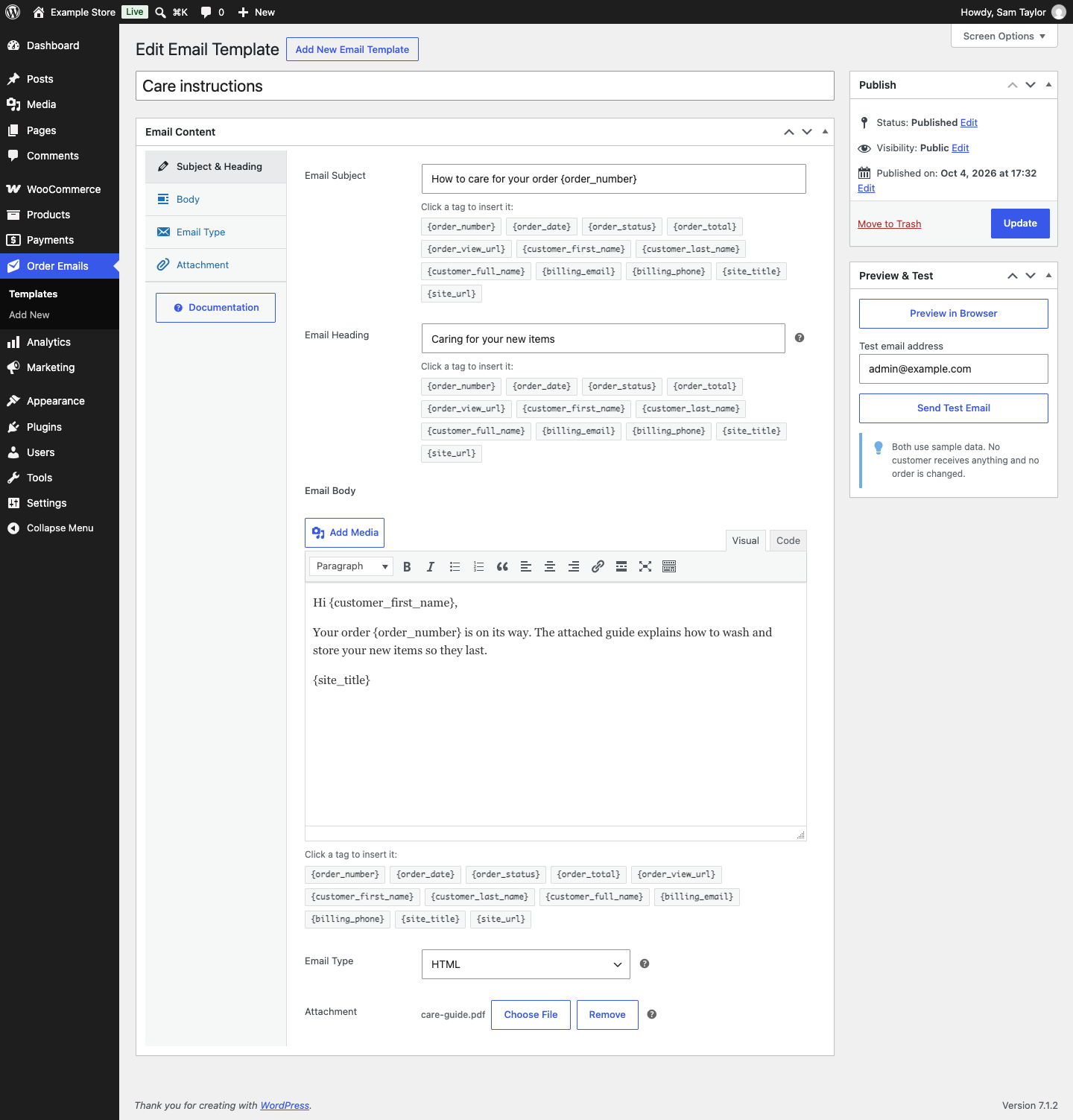
- Manage as many email templates as you need from a dedicated “Order Emails” admin menu. Each template has its own internal name (for your own reference only), Email Subject, Email Heading, Email Type (HTML / Plain text / Multipart), and a rich-text body.
- Placeholder tags such as
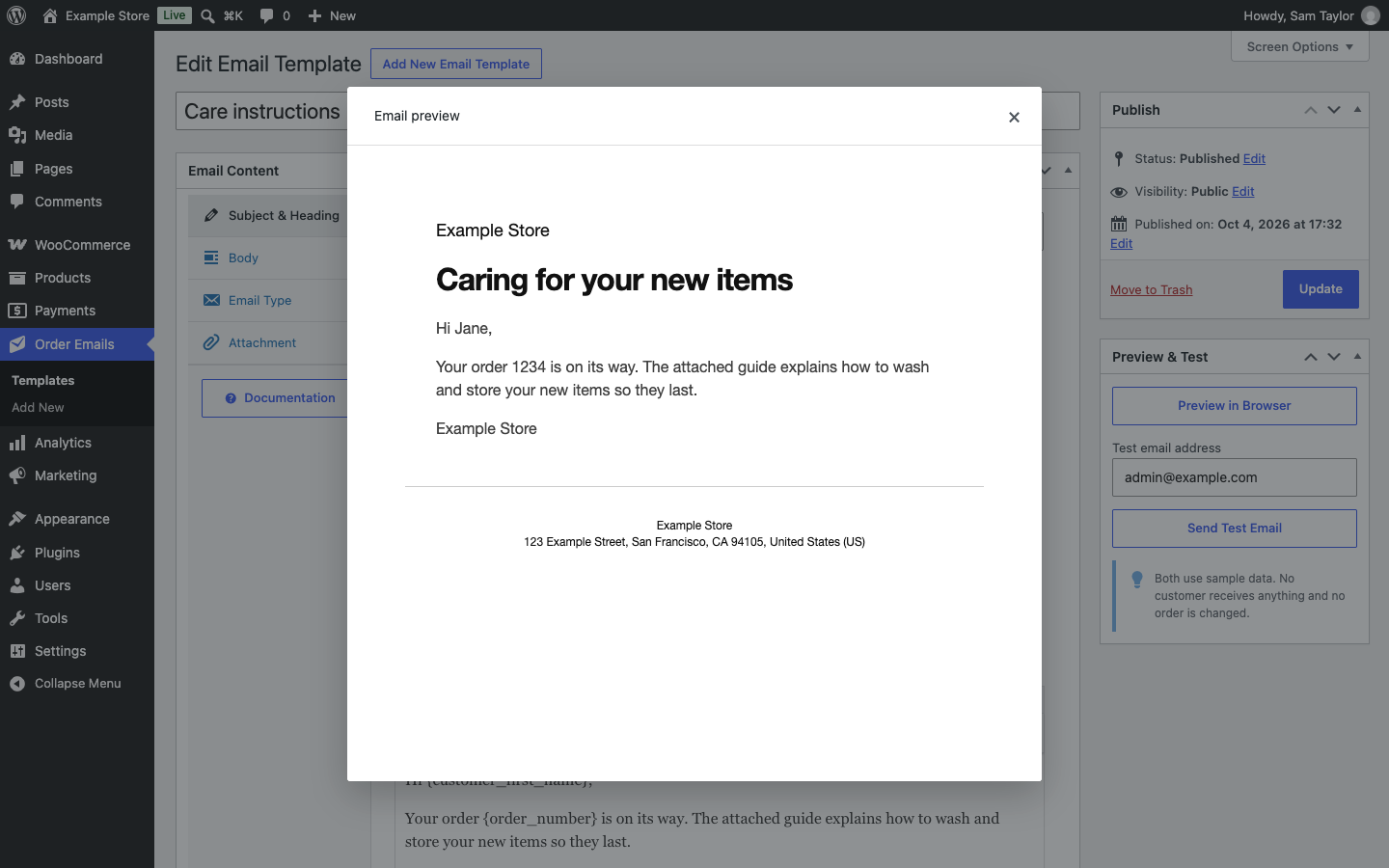
{order_number},{customer_full_name},{order_total},{order_view_url}are replaced with real order data when sending. Click a tag to insert it into the Subject, Heading or Body. - Preview any template in your browser, or send yourself a test copy with sample data, before it’s ever used on a real order. Works on Draft templates too.
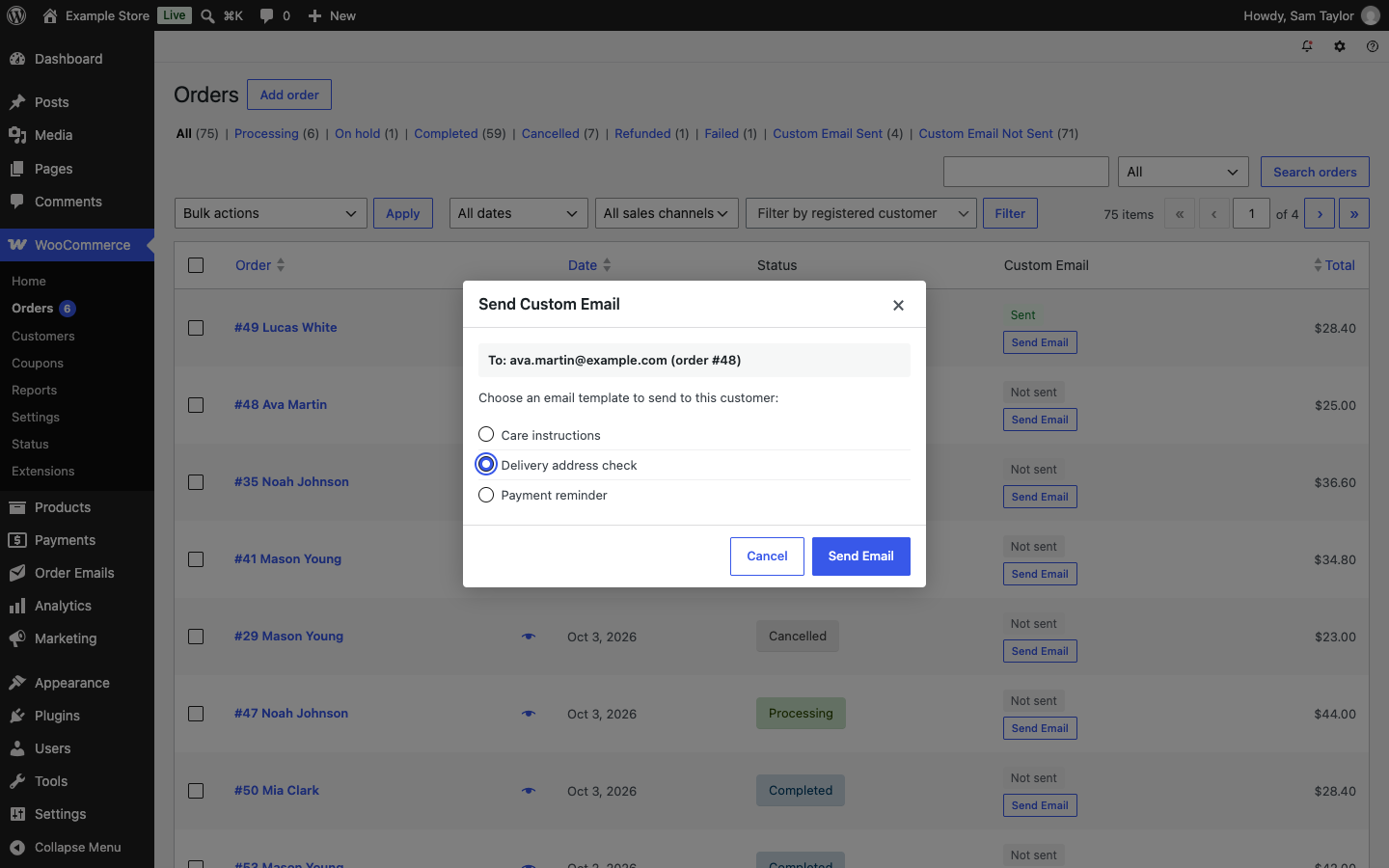
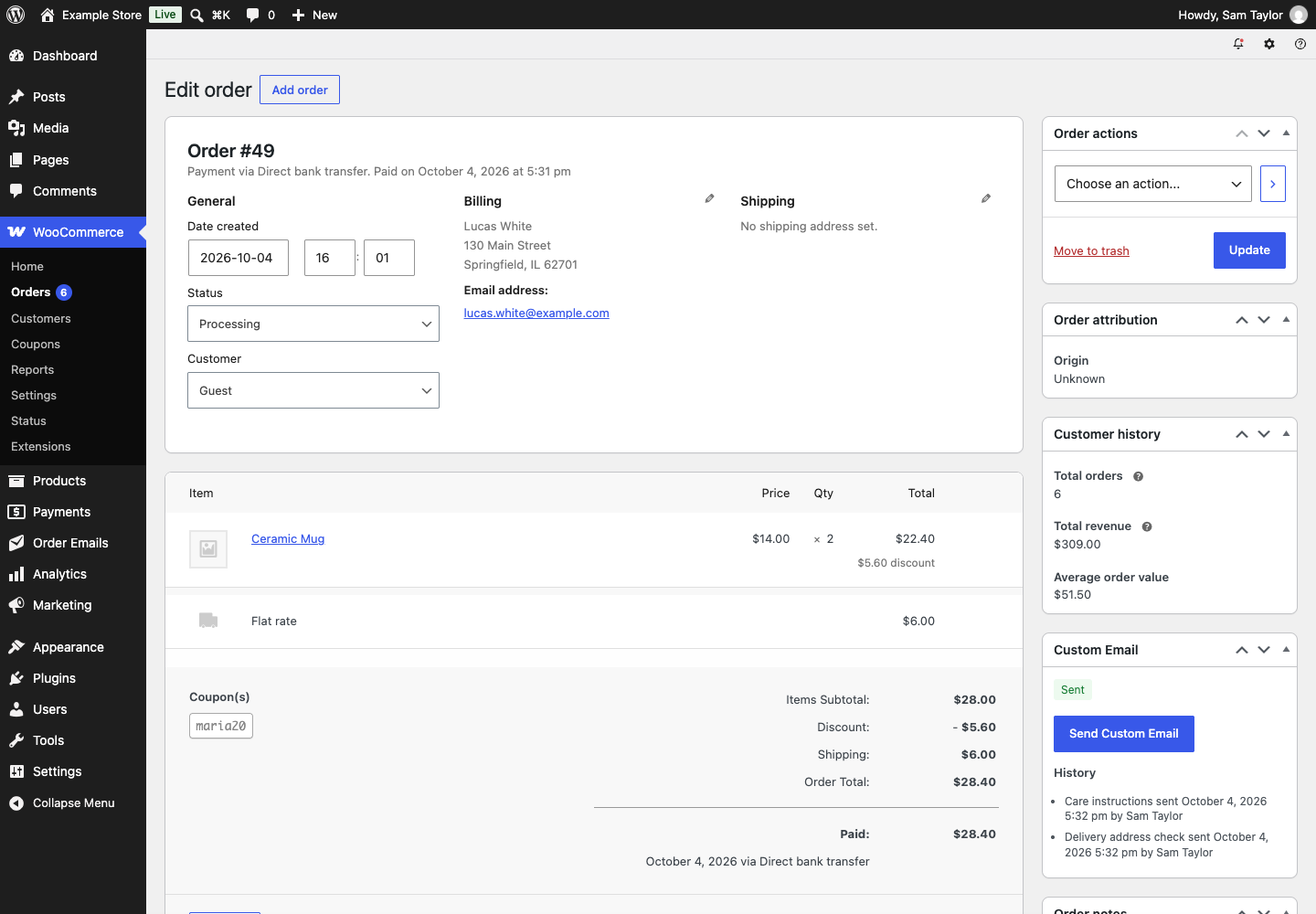
- A “Send Email” button on each order in the Orders list, and a “Send Custom Email” button on the order screen, open a window that shows the address the email goes to and lets you choose the template.
- A bulk action on the Orders list (“Send Custom Email: template name“) sends the same template to the selected orders, up to 20 per run by default, after you confirm, for example to remind a batch of stalled orders at once.
- Optionally attach one file to a template (a warranty card, a user guide, etc.). It goes out with every email sent from that template.
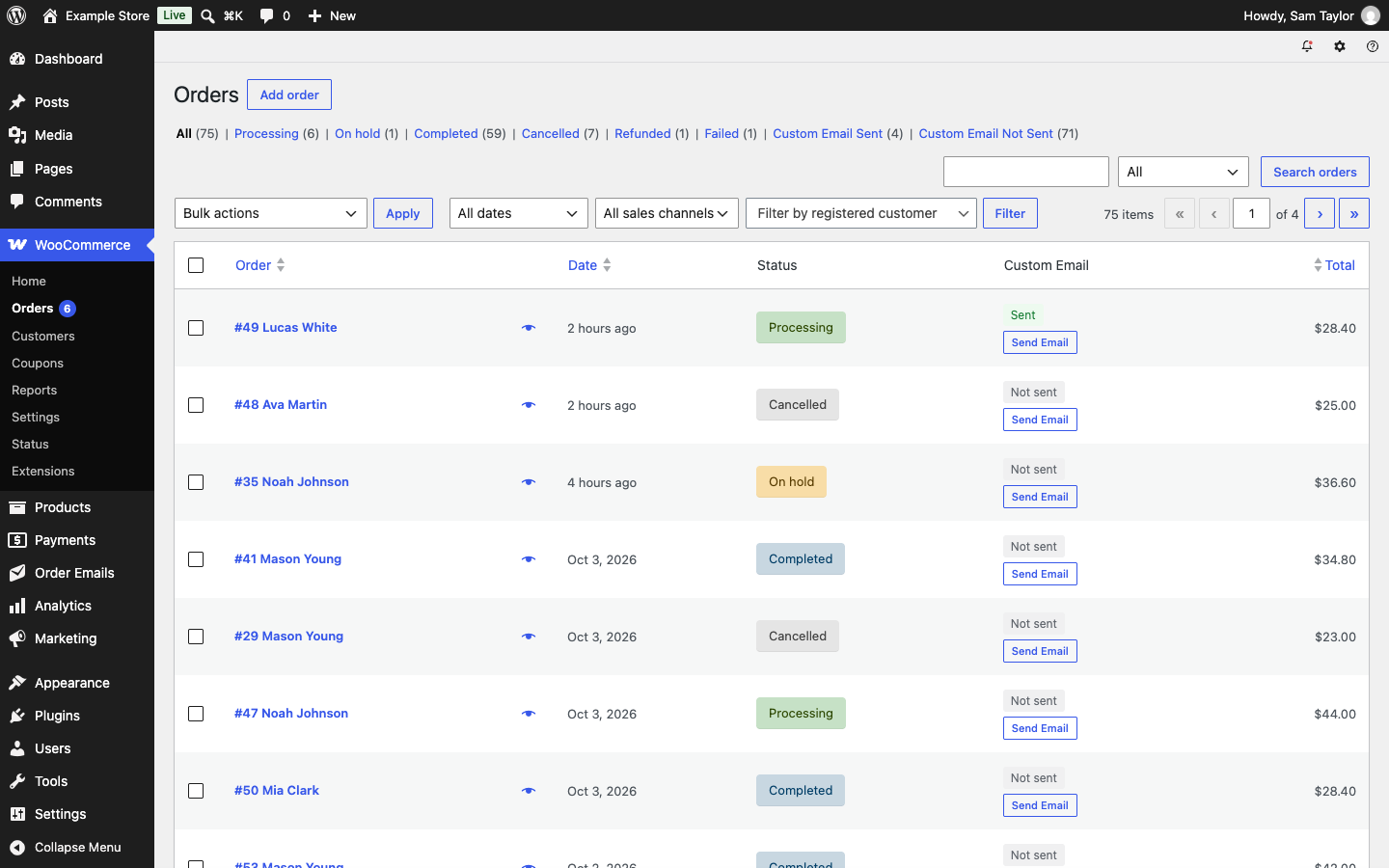
- A new “Custom Email” column on the Orders list shows a Sent / Not sent badge for every order.
- Extra “Custom Email Sent / Custom Email Not Sent” filter links next to the existing order status filters, with the number of orders in each.
- Every send adds a private order note naming the template, and a line to the order’s history with the template, the time and the staff member who sent it.
- Tag values such as
{order_status}and{order_date}, and the text of the WooCommerce email design, use your site language, as in WooCommerce’s own emails to customers, even when your wp-admin profile uses another language. - Emails are sent through WooCommerce’s own mailer (
WC()->mailer()), so they use your store’s WooCommerce email styling and go out through whatever SMTP connection you already have configured (e.g. WP Mail SMTP). No separate mail configuration is needed. - Fully compatible with WooCommerce High-Performance Order Storage (HPOS / Custom Order Tables) as well as legacy order storage.
- Developers can add their own placeholder tags, act after each email sent and change the bulk limit, with the filters and actions described in the user guide.
Documentation
The user guide, with a page for every feature, is at herapress.com/docs.
Installation
- Upload the
hera-pre-written-emails-for-woocommercefolder to/wp-content/plugins/, or upload the zip via Plugins → Add Plugin → Upload Plugin (older WordPress versions call the menu item Add New Plugin). - Activate the plugin through the “Plugins” screen. WooCommerce 8.0 or later must be installed and active.
- Go to the new “Order Emails” menu and add at least one email template, then set it to Published.
- Open WooCommerce → Orders and use the “Send Email” button/column to send a template to a customer, or select multiple orders and use the “Send Custom Email: template name” bulk action.
Frequently asked questions
Which email address does this send to?
The order’s billing email address.
What’s the difference between the template Name, Subject, and Heading?
The Name is for your staff, so you can tell templates apart. It appears in wp-admin: in the template list, the Send Custom Email window, the bulk actions and the order’s history. Customers never see it. The Subject is the actual email subject line the customer sees in their inbox. The Heading is the large heading at the top of an HTML or Multipart email, separate from the subject. Leave it blank to reuse the Subject as the Heading.
Is this a marketing or newsletter tool?
No. It’s meant for one-off, order-related communication a staff member actively chooses to send. There is no scheduling, automation, or trigger-based sending. Please don’t use it to send unsolicited bulk marketing.
Is there a limit on bulk sends?
Yes, up to 20 selected orders are processed per bulk-action run, which is one page of the Orders list at WooCommerce’s default page size. Each email can take a second or more with a remote mail server or a large attachment, and a run has to finish within the time the web server allows. Select the remaining orders and run the action again if you have more. A developer can change the number with the hpwe_bulk_send_limit filter.
Does this work with WP Mail SMTP?
Yes. The plugin sends through WooCommerce’s mailer, which uses WordPress’s wp_mail() under the hood, so it automatically goes through whatever SMTP connection WP Mail SMTP (or any other SMTP plugin) has configured. No extra setup is needed in this plugin. With Post SMTP, a Multipart template keeps its plain text version only when Post SMTP’s Mailer Type is PHPMailer and it sends over SMTP. With its default Mailer Type, or with one of its API mailers, the email goes out as HTML only.
Does this support WooCommerce’s new order storage (HPOS)?
Yes, the plugin declares compatibility and works with both HPOS and legacy order storage.
Changelog
First release. After activating, add a template under Order Emails and set it to Published.
1.0.0
- Initial release.
Screenshots
For developers
Is this your plugin? Show off the numbers.
Add a live badge to your site, docs or GitHub README. It updates on its own — no account needed.
Best Hera Pre-Written Emails for W… alternatives
All custom email plugins →FAQ
Hera Pre-Written Emails for WooComm…: quick answers
Straight answers, pulled from live WordPress.org data.
Live data from WordPress.org · checked Oct 13, 2026
Is Hera Pre-Written Emails for Woo… free?
Yes. Hera Pre-Written Emails for Woo… is free to download and use from the official WordPress.org plugin directory.
Is Hera Pre-Written Emails for Woo… safe to use in 2026?
Hera Pre-Written Emails for Woo… is a solid plugin choice in 2026, with a few things worth checking first. Was last updated 5 days ago, and scores 64/100 on our health check.
How many websites use Hera Pre-Written Emails for Woo…?
Hera Pre-Written Emails for Woo… is active on <10 WordPress websites and has been downloaded 76 times since it launched in October 2026. It was downloaded 75 times in the last 30 days.
Does Hera Pre-Written Emails for Woo… work with WordPress 7.1?
Yes. The developer has tested Hera Pre-Written Emails for Woo… up to WordPress 7.1.3, the latest release. It requires WordPress 6.5 or newer.
What PHP version does Hera Pre-Written Emails for Woo… need?
Hera Pre-Written Emails for Woo… requires PHP 7.4 or higher. Most hosts run PHP 8.x today, so it works on any modern WordPress hosting.
When was Hera Pre-Written Emails for Woo… last updated?
The latest version, 1.0.0, was released on October 9, 2026 (5 days ago).
Who makes Hera Pre-Written Emails for Woo…?
Hera Pre-Written Emails for Woo… is developed and maintained by HeraPress.
What are the best alternatives to Hera Pre-Written Emails for Woo…?
The most popular alternatives to Hera Pre-Written Emails for Woo… are Additional Custom Emails &… (2K+ installs), Send Email From Admin (700+ installs) and Custom Pingback Email (10+ installs).
Powered by PageForge
Want thousands of pages that rank like these? Build them in an afternoon.
This directory runs on the same engine as PageForge. Turn any spreadsheet, CSV or API into thousands of fast, SEO-ready WordPress pages — with schema, internal links and AI-written copy baked in.
- CSV, Google Sheets & API data sources
- AI content, schema & internal links per page
- Works with Elementor, Gutenberg, Yoast & Rank Math
- Free on WordPress.org — no credit card


