



Heartbeat Control
Heartbeat Control by WP Rocket allows you to manage the frequency of the WordPress heartbeat API in a few clicks.

Consider an alternative
Heartbeat Control shows warning signs in 2026 — compare the alternatives below before installing. It runs on 70K+ sites, is rated 4.2/5 and was last updated 3 years ago, and scores 33/100 on our health check.
- Proven at scale on 70K+ active sites
- No update in 3 years
- Only tested up to WordPress 6.3 (latest is 7.1)
How does it stack up?
Side-by-side on installs, updates, ratings & supportDaily downloads
Download spikes usually follow a new release — each site that auto-updates counts as a download.
Rankings
Where Heartbeat Control stands todayWordPress.org search rankings
Live position in the plugin search, top 100| Keyword | Position |
|---|---|
| admin-ajax | >100 |
| heartbeat | #29 |
| heartbeat api | #23 |
| heartbeat control | #12 |
| server resources | >100 |
Version adoption
Share of active sites per release.
Rating breakdown
★★★★★★★★★★ 4.2 from 68 reviews
About Heartbeat Control
From the official readme · v2.0.1Description
Heartbeat Control by WP Rocket allows you to manage the frequency of the WordPress heartbeat API in a few clicks.
The WordPress Heartbeat API is a great feature that provides real-time communication between the server and the browser when you are logged into your WordPress admin panel. It uses the file /wp-admin/admin-ajax.php to run AJAX calls from the browser. By default, AJAX requests are sent every 15 seconds on post edit pages, and every 60 seconds on the dashboard.
This is indeed helpful; but if you usually leave your WordPress admin open for long periods (for example when you write or edit posts), the AJAX requests from the API can pile up and generate high CPU usage, leading to server performance issues and even hosting account suspensions.
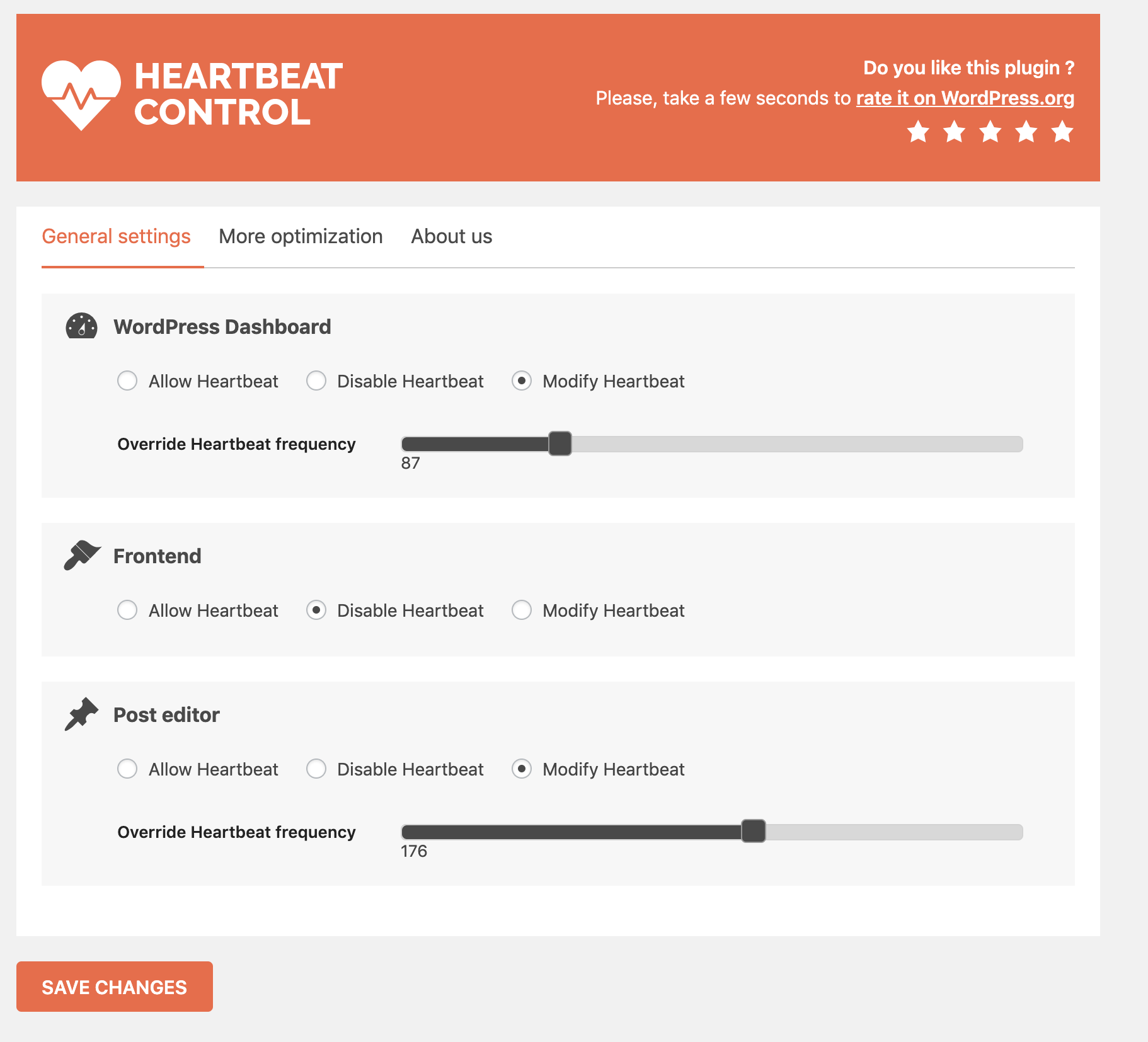
With Heartbeat Control by WP Rocket, you can easily choose to limit or completely stop the activity of the WordPress Heartbeat API. You can also add rules for specific locations only (Dashboard, Frontend or Post Editor).
To learn more about WordPress performance optimization and make your website faster, join our WP Rocket Facebook Community!
Related Plugins
- WP Rocket: Best caching plugin to speed-up your WordPress website.
- Lazy Load by WP Rocket: Best Lazy Load script to reduce the number of HTTP requests and improves the websites loading time.
- Imagify: Best Image Optimizer to speed up your website with lighter images.
Installation
- Upload the plugin folder to the /wp-content/plugins/ directory.
- Activate Heartbeat Control on the Plugins page.
- Adjust any settings within Settings > Heartbeat Control.
Frequently asked questions
How do I change my settings?
All options are located within Settings > Heartbeat Control.
Why would I want to change the default heartbeat intervals?
If you commonly leave your WordPress admin up for long periods of time, especially while writing or editing a post, the repeated POST requests can cause high resource usage. To avoid this, the heartbeat can be modified or even disabled to lower your server resource usage.
Where do I report security bugs found in this plugin?
You can report any security bugs found in the source code of the site-reviews plugin through the Patchstack Vulnerability Disclosure Program. The Patchstack team will assist you with verification, CVE assignment and take care of notifying the developers of this plugin.
Changelog
2.0.1
- Fix PHP warnings & deprecated notices
2.0 – 2019/11/04
- Revamp the settings page.
1.2.5
- Fixed issue caused by previous version deployment.
- Added hbc_disable_notice hook to force dismissal of update notices.
- Additional documentation added.
- Minor standards adjustments.
1.2.4
- Updated CMB2 to 2.4.2.
- Bumpted “tested up to” version.
- Fixed a bug that occurred if no locations were selected.
- Minor standards adjustments.
1.2.3
- Added composer.json and composer.lock that were missing.
- Updated CMB2 to 2.3
- Translation files generated.
- Language path and text domain added to plugin header.
- Bumped compatible WP version.
1.2.2
- Minor bugfixes.
Screenshots

For developers
Is this your plugin? Show off the numbers.
Add a live badge to your site, docs or GitHub README. It updates on its own — no account needed.
Best Heartbeat Control alternatives
All admin-ajax plugins →| Rank | Plugin | Active installs |
|---|---|---|
| 2 |
 Dynamic Front-End Heartbeat Control
An enhanced solution to optimize the performance of your WordPress website and…
Dynamic Front-End Heartbeat Control
An enhanced solution to optimize the performance of your WordPress website and…
|
1K+ |
| 3 |
 Amuga Ajax Log
 is a tool built for troubleshooters who need to know what is hitting…
Amuga Ajax Log
Amuga Ajax Log is a tool built for troubleshooters who need to know what is hitting…
|
20+ |
FAQ
Heartbeat Control: quick answers
Straight answers, pulled from live WordPress.org data.
Live data from WordPress.org · checked Sep 27, 2026
Is Heartbeat Control free?
Yes. Heartbeat Control is free to download and use from the official WordPress.org plugin directory.
Is Heartbeat Control safe to use in 2026?
Heartbeat Control shows warning signs in 2026 — compare the alternatives below before installing. It runs on 70K+ sites, is rated 4.2/5 and was last updated 3 years ago, and scores 33/100 on our health check.
How many websites use Heartbeat Control?
Heartbeat Control is active on 70K+ WordPress websites and has been downloaded 1,242,630 times since it launched in November 2014. It was downloaded 3,852 times in the last 30 days.
Does Heartbeat Control work with WordPress 7.1?
Heartbeat Control is officially tested up to WordPress 6.3.12, while the latest release is 7.1.2. It may still work, but try it on a staging site first.
What PHP version does Heartbeat Control need?
Heartbeat Control requires PHP 5.3 or higher. Most hosts run PHP 8.x today, so it works on any modern WordPress hosting.
When was Heartbeat Control last updated?
The latest version, 2.0.1, was released on August 31, 2023 (3 years ago).
Who makes Heartbeat Control?
Heartbeat Control is developed and maintained by WP Media.
What are the best alternatives to Heartbeat Control?
The most popular alternatives to Heartbeat Control are Dynamic Front-End Heartbeat… (1K+ installs) and Amuga Ajax Log (20+ installs).
Powered by PageForge
Want thousands of pages that rank like these? Build them in an afternoon.
This directory runs on the same engine as PageForge. Turn any spreadsheet, CSV or API into thousands of fast, SEO-ready WordPress pages — with schema, internal links and AI-written copy baked in.
- CSV, Google Sheets & API data sources
- AI content, schema & internal links per page
- Works with Elementor, Gutenberg, Yoast & Rank Math
- Free on WordPress.org — no credit card


