


Hammy
Hammy speeds up your website by generating and serving resized images for your content area depending on content width.

Consider an alternative
Hammy shows warning signs in 2026 — compare the alternatives below before installing. It runs on 100+ sites, is rated 3.3/5 and was last updated 13 years ago, and scores 30/100 on our health check.
- Small user base (100+ active installs)
- Mixed reviews — 3.3/5 from 16 ratings
- No update in 12 years
- Only tested up to WordPress 3.7 (latest is 7.1)
How does it stack up?
Side-by-side on installs, updates, ratings & support



Daily downloads
Download spikes usually follow a new release — each site that auto-updates counts as a download.
Rankings
Where Hammy stands todayWordPress.org search rankings
Live position in the plugin search, top 100| Keyword | Position |
|---|---|
| adaptive | >100 |
| figure | >100 |
| image | >100 |
| images | >100 |
| responsive | >100 |
Version adoption
Share of active sites per release.
Rating breakdown
★★★★★★★★★★ 3.3 from 16 reviews
About Hammy
From the official readme · v1.5.1Description
Introduction
Hammy takes your regular content images (only within posts and pages, not custom post types) and regenerates a number of smaller sized images. When a person visits your website, it then automatically provides them with the most appropriate image (or the smallest one possible). This makes for a better experience, especially on mobile. This uses the new WP 3.5 image code.
Will it work on my Theme?
Yes! (the only exception being themes with no standard posts or pages)
How does it work?
When activated, the <img> tag is replaced by the <figure> tag, and the alternate image sizes are provided in a way that only jQuery can access/load. If jQuery isn’t available, it falls back to the regular image you had there in the first place.
It also takes on any classes or alternate titles from the original image. It does not make any changes to your database (i.e. content or images that you already have remain untouched).
What else do I need to know?
- Supports Retina
- Uses WordPress 3.5 Image Code (no external dependency)
- You need to be willing to spend a few minutes configuring and playing with the breakpoints and choosing the correct parent container to get it right.
- Hammy filters the output every single time, but only needs to generate a resized image once.
Updates
Follow me for updates at @noeltock
GitHub
If you have technical issues or other enhancements that you’d like to contribute, please do so in the form of a pull request or issue here:
https://wordpress.org/plugins/hammy/
Feedback & Bugs
Kindly post any issues, questions or suggestions on the Hammy forums .
Installation
Video Walkthrough
Hammy already starts working upon activation, so any configuration is optional:
- Upload the folder
hammyto the/wp-content/plugins/directory - Activate the plugin through the ‘Plugins’ menu in WordPress
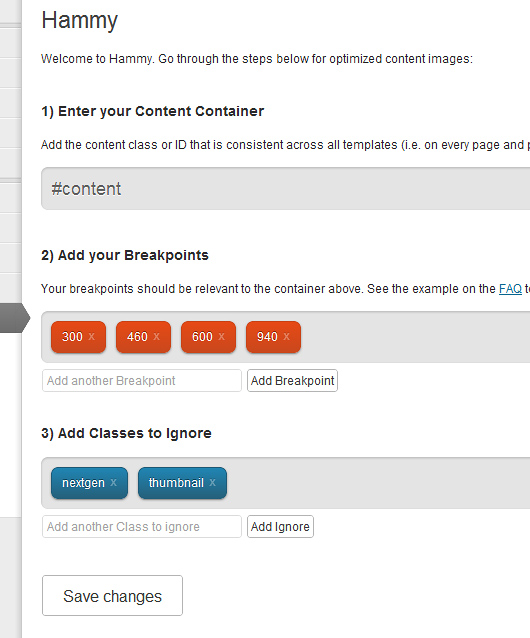
- (Optional) Go to Settings -> Hammy and review the options. Add the id/class of the container that holds your posts (i.e. #content). Then add breakpoints that are relevant to that container ( see the FAQ for an example ).
- (Optional) Edit your theme’s CSS to add
figure.hammy-responsive, in a way that it is identical to anyimgstyling used for your content area.
Changelog
Fix invalid markup
1.5.1
- Fix invalid markup
1.5.0
- Moved back to using
figureas opposed topicturefor larger compatibility (especially IE). Check your CSS to make sure figure acts like an image. - Updated Lazy Load to 1.9.3
- Gave Lazy Load placeholders dimensions so that the browser doesn’t reflow for each load
1.4.1
- Fixed Warnings
- Typo
- Tested PNG
1.4
- Allow images smaller then the smallest breakpoint to function
- WPThumb Update
- 3.8.1 Compatibility Testing
1.3.2
- WPThumb Update
1.3.1
- Readme & Banner changes
Screenshots
For developers
Is this your plugin? Show off the numbers.
Add a live badge to your site, docs or GitHub README. It updates on its own — no account needed.
Best Hammy alternatives
All adaptive plugins →FAQ
Hammy: quick answers
Straight answers, pulled from live WordPress.org data.
Live data from WordPress.org · checked Oct 5, 2026
Is Hammy free?
Yes. Hammy is free to download and use from the official WordPress.org plugin directory.
Is Hammy safe to use in 2026?
Hammy shows warning signs in 2026 — compare the alternatives below before installing. It runs on 100+ sites, is rated 3.3/5 and was last updated 13 years ago, and scores 30/100 on our health check.
How many websites use Hammy?
Hammy is active on 100+ WordPress websites and has been downloaded 67,071 times since it launched in June 2012. It was downloaded 103 times in the last 30 days.
Does Hammy work with WordPress 7.1?
Hammy is officially tested up to WordPress 3.7.41, while the latest release is 7.1.2. It may still work, but try it on a staging site first.
When was Hammy last updated?
The latest version, 1.5.1, was released on February 16, 2014 (13 years ago).
Who makes Hammy?
Hammy is developed and maintained by Noel Tock.
What are the best alternatives to Hammy?
The most popular alternatives to Hammy are Customizer Responsive Serve… (70+ installs), AddFunc Adaptive Content (50+ installs) and Mobile Switcher (50+ installs).
Powered by PageForge
Want thousands of pages that rank like these? Build them in an afternoon.
This directory runs on the same engine as PageForge. Turn any spreadsheet, CSV or API into thousands of fast, SEO-ready WordPress pages — with schema, internal links and AI-written copy baked in.
- CSV, Google Sheets & API data sources
- AI content, schema & internal links per page
- Works with Elementor, Gutenberg, Yoast & Rank Math
- Free on WordPress.org — no credit card


