


H-Shipping Multiple Shipping Addresses for WooCommerce
Seamlessly allow customers to save and manage up to 3 shipping addresses in WooCommerce. Fully compatible with My Account and Checkout pages.

Solid choice
H-Shipping Multiple Shipping Ad… is a solid plugin choice in 2026, with a few things worth checking first. Was last updated 3 weeks ago, and scores 64/100 on our health check.
- Actively developed — last update 3 weeks ago
- Tested with the latest WordPress (7.1)
- Small user base (<10 active installs)
- Very few reviews so far
How does it stack up?
Side-by-side on installs, updates, ratings & support



Daily downloads
Download spikes usually follow a new release — each site that auto-updates counts as a download.
Rankings
Where H-Shipping Multiple Shippin… stands todayWordPress.org search rankings
Live position in the plugin search, top 100| Keyword | Position |
|---|---|
| address book | >100 |
| checkout | >100 |
| multiple addresses | >100 |
| shipping | >100 |
| woocommerce | >100 |
About H-Shipping Multiple Shipping Addresses…
From the official readme · v1.1.2Description
Read the documentation – installation, settings and answers, with screenshots. Need help? Contact support.
H-Shipping Multiple Shipping Addresses for WooCommerce solves the problem of customers needing to repeatedly type different shipping addresses for their orders. Whether sending gifts to family or managing deliveries to different office locations, this plugin provides a smooth, integrated experience.
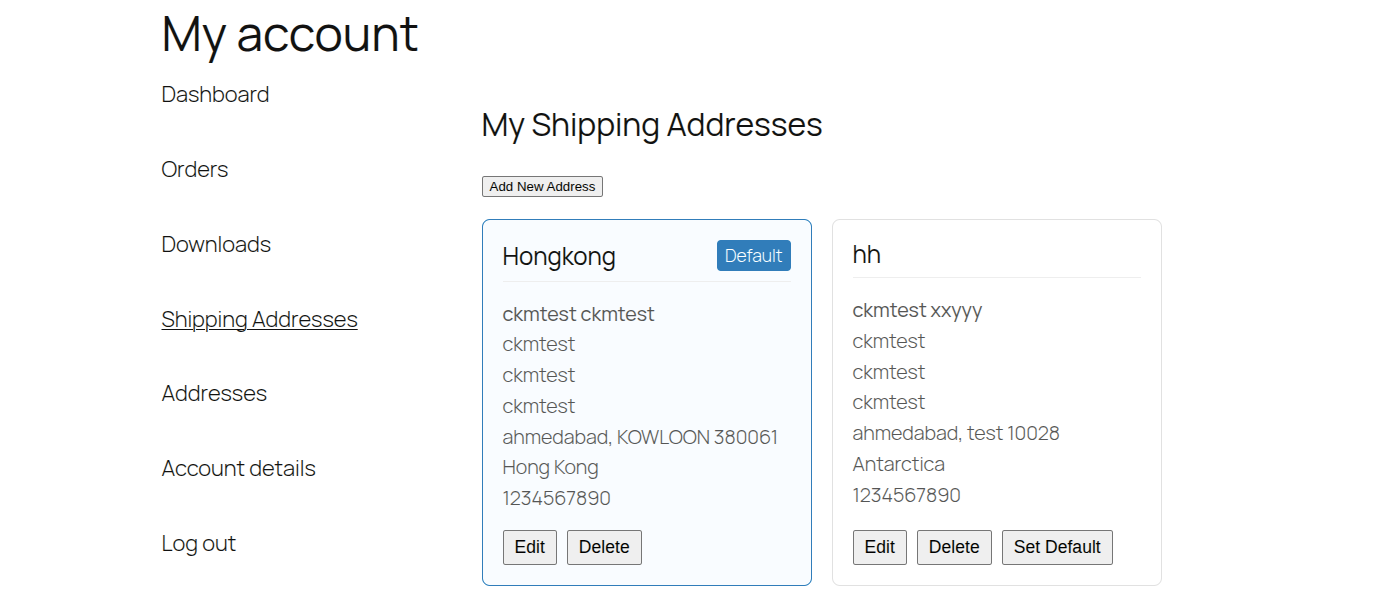
The plugin adds a dedicated “Shipping Addresses” tab to the WooCommerce “My Account” area, where users can add, edit, or delete their preferred shipping destinations. During checkout, users can simply select a saved address with a single click, automatically populating the shipping fields.
Features
- Address Book: Customers can save up to 3 unique shipping addresses.
- My Account Integration: Adds a clean, native-looking “Shipping Addresses” tab to the user account area.
- Seamless Checkout: Displays saved addresses as radio options above the shipping form at checkout.
- Classic and Block Checkout: Works with the classic checkout and with the block-based WooCommerce Checkout.
- One-Click Auto-Fill: Selecting an address instantly fills all shipping fields, including country and state.
- Ready to use: Works right after activation with sensible defaults. Change them under Multiple Shipping Addresses in the admin menu.
- Multisite Ready: Compatible with WordPress Multisite networks, with a separate address table and settings per site.
- Native UI: Designed to match your theme’s styling by using standard WooCommerce classes.
- Data Integrity: Strictly focuses on shipping fields—never overwrites billing information.
Usage
Managing Addresses (Customer)
- Log in to the store.
- Go to the My Account page.
- Click on the new “Shipping Addresses” tab.
- Click “Add New Address” to save a destination (up to 3).
- Use the “Edit” or “Delete” buttons to manage existing entries.
Using at Checkout
- Add products to the cart and proceed to checkout.
- Ensure you are logged in.
- In the Shipping section, you will see a list of your saved addresses, even before you tick “Ship to a different address”.
- Select an address to fill the form, or choose “New / Different Address” to type a new one manually.
Installation
Automatic Installation
- Log in to your WordPress Admin dashboard.
- Navigate to Plugins > Add New.
- Search for “H-Shipping Multiple Shipping Addresses for WooCommerce”.
- Click Install Now and then Activate.
Manual Installation
- Download the plugin zip file.
- Unzip the file and upload the
h-shipping-multiple-addresses-for-woocommercefolder to your/wp-content/plugins/directory. - Go to the Plugins menu in WordPress and activate the plugin.
- For Multisite: You can “Network Activate” to enable it across your entire network.
Need more detail? See the documentation.
Changelog
Support links now open the new support site. No settings change.
1.1.2
- Improvement: the Support links in the plugin and in this readme now open our new support site: https://support.wpallsolution.com/
1.1.1
- New: Online documentation: https://docs.wpallsolution.com/#/collection/hsm-plugin
- New: “Documentation” and “Support” links under the plugin name on the Plugins page and on the Multiple Shipping Addresses settings page. Support: https://wpallsolution.com/contact/
1.1.0
- New: Saved-address picker for the block-based WooCommerce Checkout (classic checkout is still supported).
- New: Sensible default settings on activation, so the plugin works right away. Existing settings are never overwritten.
- Fix: The classic checkout picker was hidden until “Ship to a different address” was ticked. It is now always visible.
- Fix: The “Set as default shipping address” checkbox in the address form did not save the default.
- Fix: “Set Default” could clear the current default when the chosen address was not found.
- Fix: A state is now required on the server for countries that have a state list.
- Fix: The WooCommerce check no longer fails on multisite network activation or custom plugin folders. The plugin now starts after WooCommerce has loaded and shows a notice if WooCommerce is missing.
- Fix: Multisite database upgrades now run on every site instead of only the first one.
- Fix: Uninstall now removes plugin settings, and removes the table on every site of a multisite network.
- Fix: The minified JavaScript and CSS now match the readable source files.
- Improvement: Smaller page payload. The list of states is only sent on the My Account page, and unused data was removed.
- Improvement: JavaScript texts such as “Add New Address” and “Edit Address” are now translatable.
- Tweak: Removed unused premium notice code and a duplicated address limit message.
- Update: Verified compatibility with WordPress 7.1.
1.0.3
- Update: Verified compatibility with WordPress 6.9.1.
- Update: Minor fixes and improvements.
1.0.2
- Update: Improved error handling in AJAX requests.
1.0.1
- New: Added Admin Settings page to Enable/Disable plugin.
- New: Added dedicated “Multiple Shipping Addresses” menu in WordPress dashboard.
- Security: Added strict server-side validation for Country/State codes and Max Address limit (3).
- Security: Added access control to redirect users if the plugin is disabled.
- Performance: Added minified CSS and JS assets for better loading speed.
- Update: Improved error handling in AJAX requests.
Screenshots

For developers
Is this your plugin? Show off the numbers.
Add a live badge to your site, docs or GitHub README. It updates on its own — no account needed.
Best H-Shipping Multiple Shipping… alternatives
All address book plugins →





FAQ
H-Shipping Multiple Shipping Addres…: quick answers
Straight answers, pulled from live WordPress.org data.
Source: WordPress.org
Is H-Shipping Multiple Shipping Ad… free?
Yes. H-Shipping Multiple Shipping Ad… is free to download and use from the official WordPress.org plugin directory.
Is H-Shipping Multiple Shipping Ad… safe to use in 2026?
H-Shipping Multiple Shipping Ad… is a solid plugin choice in 2026, with a few things worth checking first. Was last updated 3 weeks ago, and scores 64/100 on our health check.
How many websites use H-Shipping Multiple Shipping Ad…?
H-Shipping Multiple Shipping Ad… is active on <10 WordPress websites and has been downloaded 823 times since it launched in January 2026. It was downloaded 267 times in the last 30 days.
Does H-Shipping Multiple Shipping Ad… work with WordPress 7.1?
Yes. The developer has tested H-Shipping Multiple Shipping Ad… up to WordPress 7.1.5, the latest release. It requires WordPress 5.0 or newer.
What PHP version does H-Shipping Multiple Shipping Ad… need?
H-Shipping Multiple Shipping Ad… requires PHP 7.2 or higher. Most hosts run PHP 8.x today, so it works on any modern WordPress hosting.
When was H-Shipping Multiple Shipping Ad… last updated?
The latest version, 1.1.2, was released on November 7, 2026 (3 weeks ago).
Who makes H-Shipping Multiple Shipping Ad…?
H-Shipping Multiple Shipping Ad… is developed and maintained by WP All Solution.
What are the best alternatives to H-Shipping Multiple Shipping Ad…?
The most popular alternatives to H-Shipping Multiple Shipping Ad… are Disable Flamingo Addressbook (4K+ installs), Address Book for WooCommerce (3K+ installs) and Address Book & Multiple Shi… (1K+ installs).
Powered by PageForge
One template and a spreadsheet. A real page for every search.
PageForge turns each row of a CSV into a WordPress page with its own title, URL, SEO fields and schema, built on the layout you already designed. Free on WordPress.org.
- CSV and XLSX, plus Google Sheets on Professional and Enterprise
- Its own title, URL, SEO fields and schema for every page
- Works with the block editor, Elementor, Divi and Avada
- Free on WordPress.org, no credit card