


Guardian Gaze Security – Malware & Database Scanner, File Integrity Monitoring, IP Blocking
WordPress malware and database scanner that detects and helps you remove malware, hidden backdoors, and unauthorized file changes.

Solid choice
Guardian Gaze Security is a solid plugin choice in 2026, with a few things worth checking first. It runs on 40+ sites, is rated 5/5 and was last updated 3 months ago, and scores 70/100 on our health check.
- Tested with the latest WordPress (7.1)
- Small user base (40+ active installs)
- Very few reviews so far
How does it stack up?
Side-by-side on installs, updates, ratings & supportDaily downloads
Download spikes usually follow a new release — each site that auto-updates counts as a download.
Rankings
Where Guardian Gaze Security stands todayWordPress.org search rankings
Live position in the plugin search, top 100| Keyword | Position |
|---|---|
| backdoor scanner | #22 |
| database security | >100 |
| File Integrity | #29 |
| malware removal | #38 |
| malware scanner | #70 |
Version adoption
Share of active sites per release.
Rating breakdown
★★★★★★★★★★ 5 from 1 reviews
About Guardian Gaze Security
From the official readme · v2.6.1Description
Guardian Gaze is a research-driven WordPress security plugin built by RedSecLabs to help website owners, developers, and agencies find and remove malware, hidden backdoors, injected database content, and unauthorized file changes — without slowing down your site.
Unlike scanners that only check files, Guardian Gaze inspects both your WordPress files and your database, so malicious code hidden inside posts, options, postmeta, or comments doesn’t go unnoticed. Scanning works immediately after activation — there’s no mandatory account, license key, or registration wall blocking you from your first scan.
Guardian Gaze focuses on:
• WordPress malware and hidden backdoor scanning (core, plugins, themes, uploads)
• Database malware scanning (options, posts, postmeta, comments)
• File integrity monitoring for unauthorized changes
• IP management, country blocking, and traffic filtering
• Scheduled, automated scanning with email reports
• Clear, centralized visibility into your site’s security posture
Detection logic is backed by an ongoing threat intelligence feed. Guardian Gaze can run entirely with the malware definitions bundled in the plugin — optionally linking your site to our server keeps those definitions up to date automatically. Linking is free and takes seconds, but it is never required to scan.
Why Guardian Gaze?
• Scan first, decide later. No forced registration screen standing between you and a scan.
• Database-aware. Most free scanners only check files. Guardian Gaze also scans wp_options, wp_posts, wp_postmeta, and wp_comments for injected iframes, base64 payloads, spam links, and eval()-based backdoors.
• Lightweight by design. Scans are structured to avoid heavy resource usage on shared and managed hosting.
• Built by security researchers. RedSecLabs maintains the detection patterns and threat intelligence behind Guardian Gaze. Read our latest threat research at redseclabs.com.
Key Features
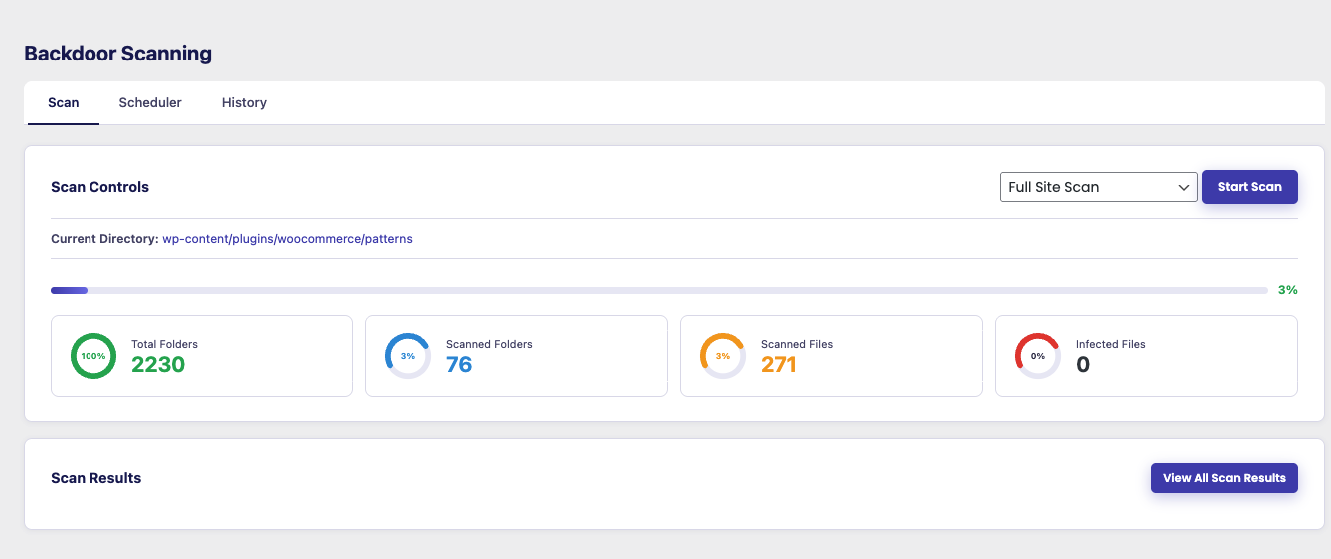
WordPress Malware & Backdoor Scanner
A built-in scanner that checks WordPress core files, plugins, themes, and the uploads directory for suspicious or unauthorized code.
• Full site, core-only, plugins-only, themes-only, or uploads-only scan modes
• Detects modified or infected files and known malware/backdoor signatures
• Highlights changes to WordPress core, plugin, or theme files
• No registration required — scan immediately after activation
• Designed for continuous monitoring, not just one-time checks
Plugin & Theme Vulnerability Check
Runs automatically before every scan, checking what’s actually installed against a continuously-updated CVE database.
• Checks every installed plugin, theme, and your WordPress core version — active or not
• Flags known, currently-unpatched vulnerabilities with severity, CVSS score, and the version that fixes them
• Flags outdated plugins/themes separately, using WordPress’s own update data
• Links straight to the full advisory for anything flagged
Database Malware Scanner
Scans your WordPress database directly for injected malicious content that file-only scanners miss.
• Checks wp_options, wp_posts, wp_postmeta, and wp_comments
• Flags hidden iframes, base64-encoded payloads, spam links, JavaScript redirects, and eval()/backdoor-style code
• Severity-rated results (critical, high, medium, low)
• One-click cleanup of flagged database records
File Integrity Monitoring
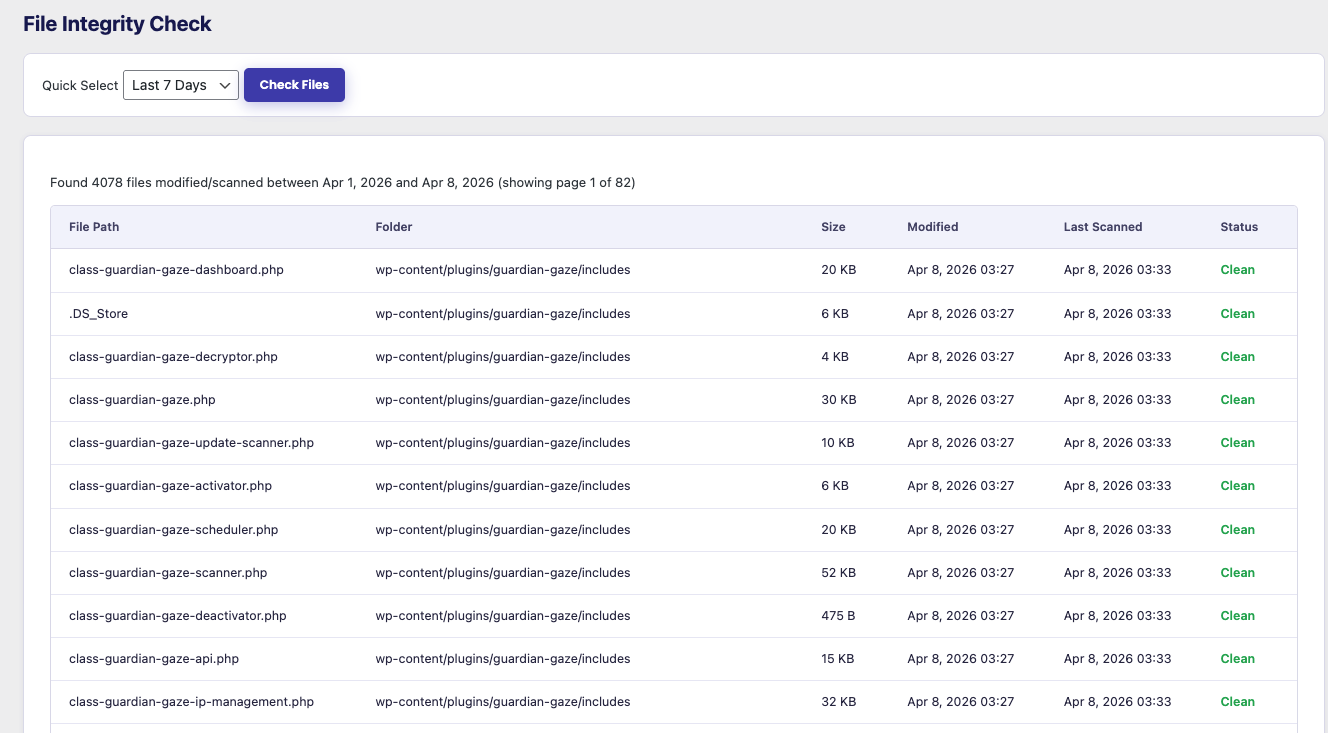
Tracks file changes across your WordPress installation over time with a SHA-256 baseline snapshot, checked hourly and on demand.
• Detects modified, newly added, or infected files
• Highlights changes in WordPress core, plugin, or theme integrity
• Lets you review findings before taking action
🔒 Premium adds File Quarantine & Restore — isolate infected files safely, then restore or delete them.
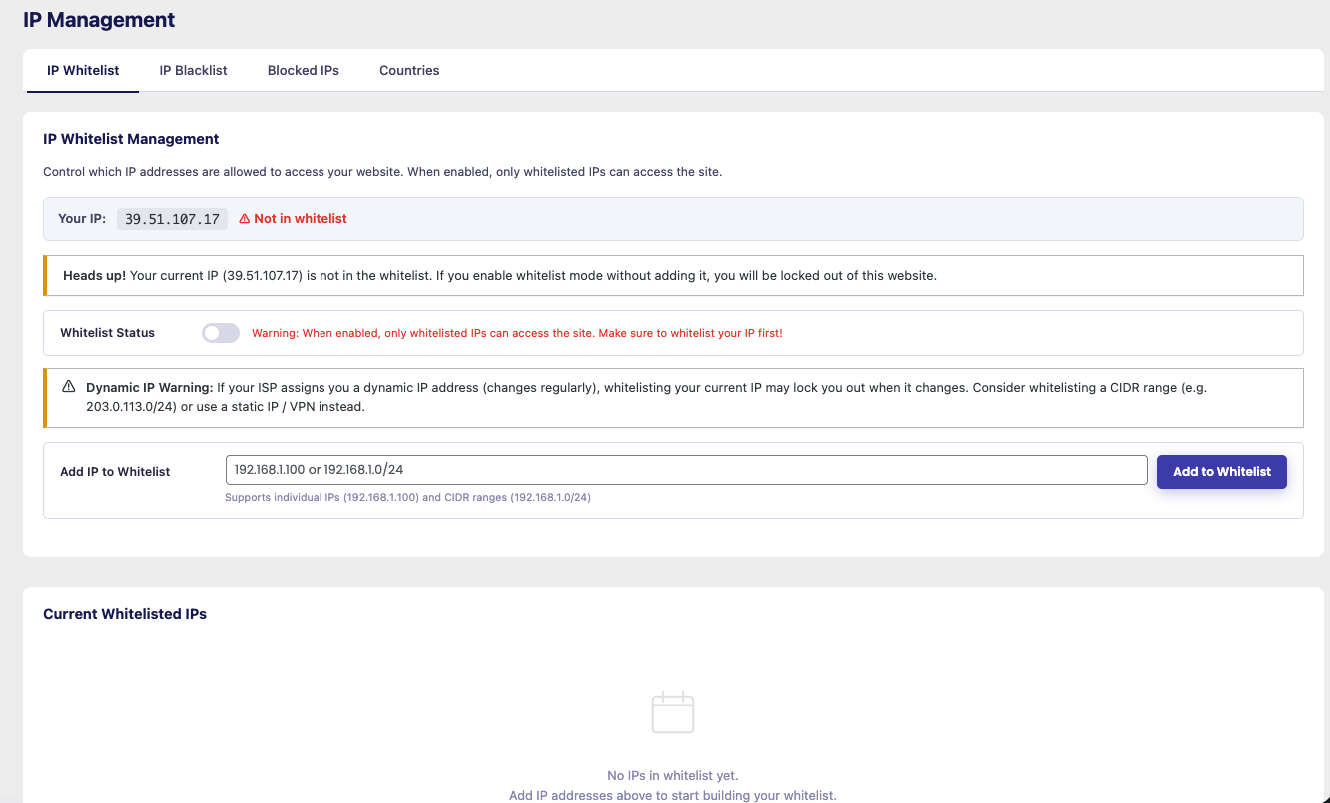
IP Management & Traffic Filtering
Manage and reduce unwanted or abusive traffic at the IP level.
• Manually block or allow specific IP addresses
• Country-level blocking for geographic traffic filtering
• Reduce bot noise, vulnerability scanners, and probing traffic
Ideal for sites experiencing repeated probing or targeted attacks.
🔒 Premium adds Brute-Force Login Lockout, Google reCAPTCHA, and Two-Factor Authentication.
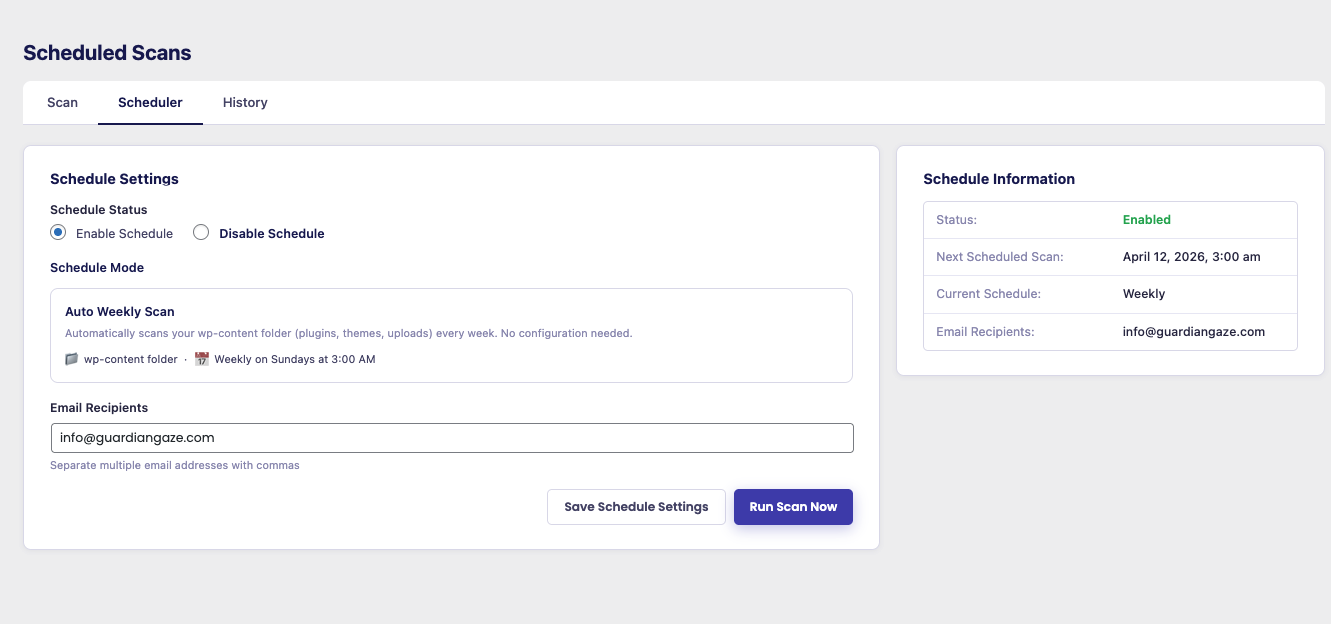
Scheduled Scanning
Automate malware scans and stay ahead of threats.
• Daily or weekly scan schedules
• Configure scan recipients and email reports
• Review results from your dashboard or by email
Security Notifications
Get emailed the moment something worth knowing about happens, instead of having to check the dashboard.
• Alert when an administrator account logs in
• Alert when a plugin, theme, or WordPress core update becomes available (sent once per new version, no duplicates)
• Set a custom alert recipient, or use the site admin email
🔒 Premium adds a permanent Security Audit Log of admin actions and events.
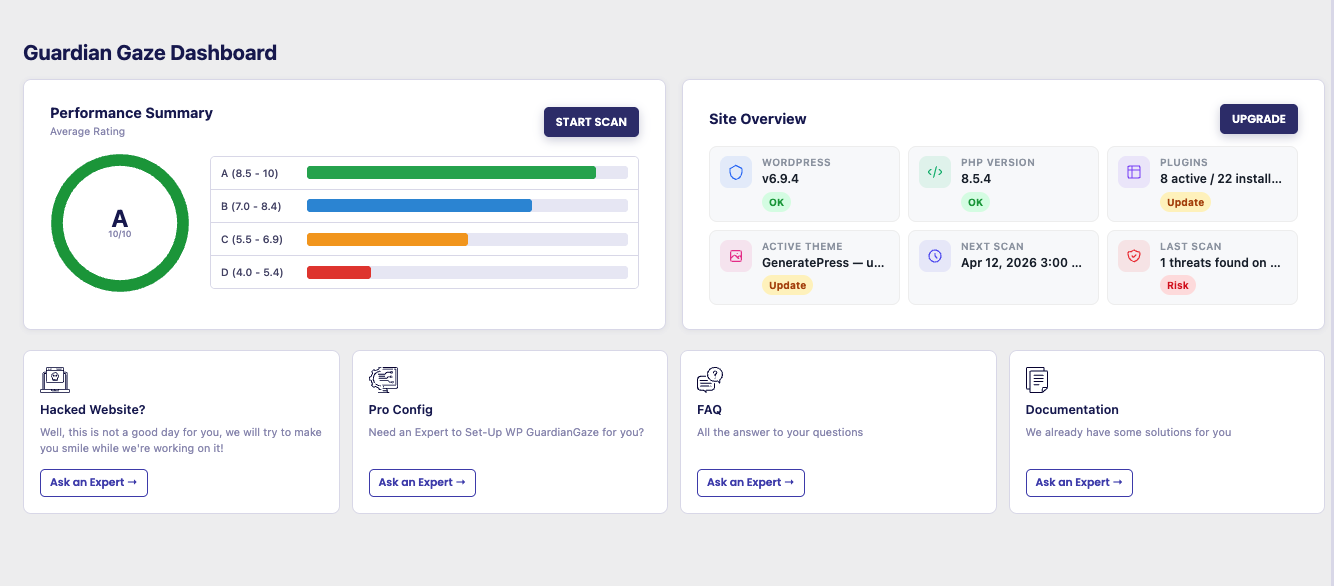
Central Security Dashboard
One place to see your site’s current security posture:
• Latest malware and database scan results
• Site health overview (WordPress, PHP, plugin, and theme status)
• Blocked and flagged IP addresses
• Overall security score with a letter grade
For Agencies and Developers
Guardian Gaze is built to run across many client sites without babysitting. Scheduled scans, email reports, and a central dashboard keep every install visible. The Agency plan adds white-label scan reports you can send to clients under your own brand. Learn about the Agency plan.
Continuous Threat Intelligence Updates
Guardian Gaze ships with a bundled set of malware definitions, so scanning works out of the box. Optionally link your site to the Guardian Gaze Security Intelligence API to keep those definitions current automatically as new threats emerge.
Privacy & Data Use
Guardian Gaze only calls external services for functionality you’re actually using, such as fetching updated malware definitions or optional geolocation lookups.
• No unnecessary data collection
• No passwords or sensitive post/page content transmitted
• Secure WordPress-native API communication (HTTPS)
• Optional features (linking, geolocation, anonymous usage analytics) can be skipped or disabled, and usage analytics is off unless you explicitly opt in
• Only the security metadata required for the feature you’re using is processed
Full details are listed under “External Services Used” below, as required for the WordPress.org plugin directory.
Premium Add-On (Optional)
Guardian Gaze is fully usable on its own — scanning, database malware detection, file integrity monitoring, IP management, and scheduled scans all work without upgrading. For teams who want additional hardening and automation, the separately-installed Guardian Gaze Premium add-on unlocks:
• 🔒 AI/LLM-Assisted Backdoor Analysis — contextual AI review of suspicious files flagged during a scan, in addition to pattern-based detection
• 🔒 Two-Factor Authentication (2FA) — TOTP support for Google Authenticator, Authy, 1Password, and similar apps
• 🔒 Google reCAPTCHA Login Protection — reCAPTCHA v2 or v3 on the login form
• 🔒 Brute-Force Login Lockout — automatic IP lockout after repeated failed login attempts
• 🔒 One-Click Security Hardening — toggle common WordPress hardening rules without editing code
• 🔒 Security Audit Log — a permanent log of important admin actions and events
• 🔒 File Quarantine & Restore — isolate infected files safely, then restore or delete them
Premium requires the free Guardian Gaze plugin to be active and is available at guardiangaze.com.
External Services Used
Guardian Gaze connects to the following services to provide security features and functionality:
1. Guardian Gaze API – wp-api.guardiangaze.com
Used for license validation, malware pattern updates, threat intelligence updates, and optional email reporting.
Data Sent:
• Admin email
• Site URL
• API key
• Plugin version and definitions version
• IP addresses (for global blocking features)
• Scan report data (if email reporting is enabled)
• Installed plugin/theme/WordPress version numbers, for the vulnerability check that runs before each scan
Terms of Service: https://www.guardiangaze.com/terms-of-service/
Privacy Policy: https://www.guardiangaze.com/privacy-policy/
2. Guardian Gaze API – www.guardiangaze.com
Used for plugin registration.
Data Sent:
• Site URL
Terms of Service: https://www.guardiangaze.com/terms-of-service/
Privacy Policy: https://www.guardiangaze.com/privacy-policy/
3. WordPress.org API – api.wordpress.org
Used for WordPress core file integrity checks and version validation.
Data Sent:
• WordPress version
• Locale / language
Terms of Service: https://wordpress.org/about/privacy/
Privacy Policy: https://wordpress.org/about/privacy/
4. Guardian Gaze Country API – wp-api.guardiangaze.com/country.php
Used for IP address geolocation.
Data Sent:
• Visitor IP address
Terms of Service: https://www.guardiangaze.com/terms-of-service/
Privacy Policy: https://www.guardiangaze.com/privacy-policy/
5. Guardian Gaze API – wp-api.guardiangaze.com (opt-in usage analytics)
Used only if you explicitly opt in via the on-screen prompt shown after activation, or the toggle under Guardian Gaze → Settings. Off by default — nothing is sent unless you say yes, and you can turn it off again at any time.
Data Sent:
• An anonymized site identifier (a one-way hash of your site URL, not the URL itself)
• Whether the plugin was activated or deactivated
• Plugin version, WordPress version, PHP version, and whether the site is a multisite install
Not sent: your site URL, email address, IP address, user data, or any site content.
Terms of Service: https://www.guardiangaze.com/terms-of-service/
Privacy Policy: https://www.guardiangaze.com/privacy-policy/
Important Notes
• All API calls use WordPress wp_remote_get() and wp_remote_post()
• Data is transferred over HTTPS whenever available
• No user passwords or sensitive content is collected or transmitted
• Geolocation lookups are cached to limit external requests
• Registering/linking your site is optional and only affects how current your malware definitions are — it does not gate scanning itself
• Anonymous activation/deactivation tracking (#5 above) is strictly opt-in, off by default, and never tied to your identity or site URL
About RedSecLabs
RedSecLabs is a cybersecurity company focused on threat research, detection engineering, and building defensive tools for real-world scenarios.
Guardian Gaze reflects this philosophy by offering a transparent, research-backed WordPress security plugin built for long-term reliability and practical protection.
Installation
From your WordPress dashboard
- Go to Plugins → Add New.
- Search for “Guardian Gaze”.
- Click Install Now, then Activate.
- Go to Guardian Gaze → Malware Scan and click Start Scan — no registration required.
Manual upload
- Download the plugin zip file.
- Go to Plugins → Add New → Upload Plugin in your WordPress dashboard.
- Select the zip file and click Install Now, then Activate.
- Go to Guardian Gaze → Malware Scan and click Start Scan.
Optional: link your site
Linking your site (Guardian Gaze → Malware Scan → Link Website) is free and optional. It keeps your malware definitions up to date automatically; it is never required to run a scan.
Changelog
2.6.1
- Fixed a bug in the file integrity scanner.
- Improved compatibility with newer versions of WordPress.
2.6.0
- File Integrity has been rebuilt: it now takes a SHA-256 baseline snapshot of core, theme, and plugin PHP files and checks it hourly (plus on demand), flagging every added, modified, or deleted file — replacing the old WordPress-core-checksum-only check. This was previously a Premium-only “File Monitor” feature and is now included free.
- Every scan is now always a full, fresh scan of every file — removed the incremental scan cache that could skip re-checking unchanged files, so results always reflect the current state of the site.
- Added a Plugin & Theme Vulnerability Check: runs automatically before every scan, checking every installed plugin, theme, and your WordPress core version (active or not) against Guardian Gaze’s continuously-updated CVE database, and flagging anything with a known, currently-unpatched vulnerability — severity, CVSS score, the version it’s fixed in, and a link to full details.
- Outdated plugins and themes are now also flagged directly in the scan results, using WordPress’s own update data — no separate step required.
- Moved Security Notifications to its own “Security Alerts” page under the Guardian Gaze menu so it’s visible immediately, without needing a linked/registered site first.
2.5.0
- Added Security Notifications: email alerts when an administrator logs in, and when a plugin, theme, or WordPress core update becomes available (sent once per new version). Configurable from Guardian Gaze → Settings. This was previously a Premium-only feature and is now included free.
2.4.0
- Added Database Malware Scanner — scans wp_options, wp_posts, wp_postmeta, and wp_comments for injected code, hidden iframes, spam links, and obfuscated payloads, with one-click cleanup of flagged records.
- Scanning no longer requires linking your site first — the Malware Scan page is usable immediately; linking is now optional and only needed to receive the latest threat definitions.
2.2.9
- AFixed bug in scanner.
- Support for WordPress up to 7.0.
2.2.8
- Added new feature improve file integrity monitoring.
- Support for php 7.0.
- Support for WordPress 4.7.
Screenshots
For developers
Is this your plugin? Show off the numbers.
Add a live badge to your site, docs or GitHub README. It updates on its own — no account needed.
Best Guardian Gaze Security alternatives
All backdoor scanner plugins →| Rank | Plugin | Active installs |
|---|---|---|
| 2 |
 BroodWeb Malware Scanner
Scan WordPress files and database content for suspicious code, malware indicators, file… |
10+ |
FAQ
Guardian Gaze Security: quick answers
Straight answers, pulled from live WordPress.org data.
Source: WordPress.org
Is Guardian Gaze Security free?
Yes. Guardian Gaze Security is free to download and use from the official WordPress.org plugin directory.
Is Guardian Gaze Security safe to use in 2026?
Guardian Gaze Security is a solid plugin choice in 2026, with a few things worth checking first. It runs on 40+ sites, is rated 5/5 and was last updated 3 months ago, and scores 70/100 on our health check.
How many websites use Guardian Gaze Security?
Guardian Gaze Security is active on 40+ WordPress websites and has been downloaded 2,739 times since it launched in December 2025. It was downloaded 370 times in the last 30 days.
Does Guardian Gaze Security work with WordPress 7.1?
Yes. The developer has tested Guardian Gaze Security up to WordPress 7.1.5, the latest release. It requires WordPress 5.3 or newer.
What PHP version does Guardian Gaze Security need?
Guardian Gaze Security requires PHP 7.2 or higher. Most hosts run PHP 8.x today, so it works on any modern WordPress hosting.
When was Guardian Gaze Security last updated?
The latest version, 2.6.1, was released on September 5, 2026 (3 months ago).
Who makes Guardian Gaze Security?
Guardian Gaze Security is developed and maintained by REDSECLABS.
What are the best alternatives to Guardian Gaze Security?
The most popular alternatives to Guardian Gaze Security are BroodWeb Malware Scanner (10+ installs).
Powered by PageForge
One template and a spreadsheet. A real page for every search.
PageForge turns each row of a CSV into a WordPress page with its own title, URL, SEO fields and schema, built on the layout you already designed. Free on WordPress.org.
- CSV and XLSX, plus Google Sheets on Professional and Enterprise
- Its own title, URL, SEO fields and schema for every page
- Works with the block editor, Elementor, Divi and Avada
- Free on WordPress.org, no credit card