



GSheetConnector – Ninja Forms Google Sheets Connector, Export Form Submissions Instant Sync to Sheets
This plugin is a bridge between your WordPress Ninja Forms and Google Sheets.

Solid choice
GSheetConnector is a solid plugin choice in 2026, with a few things worth checking first. It runs on 1K+ sites, is rated 4/5 and was last updated 2 months ago, and scores 70/100 on our health check.
- Tested with the latest WordPress (7.1)
- Very few reviews so far
How does it stack up?
Side-by-side on installs, updates, ratings & supportDaily downloads
Download spikes usually follow a new release — each site that auto-updates counts as a download.
Rankings
Where GSheetConnector stands todayWordPress.org search rankings
Live position in the plugin search, top 100| Keyword | Position |
|---|---|
| Google Integration | >100 |
| ninja forms | #7 |
| Ninja Forms Addon | #7 |
| ninja forms google sheet | #5 |
| Ninja Forms Google Sheet Integration | #5 |
Version adoption
Share of active sites per release.
Rating breakdown
★★★★★★★★★★ 4 from 4 reviews
About GSheetConnector
From the official readme · v2.0.2Description
This plugin is a bridge between your WordPress Ninja Forms and Google Sheets.
When a visitor submits his/her data on your website via a Ninja Forms, upon form submission, such data are also sent to Google Sheets.
Documentation | Support | Demo |
Premium Version
Get rid of making mistakes while adding the sheet settings or adding the headers including Merge Tags to the sheet column. We would be Launching soon the Ninja Forms Google Sheet Connector Pro version with more automated features.
Still haven’t purchased ? Ninja Forms Google Spreadsheet Addon
Check Live Demo
Demo URL: https://ninjagsheets.gsheetconnector.com/
Google Sheet URL to Check submitted Data
https://docs.google.com/spreadsheets/d/1ooBdX0cgtk155ww9MmdMTw8kDavIy5J1m76VwSrcTSs/edit#gid=1289172471
How to Use this Plugin
-
Step: 1 – In Google Sheets
➜ Log into your Google Sheets.
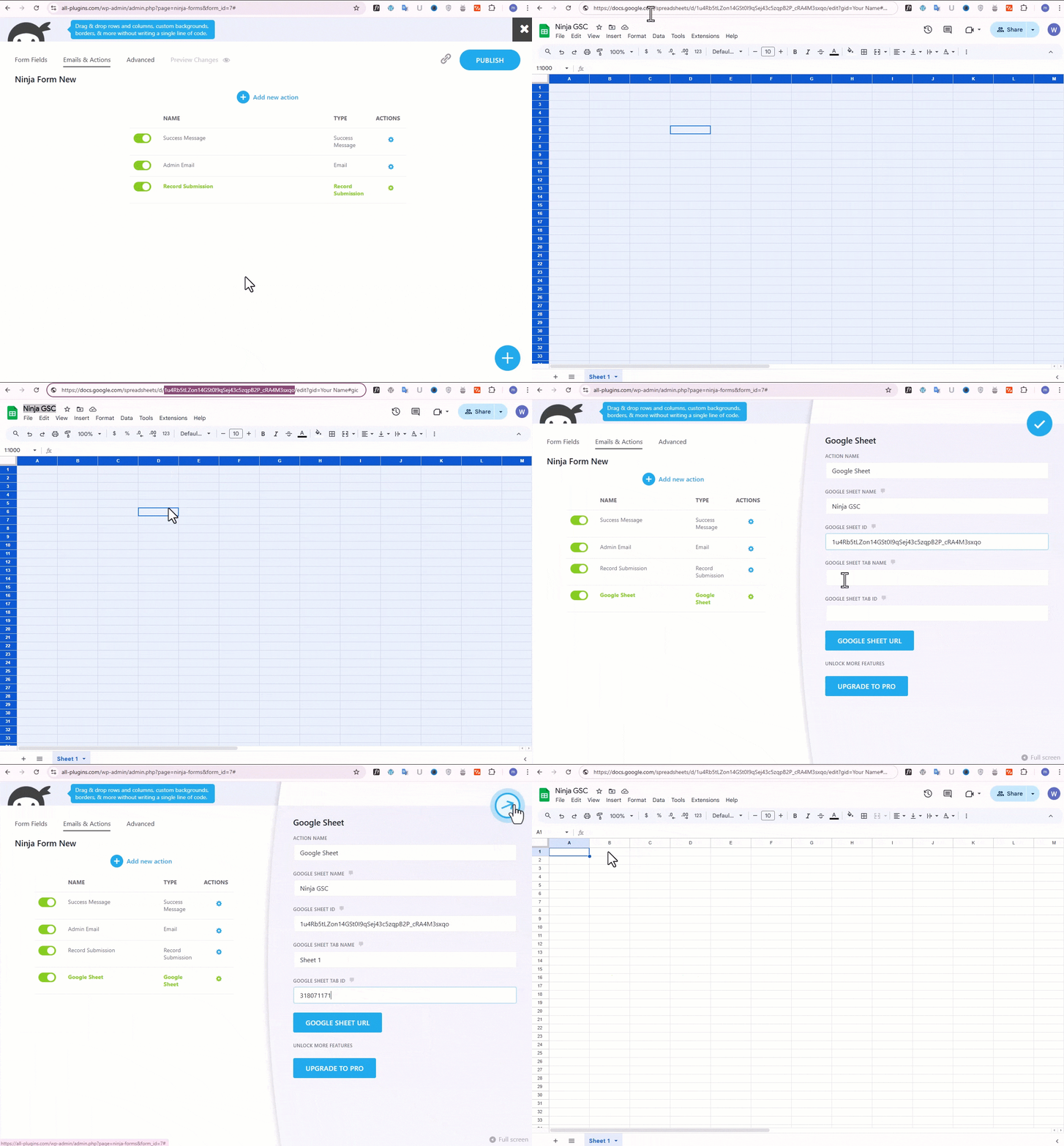
➜ Create a new Sheet and name it or select the existing sheet.
➜ Copy Sheet Name, Sheet ID, Tab Name and Tab ID (Refer Screenshots) -
Step: 2 – In WordPress Admin
➜ Navigate to Ninja Forms > Google Sheet > Integration Tab
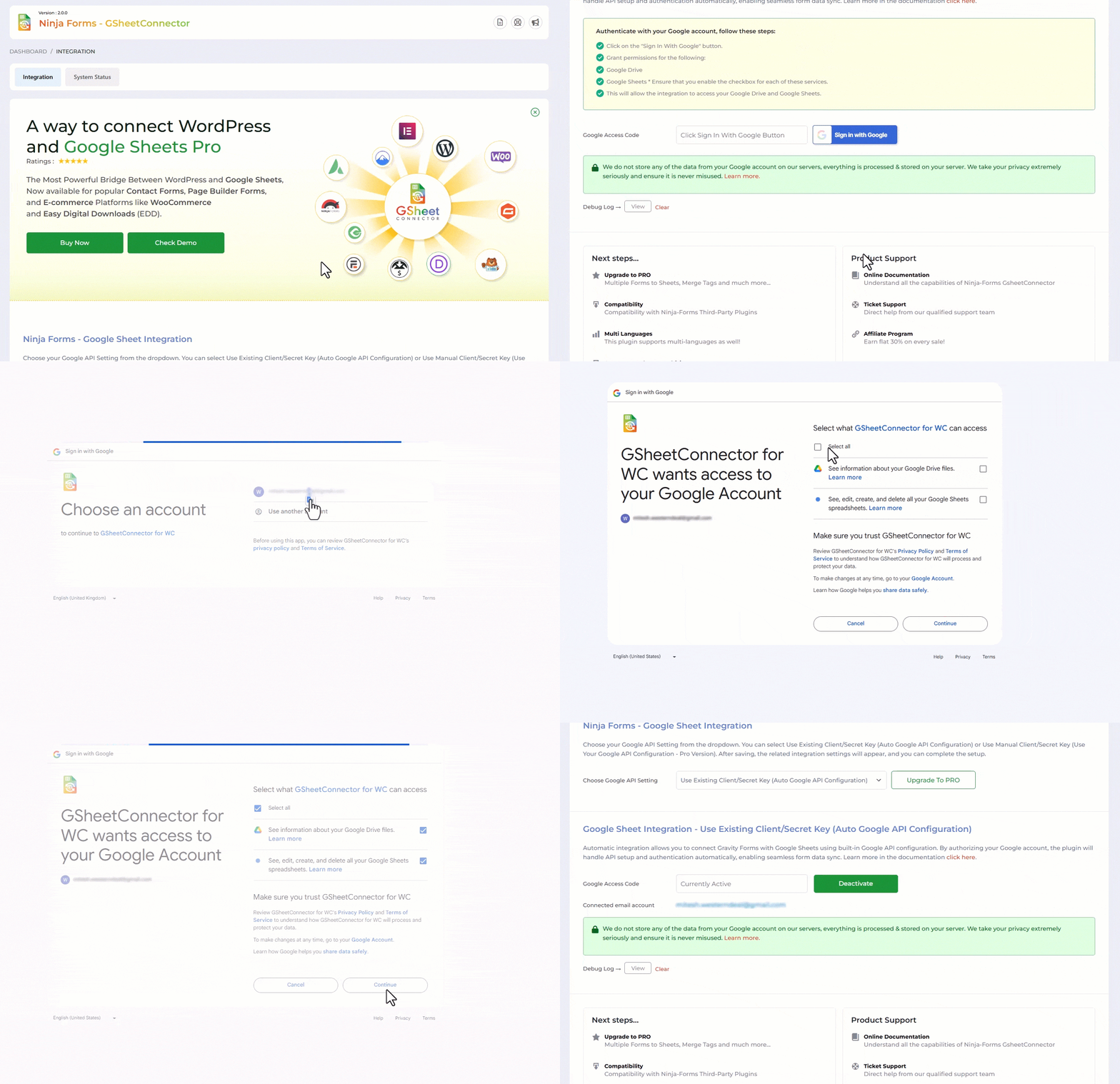
➜ Authenticate with Google using new “Google Access Code” while clicking on “Get Code”
➜ Make Sure to ALLOW Google Permissions for Google Drive and Google Sheets and then copy the code and paste in Google Access Code field, and Hit Save & Authenticate.
➜ Now Navigate to appropriate Ninja Forms > Edit Forms > Email & Actions and then Click on + icon to add Google Sheet Action and Enter Sheet Name, Sheet ID, Tab Name and Tab ID and Save and Publish. -
Step: 3 – Arranging Columns in Sheet
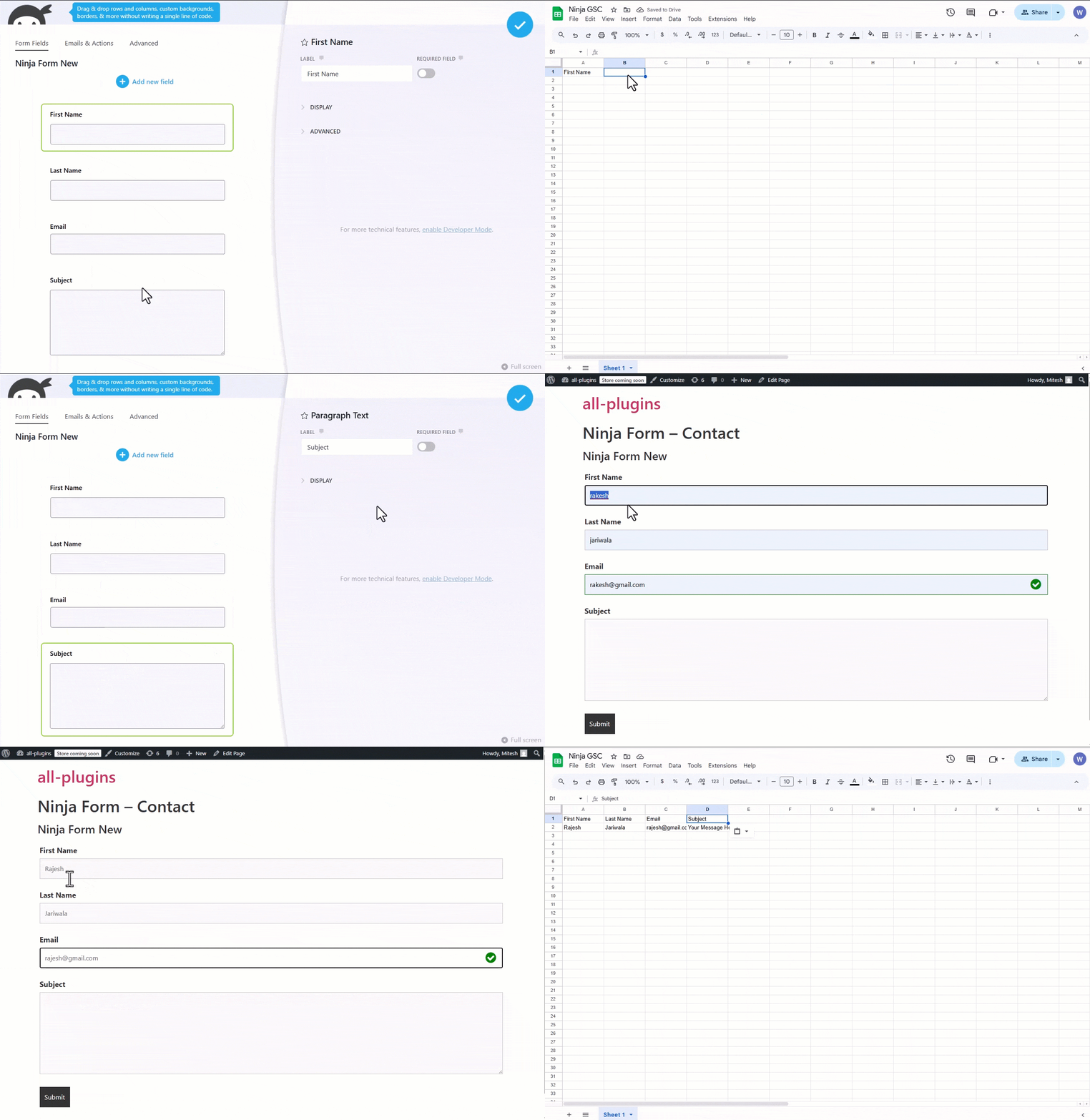
➜ In the selected Google sheet, enter column names in first row (as a header) as per the Label, Copy and Paste the form field label from the Ninja Forms to Google Sheet (e.g. “Name”, “Email”, “Comment or Message”, “date” etc).
➜ Lastly Test your Ninja Forms and verify that the data shows up in your Google Sheet.
🔥 Videos to help you get started with Ninja Forms Google Sheets Connector
🚀Ninja Forms Google Sheet Connector Introduction Video
Important Notes
➜ You must pay very careful attention to your naming. This plugin will have unpredictable results if names and spellings do not match between your Google Sheets and Ninja Forms settings.
Installation
- Upload
gsheetconnector-ninja-formsto the/wp-content/plugins/directory, ORSite Admin > Plugins > New > Search > GSheetConnector Ninja Forms > Install. - Activate the plugin through the ‘Plugins’ screen in WordPress.
- Use the
Admin Panel > Ninja Forms > Google Sheet > Integrationscreen to connect toGoogle Sheetsby entering the Access Code. You can get the Access Code by clicking the “Get Code” button.
Enjoy!
Frequently asked questions
Filled Form Entries not showing in my Configured Sheet?
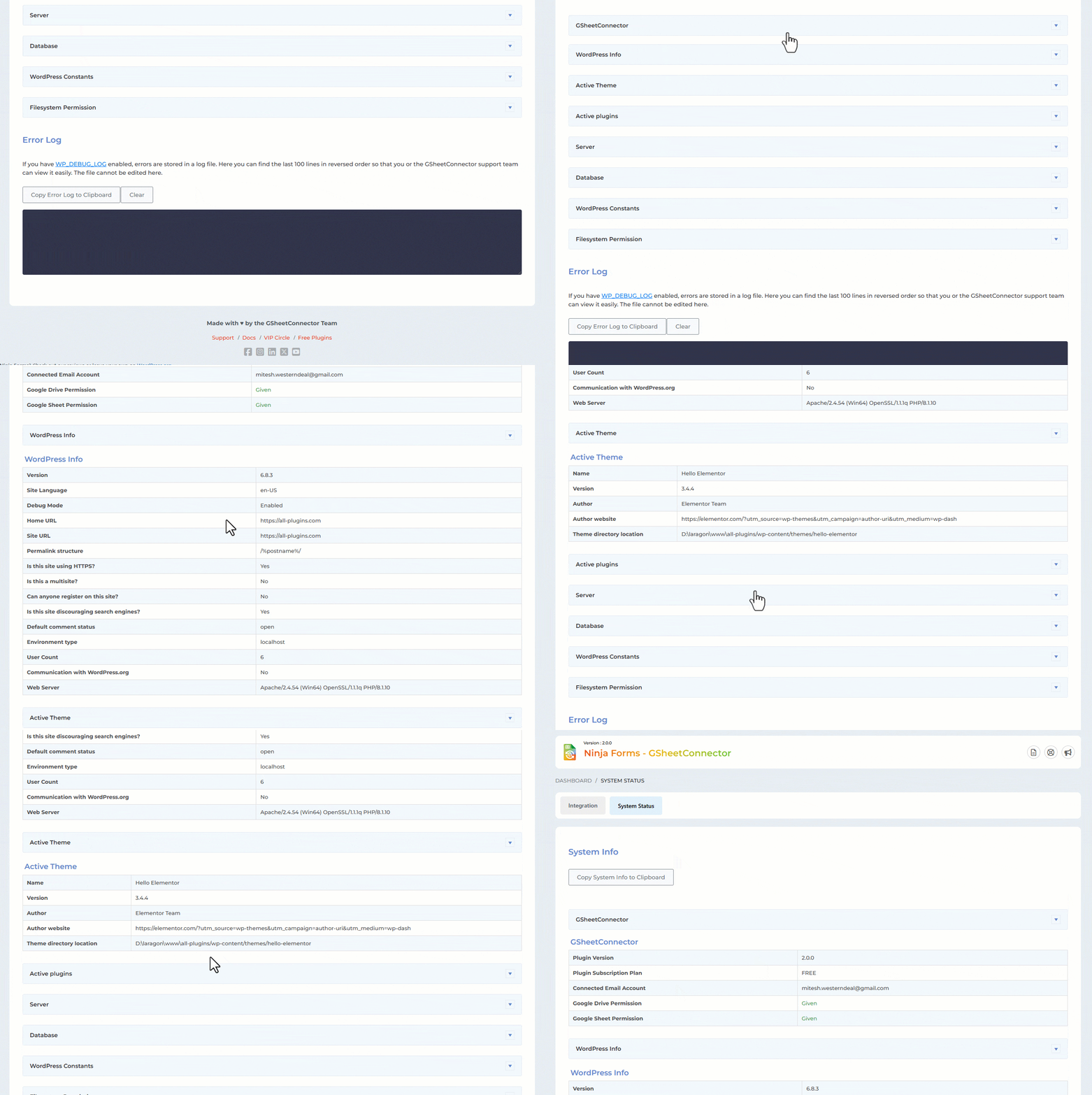
If the Entries never shows in your Sheet then one of these things might be the reason: Wrong access code or did not allowed permission to Google Drive and Google Sheets(Check debug log under Integration Tab) Not Entered Correct Sheet Name, Sheet ID or Tab Name, Tab ID It also happens due to Wrong Column name mapping ( keep in mind that not to use special characters like underscores, double or single code, space etc.) Please double-check those items and hopefully getting them right will fix the issue.
Changelog
>Get Ninja Forms Google Sheet Connector PRO addon It helps to Automate the sheet, without Manual Sheet Configuration
2.0.2
(19/11/2025)
– Fixed : Vulnerabilities issue resolved.
2.0.1
(18/11/2025)
– Updatd: UI changes.
2.0.0 (08/08/2025)
- Removed direct links to 5-star reviews to comply with WordPress plugin guidelines.
- Updated “Tested Up To” value to reflect compatibility with the latest WordPress version.
- Replaced static and tags with wp_enqueue_script and wp_enqueue_style for proper asset loading and dependency management.
- Eliminated all remote file inclusions to improve security and meet WordPress repository requirements.
- Removed plugin folder write operations and any instructions requiring users to manually edit/write files inside the plugin directory.
- Escaped all variables and options before outputting to the frontend or admin interface.
- Replaced generic function/class/constant/option names with properly prefixed versions to avoid naming collisions.
- Corrected text domain to match the plugin slug for consistent internationalization support.
- Blocked direct file access by adding appropriate file-level checks (e.g., defined( ‘ABSPATH’ ) || exit;).
- Implemented proper nonce verification and security best practices throughout AJAX and form submissions.
- Passed Plugin Check review with all critical issues resolved.
1.2.23
(16/07/2025)
– Tested up to latest version of WordPress 6.8.1.
– Confirmed compatibility with the latest versions of Ninja Forms (Free and Pro).
1.2.22
(22/04/2025)
– Added: Moved saving of credentials to database for Auto API Integration.
1.2.21
(27/01/2025)
– Added: “Requires By” in our plugin and “Required By” in the parent plugin.
– Fixed: Minor UI changes.
Screenshots
For developers
Is this your plugin? Show off the numbers.
Add a live badge to your site, docs or GitHub README. It updates on its own — no account needed.
Best GSheetConnector alternatives
All Google Integration plugins →| Rank | Plugin | Active installs |
|---|---|---|
| 2 |
 GSheetConnector for JetFormBuilder
Automatically send JetFormBuilder by Crocoblock form submissions to Google Sheets in real…
GSheetConnector for JetFormBuilder
Automatically send JetFormBuilder by Crocoblock form submissions to Google Sheets in real…
|
<10 |
FAQ
GSheetConnector: quick answers
Straight answers, pulled from live WordPress.org data.
Live data from WordPress.org · checked Oct 5, 2026
Is GSheetConnector free?
Yes. GSheetConnector is free to download and use from the official WordPress.org plugin directory. The developer also sells premium add-ons or a Pro version with extra features.
Is GSheetConnector safe to use in 2026?
GSheetConnector is a solid plugin choice in 2026, with a few things worth checking first. It runs on 1K+ sites, is rated 4/5 and was last updated 2 months ago, and scores 70/100 on our health check.
How many websites use GSheetConnector?
GSheetConnector is active on 1K+ WordPress websites and has been downloaded 32,699 times since it launched in August 2021. It was downloaded 357 times in the last 30 days.
Does GSheetConnector work with WordPress 7.1?
Yes. The developer has tested GSheetConnector up to WordPress 7.1.2, the latest release. It requires WordPress 5.6 or newer.
What PHP version does GSheetConnector need?
GSheetConnector requires PHP 7.4 or higher. Most hosts run PHP 8.x today, so it works on any modern WordPress hosting.
When was GSheetConnector last updated?
The latest version, 2.0.2, was released on August 15, 2026 (2 months ago).
Who makes GSheetConnector?
GSheetConnector is developed and maintained by WesternDeal.
What are the best alternatives to GSheetConnector?
The most popular alternatives to GSheetConnector are GSheetConnector for JetForm… (<10 installs).
Powered by PageForge
Want thousands of pages that rank like these? Build them in an afternoon.
This directory runs on the same engine as PageForge. Turn any spreadsheet, CSV or API into thousands of fast, SEO-ready WordPress pages — with schema, internal links and AI-written copy baked in.
- CSV, Google Sheets & API data sources
- AI content, schema & internal links per page
- Works with Elementor, Gutenberg, Yoast & Rank Math
- Free on WordPress.org — no credit card


