


GS Only PDF Preview
Uses Ghostscript directly to generate PDF previews.

Consider an alternative
GS Only PDF Preview shows warning signs in 2026 — compare the alternatives below before installing. It runs on 1K+ sites, is rated 5/5 and was last updated 9 years ago, and scores 39/100 on our health check.
- No update in 9 years
- Only tested up to WordPress 4.8 (latest is 7.1)
Daily downloads
Download spikes usually follow a new release — each site that auto-updates counts as a download.
Rankings
Where GS Only PDF Preview stands todayWordPress.org search rankings
Live position in the plugin search, top 100| Keyword | Position |
|---|---|
| Ghostscript | #29 |
| Ghostscript Only | #24 |
| >100 | |
| PDF Preview | >100 |
Version adoption
Share of active sites per release.
Rating breakdown
★★★★★★★★★★ 5 from 8 reviews
About GS Only PDF Preview
From the official readme · v1.0.7Description
The plugin pre-empts the standard WordPress 4.7/4.8 PDF preview production process (which uses the PHP extension Imagick) to call Ghostscript directly to produce the preview.
This means that only Ghostscript is required on the server. Neither the PHP module Imagick nor the server package ImageMagick is needed or used (though it’s fine if they’re installed anyway, and if they are they’ll be used by WP (unless you override it) to produce the intermediate sizes of the preview).
Background
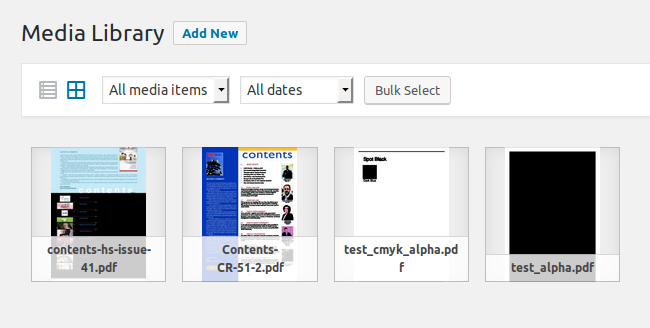
The plugin was prompted by the WP_Image_Editor_Imagick_External demonstration class uploaded to the WP Trac ticket #39262 Fall back to ImageMagick command line when the pecl imagic is not available on the server by Hristo Pandjarov, and by the wish to solve the WP Trac ticket #39216 PDFs with non-opaque alpha channels can result in previews with black backgrounds., which particularly affects PDFs with CMYK color spaces (common in the print world).
The plugin by-passes (as far as PDF previews are concerned) #39216, and also by-passes the related issue #39331 unsharpMaskImage in Imagick’s thumbnail_image is not compatible with CMYK JPEGs., as the preview JPEGs produced directly by Ghostscript use sRGB color spaces.
Limitations
The plugin requires the PHP function exec to be enabled on your system. So if the PHP ini setting disable_functions includes exec, the plugin won’t work. Neither will it work if the suhosin security extension is installed and exec is either not whitelisted or is blacklisted.
Also, the plugin is incompatible with the PHP ini setting safe_mode, an old (and misnamed) setting that was deprecated in PHP 5.3.0 and removed in PHP 5.4.0.
Security
The plugin uses the PHP function exec to call Ghostscript as a shell command. This has security implications as uncareful use with user supplied data (eg the upload file name or the file itself) could introduce an attack vector.
I believe these concerns are addressed here through screening of the file and its name and escaping of arguments. This belief is backed by a bounty of fifteen hundred thousand intergalactic credits to anyone who spots a security issue. Please disclose responsibly.
Performance
Unsurprisingly it’s faster. Crude benchmarking (see the script perf_vs_imagick.php) suggests it’s around 35-40% faster. However the production of the preview is only a part of the overhead of uploading a PDF (and doesn’t include producing the intermediate thumbnail sizes for instance) so any speed-up may not be that noticeable.
Size
On JPEG thumbnail size it appears to be comparable (though it depends on the PDF), maybe a bit larger on average. To mitigate this the default JPEG quality for the PDF preview has been lowered to 70 (from 82), which results in some extra “ringing” (speckles around letters) but the previews tested remain very readable. Note that this only affects the “full” PDF thumbnail – the intermediate-sized thumbnails as produced by Imagick or GD and any other non-PDF images remain at the standard JPEG quality of 82. You can use the WP filter wp_editor_set_quality to override this, for instance to restore the quality to 82 add to your theme’s “functions.php”:
function mytheme_wp_editor_set_quality( $quality, $mime_type ) {
    if ( 'application/pdf' === $mime_type ) {
        $quality = 82;
    }
    return $quality;
}
add_filter( 'wp_editor_set_quality', 'mytheme_wp_editor_set_quality', 10, 2 );
Quality
Eyeballing based on very limited data, ie anecdotally, the previews seem to be of superior definition with less artifacts (even with the JPEG quality reduced to 70), and more faithful to the original colours.
Tool
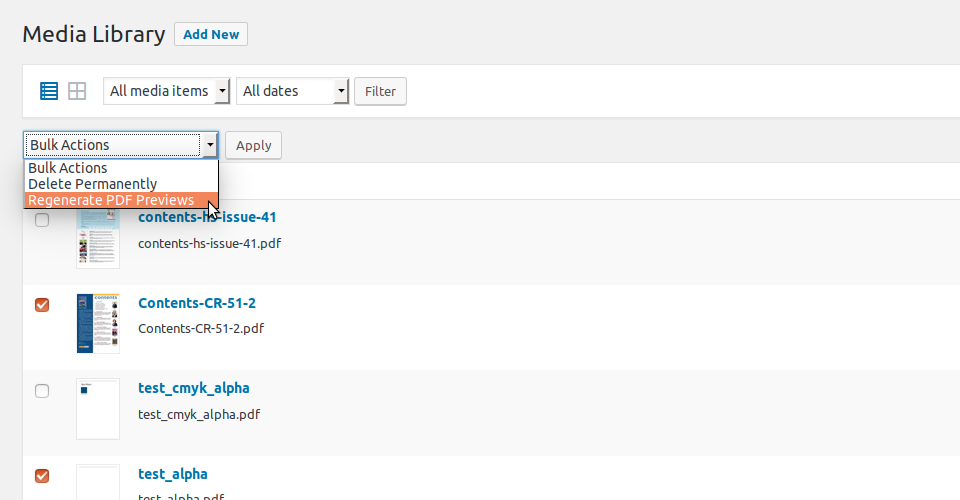
A basic administration tool to regenerate (or generate, if they previously didn’t have a preview) the previews of all PDFs uploaded to the system is included (any previously generated intermediate preview thumbnails will be removed if their dimensions differ). Note that if you have a lot of PDFs you may experience the White Screen Of Death (WSOD) if the tool exceeds the maximum execution time allowed. Note also that as the file names of the previews don’t (normally) change, you will probably have to refresh your browser to see the updated thumbnails.
As workarounds for the possible WSOD issue above, and as facilities in themselves, a “Regenerate PDF Previews” bulk action is added to the list mode of the Media Library, and a “Regenerate Preview” row action is added to each PDF entry in the list. So previews can be regenerated in batches or individually instead.
Patches
As a bonus version 1.0.2+ patches WordPress to allow linking to the preview image in “Add Media” when editing a post (#39618 Insert PDF Thumbnail into Editor). Also patches #39630 PDF Thumbnails in Media Library Don’t Fall Back to Full Size.
And
A google-cheating schoolboy French translation is supplied.
The plugin runs on WP 4.7.0 to 4.8.0, and requires Ghostscript to be installed on the server. The plugin should run on PHP 5.2.17 to 7.1, and on both Unix and Windows servers.
The project is on github.
Installation
Install the plugin in the standard way via the ‘Plugins’ menu in WordPress and then activate.
To install Ghostscript, see How to install Ghostscript on the official Ghostscript site. For Ubuntu users, there’s a package:
sudo apt-get install ghostscript
For Windows, there’s an installer available at the Ghostscript download page.
Changelog
Tested with WordPress 4.8.0, with compatibility fix for patching "Align" select of Attachment Display Settings.
1.0.7 (13 Jun 2017)
- Fix regex for patching “Align” select of Attachment Display Settings after core changeset [40640].
- Rejig tests.
- WP 4.8.0 compatible.
1.0.6 (16 Apr 2017)
- For BC so as not to break linked thumbnails, check for PDF marker before deleting on regeneration.
1.0.5 (16 Apr 2017)
- Fix Windows cmd path highest version/best match.
- Set real size not dummy for preview.
- Fix test to be preview name agnostic.
- Remove unnecessary upload_dir calc re old preview thumbnails.
- Insist on mime_type arg in test() to avoid reporting bogus supported implementation.
- Only add actions/filters if have cap.
- Add qunit tests.
- Override get_size() to work if loaded.
- Enable “Alt Text” on Attachment Details.
- WP 4.7.3 compatible.
1.0.4 (13 Feb 2017)
- Remove “+” from banned characters in file name, for BC with older uploads.
- Enable “Align” select of Attachment Display Settings.
- Workaround changing Attachment Page url and revert remove Attachment from Link To for pdfs.
1.0.3 (9 Feb 2017)
- Add dummy srcset on linked preview thumbnail so that wp_make_content_images_responsive() ignores it.
- Remove Attachment from Link To for pdfs.
1.0.2 (8 Feb 2017)
- Don’t overwrite existing JPEGs with same name as preview.
- Remove existing preview intermediates when regenerating.
- Patch WP to allow preview image linking in Add Media (#39618).
- Patch WP to use thumbnail or medium sized thumbnails in Media Library (#39630).
- WP 4.7.2 compatible.
Screenshots




For developers
Is this your plugin? Show off the numbers.
Add a live badge to your site, docs or GitHub README. It updates on its own — no account needed.
FAQ
GS Only PDF Preview: quick answers
Straight answers, pulled from live WordPress.org data.
Live data from WordPress.org · checked Nov 18, 2026
Is GS Only PDF Preview free?
Yes. GS Only PDF Preview is free to download and use from the official WordPress.org plugin directory.
Is GS Only PDF Preview safe to use in 2026?
GS Only PDF Preview shows warning signs in 2026 — compare the alternatives below before installing. It runs on 1K+ sites, is rated 5/5 and was last updated 9 years ago, and scores 39/100 on our health check.
How many websites use GS Only PDF Preview?
GS Only PDF Preview is active on 1K+ WordPress websites and has been downloaded 15,770 times since it launched in January 2017. It was downloaded 387 times in the last 30 days.
Does GS Only PDF Preview work with WordPress 7.1?
GS Only PDF Preview is officially tested up to WordPress 4.8.0, while the latest release is 7.1.4. It may still work, but try it on a staging site first.
When was GS Only PDF Preview last updated?
The latest version, 1.0.7, was released on June 13, 2017 (9 years ago).
Who makes GS Only PDF Preview?
GS Only PDF Preview is developed and maintained by bonger.
Powered by PageForge
Want thousands of pages that rank like these? Build them in an afternoon.
This directory runs on the same engine as PageForge. Turn any spreadsheet, CSV or API into thousands of fast, SEO-ready WordPress pages — with schema, internal links and AI-written copy baked in.
- CSV, Google Sheets & API data sources
- AI content, schema & internal links per page
- Works with Elementor, Gutenberg, Yoast & Rank Math
- Free on WordPress.org — no credit card


