



GroWebsite Limit Delivery To Pincodes
Limit WooCommerce delivery to specific pincodes and allow customers to check service availability before checkout.

Consider an alternative
GroWebsite Limit Delivery To Pi… shows warning signs in 2026 — compare the alternatives below before installing. It runs on 20+ sites and was last updated 8 months ago, and scores 28/100 on our health check.
- Small user base (20+ active installs)
- Very few reviews so far
- Only tested up to WordPress 6.9 (latest is 7.1)
How does it stack up?
Side-by-side on installs, updates, ratings & supportDaily downloads
Download spikes usually follow a new release — each site that auto-updates counts as a download.
Rankings
Where GroWebsite Limit Delivery T… stands todayWordPress.org search rankings
Live position in the plugin search, top 100| Keyword | Position |
|---|---|
| delivery-checker | #15 |
| pincode | #8 |
| postcode | >100 |
| shipping restriction | >100 |
| woocommerce | >100 |
Version adoption
Share of active sites per release.
About GroWebsite Limit Delivery To Pincodes
From the official readme · v1.11Description
GroWebsite Limit Delivery To Pincodes allows WooCommerce store owners to restrict checkout to specific pincodes (postcodes).
If a customer enters a non-serviceable pincode, the checkout process is automatically blocked to prevent invalid orders.
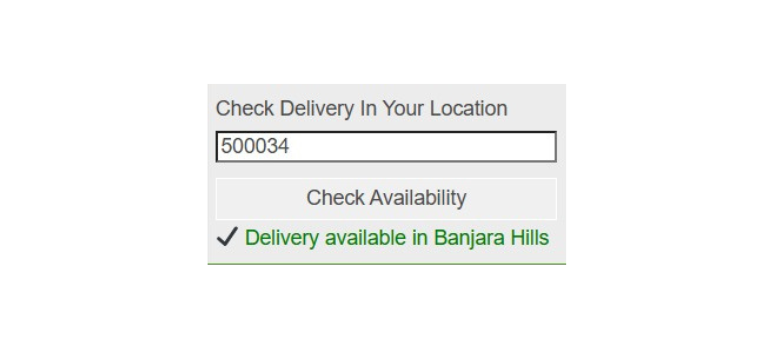
The plugin also provides a shortcode-based delivery availability checker that customers can use to verify whether delivery is available in their area before placing an order.
This plugin works seamlessly with WooCommerce checkout and supports modern WordPress themes, Elementor, and Gutenberg.
Why Use This Plugin?
GroWebsite Limit Delivery To Pincodes is designed for WooCommerce stores that deliver only to selected serviceable locations.
It helps prevent orders from unsupported areas and improves customer experience by allowing users to check delivery availability before checkout.
Perfect For
- Grocery delivery stores
- Local food delivery websites
- Pharmacy delivery stores
- Hyperlocal ecommerce websites
- Businesses delivering only to selected pincodes
Key Features
- Restrict WooCommerce checkout to selected pincodes
- Automatic checkout validation
- Disable “Place Order” button for non-serviceable areas
- AJAX-based frontend pincode checker
- Shortcode: [pincode_checker]
- Mobile responsive design
- Lightweight and optimized
- Fully translation ready
- Secure nonce-based AJAX handling
Usage
Restrict Checkout
- Go to Admin → Pincode Delivery.
- Enter one pincode per line.
- Save settings.
Customers will only be able to place orders if their billing postcode matches one of the allowed pincodes.
Frontend Delivery Checker
Use the shortcode:
[growebsite_ldp_pincode_checker]
You can place this shortcode:
- On product pages
- On homepage
- On landing pages
- Inside Elementor or Gutenberg blocks
Support
For support and documentation please visit:
https://growebsite.in/limit-delivery-pincodes/
License
This plugin is licensed under the GPLv2 or later.
Installation
Method 1: Upload via WordPress Admin
- Go to Plugins → Add New → Upload Plugin.
- Upload the plugin ZIP file.
- Click Install Now.
- Activate the plugin.
- Go to “Pincode Delivery” in the admin menu to configure allowed pincodes.
Method 2: Manual Installation
- Upload the plugin folder to the
/wp-content/plugins/directory. - Activate the plugin through the ‘Plugins’ menu in WordPress.
- Configure allowed pincodes from the admin menu.
Frequently asked questions
Does this plugin require WooCommerce?
Yes. WooCommerce must be installed and active.
Can I enter multiple pincodes?
Yes. Enter one pincode per line in the settings area.
Does it support AJAX validation?
Yes. The pincode is checked instantly without reloading the page.
Does it work on mobile devices?
Yes. The plugin interface is fully responsive.
Can I translate this plugin?
Yes. The plugin is fully translation-ready and follows standard WordPress localization practices.
Changelog
Improved plugin structure and naming conventions for WordPress.org compatibility.
1.11
- Shortcode changed
1.10
- Updated prefix naming for WordPress.org compliance
- Improved plugin structure and coding standards
- Enhanced compatibility with latest WordPress versions
1.6
- Repository-ready structure
- Proper asset enqueue (CSS and JS files)
- Improved security and sanitization
- Added localization support
- Performance improvements
1.5
- Added responsive CSS
- Improved checkout validation
1.4
- Initial public release
Screenshots



For developers
Is this your plugin? Show off the numbers.
Add a live badge to your site, docs or GitHub README. It updates on its own — no account needed.
Best GroWebsite Limit Delivery To… alternatives
All delivery-checker plugins →| Rank | Plugin | Active installs |
|---|---|---|
| 1 |
 MageComp Pincode Checker
Enable customers to check delivery availability via pincode/ZIP on the product page.
MageComp Pincode Checker
Enable customers to check delivery availability via pincode/ZIP on the product page.
|
20+ |
FAQ
GroWebsite Limit Delivery To Pincod…: quick answers
Straight answers, pulled from live WordPress.org data.
Live data from WordPress.org · checked Oct 17, 2026
Is GroWebsite Limit Delivery To Pi… free?
Yes. GroWebsite Limit Delivery To Pi… is free to download and use from the official WordPress.org plugin directory.
Is GroWebsite Limit Delivery To Pi… safe to use in 2026?
GroWebsite Limit Delivery To Pi… shows warning signs in 2026 — compare the alternatives below before installing. It runs on 20+ sites and was last updated 8 months ago, and scores 28/100 on our health check.
How many websites use GroWebsite Limit Delivery To Pi…?
GroWebsite Limit Delivery To Pi… is active on 20+ WordPress websites and has been downloaded 770 times since it launched in March 2026. It was downloaded 76 times in the last 30 days.
Does GroWebsite Limit Delivery To Pi… work with WordPress 7.1?
GroWebsite Limit Delivery To Pi… is officially tested up to WordPress 6.9.10, while the latest release is 7.1.3. It may still work, but try it on a staging site first.
What PHP version does GroWebsite Limit Delivery To Pi… need?
GroWebsite Limit Delivery To Pi… requires PHP 7.2 or higher. Most hosts run PHP 8.x today, so it works on any modern WordPress hosting.
When was GroWebsite Limit Delivery To Pi… last updated?
The latest version, 1.11, was released on March 5, 2026 (8 months ago).
Who makes GroWebsite Limit Delivery To Pi…?
GroWebsite Limit Delivery To Pi… is developed and maintained by growebsite.
What are the best alternatives to GroWebsite Limit Delivery To Pi…?
The most popular alternatives to GroWebsite Limit Delivery To Pi… are MageComp Pincode Checker (20+ installs).
Powered by PageForge
Want thousands of pages that rank like these? Build them in an afternoon.
This directory runs on the same engine as PageForge. Turn any spreadsheet, CSV or API into thousands of fast, SEO-ready WordPress pages — with schema, internal links and AI-written copy baked in.
- CSV, Google Sheets & API data sources
- AI content, schema & internal links per page
- Works with Elementor, Gutenberg, Yoast & Rank Math
- Free on WordPress.org — no credit card


