


GR Widget – Google Reviews Widget
Google reviews widget for WordPress — shortcode or block, no API keys. Link a free account for more. Unlimited views.

Safe pick
Yes — GR Widget is a safe, well-maintained plugin to use in 2026. It runs on 500+ sites, is rated 5/5 and was last updated 1 month ago, and scores 86/100 on our health check.
- Actively developed — last update 1 month ago
- Tested with the latest WordPress (7.1)
- Small user base (500+ active installs)
How does it stack up?
Side-by-side on installs, updates, ratings & support



Daily downloads
Download spikes usually follow a new release — each site that auto-updates counts as a download.
Rankings
Where GR Widget stands todayWordPress.org search rankings
Live position in the plugin search, top 100| Keyword | Position |
|---|---|
| business reviews | #26 |
| Google Reviews | #14 |
| google reviews embed | #10 |
| google reviews widget | #7 |
| testimonials | >100 |
Version adoption
Share of active sites per release.
Rating breakdown
★★★★★★★★★★ 5 from 10 reviews
About GR Widget – Google Reviews Widget
From the official readme · v1.1.2Description
⭐ Show Google reviews on your WordPress site in minutes — no Google API keys, no Google sign-in, and no review data stored in your database.
GR Widget is a Google reviews embed plugin for WordPress: search for your business in wp-admin, pick a layout, and publish with a shortcode or Gutenberg block. Reviews stay fresh because they sync on the GR Widget platform.
No account is required to get started. Link a free GRWidget.com account from GR Widget → Account (one click — no API key copy/paste) to unlock 3 widgets, 8 layouts, 10 reviews available, plus the hosted web builder. Paid plans add unlimited widgets, daily sync, and Business features.
🚀 Unlimited views on every plan — including free. Your widgets are not metered by page views.
Why site owners choose this Google reviews widget
- 🔑 No Google API keys — search by business name; we handle Google data on our servers
- 🧩 Shortcode + Gutenberg block —
[grwi_widget id="your-key"]or the GR Widget block to embed Google reviews - 🎨 4 layouts unlinked / 8 with a free account — badges, review feeds, sliders, stickers (paid plans unlock all 13 layouts, including Carousel feed and Masonry feed)
- 🎛️ Hosted builder — link a free account and customise plugin widgets in the full builder on GRWidget.com
- 🔄 Reviews stay fresh — synced on GRWidget.com (weekly on Free and Site; daily on Business and Agency)
- 🛡️ No local review storage — your WordPress database stays clean
- ✨ Works standalone — create widgets without an account; link a free account when you need more
Free WordPress plugin (no account required)
- ✅ Up to 1 Google review widget per site (unlinked)
- ✅ 4 layouts (Rating Badge, List feed, Slider feed, Classic sticker)
- ✅ Up to 5 reviews available per business
- ✅ Weekly review sync
- ✅ Shortcode and Gutenberg block embeds
- ✅ Embed script loads only on pages that contain a widget
- ✅ Unlimited views — no view caps on free or paid
- ✅ No GR Widget branding on verified official WordPress installs
Link a free GRWidget.com account (still $0)
From GR Widget → Account, click to create or link a free account. No card required. That unlocks:
- ✅ 3 widgets (instead of 1)
- ✅ 8 layouts (instead of 4) — adds Inline badge, Compact badge, Grid feed, and Tag sticker
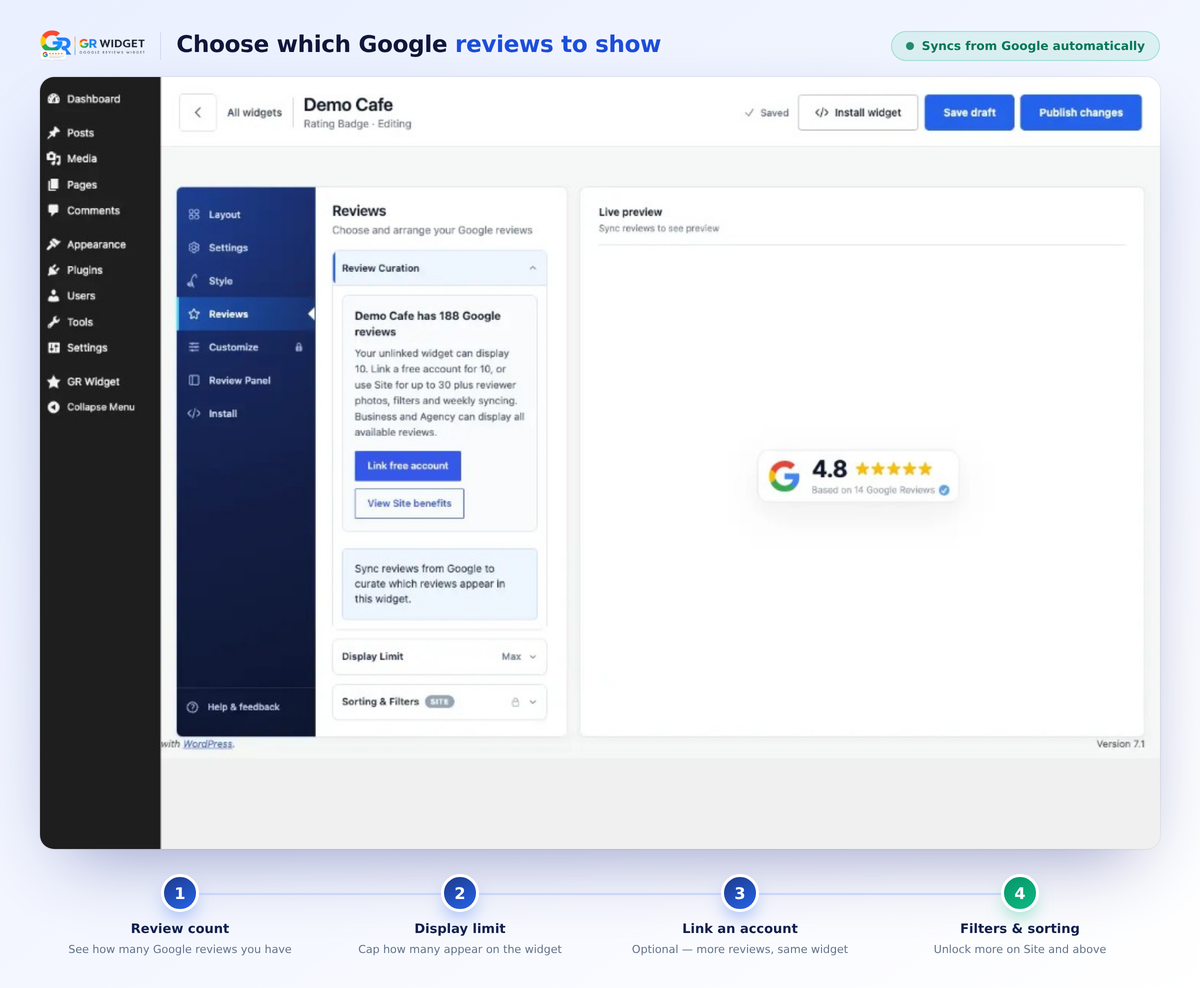
- ✅ 10 reviews available per business (instead of 5)
- ✅ Hosted web builder on GRWidget.com, cloud backup, and the web dashboard
The free tier is a complete, ongoing product — not a time-limited trial. Existing widgets and shortcodes keep working if you hit the current widget limit.
What paid plans unlock 💎
When you need more than the linked free allowance, paid plans are domain-based (clear pricing — not charged per page view):
- ♾️ Unlimited widgets (Site and above)
- 📈 More reviews available — up to 30 on Site, unlimited on Business/Agency
- ⏱️ Daily sync on Business and Agency (Free and Site stay weekly)
- 🎨 All 13 layouts (badges, feeds, Slider feed, Carousel feed, Masonry feed, stickers, and more) — new styles are included on paid plans
- 🪄 Filters — highlight the reviews that matter
- 👤 Reviewer photos (and review photos on Business+)
- 🧠 AI review summary (Business+)
- 🔍 JSON-LD / review structured data for search engines on Business & Agency (eligibility for rich results is never guaranteed)
- 🏷️ Agency adds white-label, multi-client management, widget stats, and 10 combined invited seats
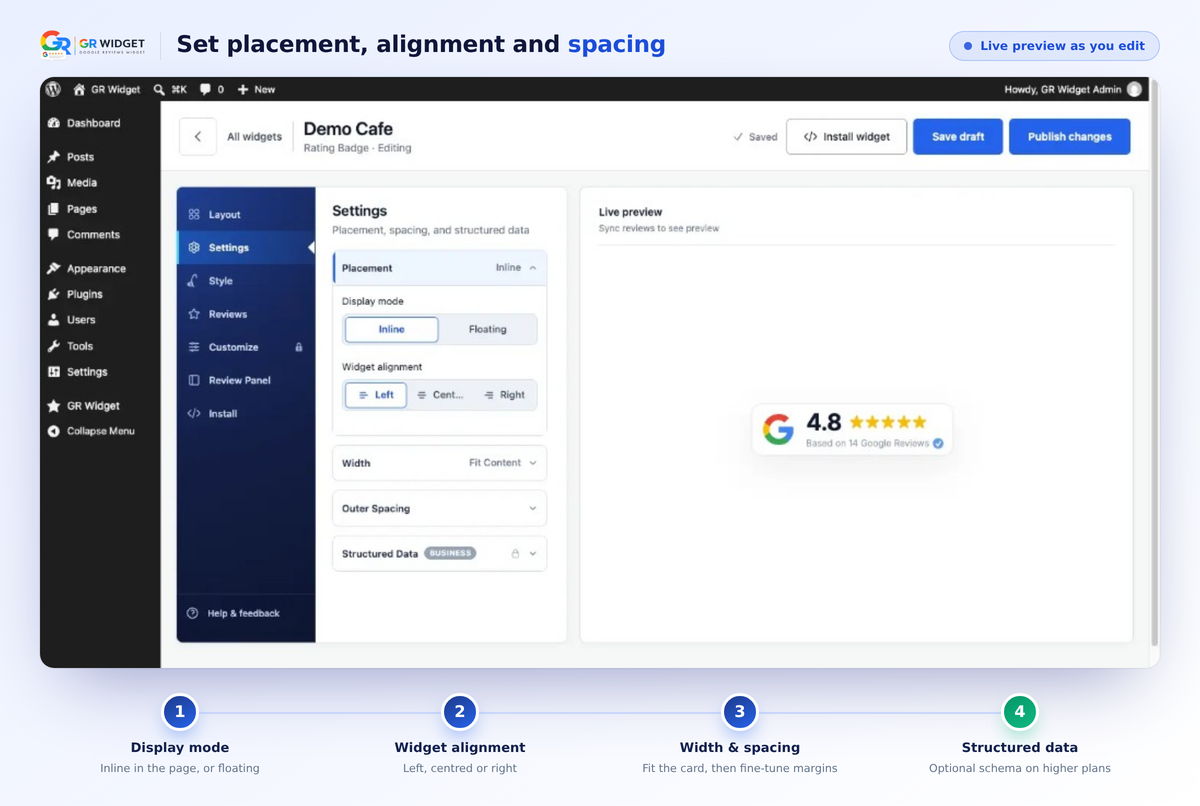
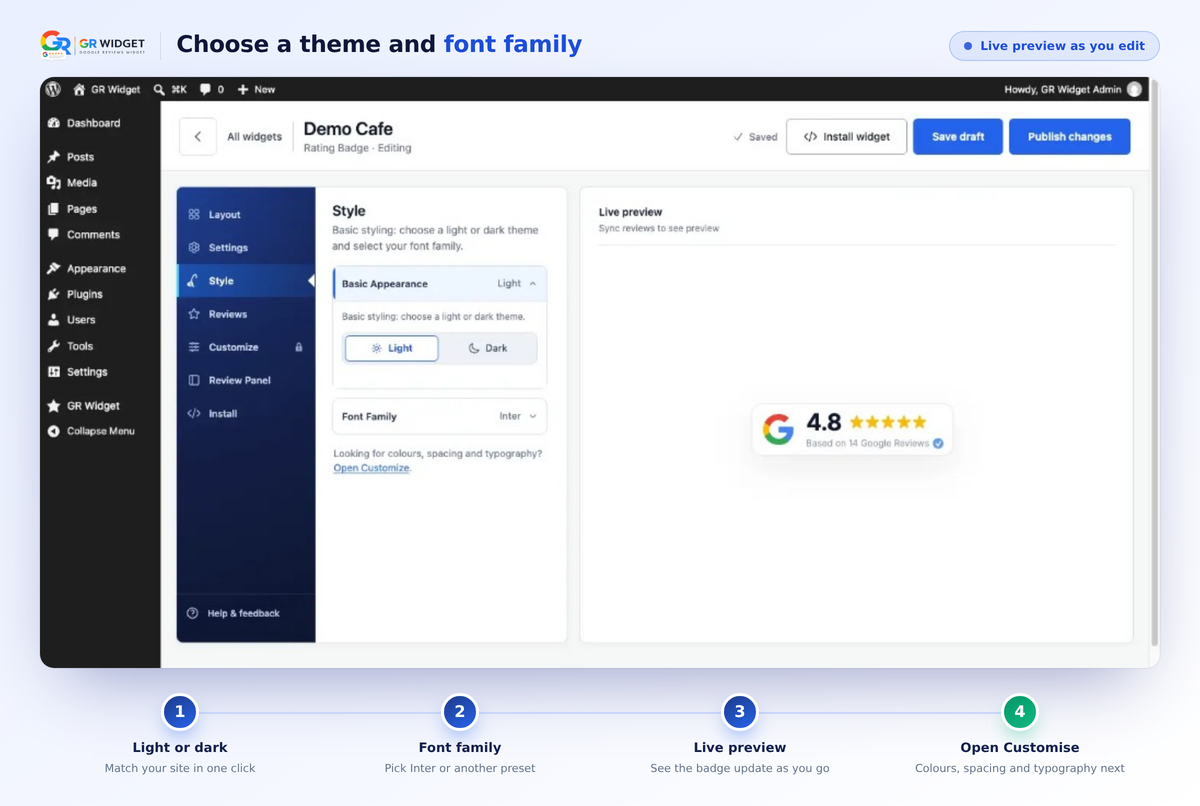
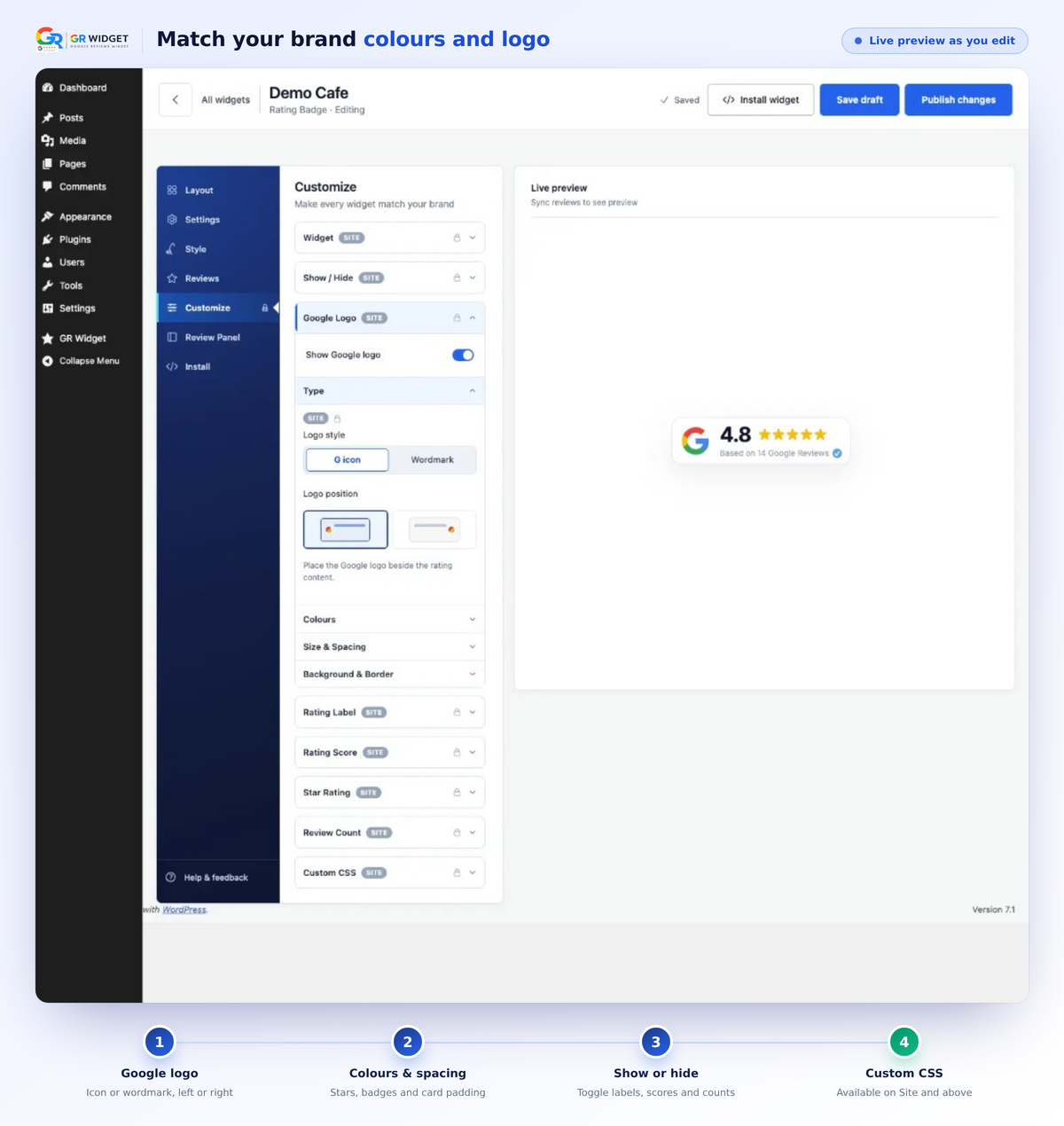
- 🎛️ Full design customisation (Site+) — make every widget match your brand with colours, typography, spacing, borders, labels, element controls, and custom CSS (Free keeps light/dark theme + font family)
Compare plans at GRWidget.com.
How it works
- Install and activate GR Widget
- Open GR Widget in wp-admin and search for your business
- Pick a layout and create your Google review widget
- Paste the shortcode or insert the GR Widget block — done
- (Optional) Link a free GRWidget.com account from GR Widget → Account to unlock 3 widgets, 8 layouts, 10 reviews, and the hosted builder
Widget HTML/CSS/JS is served by the hosted grwidget.js embed and the GRWidget.com API. This plugin is a thin, Plugin Check–friendly client.
You can see live examples of all the Google Reviews Widget layouts and styles available on our examples page.
Support
🛟 Something not working? Please ask — GR Widget is actively improving, and we address reported issues very quickly.
- 🐞 Report bug — open a widget in Customize, then click Report bug in the left rail (or top bar). That sends the issue to our team with useful context.
- 💬 Community (WordPress Plugin) — grwidget.com/community/c/wordpress-plugin for install, shortcode, block, and linking questions
- 📘 WordPress.org support forum — wordpress.org/support/plugin/gr-widget
- 💡 Feature requests — post ideas on the WordPress.org support forum for GR Widget. We continually explore improvements and consider all feature requests.
External services
This plugin relies on external services to work. By installing and activating it, you authorize the connections below (similar to Akismet or other SaaS-connected plugins — no separate opt-in checkbox is required because the plugin cannot function without GRWidget.com).
GRWidget.com
What it is: GRWidget.com (operated by EXTHUS LTD) hosts the Google review widget service — API, embed script, review sync, and wp-admin tools.
Used for: Site registration, business search, review sync, widget creation and configuration, plan limits, hosted previews, the style editor, the hosted builder (when you link an account), and serving live embeds on your public site.
When it is contacted:
- Plugin activation — registers your WordPress site and retrieves plan limits
- wp-admin (GR Widget) — business search, widget create/delete, account linking, plan refresh; layout cards use local miniature previews (no iframes); live preview loads
grw-preview.js; widget style editor runs entirely in wp-admin - Widget customisation — colours, fonts, and display options are edited on the native Customise screen in wp-admin (API-backed; no external tabs or iframes). After linking an account, you can also customise the same widgets in the full-featured web builder
- Public site — loads
grwidget.com/v1/grwidget.jsonly on pages that contain a GR Widget shortcode or block (not site-wide); the script fetches widget JSON to render review embeds - Background — plan limits may refresh twice daily via WordPress cron
Data sent to GRWidget.com:
- Site URL and hostname
- Plugin version
- Site credentials issued at registration (stored locally in WordPress options)
- Business place IDs, names, addresses, ratings, and review counts you select in wp-admin
- Widget layout and style configuration choices
- API token (only when you choose to link a GRWidget.com account)
- Referrer hostname when a visitor loads a widget embed (to verify the widget is used on an allowed domain)
Data not sent by this plugin:
- WordPress user passwords or wp-admin login credentials
- Unrelated site content or visitor analytics
- Payment or billing details (checkout happens on GRWidget.com, not inside the plugin)
Terms and privacy:
- Service: https://grwidget.com
- Privacy policy: https://grwidget.com/privacy
- Terms of use: https://grwidget.com/terms
Google (business data and review links)
What it is: Google Maps / Google Business Profile — the source of business listings and public Google reviews displayed in widgets.
Used for: Business search results and review content are fetched by GRWidget.com from Google on your behalf. Widgets may also show links such as “View on Google” or “Write a review” that open Google in the visitor’s browser.
When it is involved:
- wp-admin — when you search for a business or trigger review sync, your search terms and selected place ID are sent to GRWidget.com, which queries Google server-side (your WordPress site never stores or sends Google API keys)
- Public site — review text, ratings, and business details are served from GRWidget.com (originally sourced from Google). Optional Google links appear in the widget UI; data is sent to Google only if a visitor clicks those links and leaves your site
Data sent:
- To GRWidget.com (then to Google server-side): business search queries, Google place IDs, and business metadata needed to sync reviews
- To Google directly from the visitor’s browser: only when a visitor clicks a Google link in a widget (standard browser navigation; may include referrer URL per the browser’s normal behaviour). The plugin does not call Google APIs from WordPress.
Terms and privacy:
- Google Terms of Service: https://policies.google.com/terms
- Google Privacy Policy: https://policies.google.com/privacy
Google Fonts (optional, visitor browsers)
What it is: Google’s hosted web font service (fonts.googleapis.com), used only when a widget is configured to use a Google Font rather than the site’s inherited/system font.
Used for: Loading the font files that style widget text on the public site.
When it is contacted: When a visitor views a page containing a widget whose style uses a Google Font preset — the hosted grwidget.js embed script injects a stylesheet request to Google Fonts.
Data sent: The visitor’s browser requests font CSS from Google; Google may log the request per its own policies (typically IP address and user-agent). No WordPress user or site-admin data is sent by the plugin for this purpose.
Terms and privacy:
- Google Fonts FAQ (privacy): https://developers.google.com/fonts/faq#what_does_using_the_google_fonts_api_mean_for_the_privacy_of_my_users
- Google Privacy Policy: https://policies.google.com/privacy
Other third parties
This plugin does not load third-party advertising or analytics trackers on your public site. Scripts and styles for wp-admin UI (except the GRWidget.com connections above) are bundled in the plugin. Upgrade and account links open GRWidget.com in your browser only when you click them.
Installation
For a full walkthrough, follow our guide to embed Google reviews in WordPress.
- Install GR Widget from Plugins → Add New (search “GR Widget” or “Google reviews”), or upload the ZIP.
- Activate the plugin — it registers your site with GRWidget.com automatically.
- Go to GR Widget in the WordPress admin menu.
- Search for your business, choose a layout, and click Create widget.
- Copy
[grwi_widget id="your-embed-key"]into a page or post, or insert the GR Widget block. - Optional: open GR Widget → Account and link a free GRWidget.com account (one click — no API token paste). That unlocks 3 widgets, 8 layouts, 10 reviews available, and the hosted builder.
The plugin loads the embed script automatically on pages that contain a widget — no manual <script> tag needed.
Frequently asked questions
Do I need a GR Widget account?
No. Unlinked installs include 1 widget, 4 layouts, 5 reviews available, and weekly sync. Link a free GRWidget.com account for 3 widgets, 8 layouts, and 10 reviews available — still free. Paid plans add unlimited widgets, daily sync, and extra layouts. Linking does not require a paid plan.
How do I link a free GR Widget account?
Open GR Widget → Account and click to create or sign in. Linking is one click — you do not generate or paste an API token. That unlocks 3 widgets, 8 layouts, 10 reviews available, cloud backup, and the hosted builder, still at $0.
Can I customise plugin widgets in the GRWidget.com builder?
Yes. Link your WordPress site from GR Widget → Account (one click), then open any widget in the hosted builder on GRWidget.com. The native Customise screen in wp-admin works without an account.
Do I need a Google API key or Google sign-in?
No. Search for your business by name in wp-admin. GR Widget handles Google data on our servers — your WordPress site never stores API keys.
Are views limited?
No. Unlimited views on free and paid plans. Plans are based on domains and features — not page-view metering.
How do I embed Google reviews on a WordPress page?
After creating a Google review widget, paste the shortcode into any page, post, or widget area, or insert the GR Widget Gutenberg block and pick one of this site’s widgets from the list (you can still enter a widget key manually). That is the simplest way to embed Google reviews on WordPress without writing code.
Where are reviews stored?
On GRWidget.com. The plugin does not download or store review content in WordPress.
What happens when I reach the free widget limit?
Unlinked sites can create 1 widget. Linking a free GRWidget.com account raises that to 3. Paid plans (Site and above) have unlimited widgets. Existing widgets and shortcodes keep working if you hit the current limit — there is no trial expiry and no lockout of widgets you already created.
Why do some layouts show as paid plan previews?
Unlinked installs include 4 layouts. Linking a free account unlocks 8. Paid Site plans include all 13 launch layouts. Locked layout cards in wp-admin are marketing previews only — they are not disabled plugin code. Upgrade and link-account links open GRWidget.com in your browser; no in-plugin payments are offered.
How do I upgrade?
Open GR Widget → Account. Link a free account first if you have not already (one click — no API token paste). For paid plans, use View plans in the plugin to compare Site, Business, and Agency on GRWidget.com. After checkout, your linked site picks up the new plan automatically.
What if GRWidget.com is temporarily unavailable?
Existing embeds on your public site continue to load from GRWidget.com when visitors view pages. wp-admin may show a connection notice until the service is reachable again. Cached plan limits are used when available.
How do I get help or report a bug?
Use Report bug in the widget Customize screen (left rail or top bar). For questions, post in the WordPress Plugin community or the WordPress.org support forum. We’re actively improving the plugin and respond quickly.
How do I request a new feature?
Post your idea on the WordPress.org support forum for GR Widget. We continually explore improvements and consider all feature requests.
Why does Elementor show the shortcode as text in the editor?
In Elementor, the Shortcode or HTML widget may show [grwi_widget …] as plain text inside the editor. The reviews still render on preview and on the front end. That is expected.
Changelog
Preview layouts and styles before you publish, Slider/Carousel names now match the layouts, and linked accounts can search and save in wp-admin again. Existing widgets and shortcodes are unchanged. Safe update.
1.1.2
- Preview every layout and styling option in the builder, including ones on a higher plan.
- Choosing a layout before a business now shows a notice in the plugin.
- Carousel feed and Slider feed names were swapped so they match the layouts. Existing widgets look the same.
- A default Free widget no longer asks you to upgrade for custom styling. Light theme, default font, full width, and empty spacing stay Free.
- Outer Spacing, theme, fonts, Display Limit, and basic Review Panel options are labelled Free.
- Switching feed layouts no longer turns on review photos. Photo settings only apply when that feed is selected.
- Display Limit updates as you type, including after changing tabs. You can preview a higher count than your plan publishes.
- WordPress widgets stay branding-free. Branding controls are removed from the plugin builder.
- Linked GRWidget.com accounts can list, open, preview, and save widgets, and search for a business in wp-admin again.
- If the widget list fails to load, you get a retry message instead of an empty screen.
1.1.1
- Improvements to make linking a free GR Widget account from the plugin simpler.
- Width controls in the WordPress Customise builder (same options as the web builder).
- Widgets you created on GRWidget.com now appear in the WordPress plugin automatically when your account is linked. No manual refresh.
- Stops loading the embed script twice on sites that also pasted the GR Widget script tag.
- Gutenberg block: pick one of this site’s widgets from a list instead of pasting the embed key. You can still enter a key manually.
- Feed layouts: mobile headers now wrap cleanly so the title, stars, and “Write a review” button no longer overlap or get cut off.
1.1.0
- Redesigned native Customize builder with more options and features.
- Link a GR Widget account with a click (sign in or create an account) — no API key copy/paste.
- Additional customisation controls in the builder.
- Change layout from inside the builder.
- Raise free plugin limits by linking a free GR Widget account.
- Other minor bug fixes and improvements.
1.0.3
- Customise Review Button / Footer Button on feed widgets (show/hide, colours, and typography).
- Style and Customize panels use closed-by-default accordions matching the web builder.
- AI Summary live preview works in the native builder when exploring locked plans.
1.0.2
- Report a bug is now visible in the Customize left rail (matching the web builder), and still available in the top bar.
- Linked GRWidget.com accounts can submit bug reports from the native builder (previously blocked when the site was linked).
1.0.1
- Updated the plugin display name to “GR Widget – Google Reviews Widget” for clearer directory search and discoverability (no functional changes; slug, settings, and shortcodes are unchanged).
Screenshots


For developers
Is this your plugin? Show off the numbers.
Add a live badge to your site, docs or GitHub README. It updates on its own — no account needed.
Best GR Widget alternatives
All business reviews plugins →





FAQ
GR Widget – Google Reviews Widget: quick answers
Straight answers, pulled from live WordPress.org data.
Live data from WordPress.org · checked Sep 27, 2026
Is GR Widget free?
Yes. GR Widget is free to download and use from the official WordPress.org plugin directory.
Is GR Widget safe to use in 2026?
Yes — GR Widget is a safe, well-maintained plugin to use in 2026. It runs on 500+ sites, is rated 5/5 and was last updated 1 month ago, and scores 86/100 on our health check.
How many websites use GR Widget?
GR Widget is active on 500+ WordPress websites and has been downloaded 2,208 times since it launched in July 2026. It was downloaded 981 times in the last 30 days.
Does GR Widget work with WordPress 7.1?
Yes. The developer has tested GR Widget up to WordPress 7.1.2, the latest release. It requires WordPress 6.0 or newer.
What PHP version does GR Widget need?
GR Widget requires PHP 7.4 or higher. Most hosts run PHP 8.x today, so it works on any modern WordPress hosting.
When was GR Widget last updated?
The latest version, 1.1.2, was released on August 28, 2026 (1 month ago).
Who makes GR Widget?
GR Widget is developed and maintained by GR Widget.
What are the best alternatives to GR Widget?
The most popular alternatives to GR Widget are Site Reviews (60K+ installs), WP Google Review Slider (30K+ installs) and Helpfulcrowd Product Reviews (60+ installs).
Powered by PageForge
Want thousands of pages that rank like these? Build them in an afternoon.
This directory runs on the same engine as PageForge. Turn any spreadsheet, CSV or API into thousands of fast, SEO-ready WordPress pages — with schema, internal links and AI-written copy baked in.
- CSV, Google Sheets & API data sources
- AI content, schema & internal links per page
- Works with Elementor, Gutenberg, Yoast & Rank Math
- Free on WordPress.org — no credit card


