



Variation Dropdown to Radio Buttons for WooCommerce
Variation Dropdown to Radio Buttons for WooCommerce converts the standard WooCommerce variation dropdown into beautiful, clickable radio buttons, switch boxes, or enhanced select controls — making it easier for…

Use with caution
Variation Dropdown to Radio But… works, but test it on a staging site before relying on it in 2026. It runs on 100+ sites, is rated 5/5 and was last updated 2 months ago, and scores 55/100 on our health check.
- Small user base (100+ active installs)
- Very few reviews so far
How does it stack up?
Side-by-side on installs, updates, ratings & support



Daily downloads
Download spikes usually follow a new release — each site that auto-updates counts as a download.
Rankings
Where Variation Dropdown to Radio… stands todayWordPress.org search rankings
Live position in the plugin search, top 100| Keyword | Position |
|---|---|
| product variations | #78 |
| Radio Buttons | #4 |
| variation swatches | #66 |
| woocommerce radio buttons | #2 |
| woocommerce variations | #59 |
Version adoption
Share of active sites per release.
Rating breakdown
★★★★★★★★★★ 5 from 3 reviews
About Variation Dropdown to Radio Buttons for…
From the official readme · v3.0Description
Variation Dropdown to Radio Buttons for WooCommerce converts the standard WooCommerce variation <select> dropdown into beautiful, clickable radio buttons, switch boxes, or enhanced select controls — making it easier for customers to browse and choose product variations without hunting through a dropdown list.
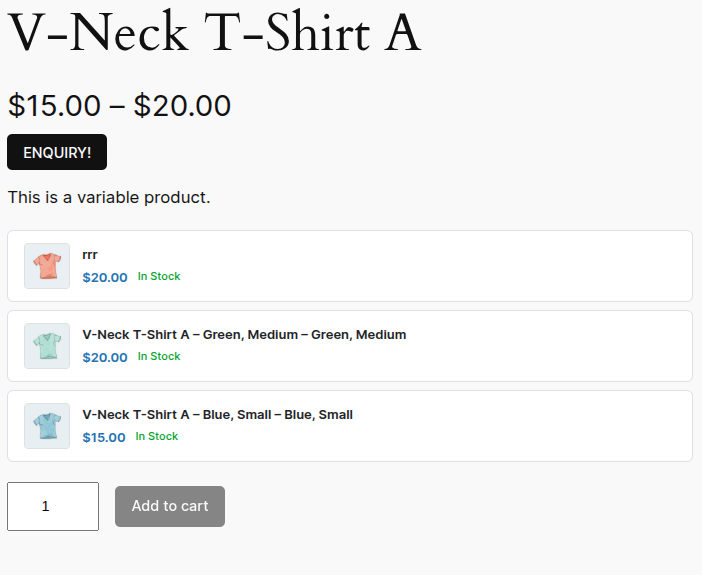
Customers can see all available options at a glance, compare prices and stock status side-by-side, and select a variation in one click. The result is a faster, more intuitive shopping experience that reduces friction and increases add-to-cart rates.
⭐ Get the Pro Version for advanced layouts, image controls, column grids, and priority support.
Why Replace WooCommerce Dropdown Variations?
The default WooCommerce dropdown hides all your variation options inside a collapsed select box. Shoppers must click, scroll, and read through a plain list — often missing options entirely. Radio buttons surface every variation immediately, letting customers see images, prices, and stock at a glance before they click.
Studies consistently show that visible product options reduce decision friction and increase conversion rates in e-commerce.
Core Features
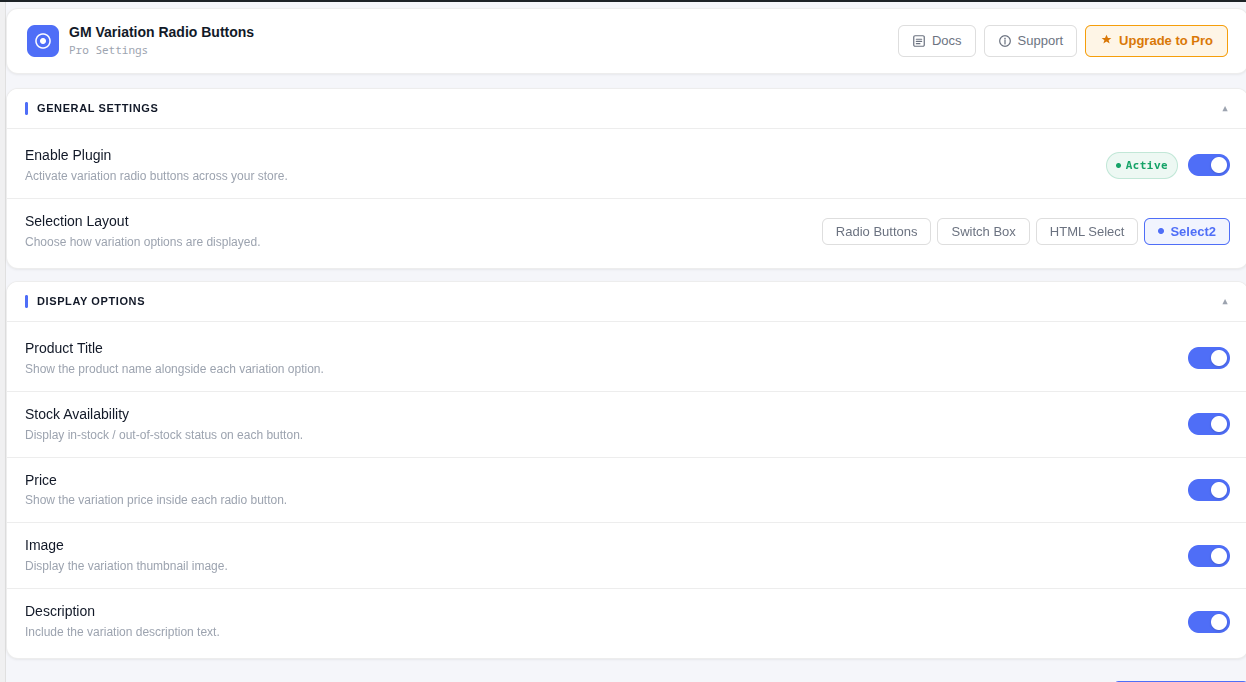
- Radio Buttons layout — replaces variation dropdowns with styled radio button cards
- Switch Box layout — modern card-style layout with image, price, and stock
- HTML Select layout — clean, accessible native select element
- Select2 layout — searchable, styled dropdown powered by Select2
- Show variation image — display variation thumbnail inside each option
- Show variation price — surface price differences directly on each button
- Show stock availability — display In Stock / Out of Stock per variation
- Show variation description — include variation description text beneath each option
- Show product title — prepend the parent product name to each variation label
- Out-of-stock handling — disable, strikethrough, or hide unavailable variations
- Custom variation name — override the label per variation from the product edit screen
- Lightweight and fast — scripts and styles load only on single product pages
- Zero configuration — works immediately after activation with sensible defaults
- Column grid control — set exact column counts for desktop and mobile independently
- Image position — place variation image left, above, or below the variation label
- Button style options — card, minimal, outlined, and more
- Priority email support — direct access to the development team
- Early access — first access to new layouts and features
Documentation & Support
Full setup guide, screenshots, and developer hooks are available in the plugin documentation.
For questions, bugs, or feature requests, visit the support page or open a thread in the WordPress.org support forum.
Works With
- WooCommerce 5.0 and above
- Simple variable products with any number of attributes
- All major WooCommerce-compatible themes (Storefront, Flatsome, Astra, Divi, OceanWP, and more)
- Page builders: Elementor, WPBakery, Beaver Builder, Gutenberg
Installation
- Upload the
gm-variations-radio-buttons-for-woocommercefolder to/wp-content/plugins/, or install directly from the WordPress plugin directory. - Activate the plugin through the Plugins menu in WordPress.
- Go to GM Radio Buttons in the WordPress admin sidebar.
- Choose your preferred layout (Radio Buttons, Switch Box, HTML Select, or Select2).
- Toggle display options to your preference and click Save Settings.
No additional setup is required. The plugin activates on all variable product pages automatically.
Frequently asked questions
Does this plugin work with all WooCommerce themes?
Yes. The plugin hooks into woocommerce_before_variations_form and renders its own markup before the native WooCommerce variation form. It is compatible with all standard WooCommerce themes including Storefront, Astra, Flatsome, Divi, OceanWP, and Blocksy.
Will it slow down my website?
No. The plugin’s CSS and JavaScript files are enqueued only on single product pages (is_product()), so they have zero impact on every other page on your site.
Can I show a different name for each variation?
Yes. Each product variation has a Custom Radio Product Name field added in the variation panel. If filled in, it overrides the auto-generated variation label.
What happens to out-of-stock variations?
You can choose one of three behaviours in the settings: Disable (greyed out, not selectable), Strikethrough (visible with a strikethrough style), or Hide (removed from the list entirely).
Can I control how many columns the variations display in?
Column control is available in the Pro version, with separate settings for desktop and mobile breakpoints.
Does it support variable products with multiple attributes?
Yes. The plugin renders all variation combinations for products with any number of attributes.
Is it compatible with WooCommerce High-Performance Order Storage (HPOS)?
Yes. The plugin does not interact with the orders table and is fully compatible with HPOS / Custom Order Tables.
Where can I find the documentation?
Full documentation is at https://www.codesmade.com/variation-dropdown-to-radio-for-woocommerce-documentation/
Changelog
Major update. Settings have been migrated automatically. The admin panel has been fully rebuilt in React. Please review your Display Options after upgrading to confirm settings are as expected.
3.0
- Rebuilt settings panel with React — no page reloads, instant save feedback
- Added Switch Box layout with configurable image position (left, top, bottom)
- Added Select2 layout with searchable styled dropdown
- Added out-of-stock action setting: disable, strikethrough, or hide
- Added column grid control for desktop and mobile (Pro)
- Added per-variation custom name field in the product editor
- Removed dependency on
@wordpress/components— all UI components are now custom-built - Light theme for admin settings with Docs, Support, and Upgrade to Pro header links
- REST API endpoints for settings get/save
- Performance: scripts and styles now load only on
is_product()pages
2.0
- Added image display inside radio buttons
- Added price display per variation
- Added stock availability display
- Added variation description display
- General settings panel redesign
1.0
- Initial release — basic dropdown to radio button conversion
Screenshots


For developers
Is this your plugin? Show off the numbers.
Add a live badge to your site, docs or GitHub README. It updates on its own — no account needed.
Best Variation Dropdown to Radio B… alternatives
All product variations plugins →





FAQ
Variation Dropdown to Radio Buttons…: quick answers
Straight answers, pulled from live WordPress.org data.
Live data from WordPress.org · checked Sep 28, 2026
Is Variation Dropdown to Radio But… free?
Yes. Variation Dropdown to Radio But… is free to download and use from the official WordPress.org plugin directory.
Is Variation Dropdown to Radio But… safe to use in 2026?
Variation Dropdown to Radio But… works, but test it on a staging site before relying on it in 2026. It runs on 100+ sites, is rated 5/5 and was last updated 2 months ago, and scores 55/100 on our health check.
How many websites use Variation Dropdown to Radio But…?
Variation Dropdown to Radio But… is active on 100+ WordPress websites and has been downloaded 2,968 times since it launched in April 2021. It was downloaded 112 times in the last 30 days.
Does Variation Dropdown to Radio But… work with WordPress 7.1?
Variation Dropdown to Radio But… is officially tested up to WordPress 7.0.6, while the latest release is 7.1.2. It may still work, but try it on a staging site first.
What PHP version does Variation Dropdown to Radio But… need?
Variation Dropdown to Radio But… requires PHP 7.4 or higher. Most hosts run PHP 8.x today, so it works on any modern WordPress hosting.
When was Variation Dropdown to Radio But… last updated?
The latest version, 3.0, was released on July 19, 2026 (2 months ago).
Who makes Variation Dropdown to Radio But…?
Variation Dropdown to Radio But… is developed and maintained by theme funda.
What are the best alternatives to Variation Dropdown to Radio But…?
The most popular alternatives to Variation Dropdown to Radio But… are Smart Variations Images & S… (1K+ installs), QODE Variation Swatches for… (1K+ installs) and Variations as Single Product (1K+ installs).
Powered by PageForge
Want thousands of pages that rank like these? Build them in an afternoon.
This directory runs on the same engine as PageForge. Turn any spreadsheet, CSV or API into thousands of fast, SEO-ready WordPress pages — with schema, internal links and AI-written copy baked in.
- CSV, Google Sheets & API data sources
- AI content, schema & internal links per page
- Works with Elementor, Gutenberg, Yoast & Rank Math
- Free on WordPress.org — no credit card


