


Glyphwell – Visual Equation Editor
Author beautiful math in the WordPress block editor with a WYSIWYG editor, symbol palette, matrix builder, and crisp rendering.

Solid choice
Glyphwell is a solid plugin choice in 2026, with a few things worth checking first. It runs on 10+ sites and was last updated 1 month ago, and scores 62/100 on our health check.
- Tested with the latest WordPress (7.1)
- Small user base (10+ active installs)
- Very few reviews so far
How does it stack up?
Side-by-side on installs, updates, ratings & support


Daily downloads
Download spikes usually follow a new release — each site that auto-updates counts as a download.
Rankings
Where Glyphwell stands todayWordPress.org search rankings
Live position in the plugin search, top 100| Keyword | Position |
|---|---|
| equation | #7 |
| katex | #5 |
| latex | #15 |
| math | >100 |
| mathml | #4 |
Version adoption
Share of active sites per release.
About Glyphwell – Visual Equation Editor
From the official readme · v1.0.0Description
Glyphwell brings professional math authoring straight into the WordPress block editor — no shortcodes, no external services, no fuss.
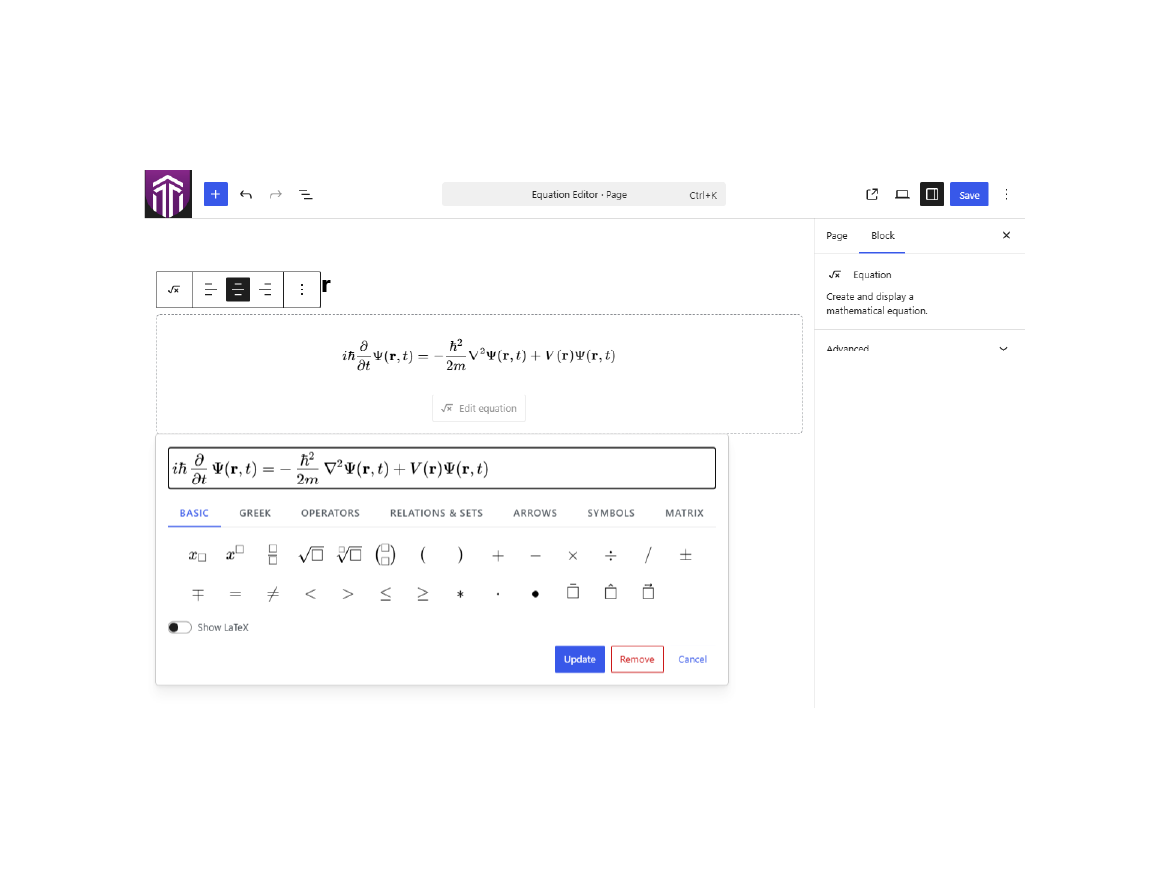
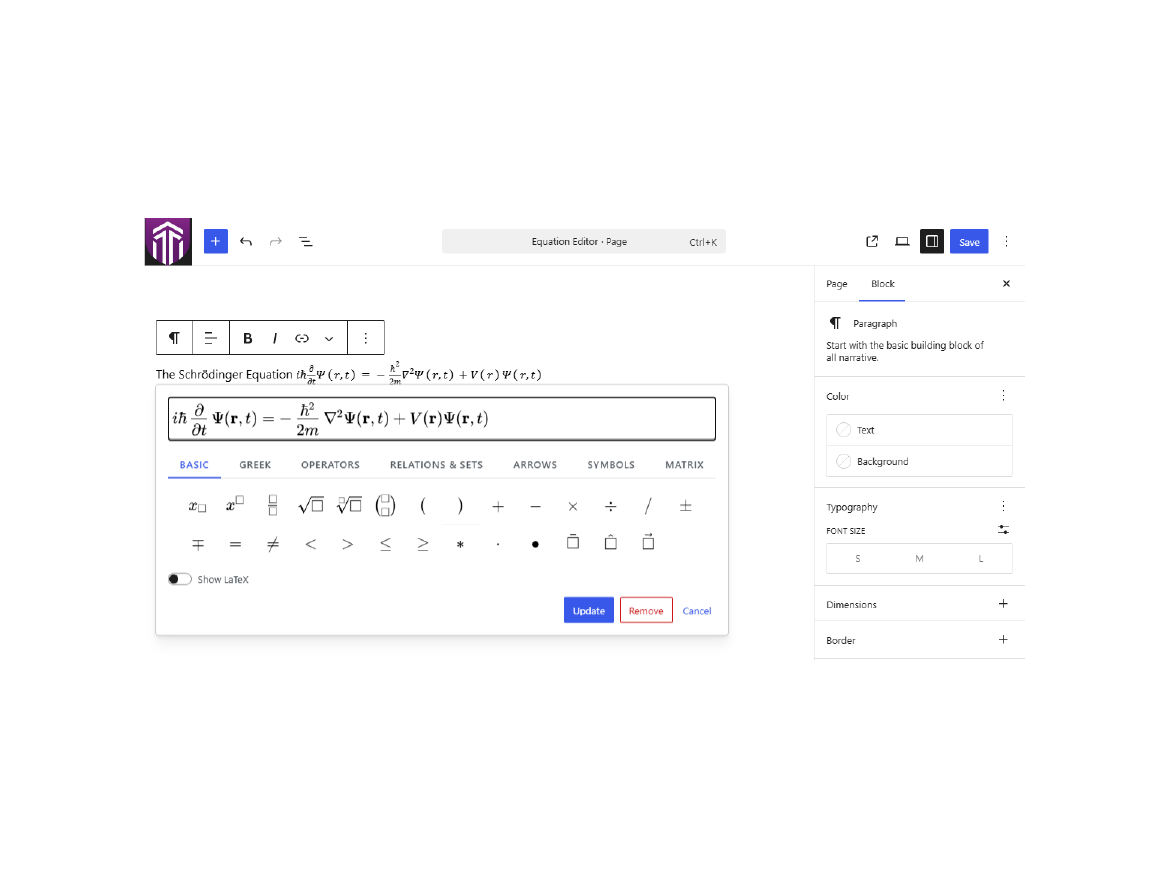
Compose display equations with the standalone Equation block, or drop inline equations right into your Paragraphs, Headings, Lists, and Table cells. A MathLive-powered WYSIWYG field lets you type and click your way to polished math, while a tabbed symbol palette puts Greek letters, operators, relations, sets, arrows, and more just a tap away. Need a matrix? The built-in matrix builder lets you set the size, choose your brackets, and add or remove rows and columns visually.
Prefer raw LaTeX? Flip on the Show LaTeX toggle to edit the source directly. Every equation is stored as clean LaTeX and rendered on the front end by the bundled KaTeX engine for fast, crisp math on every device, with sanitized MathML kept alongside for portability and accessibility.
Everything ships locally. MathLive, KaTeX, fonts, styles, and scripts are all bundled with the plugin — nothing is ever loaded from a CDN or an external service, and no tracking is included. Front-end assets load only on pages that actually contain equations, keeping the rest of your site lean. Fully translation-ready with a bundled translation template.
Features:
- Standalone Equation block for display equations.
- Inline equation format for Paragraph, Heading, List, and Table content.
- WYSIWYG editing — type or point-and-click.
- Tabbed symbol palette: Basic, Greek, Operators, Relations & Sets, Arrows, Symbols, and Matrix.
- Visual matrix builder with adjustable size, bracket styles, and row/column controls.
- Show LaTeX toggle for editing the raw source.
- Left, center, and right alignment for standalone equations.
- Fast, high-quality KaTeX rendering on the front end.
- Sanitized MathML stored alongside each equation.
- 100% local assets — no CDN, no external calls, no tracking.
- Front-end assets load only on pages that contain equations.
- Translation-ready with a bundled .pot template.
Glyphwell does not add equation numbering, labels, cross-references, custom macros, tracking, or external service calls.
Installation
- Upload the plugin folder to
/wp-content/plugins/glyphwell/. - Activate Glyphwell from the Plugins screen in WordPress.
- Insert the Equation block or use the Equation toolbar button in supported rich text fields.
Frequently asked questions
Does this plugin load scripts or styles from a CDN?
No. MathLive, KaTeX, fonts, CSS, and JavaScript are bundled locally.
Does this replace the WordPress core Math block?
No. The Equation block and inline equation format remain separate from core math features.
What is stored as the editable equation source?
LaTeX is stored as the editable source. Generated MathML is stored alongside it for portability and accessibility.
How are equations rendered on the front end?
Glyphwell renders every equation from its stored LaTeX using the locally bundled KaTeX engine. The front-end assets load only on pages that contain equations.
Screenshots
For developers
Is this your plugin? Show off the numbers.
Add a live badge to your site, docs or GitHub README. It updates on its own — no account needed.
Best Glyphwell alternatives
All equation plugins →
FAQ
Glyphwell – Visual Equation Editor: quick answers
Straight answers, pulled from live WordPress.org data.
Live data from WordPress.org · checked Sep 29, 2026
Is Glyphwell free?
Yes. Glyphwell is free to download and use from the official WordPress.org plugin directory.
Is Glyphwell safe to use in 2026?
Glyphwell is a solid plugin choice in 2026, with a few things worth checking first. It runs on 10+ sites and was last updated 1 month ago, and scores 62/100 on our health check.
How many websites use Glyphwell?
Glyphwell is active on 10+ WordPress websites and has been downloaded 221 times since it launched in July 2026. It was downloaded 74 times in the last 30 days.
Does Glyphwell work with WordPress 7.1?
Yes. The developer has tested Glyphwell up to WordPress 7.1.2, the latest release. It requires WordPress 6.0 or newer.
What PHP version does Glyphwell need?
Glyphwell requires PHP 8.0 or higher. Most hosts run PHP 8.x today, so it works on any modern WordPress hosting.
When was Glyphwell last updated?
The latest version, 1.0.0, was released on August 20, 2026 (1 month ago).
Who makes Glyphwell?
Glyphwell is developed and maintained by Ethan Lin.
What are the best alternatives to Glyphwell?
The most popular alternatives to Glyphwell are WP-KaTeX (700+ installs), Youngwhan's Simple Latex (200+ installs) and CFF Fitness and Health Oper… (60+ installs).
Powered by PageForge
Want thousands of pages that rank like these? Build them in an afternoon.
This directory runs on the same engine as PageForge. Turn any spreadsheet, CSV or API into thousands of fast, SEO-ready WordPress pages — with schema, internal links and AI-written copy baked in.
- CSV, Google Sheets & API data sources
- AI content, schema & internal links per page
- Works with Elementor, Gutenberg, Yoast & Rank Math
- Free on WordPress.org — no credit card


